
In Anjana Data there is the possibility of defining a set of validations on the metadata attributes configured in the templates of each object. The goal of these validations is to ensure correct data entry and guarantee coherence, consistency and control in the documentation of data assets.
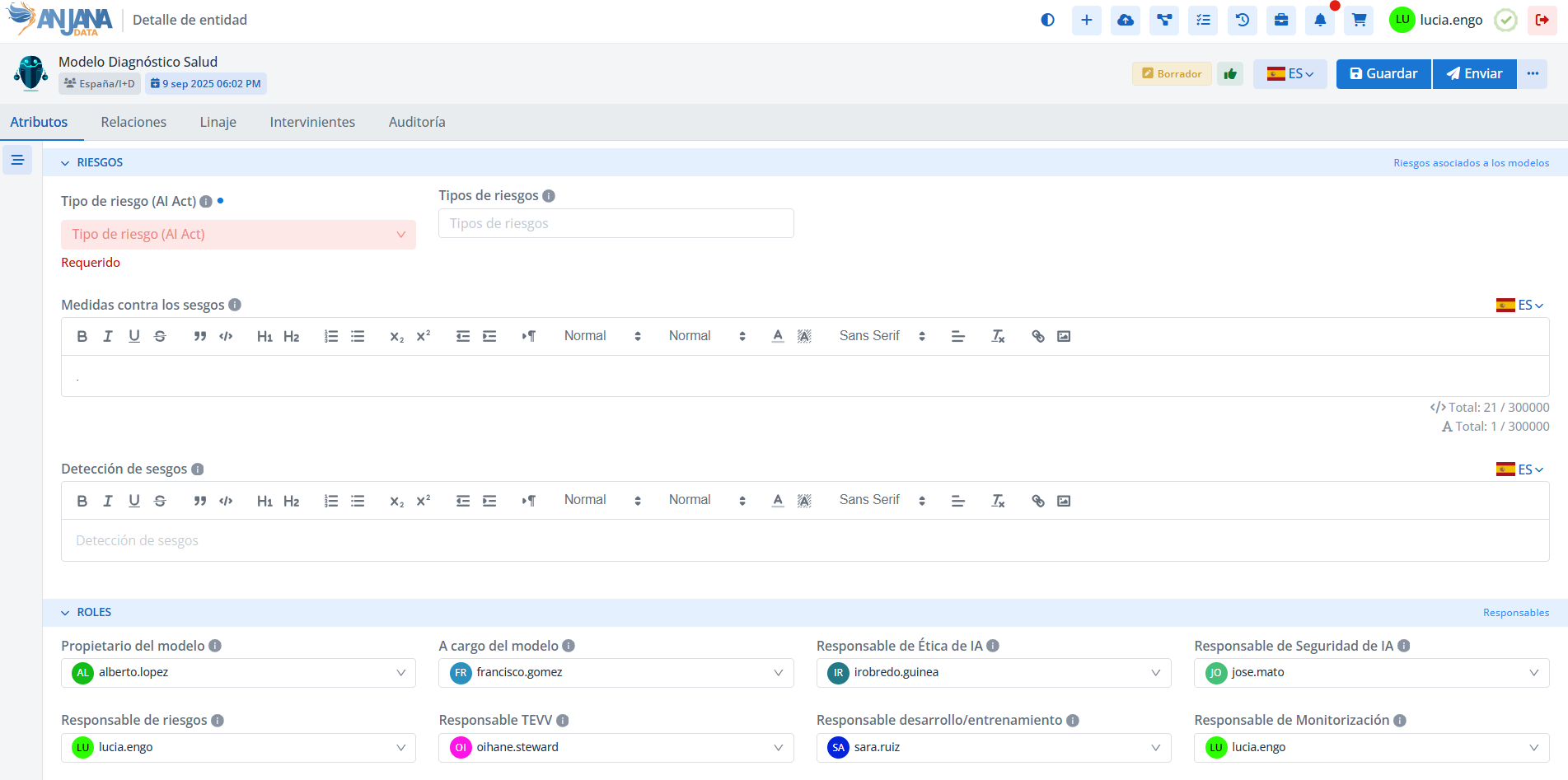
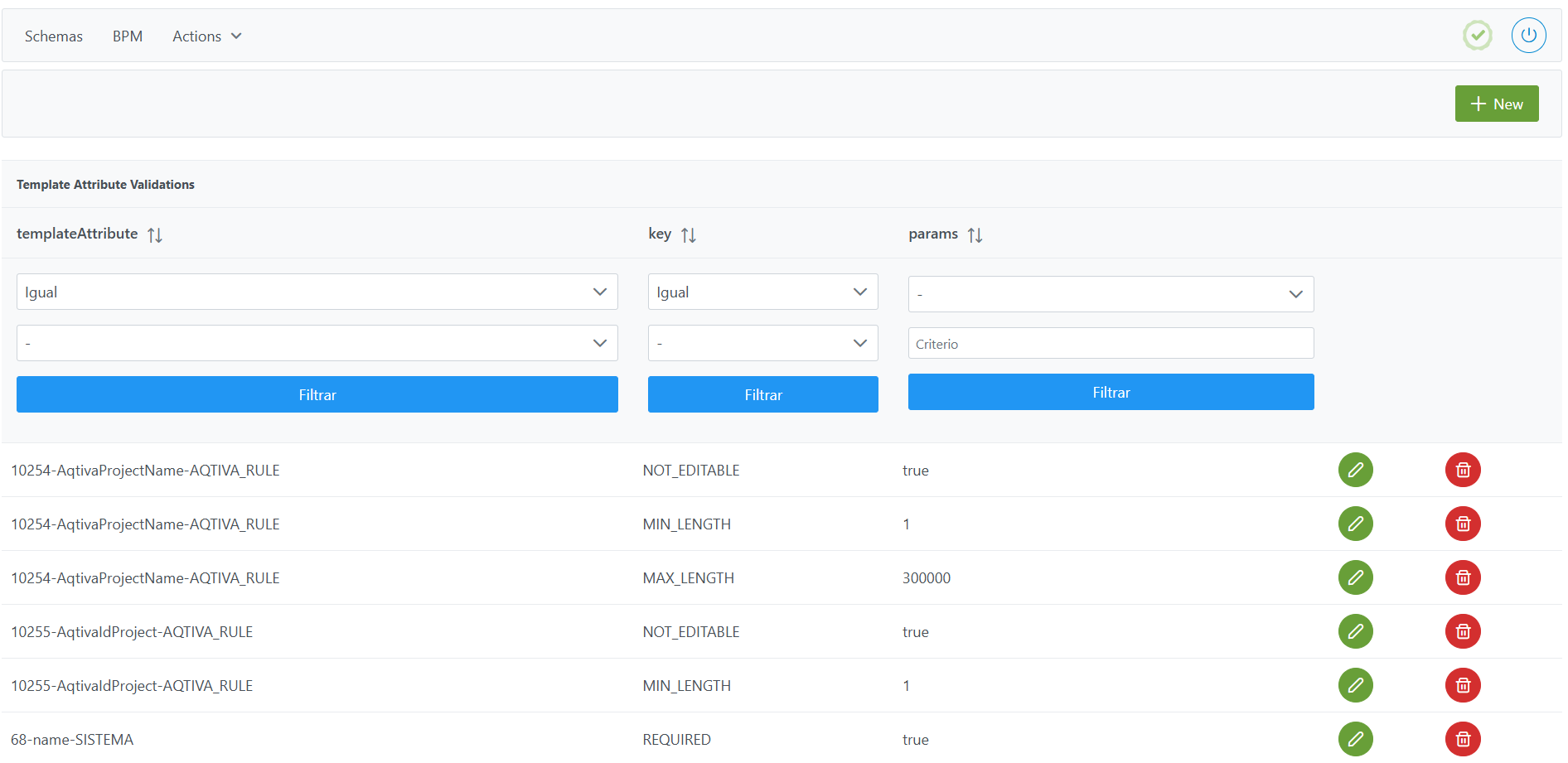
Template Attribute Validations table in the Configuration Panel (Administrator view)
These validations are recorded in the Template Attribute Validations table and allow rules to be applied to the attributes assigned to a specific template.
Supported validation types
Validations can cover different functional needs:
-
Mandatory attributes (
REQUIRED)
Identify the attributes that must mandatorily be filled in on a template. -
Non-editable attributes (
NOT_EDITABLE)
Restrict the editing of an attribute, blocking its modification in the templates. -
Dependency between values (
DEPENDS_ON)
Link the values of a selector-type attribute (SELECT,SELECT_IMG,SELECT_IMG_TXT,MULTI_SELECT, etc.) to the value chosen in another attribute. -
Value inheritance (
HERITABLE)
Identify boolean attributes whose value is inherited from other related objects according to the metamodel (e.g.: a dataset inherits the boolean value true that indicates it has personal data if any of its dataset fields has it set to true). Inheritance can only occur between entities that have a relationship according to the Anjana Data native metamodel, i.e., the following cases:-
DATASET attributes inherit boolean values from DATASET FIELD attributes.
-
DSA attributes inherit boolean values from attributes of the entities contained in the
dsaContentattribute. -
INSTANCE attributes inherit boolean values from attributes of the entities contained in the
datasetsinputininstanceanddatasetsoutputininstanceattributes.
-
-
Value ranges (
MIN/MAX)
Define minimum and maximum values for numeric attributes. -
String lengths (
MIN_LENGTH/MAX_LENGTH)
Set restrictions on the number of characters in short/long text attributes. -
Decimal precision (
MIN_DECIMAL_PRECISION/MAX_DECIMAL_PRECISION)
Define the minimum or maximum number of decimals in decimal attributes. -
Array restrictions (
MIN_LENGTH_ARRAY/MAX_LENGTH_ARRAY)
Control the minimum or maximum number of values in multivalued attributes. -
Subtype filter (
SUBTYPE_FILTER)
Limits the entity subtypes that can be associated in attributes of typeENTITY_CONTAINER,ENTITY_SEARCHorARRAY_ENTITY. -
Relationship type (
RELATIONSHIP_TYPE)
Determines the native relationship that is automatically created from anENTITY_CONTAINERattribute.
Note: When using the entities of the native metamodel, the following RELATIONSHIP_TYPE validations must exist:
-
On the
dsaContentattribute of DSA, this validation must be entered withDSA_CONTENTas the parameter. -
On the
instanceInDatasetattribute of INSTANCE, this validation must be entered withINSTANCE_DATASET_INas the parameter. -
On the
instanceoUTDatasetattribute of INSTANCE, this validation must be entered withINSTANCE_DATASET_OUTas the parameter. -
On the
solutionRelatedInstanceattribute of SOLUTION, this validation must be entered withSOLUTION_RELATED_INSTANCEas the parameter.
Validation matrix by attribute types
|
Numeric attribute type |
Validations |
|||||||
|
MIN |
MAX |
MAX DECIMAL PRECISION |
MIN DECIMAL PRECISION |
MAX LENGTH ARRAY |
MIN LENGTH ARRAY |
REQUIRED |
NOT EDITABLE |
|
|
ARRAY DECIMAL |
x |
x |
x |
x |
x |
x |
x |
x |
|
ARRAY NUMBER |
x |
x |
|
|
x |
x |
x |
x |
|
INPUT DECIMAL |
x |
x |
x |
x |
|
|
x |
x |
|
INPUT NUMBER |
x |
x |
|
|
|
|
x |
x |
|
INPUT RANGE |
x |
x |
|
|
|
|
x |
x |
|
Alphanumeric attribute type |
Validations |
|||||
|
MAX LENGTH |
MIN LENGTH |
MAX LENGTH ARRAY |
MIN LENGTH ARRAY |
REQUIRED |
NOT EDITABLE |
|
|
ARRAY ALPHANUMERICAL |
x |
x |
x |
x |
x |
x |
|
ARRAY UPLOAD URL |
|
|
x |
x |
x |
x |
|
ENRICHED TEXT AREA |
x |
|
|
|
x |
x |
|
INPUT TEXT INTERNATIONAL |
x |
x |
|
|
x |
x |
|
ENRICHED TEXT AREA INTERNATIONAL |
x |
|
|
|
x |
x |
|
TEXT AREA INTERNATIONAL |
x |
x |
|
|
x |
x |
|
INPUT TEXT |
x |
x |
|
|
x |
x |
|
TEXT AREA |
x |
x |
|
|
x |
x |
|
UPLOAD URL |
|
|
|
|
x |
x |
|
Value-selection attribute type |
Validations |
||||||
|
DEPENDS ON |
MAX LENGTH ARRAY |
MIN LENGTH ARRAY |
REQUIRED |
NOT EDITABLE |
SUBTYPE FILTER |
RELATIONSHIP TYPE |
|
|
ARRAY ENTITY |
|
x |
x |
x |
x |
x |
|
|
MULTI ORGANIZATIONAL UNIT |
|
x |
x |
x |
x |
|
|
|
MULTI USERS |
|
x |
x |
x |
x |
|
|
|
ENTITY CONTAINER |
|
x |
x |
x |
x |
x |
x |
|
ENTITY SEARCH |
|
|
|
x |
x |
x |
|
|
MULTI SELECT |
x |
x |
x |
x |
x |
|
|
|
MULTI SELECT IMG |
x |
x |
x |
x |
x |
|
|
|
MULTI SELECT IMG TXT |
x |
x |
x |
x |
x |
|
|
|
SELECT ORGANIZATIONAL UNIT |
|
|
|
x |
x |
|
|
|
SELECT |
x |
|
|
x |
x |
|
|
|
SELECT IMG |
x |
|
|
x |
x |
|
|
|
SELECT IMG TXT |
x |
|
|
x |
x |
|
|
|
TREE SELECT |
|
|
|
x |
x |
|
|
|
TREE MULTISELECT |
|
x |
x |
x |
x |
|
|
|
SELECT USERS |
|
|
|
x |
x |
|
|
|
Other attribute types |
Validations |
||||
|
HERITABLE |
MAX LENGTH ARRAY |
MIN LENGTH ARRAY |
REQUIRED |
NOT EDITABLE |
|
|
ARRAY BOOLEAN |
|
x |
x |
x |
x |
|
ARRAY DATE |
|
x |
x |
x |
x |
|
ARRAY UPLOAD FILE |
|
x |
x |
x |
x |
|
INPUT CHECKBOX |
x |
|
|
|
x |
|
INPUT DATE |
|
|
|
x |
x |
|
UPLOAD FILE |
|
|
|
x |
x |
Structure of the Template Attribute Validations table
Each registered validation is characterized by the following elements:
-
templateAttribute: Unique identifier of an attribute within the object's template for which the validation is defined.
Note: Keep in mind that an attribute can have different validations in each template (e.g. the attribute that indicates Sensitivity may be required in a DATASET but not in a DSA)
-
key: validation key. It must correspond to one of the following values:-
DEPENDS_ON: dependency on another attribute of the same template. It is configured for the target attribute, i.e., the attribute whose reference values appear pre-filtered based on the values selected in the attribute it depends on.-
Applies to: value-selection attributes (
SELECT,SELECT_IMG,SELECT_IMG_TXT,MULTI_SELECT,MULTI_SELECT_IMG,MULTI_SELECT_IMG_TXT,TREE_SELECT,TREE_MULTISELECT)
-
-
HERITABLE: in the case that its value is inherited from another metadata field.-
Applies to: boolean attributes (
INPUT_CHECKBOX) and boolean arrays (ARRAY_BOOLEAN).
-
-
MAX: maximum number.-
Applies to: numeric attributes (
INPUT_NUMBER,INPUT_DECIMAL,INPUT_RANGE,ARRAY_NUMBER,ARRAY_DECIMAL).
-
-
MIN: minimum number.-
Applies to: numeric attributes (
INPUT_NUMBER,INPUT_DECIMAL,INPUT_RANGE,ARRAY_NUMBER,ARRAY_DECIMAL).
-
-
MAX_DECIMAL_PRECISION: maximum precision for decimal values.-
Applies to: decimal attributes (
INPUT_DECIMAL,ARRAY_DECIMAL).
-
-
MIN_DECIMAL_PRECISION: minimum precision for decimal values.-
Applies to: decimal attributes (
INPUT_DECIMAL,ARRAY_DECIMAL).
-
-
MAX_LENGTH: maximum length in number of characters.-
Applies to: text attributes (
INPUT_TEXT,TEXT_AREA,ENRICHED_TEXT_AREA,INPUT_TEXT_INTERNATIONAL,TEXT_AREA_INTERNATIONAL,ENRICHED_TEXT_AREA_INTERNATIONAL,ARRAY_ALPHANUMERICAL).
-
-
MIN_LENGTHMIN_LENGTH: minimum length in number of characters.-
Applies to: text attributes (
INPUT_TEXT,TEXT_AREA,INPUT_TEXT_INTERNATIONAL,TEXT_AREA_INTERNATIONAL,ENRICHED_TEXT_AREA_INTERNATIONAL,ARRAY_ALPHANUMERICAL). -
Should not be applied to:
ENRICHED_TEXT_AREA,ENRICHED_TEXT_AREA_INTERNATIONALdue to html tags.
-
-
MAX_LENGTH_ARRAY: maximum number of array elements.-
Applies to: multivalued attributes (
ARRAY_BOOLEAN,ARRAY_DATE,ARRAY_NUMBER,ARRAY_DECIMAL,ARRAY_ALPHANUMERICAL,ARRAY_UPLOAD_FILE,ARRAY_UPLOAD_URL,MULTI_SELECT,MULTI_SELECT_IMG,MULTI_SELECT_IMG_TXT,MULTI_USERS,MULTI_ORGANIZATIONAL_UNIT,TREE_MULTISELECT).
-
-
MIN_LENGTH_ARRAY: minimum number of array elements.-
Applies to: multivalued attributes (
ARRAY_BOOLEAN,ARRAY_DATE,ARRAY_NUMBER,ARRAY_DECIMAL,ARRAY_ALPHANUMERICAL,ARRAY_UPLOAD_FILE,ARRAY_UPLOAD_URL,MULTI_SELECT,MULTI_SELECT_IMG,MULTI_SELECT_IMG_TXT,MULTI_USERS,MULTI_ORGANIZATIONAL_UNIT,TREE_MULTISELECT).
-
-
NOT_EDITABLE: not modifiable.-
Applies to: all attribute types
-
-
RELATIONSHIP_TYPE: relationship subtype that is created-
Applies to: native attributes of type
ENTITY_CONTAINER
-
-
REQUIRED: mandatory attribute-
Applies to: all attribute types
-
-
SUBTYPE_FILTER: allowed entity subtype.-
Applies to: entity-type attributes (
ENTITY_CONTAINER,ENTITY_SEARCH,ARRAY_ENTITY)
-
-
-
params: parameters to fill in according to the following table
|
key |
params |
|
DEPENDS_ON |
The name of the attribute it depends on must be indicated (value of the name field in the |
|
MAX MAX_DECIMAL_PRECISION MAX_LENGHT MAX_LENGHT_ARRAY MIN MIN_DECIMAL_PRECISION MIN_LENGHT MIN_LENGHT_ARRAY |
Require a numeric value that defines the corresponding limit. |
|
REQUIRED NOT_EDITABLE |
Must be configured with the value |
|
HERITABLE |
Accepts two possible values:
|
|
RELATIONSHIP_TYPE |
The name of the relationship subtype must be indicated (name field in the |
|
SUBTYPE_FILTER |
The names of the allowed entity subtypes must be indicated (name field of the |
Notes on attribute validations
When configuring validations in the Template Attribute Validation table, the following considerations must be taken into account:
-
Attributes that are part of the primary key (PK):
The attributesname,source,destination,infrastructure,technology,zone,path,processAriandsolutionArimust always be configured with theREQUIREDandNOT_EDITABLEvalidations to ensure they are complete.-
If this rule is not met, the configuration validation executed from Portuno will fail.
-
Additionally, downloading templates in Excel format from the Data Portal will fail.
-
-
Attribute
physicalName:
In entity-type subtypes that can be extracted through automatic discovery, this attribute must be validated asNOT_EDITABLE.-
This ensures it always retains the original value from the source.
-
It is not necessary to add the
REQUIREDvalidation.
-
-
Attributes of type
INPUT_RANGE:
Must mandatorily haveMINandMAXvalidations to correctly identify the allowed range of values.-
If not configured, the
MIN_INTEGERandMAX_INTEGERvalues defined in theAppConfigurationstable will be applied by default.
-
-
Numeric attributes (
INPUT_NUMBER,ARRAY_NUMBER,INPUT_DECIMAL,ARRAY_DECIMAL):
If explicitMINandMAXvalidations are not defined, theMIN_INTEGERandMAX_INTEGERvalues from theAppConfigurationstable are applied as well. -
Decimal attributes (
INPUT_DECIMAL,ARRAY_DECIMAL):
IfMIN_DECIMAL_PRECISIONandMAX_DECIMAL_PRECISIONvalidations are not configured, theMIN_INTEGERandMAX_INTEGERvalues defined in theAppConfigurationstable are applied. -
Long text attributes (
INPUT_TEXT_INTERNATIONAL,TEXT_AREA_INTERNATIONAL,TEXT_AREA):
IfMIN_LENGTHandMAX_LENGTHvalidations are not configured, theMIN_LENGTH_TEXT_EDITORandMAX_LENGTH_TEXT_EDITORvalues from theAppConfigurationtable are applied by default. Note: defaultMIN_LENGTHvalidations are not applied toENRICHED_TEXT_AREAENRICHED_TEXT_INTERNATIONAL -
Short text attributes (
INPUT_TEXT,ARRAY_ALPHANUMERICAL):
IfMIN_LENGTHandMAX_LENGTHvalidations are not configured, theMIN_LENGTH_TEXT_EDITORandMAX_LENGTH_TEXT_BDvalues from theapp_configurationstable are applied. -
Validation
RELATIONSHIP_TYPE:
It is mandatory on all attributes of typeENTITY_CONTAINER.-
It identifies the relationship that is created in the metamodel (e.g.:
DSA_CONTENT,INSTANCE_DATASET_IN,INSTANCE_DATASET_OUT,SOLUTION_RELATED_INSTANCE). -
It must not be modified once configured.
-
-
Fresh installations (with no prior configuration):
After the initial creation of templates, it is necessary to register all the mandatory validations described above to guarantee the system's consistency. -
Boolean attributes:
It is not recommended to applyREQUIREDvalidation on boolean-type attributes, since they cannot represent an “undefined” or “empty” state.-
A boolean only distinguishes between true or false.
-
Mandatory validation implies the obligation to always set it to true.
-
-
Dependencies between SELECT-type attributes (
DEPENDS_ON):
For this validation to work, the relationships between attributes must be configured in theAttribute Relationshipstable. -
Uniqueness rule:
It is not possible to configure the same validation twice for the same template attribute.
Creating a validation in the Template Attribute Validations table
Creating a new validation on a template involves registering a new record in the Template Attribute Validations table that links a template attribute with a validation rule.
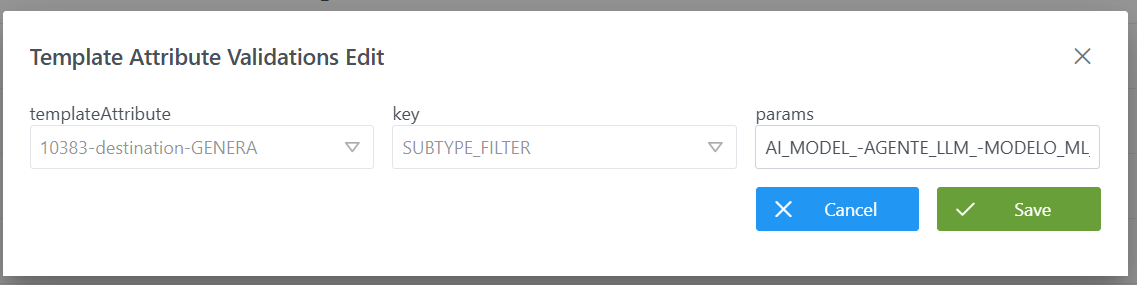
To add the record and create a new validation:
-
Click the New button in the top right corner. This will open a wizard with the fields defined in the section Structure of the table
Template Attribute Validations. -
Fill in the fields according to the structure described:
-
templateAttribute: select the template attribute to which the validation is to be associated (e.g.:10383-destination-GENERA). -
key: select the validation key that will be applied (e.g.:SUBTYPE_FILTER). -
params: indicate the parameters required for the selected validation.
In this example, the destination of the relationship is limited to certain entity subtypes only, listed in the field separated by_-and without spaces:AI_MODEL_-AGENTE_LLM_-MODELO_MLThis means that the
destinationattribute of theGENERArelationship will only allow entities of type AI_MODEL, AGENTE_LLM or MODELO_ML as the destination.
-
-
Click Save to save the validation or Cancel to discard it.
Note
After creating validations, it is necessary to execute the Clear cache action from the new Configuration Panel (Home > Reset operations > Clear cache) so that the changes are applied and visible in the Data Portal.
Modifying a validation on a template attribute in the Template Attribute Validations table
Modifying an existing validation on a template is managed from the Template Attribute Validations table in the Configuration Panel.
Important considerations
-
It is only possible to modify the
paramsfield of an already created validation. -
The
templateAttributeandkeyfields are not editable. -
If it is necessary to change the associated template attribute (
templateAttribute) or the validation key (key), the existing validation must be deleted and a new one created with the correct values.
Procedure to modify params
-
Locate the validation to be edited in the
Template Attribute Validationstable. -
Click the Edit button (green icon).
-
In the wizard, modify the value of the
paramsfield according to the selected validation rule.Examples:
-
For a
SUBTYPE_FILTERtype validation, update the list of allowed entity subtypes, separated by_-and without spaces (example:AI_MODEL_-MODELO_ML). -
For a
MAX_LENGTHtype validation, adjust the maximum number of characters (example:300000). -
For a
HERITABLEtype validation, indicate whether inheritance applies with the valueHIGHorLOW.
-
-
Click Save to save the changes or Cancel to discard them.
Note:
After modifying validations, it is necessary to execute the Clear cache action from the new Configuration Panel (Home > Reset operations > Clear cache) so that the changes are applied and visible in the Data Portal.
Configuring attribute validations on templates via direct database access (Developer view)
The attribute validations for each template are stored in the anjana.template_attribute_validation table.
|
Column |
Type |
Restrictions / Notes |
|---|---|---|
|
|
|
NOT NULL. FK to |
|
|
|
Validation key (e.g.: |
|
|
|
Validation parameters. E.g.: number, |
Below is a sample script to configure several validations on the destination attribute of the GENERA relationship:
INSERT INTO anjana.template_attribute_validation
  (id_template_attribute, validator_key, validator_params)
VALUES
  (10383, 'NOT_EDITABLE',   'true'),
  (10383, 'REQUIRED',       'true'),
  (10383, 'SUBTYPE_FILTER', 'AI_MODEL_-AGENTE_LLM_-MODELO_ML_DL');
Important:
-
Once the insert has been executed, run the table's sequence update. (From the new Configuration Panel under
Home > Reset operations > Reset database sequences, the sequences of all tables, including this one, can be updated). -
All the weight of the configuration logic falls on the developer who executes the SQL queries directly on the tables. It is recommended to carefully review the Structure section.