
Purpose of customization
Anjana Data offers extensive functional configuration options, such as the definition of roles, permissions, metamodels, workflows or templates, that allow the platform to be adapted to each client's processes and organizational structure.
In addition to this functional layer, the platform allows a visual customization that provides aesthetic consistency with each organization's corporate identity.
This guide focuses on that visual and aesthetic side of customization. It describes how to adapt the graphical elements of the Anjana Data interface, including iconography, logos, style sheets (CSS) and translation files, to offer an experience more aligned with each organization's brand image.
The goal is to make it easy for each Anjana Data implementation to maintain its own visual identity, without altering the functional configuration or the internal behavior of the platform.
Areas of visual customization in Anjana Data Platform
Visual customization in Anjana Data Platform allows the graphical and presentation elements that define the look of the interface to be modified, while respecting the product's technical and functional structure.
The main areas of this customization are:
-
Iconography and logos
They allow the icons used in the platform to be adapted and the default Anjana Data logo to be replaced with the organization's own logo.
Icons are managed in SVG format within specific folders of the S3/MinIO storage, according to their purpose (attributes, subtypes, languages, etc.). -
Visual styles (custom CSS)
Through thecustom-css.cssfile, it is possible to modify design aspects such as colors, fonts or backgrounds. This customization must be carried out following the technical recommendations to guarantee the compatibility and correct operation of the interface. -
Translations and internationalization (i18n)
Anjana Data Platform supports multilingual environments. Translations are managed throughjsonfiles generated from Portuno and stored in thei18nbucket. This allows the interface to be adapted to each organization's working languages.
Together, these elements make it possible to reflect the visual and linguistic identity of the organization in Anjana Data, maintaining a consistent, professional user experience aligned with the brand
Technical storage structure of the visual elements
Anjana Data Platform uses a file storage system on cloud servers compatible with Amazon S3/MinIO. This environment acts as a repository for unstructured data (such as images, videos, backups or configurations) needed both for internal operation and for the platform's visual customization.
To ensure correct and organized operation, Anjana uses different buckets for specific purposes:
-
imports → Stores the Excel files used in the bulk import of objects.
-
dsa → Stores DSA contracts and any files attached to entities or relationships.
-
workflows → Contains the XML files with the configuration of the workflows that run in Anjana (folder names must be longer than three characters).
-
textarea → Stores the images uploaded in attributes of type
ENRICHED_TEXT_AREA. -
cdn → Includes the application's visual and configuration resources, such as icons, translation files or custom styles. This content must be preloaded from the releases.anjanadata.org repository (
releasesraw/com/anjana/cdnunder the corresponding version). -
i18n → Stores the translation files generated from Portuno to enable multi-language support in Anjana (by default,
es-ES.jsonanden-US.json).
Within cdn/ the customization of iconography and styles is organized according to the structure described in this document:
-
/images/attribute-icons→ Icons native to the application core (not customizable). -
/images/subtype-icons→ Customizable subtype icons for entities and relationships. -
/brand→ Organization logo for the header and loading indicator. -
custom-css.css→ Custom style file to adapt the platform's visual appearance.
Detail of the cdn/ bucket and customizable content
The cdn/ bucket, located in the MinIO or S3 storage environment, brings together all the customizable elements that define the visual appearance of the Anjana Data platform.
Its purpose is to allow each organization to adapt aspects such as icons, logos, translations and visual styles, so that the interface reflects its corporate identity.
These elements are organized into subfolders according to their purpose, which are detailed below.
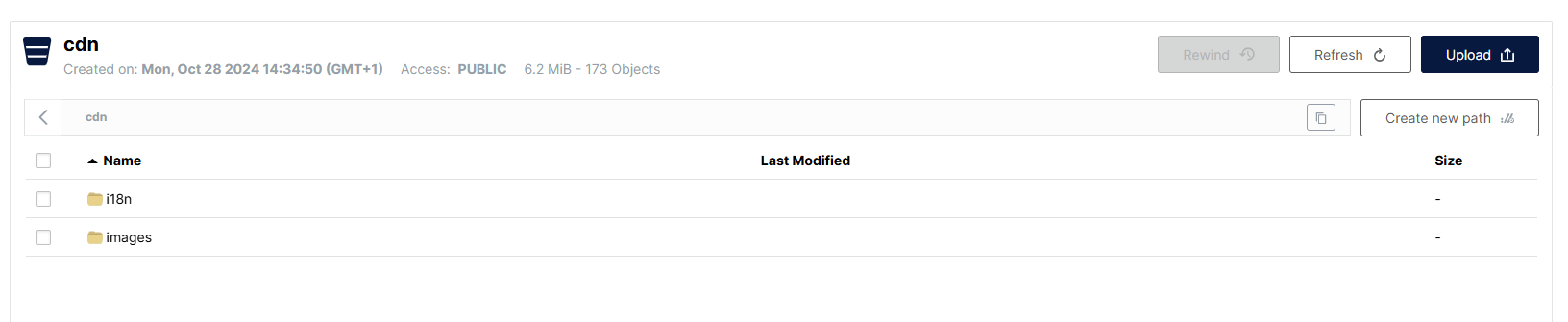
i18n folder
This folder contains the translation files used by the platform to support multiple languages.
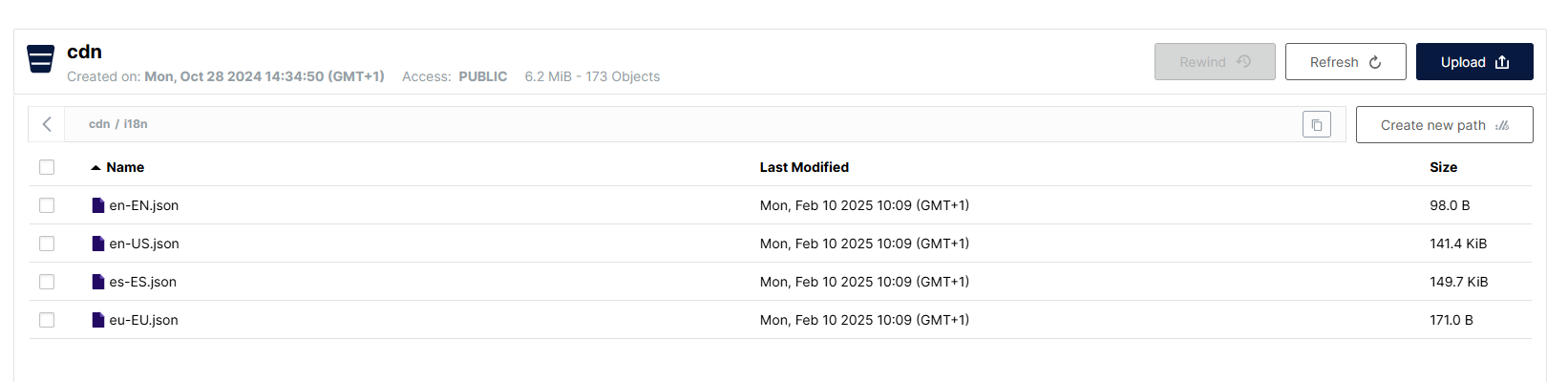
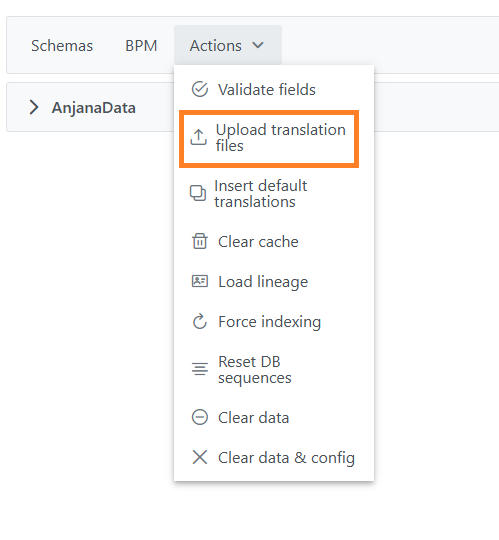
Translations are updated from the new Configuration Portal, using the Internationalization > Publish button available in the header. This process retrieves the information stored in the database and automatically generates the corresponding files, which are then uploaded to the MinIO/S3 storage.
Together, the content of the cdn/ bucket forms the visual basis of customization in Anjana Data.
Through the correct configuration of its folders and files, it is possible to maintain a visual identity that is consistent and adapted to each client's brand, without compromising the stability or operation of the platform.
The naming of translation files (for example, es-ES.json) is automatically generated from the value of the language column of the Translations table.
To guarantee the correct operation of the platform, this value must match one of the codes defined in the i18nCode column of the Languages table.
If the name of any of the files stored in cdn/i18n does not match a valid i18n code, it is advisable to review the Translations configuration table in the Configuration Portal. It is possible that an incorrect code has been entered in the language column of that table, which will result in a file being generated with an incorrect name.
Example:
If a file named es-ES1.json appears in the cdn/i18n bucket, it is most likely that the value es-ES1 was mistakenly entered in the language column of some record in the Translations table, instead of the correct value es-ES.
Images folder
Within cdn/, the images/ folder groups together the images and icons used in the user interface. It is in turn organized into several subfolders, each with a specific purpose:

attribute-icons folder
This folder, located in cdn/images, contains the icons associated with attributes of type SELECT_IMG, MULTI_SELECT_IMG, SELECT_IMG_TXT and MULTI_SELECT_IMG_TXT.
These icons can be customized to improve the visual identification of values in the application.
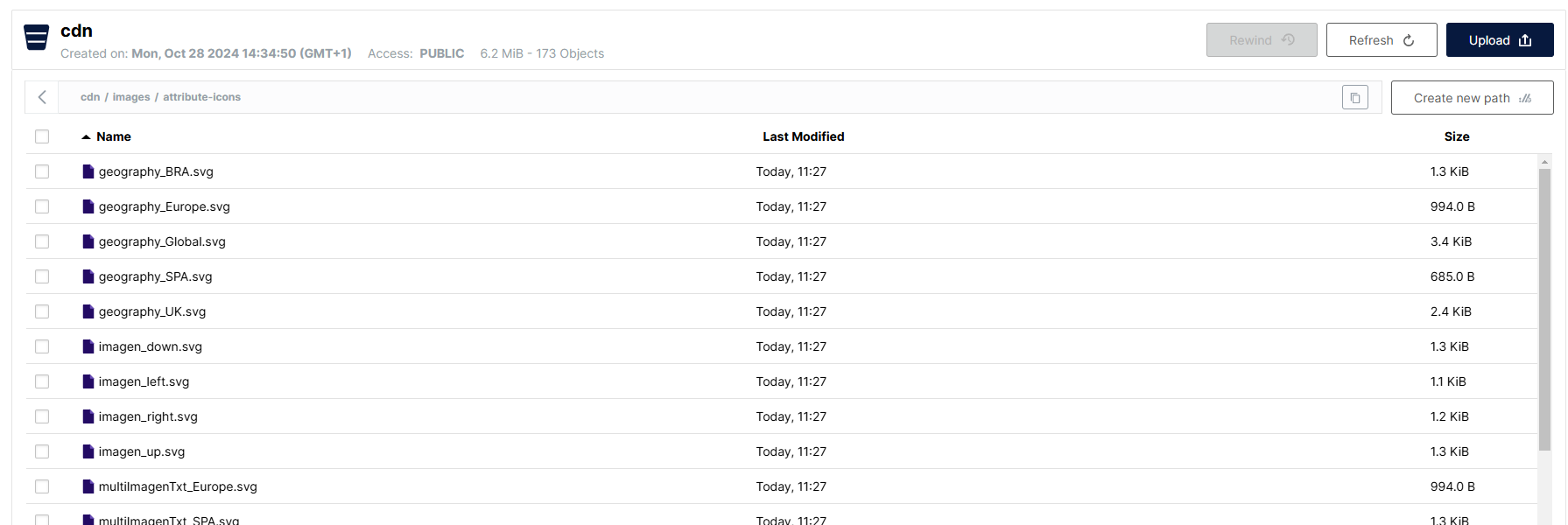
The Custom icons section of this document details the technical requirements (format, size, naming) and the procedure for including them correctly.
brand folder
This folder, located in cdn/images, allows the platform's corporate image to be customized.
The organization's logo can be uploaded here, and it will be shown both in the main header and in the loading indicator during loading processes.
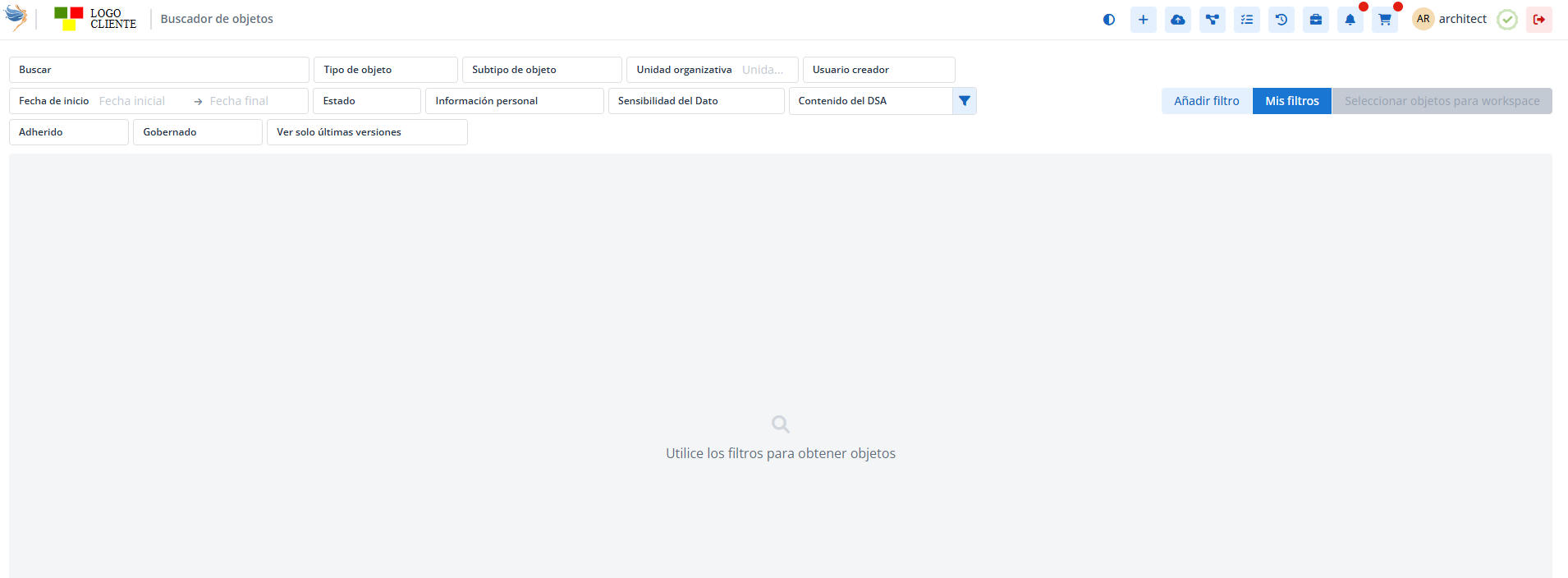

If you do not want to include your own logo, the folder must remain empty, in which case the default design of Anjana Data Platform will be applied.

The Custom icons section describes the requirements these images must meet (SVG format, recommended dimensions, file name, etc.) to guarantee their correct display.
subtype-icons folder
This folder, located in cdn/images, includes the customizable subtype icons for entities and relationships that appear in the Data Portal.
Thanks to this folder, each organization can assign specific icons to the different object types, improving the clarity and usability of the interface.
The technical requirements and naming convention are also detailed in the Custom icons section of this document.
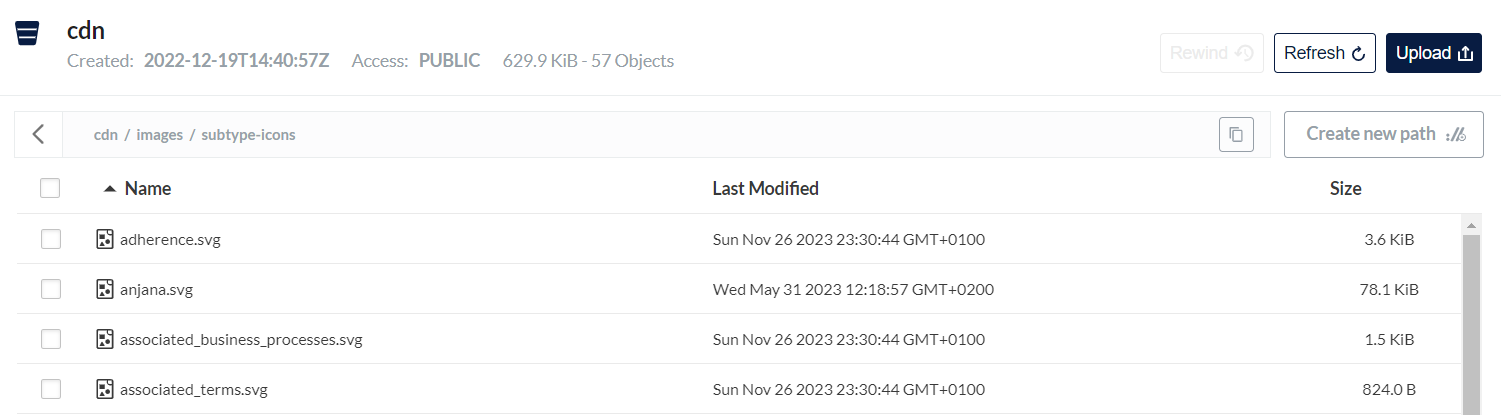
The Custom icons section describes the requirements these images must meet (SVG format, recommended dimensions, file name, etc.) to guarantee their correct display.
Iconography
Anjana Data uses a set of icons that contribute to the platform's usability, visual consistency and customization.
Icons are classified into two main groups: default icons, which are part of the product's core, and customizable icons, which allow the platform's appearance to be adapted to each organization's visual identity.
Default icons
Default icons are included natively in Anjana Data Platform and cannot be modified by the user.
They represent platform modules, common actions and system states, and are accompanied by descriptive tooltips that make their function easier to understand, thereby improving the user experience.

Flag icons for languages
The system includes a predefined set of flags representing the languages available on the platform (including the co-official languages of Spain).
To configure the languages correctly, the i18n code mapping table included in the appendix of this document must be used.

If an additional flag not currently included is needed, its addition can be requested by contacting the Anjana Data Global Support team.
Status icons
Anjana Data uses specific icons to represent the states of objects and workflows, which are included by default in the application.
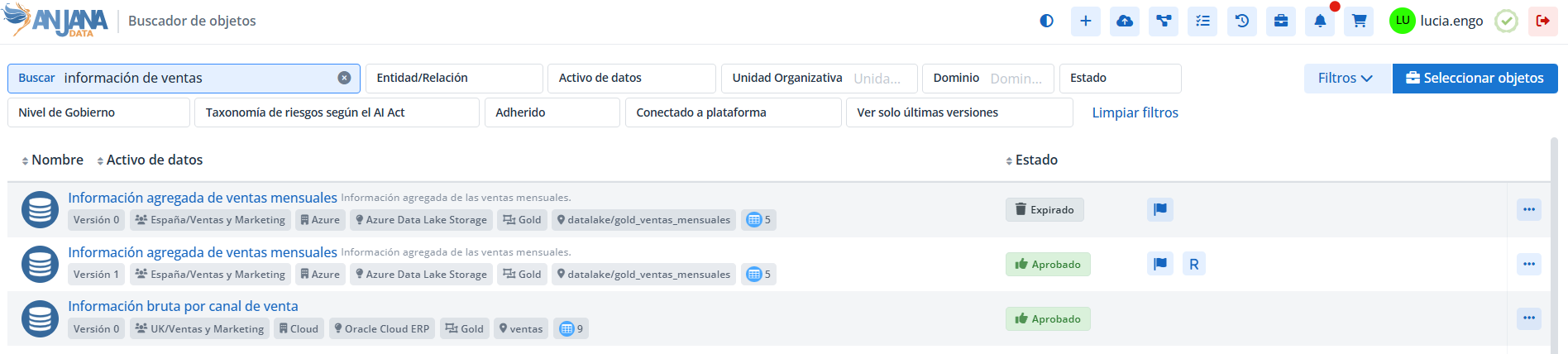
The currently supported states are:
-
Approved
-
Deprecated
-
Disabled
-
Draft
-
Expired
-
Imported
-
Pending
-
Rejected
-
On hold.
Customizable icons
In addition to the default icons, Anjana Data Platform allows certain graphical elements to be customized to adapt the platform's appearance.
These customizations are managed in the cdn/images/ bucket, within the specific subfolders described below.
Icons for attributes with image (attribute-icons/)
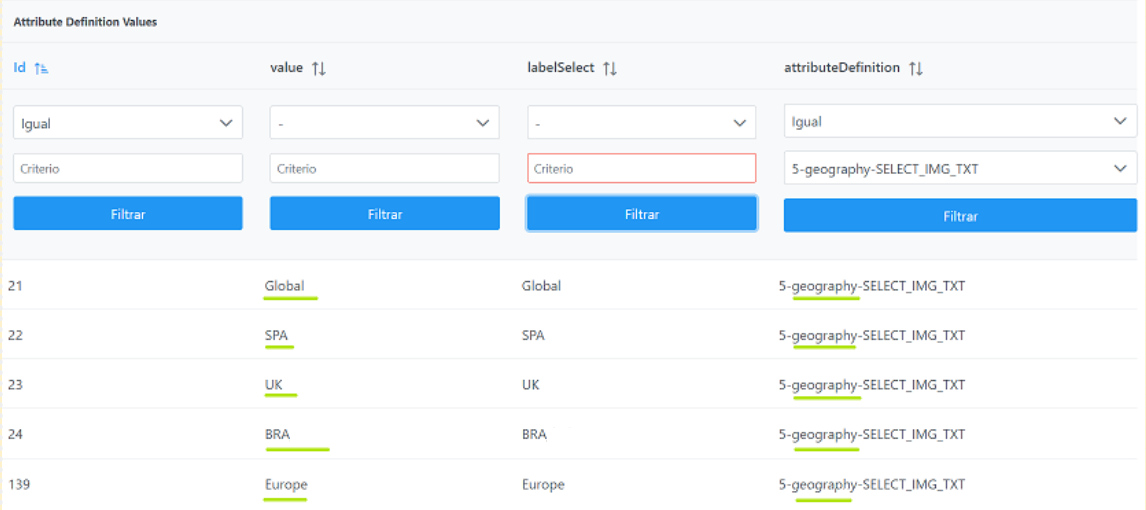
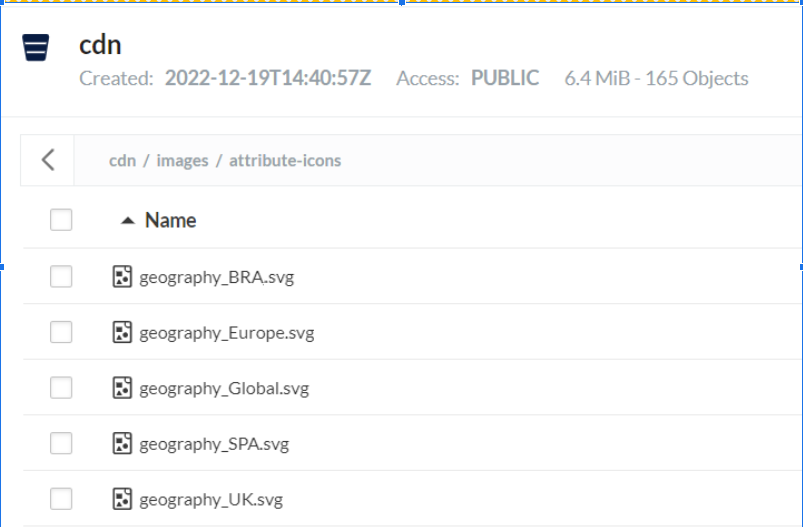
This folder contains the icons used in attributes configured with the data types:
SELECT_IMG, MULTI_SELECT_IMG, SELECT_IMG_TXT and MULTI_SELECT_IMG_TXT.
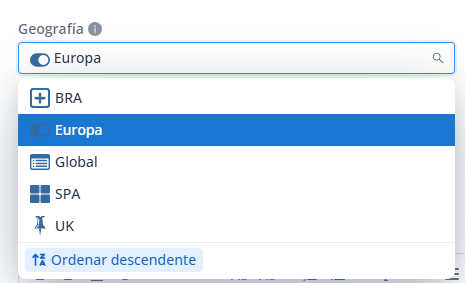
SELECT_IMG_TXT
Technical requirements for attributes with image:
For the icons to display correctly, they must meet the following requirements:
-
Format: SVG only
-
Recommended maximum size: 5KB
-
Recommended maximum size: 20px * 20px
-
Required aspect ratio: 1:1
-
The file name must follow this structure (respecting upper and lower case): <attributeName>_<value>.svg
Corporate logo (brand/)
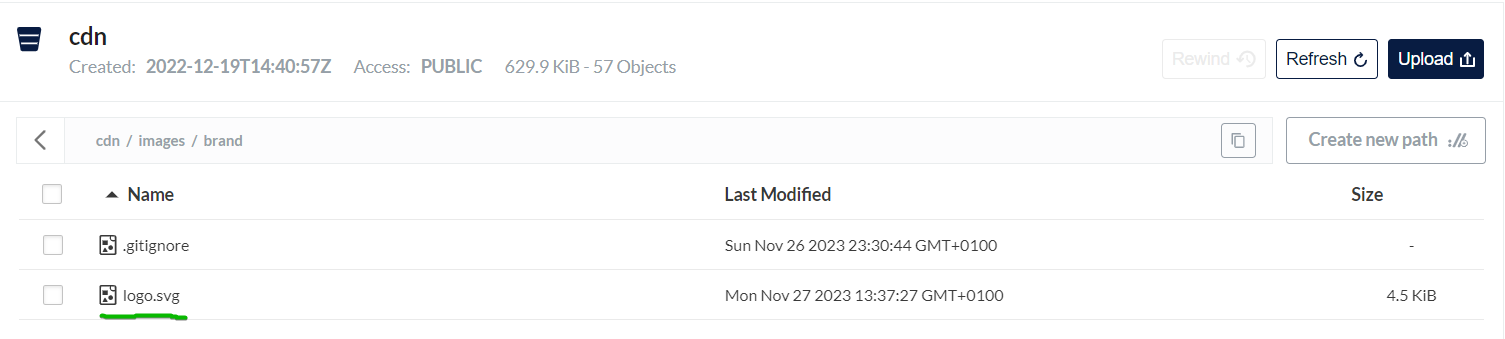
The brand/ folder allows the organization's logo to be included, which will be shown both in the platform header and in the loading indicator during loading.
If you do not want to include a logo, this folder can be left empty.
Requirements the client's corporate logo must meet for the header
For the logo to display correctly, the icons must meet the following requirements:
-
Format: SVG only
-
Recommended maximum file size: 5KB
-
Recommended maximum size: 80px * 25px
-
Required aspect ratio: 3.2:1
-
The file name must be: logo.svg
Subtype icons (subtype-icons/)
Anjana Data allows the icons associated with object subtypes to be customized in the Data Portal, improving the visual identification of entities and relationships.

Requirements subtype icons must meet
For the icons to display correctly on all screens of the application, the icons must meet the following requirements:
-
Format: SVG only
-
Recommended maximum size: 5KB
-
Recommended maximum size: 20px * 20px
-
Required aspect ratio: 1:1
-
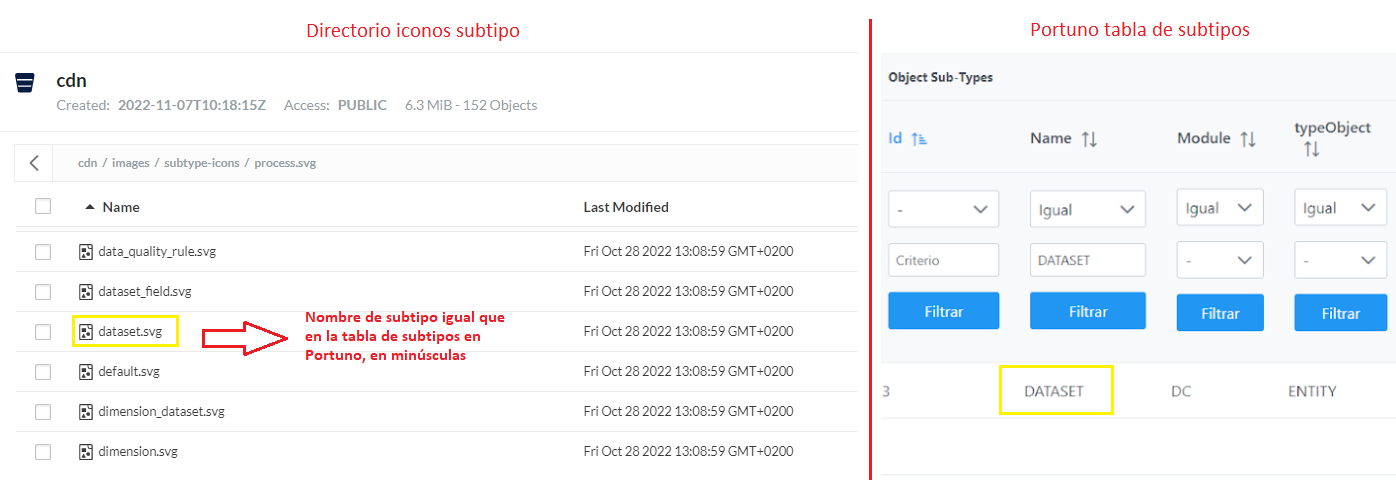
The name of the file uploaded to Minio must be the same as the object subtype in lower case. For example: for the entity subtype DATASET the icon must be named dataset.svg
Style customization (CSS)
Anjana Data allows the visual styles of the interface to be customized by including an additional CSS file.
This functionality makes it possible to adapt colors, fonts, sizes or backgrounds to the organization's visual identity, while maintaining the platform's base structure.
Style modifications must be carried out by technical staff with knowledge of CSS, since an incorrect configuration can affect the appearance or operation of the application. Anjana Data is not responsible for changes made in custom style sheets.
Custom style file
To apply a style customization, a file named custom-css.css must be created and stored in the root of the cdn/ bucket in the MinIO/S3 environment.
This file will override or complement the platform's predefined styles when the interface loads.
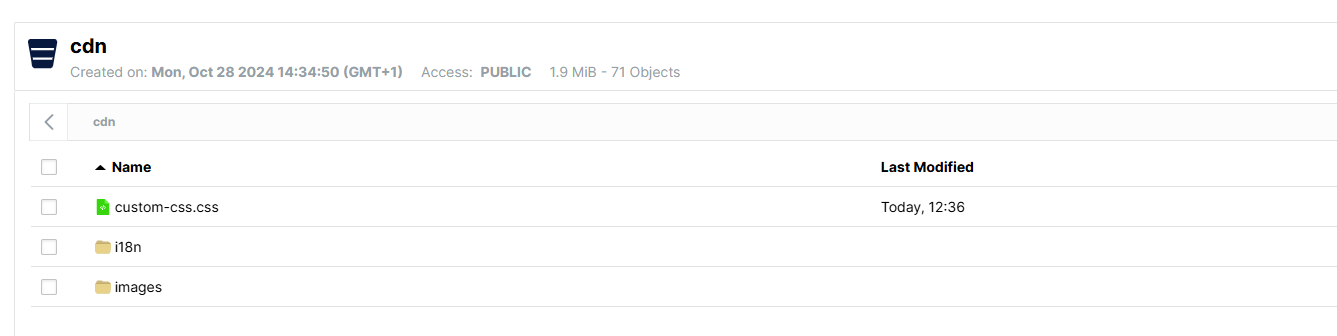
Technical requirements for the style file:
-
The file must be named exactly
custom-css.css. -
It must be located in the root of
cdn/, not inside subfolders. -
It is recommended to use comments within the CSS to document the changes made.
-
In the modified styles, the
!importantrule must be used to guarantee that the changes take precedence over the application's original definitions.
Customization best practices
-
Limit changes to cosmetic style elements (colors, fonts, icons or sizes), avoiding altering structural or interaction components.
-
Check the results in different modules and screen resolutions before applying the changes in production.
-
Keep a record or version control of the
custom-css.cssfile to facilitate traceability and recovery in case of incidents. -
Coordinate modifications with the design or product team to ensure consistency with the corporate visual identity.
Customization example
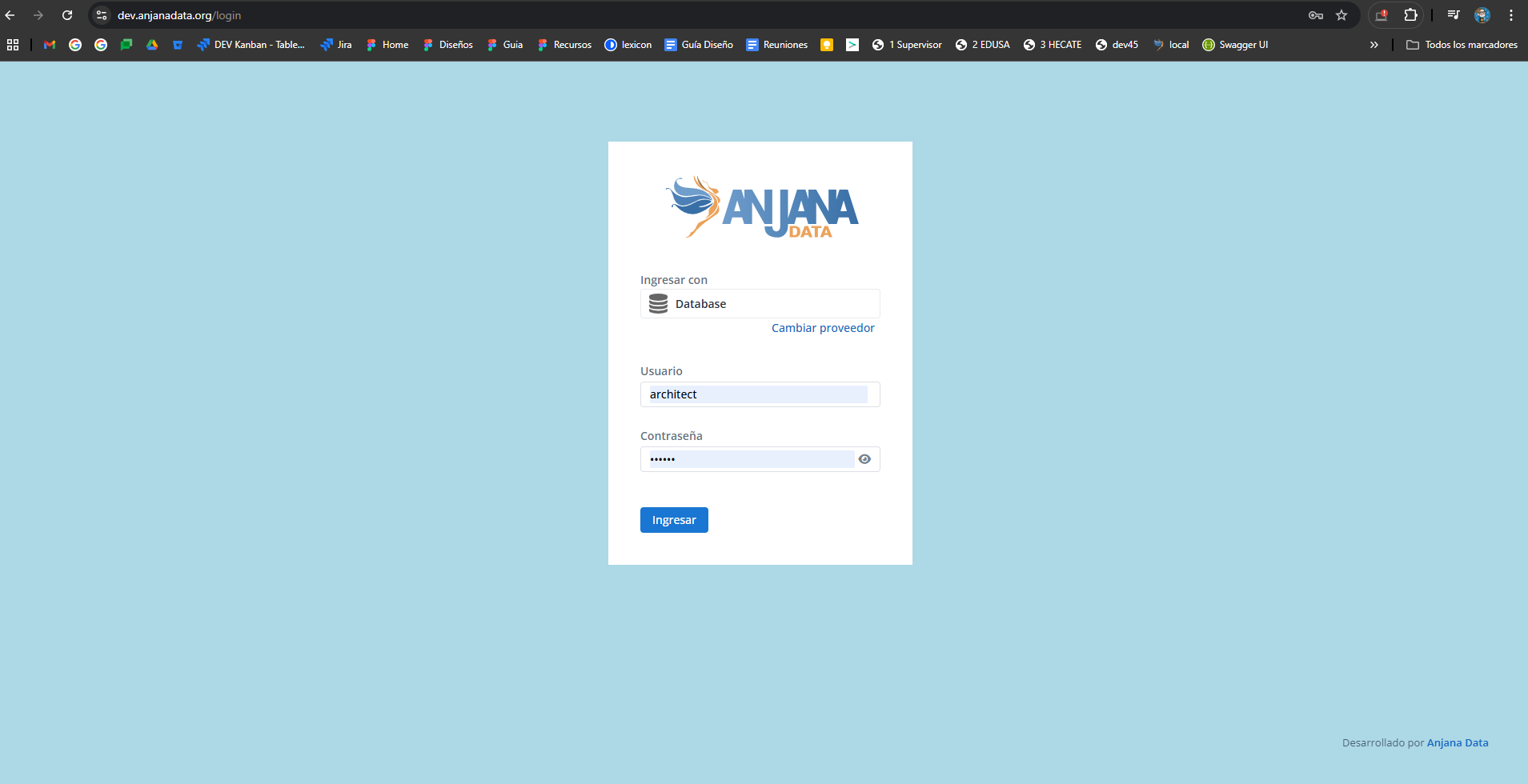
Below is an example of how to modify the background color of the login screen using the custom-css.css file:
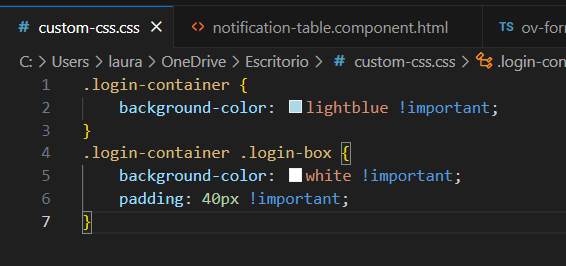
The background of the login screen will show the corporate color defined in the custom file.
APPENDIX
This appendix details the flags and language identifiers included in Anjana Data Platform, as well as their correspondence with the configuration of the Configuration Portal.
Each flag is associated with an i18n code that is used in the Languages table and in the language column of the Translations table. For more information on language and translation configuration, see the Anjana Data functional configuration guide.
Language codes can be used in both lower case and upper case, since the system does not distinguish between the two formats.
For flags to be displayed correctly in the interface, it is essential to use only the official i18n codes indicated in this table or in the list of available languages.
Custom codes must not be created or used (for example, es-ES1, en-UKx, etc.), since the application does not recognize them and, as a result, will not display the corresponding flag.
If a new language not currently included needs to be added, its addition must be requested from the Anjana Data Global Support team.
|
FLAGS/LANGUAGES IN SPAIN |
|
|
es-ct |
Catalan |
|
es-ga |
Galician |
|
es-es |
Spanish |
|
es-pv |
Basque |
|
OTHER FLAGS |
|
|
af-af |
Afghanistan |
|
ax-ax |
Åland Islands |
|
al-al |
Albania |
|
dz-dz |
Algeria |
|
as-as |
American Samoa |
|
ad-ad |
Andorra |
|
ao-ao |
Angola |
|
ai-ai |
Anguilla |
|
aq-aq |
Antarctica |
|
ag-ag |
Antigua and Barbuda |
|
ar-ar |
Argentina |
|
am-am |
Armenia |
|
aw-aw |
Aruba |
|
ac-ac |
Ascension Island |
|
au-au |
Australia |
|
at-at |
Austria |
|
az-az |
Azerbaijan |
|
bs-bs |
Bahamas |
|
bh-bh |
Bahrain |
|
bd-bd |
Bangladesh |
|
bb-bb |
Barbados |
|
by-by |
Belarus |
|
be-be |
Belgium |
|
bz-bz |
Belize |
|
bj-bj |
Benin |
|
bm-bm |
Bermuda |
|
bt-bt |
Bhutan |
|
bo-bo |
Bolivia |
|
bq-bq |
Caribbean Netherlands |
|
ba-ba |
Bosnia and Herzegovina |
|
bw-bw |
Botswana |
|
bv-bv |
Bouvet Island |
|
br-br |
Brazil |
|
io-io |
British Indian Ocean Territory |
|
bn-bn |
Brunei |
|
bg-bg |
Bulgaria |
|
bf-bf |
Burkina Faso |
|
bi-bi |
Burundi |
|
cv-cv |
Cape Verde |
|
kh-kh |
Cambodia |
|
cm-cm |
Cameroon |
|
ca-ca |
Canada |
|
ic-ic |
Canary Islands |
|
ky-ky |
Cayman Islands |
|
cf-cf |
Central African Republic |
|
cefta-cefta |
Central European Free Trade Agreement |
|
td-td |
Chad |
|
cl-cl |
Chile |
|
cn-cn |
China |
|
cx-cx |
Christmas Island |
|
cp-cp |
Clipperton Island |
|
cc-cc |
Cocos Islands |
|
co-co |
Colombia |
|
km-km |
Comoros |
|
ck-ck |
Cook Islands |
|
cr-cr |
Costa Rica |
|
hr-hr |
Croatia |
|
cu-cu |
Cuba |
|
cw-cw |
Curaçao |
|
cy-cy |
Cyprus |
|
cz-cz |
Czech Republic |
|
ci-ci |
Ivory Coast |
|
cd-cd |
Democratic Republic of the Congo |
|
dk-dk |
Denmark |
|
dj-dj |
Djibouti |
|
dm-dm |
Dominica |
|
do-do |
Dominican Republic |
|
eac-eac |
East African Community |
|
ec-ec |
Ecuador |
|
eg-eg |
Egypt |
|
sv-sv |
El Salvador |
|
gb-eng |
England |
|
gq-gq |
Equatorial Guinea |
|
er-er |
Eritrea |
|
ee-ee |
Estonia |
|
sz-sz |
Eswatini |
|
et-et |
Ethiopia |
|
eu-eu |
Europe |
|
fk-fk |
Falkland Islands |
|
fo-fo |
Faroe Islands |
|
fm-fm |
Micronesia |
|
fj-fj |
Fiji |
|
fi-fi |
Finland |
|
fr-fr |
France |
|
gf-gf |
French Guiana |
|
pf-pf |
French Polynesia |
|
tf-tf |
French Southern Territories |
|
ga |
Gabon |
|
gm-gm |
Gambia |
|
ge-ge |
Georgia |
|
de-de |
Germany |
|
gh-gh |
Ghana |
|
gi-gi |
Gibraltar |
|
gr-gr |
Greece |
|
gl-gl |
Greenland |
|
gd-gd |
Grenada |
|
gp-gp |
Guadeloupe |
|
gu-gu |
Guam |
|
gt-gt |
Guatemala |
|
gg-gg |
Guernsey |
|
gn-gn |
Guinea |
|
gw-gw |
Guinea-Bissau |
|
gy-gy |
Guyana |
|
ht-ht |
Haiti |
|
hm-hm |
Heard Island and McDonald Islands |
|
va-va |
Vatican City |
|
hn-hn |
Honduras |
|
hk-hk |
Hong Kong |
|
hu-hu |
Hungary |
|
is-is |
Iceland |
|
in-in |
India |
|
id-id |
Indonesia |
|
ir-ir |
Iran |
|
iq-iq |
Iraq |
|
ie-ie |
Ireland |
|
im-im |
Isle of Man |
|
il-il |
Israel |
|
it-it |
Italy |
|
jm-jm |
Jamaica |
|
jp-jp |
Japan |
|
je-je |
Jersey |
|
jo-jo |
Jordan |
|
kz-kz |
Kazakhstan |
|
ke-ke |
Kenya |
|
ki-ki |
Kiribati |
|
xk-xk |
Kosovo |
|
kw-kw |
Kuwait |
|
kg-kg |
Kyrgyzstan |
|
la-la |
Laos |
|
lv-lv |
Latvia |
|
arab-arab |
Arab League |
|
lb-lb |
Lebanon |
|
ls-ls |
Lesotho |
|
lr-lr |
Liberia |
|
ly-ly |
Libya |
|
li-li |
Liechtenstein |
|
lt-lt |
Lithuania |
|
lu-lu |
Luxembourg |
|
mo-mo |
Macau |
|
mg-mg |
Madagascar |
|
mw-mw |
Malawi |
|
my-my |
Malaysia |
|
mv-mv |
Maldives |
|
ml-ml |
Mali |
|
mt-mt |
Malta |
|
mh-mh |
Marshall Islands |
|
mq-mq |
Martinique |
|
mr-mr |
Mauritania |
|
mu-mu |
Mauritius |
|
yt-yt |
Mayotte |
|
mx-mx |
Mexico |
|
md-md |
Moldova |
|
mc-mc |
Monaco |
|
mn-mn |
Mongolia |
|
me-me |
Montenegro |
|
ms-ms |
Montserrat |
|
ma-ma |
Morocco |
|
mz-mz |
Mozambique |
|
mm-mm |
Myanmar |
|
na-na |
Namibia |
|
nr-nr |
Nauru |
|
np-np |
Nepal |
|
nl-nl |
Netherlands |
|
nc-nc |
New Caledonia |
|
nz-nz |
New Zealand |
|
ni-ni |
Nicaragua |
|
ne-ne |
Niger |
|
ng-ng |
Nigeria |
|
nu-nu |
Niue |
|
nf-nf |
Norfolk Island |
|
kp-kp |
North Korea |
|
mk-mk |
North Macedonia |
|
gb-nir |
Northern Ireland |
|
mp-mp |
Northern Mariana Islands |
|
no-no |
Norway |
|
om-om |
Oman |
|
pk-pk |
Pakistan |
|
pw-pw |
Palau |
|
pa-pa |
Panama |
|
pg-pg |
Papua New Guinea |
|
py-py |
Paraguay |
|
pe-pe |
Peru |
|
ph-ph |
Philippines |
|
pn-pn |
Pitcairn Islands |
|
pl-pl |
Poland |
|
pt-pt |
Portugal |
|
pr-pr |
Puerto Rico |
|
qa-qa |
Qatar |
|
cg-cg |
Congo |
|
ro-ro |
Romania |
|
ru-ru |
Russia |
|
rw-rw |
Rwanda |
|
re-re |
Réunion |
|
bl-bl |
Saint Barthélemy |
|
sh-sh |
Saint Helena |
|
kn-kn |
Saint Kitts and Nevis |
|
lc-lc |
Saint Lucia |
|
mf-mf |
Saint Martin |
|
pm-pm |
Saint Pierre and Miquelon |
|
vc-vc |
Saint Vincent and the Grenadines |
|
ws-ws |
Samoa |
|
sm-sm |
San Marino |
|
st-st |
São Tomé and Príncipe |
|
sa-sa |
Saudi Arabia |
|
gb-sct |
Scotland |
|
sn-sn |
Senegal |
|
rs-rs |
Serbia |
|
sc-sc |
Seychelles |
|
sl-sl |
Sierra Leone |
|
sg-sg |
Singapore |
|
sx-sx |
Sint Maarten |
|
sk-sk |
Slovakia |
|
si-si |
Slovenia |
|
sb-sb |
Solomon Islands |
|
so-so |
Somalia |
|
za-za |
South Africa |
|
gs-gs |
South Georgia and the South Sandwich Islands |
|
kr-kr |
South Korea |
|
ss-ss |
South Sudan |
|
lk-lk |
Sri Lanka |
|
ps-ps |
State of Palestine |
|
sd-sd |
Sudan |
|
sr-sr |
Suriname |
|
sj-sj |
Svalbard and Jan Mayen |
|
se-se |
Sweden |
|
ch-ch |
Switzerland |
|
sy-sy |
Syria |
|
tw-tw |
Taiwan |
|
tj-tj |
Tajikistan |
|
tz-tz |
Tanzania |
|
th-th |
Thailand |
|
tl-tl |
East Timor |
|
tg-tg |
Togo |
|
tk-tk |
Tokelau |
|
to-to |
Tonga |
|
tt-tt |
Trinidad and Tobago |
|
ta-ta |
Tristan da Cunha |
|
tn-tn |
Tunisia |
|
tm-tm |
Turkmenistan |
|
tc-tc |
Turks and Caicos Islands |
|
tv-tv |
Tuvalu |
|
tr-tr |
Turkey |
|
ug-ug |
Uganda |
|
ua-ua |
Ukraine |
|
ae-ae |
United Arab Emirates |
|
en-uk |
United Kingdom |
|
un-un |
United Nations |
|
um-um |
United States Minor Outlying Islands |
|
en-us |
United States of America |
|
xx-xx |
Unknown |
|
uy-uy |
Uruguay |
|
uz-uz |
Uzbekistan |
|
vu-vu |
Vanuatu |
|
ve-ve |
Venezuela |
|
vn-vn |
Vietnam |
|
vg-vg |
British Virgin Islands |
|
vi-vi |
United States Virgin Islands |
|
gb-wls |
Wales |
|
wf-wf |
Wallis and Futuna |
|
eh-eh |
Western Sahara |
|
ye-ye |
Yemen |
|
zm-zm |
Zambia |
|
zw-zw |
Zimbabwe |