
This guide explains how to configure Anjana Data to adapt it to each organization's requirements. It describes the steps needed to configure the different components of the data governance model.
This guide covers the following configuration sections:
-
Governance operating model: definition of roles, permissions, data domains, workflows, workflow trigger rules, and notifications.
-
Metamodel and metadata templates: configuration of the entity-relationship model and its associated templates: menus, sections, attributes, validations, and versioning rules.
-
Lineage and lifecycle: configuration of the lineage layers, the object subtypes belonging to each layer, and the aggregation relationships.
-
Portals and filters: configuration of the filters available in the object search engine and in the audit screen of the Data Portal.
-
Internationalization: management of the platform's languages and translations.
-
System variables: global application behavior parameters.
-
Batch configuration: scheduling of periodic automated tasks.
This guide is intended for the platform's functional administrators: the profiles responsible for configuring and maintaining the configuration within the Configuration Panel, regardless of who defined the governance model.
Basic concepts for configuring Anjana Data
Before starting with the functional configuration, it is advisable to know the key concepts of Anjana Data. Below are the most relevant definitions for interpreting this guide. For a complete description, see https://wiki.anjanadata.com/es/funcional/26.1/glosario-de-terminos-de-anjana-data .
Main concepts
-
Data domain / organizational unit: structure that allows organizing and segmenting data assets within the organization. It serves as the basis for the authorization mechanisms that determine which users exercise governance roles over each asset.
-
Governance roles: functions and responsibilities assigned to the different profiles within the data governance model.
-
Permissions: authorizations that determine which actions a user can perform on the platform's objects. Permissions are additive: a user has the sum of all permissions associated with their roles.
-
Users: people with access to the platform. Each user can be assigned one or more governance roles.
-
Workflows: configurable workflows that support the validation processes for governance actions, from the creation of an asset to the authorization of access to its data.
-
Notifications: automatic alerts that inform users about changes, requests, or pending actions on the platform.
-
Metamodel: conceptual structure that defines which entities and relationships are governed on the platform.
-
Entity: metamodel element representing a data or information asset (e.g., dataset, report, AI model, data processing activity...).
-
Relationship: link between two entities reflecting dependencies, hierarchies, or associations.
-
Object type: basic classification of the elements governed in the metamodel. Indicates whether it is an entity or a relationship.
-
Object subtype: specific category of an object within the metamodel. For example, dataset or term for entities; dependency or aggregation for relationships.
-
Lineage: ability to trace the path and transformation of data throughout its lifecycle.
-
Lineage layer: level within the lineage that groups entities and relationships according to their function (e.g., technical layer, consumption layer, semantic layer...).
-
Aggregation relationship: metamodel relationship representing grouping dependencies between entities within a lineage layer.
-
Audit: module that records and allows querying of all actions performed on the platform or on connected external systems.
-
Data Portal: business-user-oriented interface for querying data assets, requesting access, and collaborating on their governance.
-
Filters: configurable criteria that facilitate the search and selection of objects in the object search engine and in the audit screen.
-
Translation keys: identifiers that allow the platform to be displayed in multiple languages, so that each user sees roles, domains, templates, attributes, and notifications in their configured language.
Configuration mechanisms
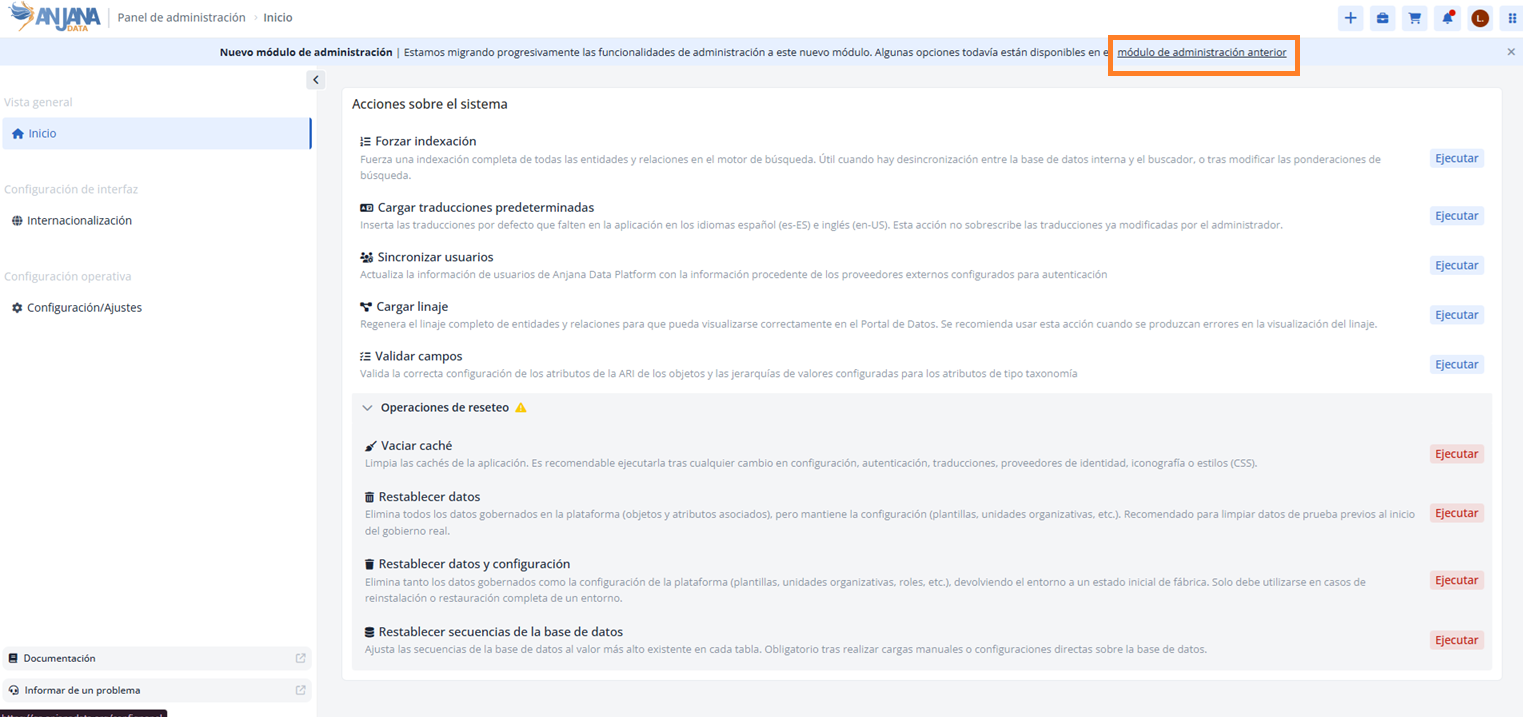
The Administration Panel allows entering all the parameters needed for the functional configuration and much of the technical configuration. This portal is in the process of being migrated; in this version, a new, more advanced portal has been enabled that implements a greater number of validation rules and automatically applies much of the configuration logic, reducing the risk of error.
Note: the Configuration Panel is the front end of the internal microservice called Portuno. It is currently being migrated to a new administration module; during this period, some options remain available in the previous module.
The Configuration Panel is organized into the following sections:
-
Home - System actions: system maintenance actions (see details below).
-
Internationalization: management of available languages and platform translations.
-
Configuration / Settings: global application behavior parameters.
-
Previous module (in the process of migration): access to the functional configuration tables (Schemas), the visual workflow editor (BPM), and the rest of the configuration options that have not yet been incorporated into the new module.
To operate in the Administration Panel, the user must be assigned roles with appropriate permissions:
-
ANJANA_ADMIN_ACCESS: permission that grants access to the Administration Panel and to the functional configuration tables. -
ANJANA_CREDENTIAL_ADMIN: permission that grants access to the authentication and authorization tables (this role does not grant access to the Configuration Panel by itself).
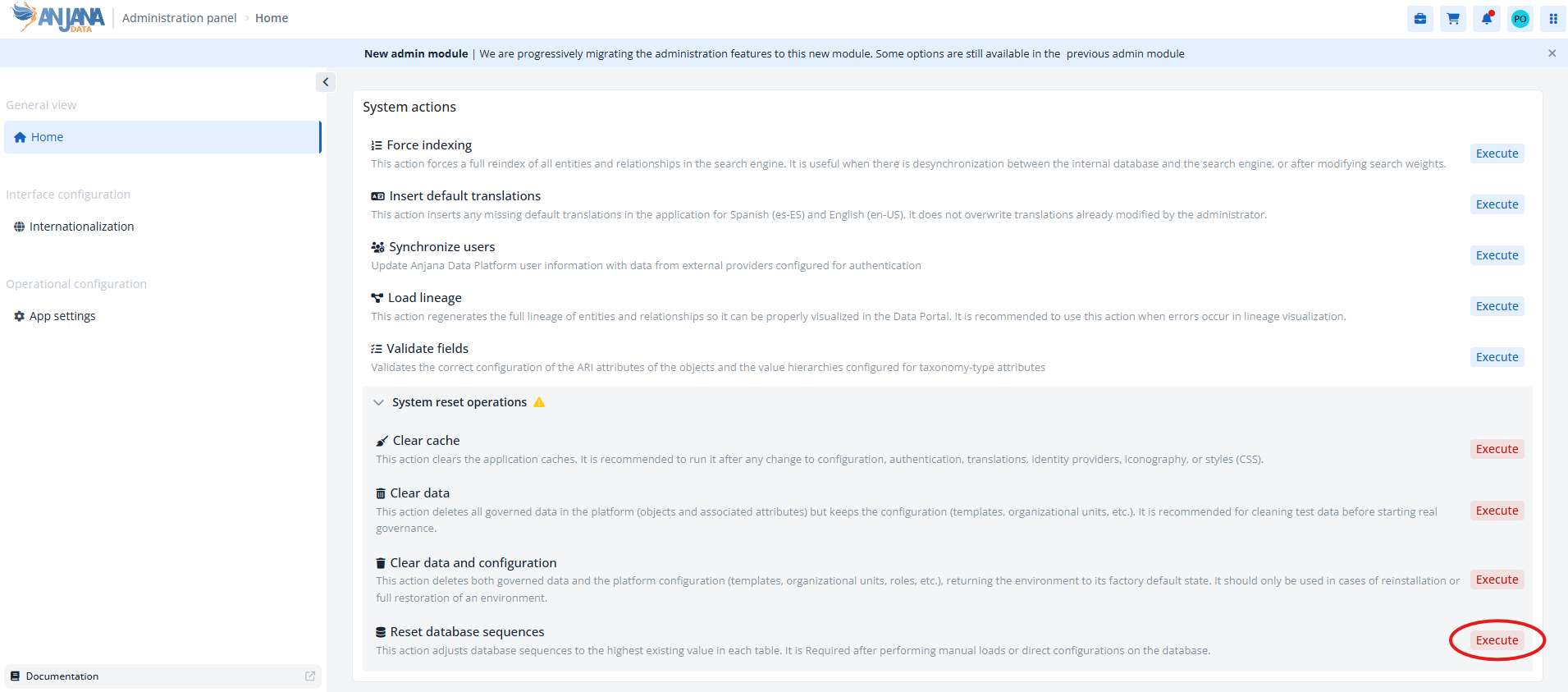
System actions (Home)
Actions are grouped into two blocks:
System actions
|
Action |
Description |
|---|---|
|
Force reindexing |
Forces a complete reindexing of all entities and relationships in the search engine. Recommended when desynchronization is detected between the database and the search engine, or after modifying search weightings. |
|
Load default translations |
Inserts the default translations missing from the platform for Spanish (es-ES) and English (en-US). It does not overwrite translations that have been modified by the administrator. |
|
Synchronize users |
Updates the platform's user information with data from the identity providers configured for authentication. |
|
Load lineage |
Regenerates the complete lineage of entities and relationships so it can be displayed correctly in the Data Portal. Recommended when errors occur in the lineage display. |
|
Validate Fields |
Validates the configuration of objects' ARI attributes and the value hierarchies of taxonomy-type attributes. |
Reset operations ⚠️
These actions are irreversible. Use them only when strictly necessary.
|
Action |
Description |
|---|---|
|
Clear cache |
Clears the application's caches. Recommended after any change to configuration, authentication, translations, identity providers, iconography, or styles (CSS). |
|
Reset data |
Deletes all governed data (objects and attributes), keeping the configuration (templates, organizational units, etc.). Recommended for cleaning up test data before starting actual governance. |
|
Reset data and configuration |
Deletes both the governed data and all platform configuration, returning the environment to its factory state. Use only in cases of reinstallation or complete restoration. |
|
Reset database sequences |
Adjusts the PostgreSQL database sequences to the maximum existing value in each table. Necessary after manual loads or direct configurations in the database. |
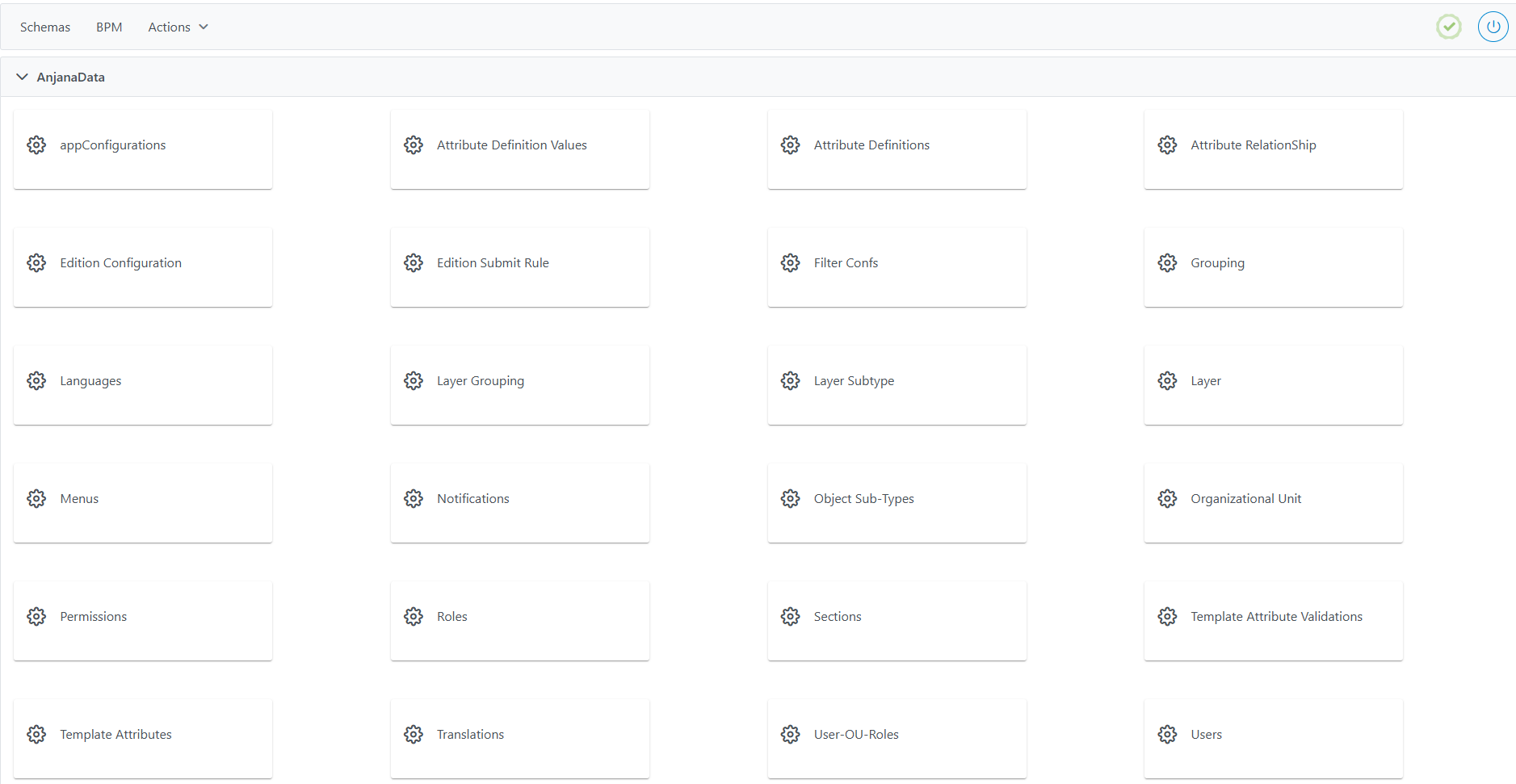
Using the Schemas module (previous module)
From the Schema option, you access the complete catalog of Anjana Data tables, where all the platform's configuration parameters are stored.
Accessing the functional configuration tables
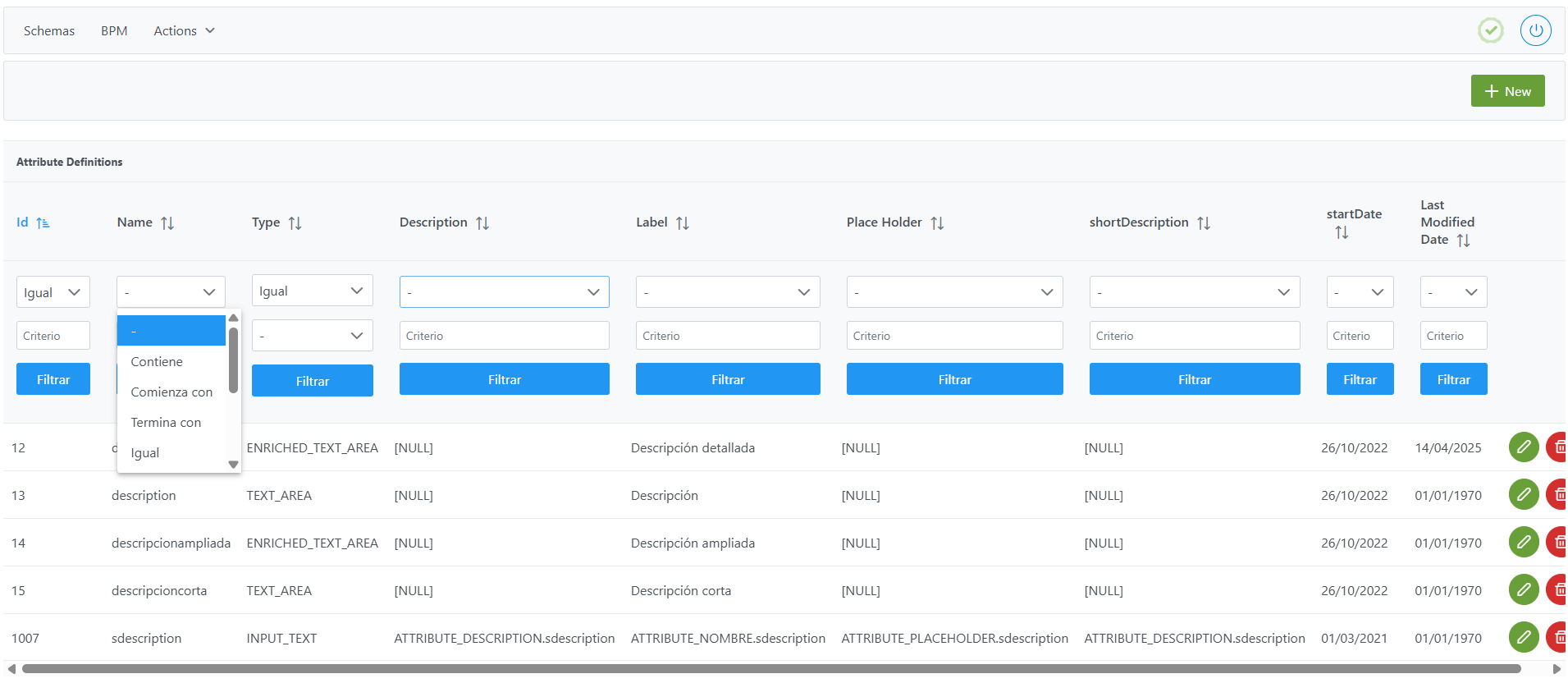
The user can click directly on each table to view or modify its content. For each table, filters are available, along with the ability to sort columns.
Applying filters to the functional configuration tables
Filters allow searching for records according to different criteria:
-
Values equal to, starting with, ending with, or containing the entered text.
-
Selection from a list of possible options.
-
Filtering by empty (null) or non-empty values.
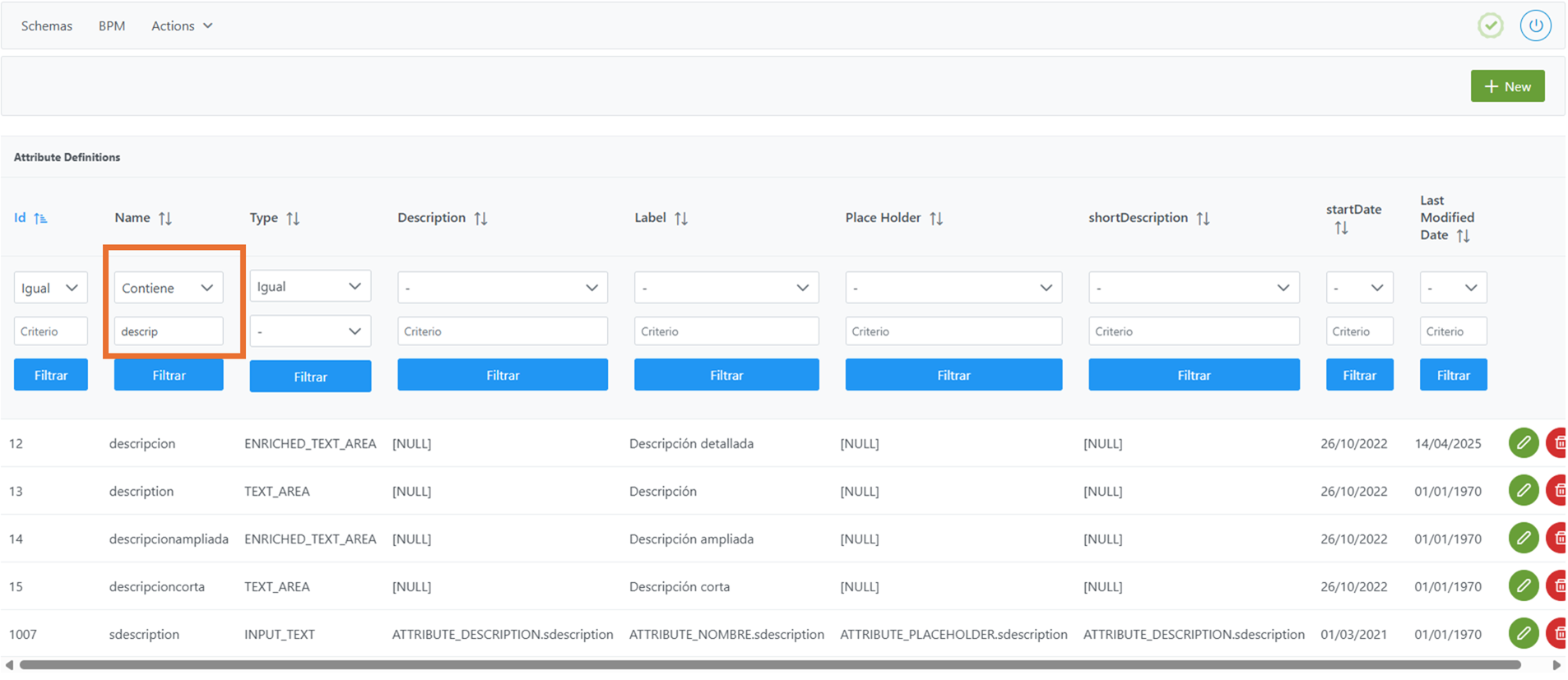
To undo a filter, simply enter the - character in one of the filter fields (operator or value) and reapply it.
Applying record sorting to the functional configuration tables
To sort, simply click on the column name until the desired order is obtained (ascending or descending). It is possible to sort by several columns at once by holding down the Ctrl key while clicking on the names of additional columns.