
Within the Anjana Data Platform there are multiple batch processes that run automatically and unattended according to the frequency configured in the system variables table (Configuration/Settings) of the new Administration module. Some examples are the user synchronization batch or the expiration batch. To find out what each batch does, see the Batches guide.
Changing a batch's cron expression does not take effect until the service it runs on is restarted (Kerno or Zeus). Until that restart, the platform continues to use the previous value of the variable. For this reason, the service that the administrator must restart for the new value to apply is indicated next to each batch.
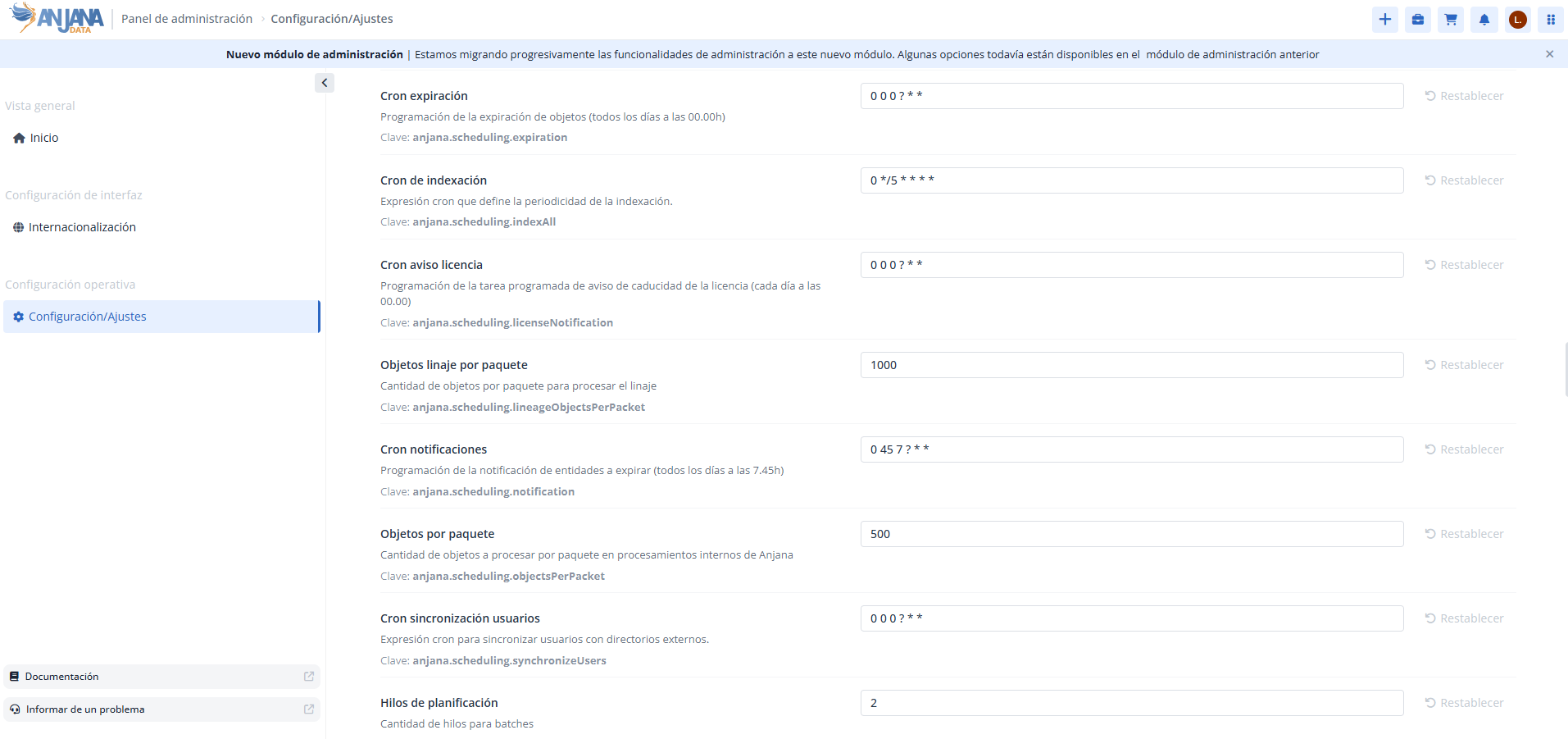
To configure the schedule, Spring cron expressions are used. These expressions are made up of 6 elements that determine the execution frequency:
-
The first element refers to seconds (it can take values between
0and59).-
It accepts
*to indicate that it runs for all possible values.
-
-
The second element refers to minutes (it can take values between
0and59).-
It accepts
*to indicate that it runs for all possible values.
-
-
The third element refers to hours (it can take values between
0and23).-
It accepts
*to indicate that it runs for all possible values.
-
-
The fourth element refers to the day of the month (it can take values between
1and31).-
It accepts
?to leave the field free if the day of the week has already been defined. -
It accepts
*to indicate that it runs for all possible values.
-
-
The fifth element refers to the month of the year (it can take values between
1and12).-
It accepts
*to indicate that it runs for all possible values.
-
-
The sixth element refers to the day of the week (it can take values between
0and7, both0and7represent Sunday, the other numbers range from1=Monday to6=Saturday).-
It accepts
?to leave the field free if the day of the month has already been defined. -
It accepts
*to indicate that it runs for all possible values.
-
Examples:
-
If the expression
0 0 8 * * *is configured, the batch will run every day at 8am . -
If the expression
0 30 9 1 * ?is configured, the batch will run at 9:30 am on the 1st of every month.
Other conventions followed:
-
Commas can be used to separate the elements of a list (for example: 1,15, the 1st and the 15th).
-
The - can be used to express a range of elements (for example: 8-10, from 8 to 10, both inclusive). The range always includes the endpoints.
For more examples, see the official documentation: Spring Cron Expressions.
Batch configuration summary
Each batch is scheduled via its anjana.scheduling.* property and runs on a specific service, which is the one that must be restarted for a scheduling change to take effect:
|
Process |
Service |
Property |
Default value |
|---|---|---|---|
|
License notice |
Zeus |
|
|
|
User synchronization |
Zeus |
|
|
|
Expiration |
Kerno |
|
|
|
Expiration pre-notice (notifications) |
Kerno |
|
|
|
Expiration pre-notice - days window |
Kerno |
|
|
|
Full indexing |
Kerno |
|
Disabled |
License notice
Service: Zeus.
The batch for the notice of a license about to expire, via the property:
anjana.scheduling.licenseNotification is used to configure the scheduled task to send notifications for a license about to expire or already expired (default = 0 0 0 ? * * ).
User synchronization
Service: Zeus.
The batch for synchronizing users from providers to the Anjana Data database, via the property:
anjana.scheduling.synchronizeUsers is used to configure the scheduled task to synchronize in the database the users coming from the authentication providers (default = 0 0 0 ? * * ).
Expiration
Service: Kerno.
The expiration batch is configured via the property:
anjana.scheduling.expiration is used to configure the expiration of objects (default: 0 45 7 ? * *).
Expiration pre-notice (notifications)
Service: Kerno.
The expiration pre-notice batch is configured via the properties:
-
anjana.scheduling.notification is used to configure the notification of objects about to expire (default: 0 45 7 ? * *).
-
anjana.notification.expiration is used to configure, in number of days, the objects that will expire within that range (default: 4).
Full indexing
Service: Kerno.
The batch for indexing all objects (entities and relationships) is configured via the following property:
anjana.scheduling.indexAll is used if you want to configure the periodic indexing of all the application's objects (with the exceptions mentioned in the User Guide). This setting is disabled by default.
This section is primarily intended for technical and functional administrators responsible for the configuration and maintenance of the Anjana Data Platform.