
I can create objects but, when entering the Action, no entity or relationship subtypes are available
You need to check the role's permissions. It is likely that, in the permission table, that role does not have any CREATION_MODIF or AUTOMATIC_METADATA permission but does have the WIZARD one. In this case, the WIZARD permission must be removed so that the creation option disappears from the Anjana front end.
An attribute of an object does not appear filled in in the Anjana Portal
In this case you need to check that the attribute has the same attribute_definition name as the one indicated in Required Attributes.
If it is correct, you should reindex all objects from Portuno and check again. If, after reindexing, the attribute appears correctly filled in, there may have been a Solr outage or unavailability of the Minerva service.
An error appears when requesting an adherence
If you receive an error when submitting an adherence request, the problem is likely that the attributes required for this relationship are missing.
It is mandatory to define the ADHERENCE relationship in the object_subtype table, and the attributes marked as Required for it must be added in template_attribute.
Attributes that should not be there appear in the form of an entity or relationship
If you have configured the templates and see incorrect attributes in the form, this may be due to an incorrect mapping of the attributes to the section of the displayed object.
That is, you should review the anjana.template_attribute table to check whether the attributes are in the correct section.
I need to delete an attribute from a template for which I already have created objects
In this case, to avoid leaving corrupted objects with a value for a deleted attribute, instead of deleting it, Anjana recommends deactivating the attribute in the template.
To do this, in the template_attribute table, the active flag must be changed to false in the record corresponding to that attribute in that template.
With this, the objects keep the value they had for the attribute, even though it is not visible in the form and, therefore, cannot be edited or queried. So, if you want to activate it later, you simply need to change the active flag to true, and its value can be queried again for the objects that had a value.
I need to change the type of a template attribute
If you need to change the type of a template attribute and already have previously created objects of that subtype, it is advisable to:
-
Delete the Kerno collection from Solr (see "How to completely delete a Solr collection?" on this page if in doubt)
-
Restart Minerva
-
Index all records again from the Administration Portal
-
Check whether the validations and the attribute value are compatible with the new changed type
I need to change the reference values of a template attribute
If you need to modify the reference values of a template attribute and already have previously created objects of that subtype, it is advisable to:
-
Add the new reference value in anjana.attribute_definition_value
-
Perform a bulk edit of the objects to change the value of their attribute and use the new one
-
Once all attribute values have been changed to the new ones, delete the old values that will no longer be used (anjana.attribute_definition_value)
An error appears in Portuno when trying to create a record in a table
If, in Portuno, while editing the Anjana configuration, a 500 "Internal Server Error" appears, you should check whether duplicates are being created in the table being modified, or records with a required field left empty. This error can occur, for example, when creating an object_subtype with the same name as an existing one, when including the same attribute twice in a section of a template, when creating a permission without assigning a role…
It is also possible that the table sequence is broken; in that case, it is recommended to run the Portuno action Reset DB Sequences.
An error appears when uploading a file to a template
If, when uploading a file to a template attribute, the "Embarrassing Error" screen appears, it may be due to the default configured file size limit.
To change this configuration and increase the limit, you need to edit the Kerno yml file by adding the following:
|
spring.servlet.multipart.max-file-size: 10MB |
After the change, Kerno must be restarted for the configuration to take effect.
How to configure a new template in Anjana?
-
Define the object to configure (anjana.object_subtype table)
-
Define the menus that will complete its dynamic form and their sections (anjana.menu and anjana.sections tables)
-
Define or reuse the attributes (and their values, in case they are reference values) that will make up the template (anjana.attribute_definition and anjana.attribute_definition_value tables)
-
Organize the attributes in the template sections (anjana.template_attribute table)
-
Define the attribute validations for the template (whether the attribute is required, whether it depends on another, whether it is editable…) (template_attribute_validation table)
-
Define the versioning rules that identify the template attributes that generate a version (the case of Anjana's native entities: dataset, dataset_field, process, instance or solution)
-
Define the workflow launch rules in case a role should not send a workflow when an attribute of the objects' template changes
-
Complete anjana.object_subtype with the information on the workflows that will be launched with each action
-
Configure, validate and deploy the workflows from the Administration Portal.
How to configure a layer for lineage?
To configure a lineage layer, you need to complete the following tables in this order:
-
Define the layer to configure (anjana.layer table) and determine whether it will be the default layer in the lineage or not
-
Include the object subtypes that will appear in the lineage layer (anjana.layer_subtype table)
-
Configure the relationships between entities that can be displayed in any of the lineage layers as an aggregation in any of the layers (anjana.grouping_lineage table).
For a metamodel relationship (non-native) to actually work as an aggregation, in the anjana.object_subtype table the relationship must have the Parental flag enabled.
Define which grouping relationships from anjana.grouping_lineage act as aggregation relationships in the layer being configured.
When submitting an object for validation, nothing seems to happen despite having correctly configured the permissions and the template and having deployed the workflows
In this case you need to check whether the object_subtype table has a record for the template with the name of the workflows that have been configured.
I have uploaded some workflows but I am not sure whether they have been deployed correctly
The act_re_procdef table in the hermes schema belongs to Activiti, and the deployed workflows are recorded in it.
If the workflows were uploaded via xml upload and the workflows are not deployed, check that the file extension is bpmn20.xml.
I launched a validation workflow and all the workflow steps remained in Waiting status and without a role assignment
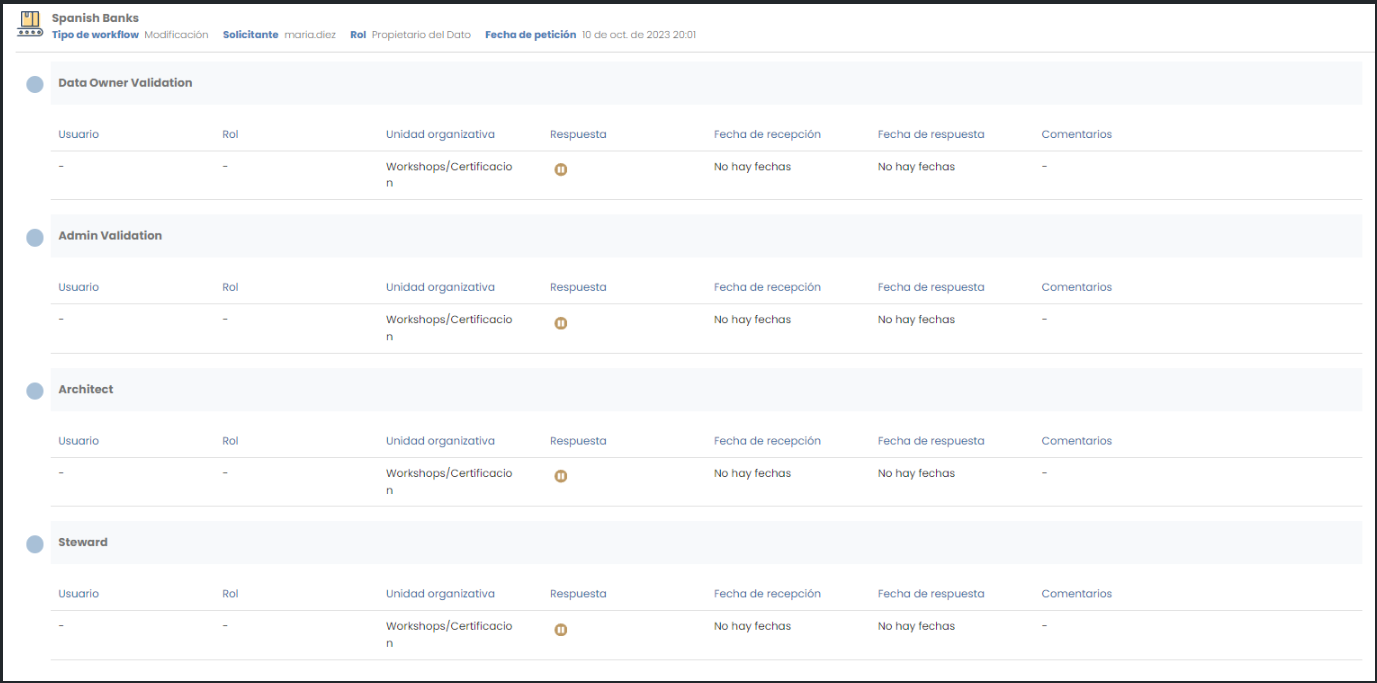
This is due to an error in the workflow configuration. To fix it, you need to access Portuno and, in the BPM section, open the workflow corresponding to the launched action (check the object subtype configuration in the object_subtype table) and review the states and the conditions between them. For more detail, see the Workflow Configuration Guide.
The error may be due to a mistake in the name of the attribute used, missing quotation marks, a poorly defined jump condition…
In any case, a launched workflow that has been left in this state cannot be recovered. The option to approve or reject the associated object is to clone it and, once the workflow has been fixed, saved, validated and deployed from Portuno, launch it for this new object. The object associated with the faulty workflow can be deleted with the DELETE_ALL or DELETE_MY_OBJ permission.
How to completely delete a Solr collection?
If, after deleting a Solr collection and starting Minerva, you notice that there is a schema associated with the collection that has been recreated, this is because Zookeeper stores the configuration of those collections and it was not deleted correctly.
The complete deletion of the collection is achieved with the command:
http://<SOLR_URL>:<SOLR_PORT>/solr/admin/configs?action=DELETE&omitHeader=true&name=<COLLECTION_NAME>.AUTOCREATED
A "Error 500: Internal Server Error" appears when downloading an excel
Import, reimport or metadata excel download errors can have various causes:
-
Errors in the translations associated with the translation keys of the README texts (Error 500: Internal Server Error). It is recommended to review the Translations configuration to ensure that all translation keys are configured in the languages set up in Languages and that there are no errors in the translation values, paying special attention to the number and format of the "%s".
-
Configuration errors in the validations of the metadata attributes that make up the primary key (Error: The configuration of the primary keys or PKs is incorrect). It is recommended to review the Template Attribute Validations table, ensuring that the validations (required, not editable…) have been configured on the metadata that are part of the object's ARI (name, source, destination…) To make it easier to detect these configuration errors, the administrator can use the "Validate fields" action available within the Configuration Panel. When clicked, they will receive a notification in the Data Portal indicating which metadata of each entity and relationship have configuration errors regarding the PKs.
-
Cache clearing: Even though the configurations may be correct, it is possible that they have not been updated in all the platform's microservices. Cache clearing can be forced from the Configuration Panel, with the "Clear cache" action.
Composition Relationships (DSA_CONTENT) between DSAs and the contained assets (dsaContent) are not visible/created
The composition relationships shown in the Relationships tab of the Data Portal are based on relationships of type "DSA_CONTENT". These relationships are native relationships that have a DSA as their origin and, as their destination, any subtype that has been configured as accepted in the DSA's dsaContent attribute.
To establish the composition relationships ("DSA_CONTENT" relationship), the following functional configuration is required:
-
In Attribute Definition, the attribute with name "dsaContent" must exist and must be of type "ENTITY_CONTAINER"
-
In Template Attribute, the "dsaContent" attribute (of type "ENTITY_CONTAINER") must be declared as active ("active" = true) within some section of the "DSA" entity subtype
-
In Template Attribute Validations, a validation must exist for the "dsaContent" declared in the DSA with key "RELATIONSHIP_TYPE" and params "DSA_CONTENT"