
This page documents the system variables that are configured in the new Administration module, in the Configuration/Settings section. These variables are loaded by each module (Kerno, Hermes, Minerva, Zeus…) at startup and allow global behaviors to be defined, such as validation limits, queue configurations, connections, batch process scheduling, internationalization, among others.
Proper management of these properties is essential for the operation of Anjana Data, for both administrators and developers.
Configuration of the new Administration Panel (Administrator view)
The system variables that are configured in the Configuration/Settings section of the new Administration Portal.
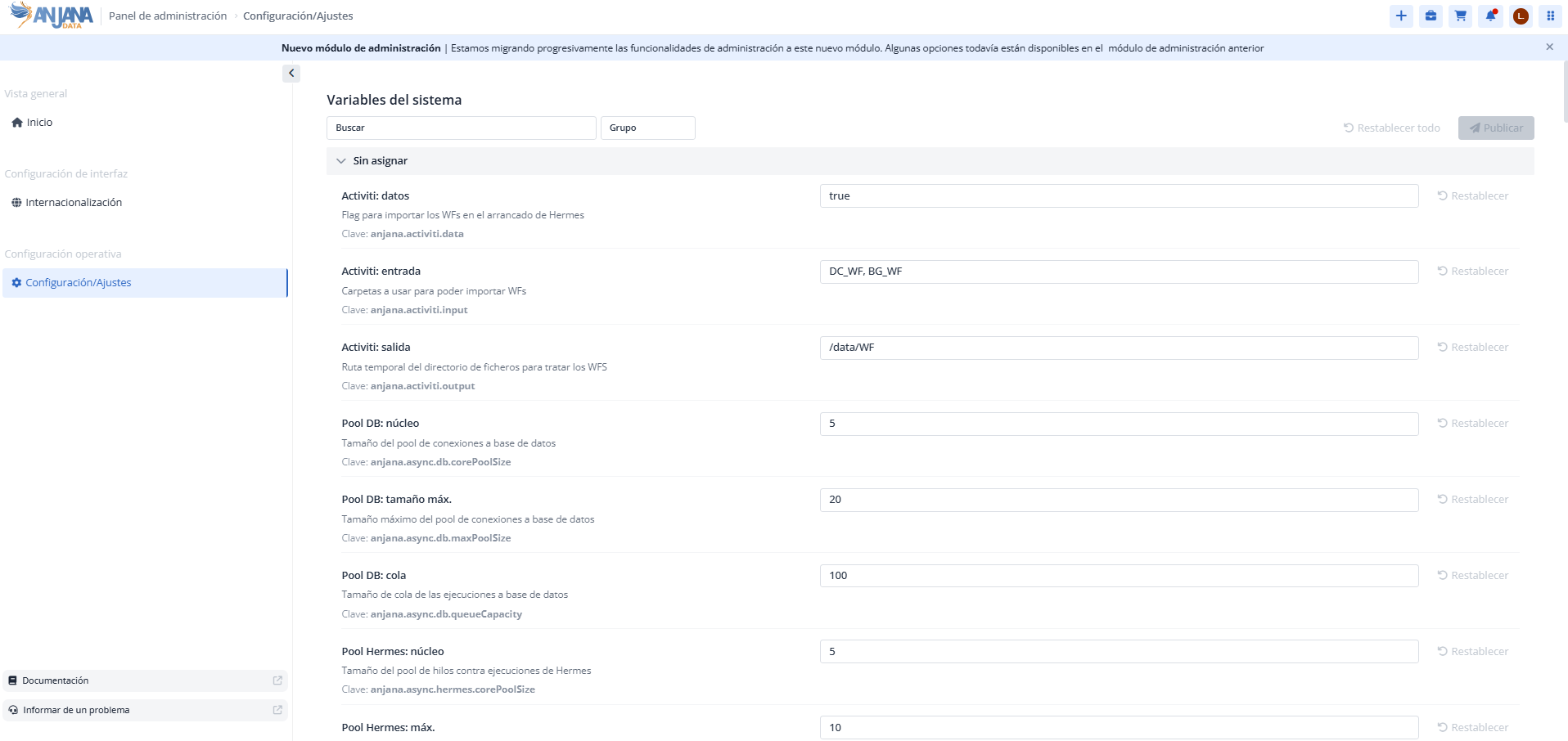
Structure of the System Variables
Each registered variable is characterized by the following elements:
-
Key: the name of the property that the different microservices will look for. -
Description: informational field to describe the variables. -
Value: the value assigned to the property indicated in thekeyfield.
Table of available variables
The following table shows all the available system variables.
|
key |
value |
application |
description |
|---|---|---|---|
|
anjana.activiti.data |
true |
hermes |
Flag to import the WFs at Hermes startup |
|
anjana.activiti.input |
DC_WF, BG_WF |
hermes |
Folders to use to import WFs. If a new folder to store workflows is created in the BPM editor of the Configuration Panel, it must be included in the |
|
anjana.activiti.output |
/data/WF |
hermes |
Temporary path of the file directory used to process the WFs |
|
anjana.async.db.corePoolSize |
5 |
kerno |
Size of the database connection pool |
|
anjana.async.db.maxPoolSize |
20 |
kerno |
Maximum size of the database connection pool |
|
anjana.async.db.queueCapacity |
100 |
kerno |
Queue size for database executions |
|
anjana.async.hermes.corePoolSize |
5 |
kerno |
Size of the thread pool for executions against Hermes |
|
anjana.async.hermes.maxPoolSize |
10 |
kerno |
Maximum size of the thread pool for executions against Hermes |
|
anjana.async.hermes.queueCapacity |
1000 |
kerno |
Size of the queue for executions against Hermes |
|
anjana.async.minerva.corePoolSize |
5 |
kerno |
Size of the thread pool for executions against Minerva |
|
anjana.async.minerva.maxPoolSize |
20 |
kerno |
Maximum size of the thread pool for executions against Minerva |
|
anjana.async.minerva.queueCapacity |
100 |
kerno |
Size of the queue for executions against Minerva |
|
anjana.async.pool.corePoolSize |
5 |
hermes |
Size of Hermes' asynchronous processing pool |
|
anjana.async.pool.maxPoolSize |
20 |
hermes |
Maximum size of Hermes' asynchronous processing pool |
|
anjana.async.pool.queueCapacity |
100 |
hermes |
Size of Hermes' processing queue |
|
anjana.combinations.max |
10 |
kerno |
Maximum number of combinations to display for the adherence cart |
|
anjana.expiration.days |
7 |
kerno |
Number of days added to the current date to set the expiration date of the object that is deprecated when versioned via Excel |
|
anjana.group.enableCrossGrouping |
true |
zeus |
Enables grouping of the OUs of the Cross roles into a single OU called “Cross” |
|
anjana.internationalization.separatorNameColumnsExcel |
_ |
kerno |
Character used as a separator for values in multivalued attributes in Excel |
|
anjana.last-execution.maxRetry |
0 |
hermes |
Number of retries in the LastExecution steps of the WFs, with 0 meaning infinite attempts |
|
anjana.last-execution.waitRetry |
300 |
hermes |
Wait time between attempts in the LastExecution steps of the WFs |
|
anjana.mail.aws[0] |
|
zeus |
Provider property from which to obtain the email; several can exist by numbering the properties with ‘[number]’ (see the anjana.mail.azure[x] or anjana.mail.google[x] properties) |
|
anjana.mail.azure[0] |
|
zeus |
Provider property from which to obtain the email; several can exist by numbering the properties with ‘[number]’ |
|
anjana.mail.azure[1] |
otherMails |
zeus |
Provider property from which to obtain the email; several can exist by numbering the properties with ‘[number]’ |
|
anjana.mail.azure[2] |
userPrincipalName |
zeus |
Provider property from which to obtain the email; several can exist by numbering the properties with ‘[number]’ |
|
anjana.mail.db[0] |
|
zeus |
Provider property from which to obtain the email; several can exist by numbering the properties with ‘[number]’ |
|
anjana.mail.google[0] |
primaryEmail |
zeus |
Provider property from which to obtain the email; several can exist by numbering the properties with ‘[number]’ |
|
anjana.mail.google[1] |
emails |
zeus |
Provider property from which to obtain the email; several can exist by numbering the properties with ‘[number]’ |
|
anjana.mail.ldap[0] |
|
zeus |
Provider property from which to obtain the email; several can exist by numbering the properties with ‘[number]’ |
|
anjana.notification.expiration |
4 |
kerno |
Number of advance notice days for notifications indicating the upcoming expiration of an object |
|
anjana.numberDatasetFieldsForWarning |
100 |
kerno |
Number of dataset_fields to consider a Dataset large, in which actions performed by users will redirect them to the Portal instead of leaving them waiting for completion |
|
anjana.numberEntitiesToSubmit |
50 |
kerno |
Number of entities to send for validation at a time during Excel import |
|
anjana.provider.primary |
Database |
zeus |
Property to indicate whether a primary provider should be pre-selected on the login screens, and which one it should be. This value must match the security.authentication.<provider> property and the name of the chosen provider's instance. For database and Ldap, the values are ‘Database’ and ‘Ldap’ respectively. |
|
anjana.retries |
5 |
kerno |
Retries in case of communication failure during reindexing |
|
anjana.role.defaultRole |
default |
|
Role applied to users when they register in Anjana. Allows access to users without a role specified in the application. |
|
anjana.scheduling.enabled |
true |
kerno |
Flag to enable Kerno's batches |
|
anjana.scheduling.expiration |
0 0 0 ? * * |
kerno |
Schedule for object expiration (every day at 00:00) |
|
anjana.scheduling.licenseNotification |
0 0 0 ? * * |
zeus |
Schedule for the scheduled task that notifies of license expiration (every day at 00:00) |
|
anjana.scheduling.lineageObjectsPerPacket |
1000 |
kerno |
Number of objects per packet for processing lineage |
|
anjana.scheduling.notification |
0 45 7 ? * * |
kerno |
Schedule for the notification of entities about to expire (every day at 7:45) |
|
anjana.scheduling.notification |
0 0 0 ? * * |
zeus |
Schedule for the scheduled task that reviews cross roles |
|
anjana.scheduling.objectsPerPacket |
500 |
kerno |
Number of objects to process per packet in Anjana's internal processing |
|
anjana.scheduling.threads |
2 |
kerno |
Number of threads for batches |
|
anjana.scheduling.threadScheduleSeconds |
15 |
kerno |
Delay in seconds between indexing packets |
|
anjana.separatorAttribute |
_- |
kerno |
Character used as a separator for multivalued attributes in the database |
|
anjana.tot.createCustom |
false |
kerno |
Flag so that, if metadata extraction with a plugin obtains an attribute that is not found in the template, it is created as a custom attribute of the object |
|
anjana.waitRetry |
10 |
kerno |
Wait time between each attempt in case of communication failure during reindexing |
|
anjana.workflow.launchIfCustomChanges |
true |
kerno |
Flag to take custom attributes into account when checking for changes in an object to decide whether to launch the workflow |
|
ARI_OBJECT_SEPARATOR |
: |
|
Character used to separate keywords in the ARI name of files uploaded to Minio or S3 |
|
default_language_app |
en-US |
|
Default language of the application, value of the i18n_code field in the zeus.languages table |
|
MAX_DECIMAL_PRECISION |
16 |
|
Maximum number of digits allowed in the decimal part of an input_decimal (or array) |
|
MAX_INTEGER |
9223372036854775807 |
|
Maximum value in an attribute of type integer, decimal, array, or range |
|
MAX_LENGTH_TEXT_BD |
255 |
|
Maximum number of characters allowed in the database for input_text type fields and their multi-language variants, such as in workflow validation or the adherence request |
|
MAX_LENGTH_TEXT_EDITOR |
300000 |
|
Maximum number of characters allowed for an attribute of type text_area, enriched_textarea, and their multi-language variants |
|
MIN_DECIMAL_PRECISION |
0 |
|
Minimum number of digits allowed in the decimal part of an input_decimal (or array) |
|
MIN_INTEGER |
-9223372036854775808 |
|
Minimum value in an attribute of type integer, decimal, array, or range |
|
MIN_LENGTH_TEXT_EDITOR |
1 |
|
Minimum number of characters allowed for an attribute of type input_text, text_area, enriched_textarea, and their multi-language variants of all three |
|
MIN_LENGTH_SEARCH_USER |
0 |
|
Minimum number of characters required for the user search to start showing results |
|
solr.module.kerno.collection |
kerno |
minerva |
Name of the Solr collection for Anjana objects |
|
solr.module.kerno.generate |
true |
minerva |
Flag to create the object collection in Solr at startup, if it does not exist |
|
solr.module.kerno.replication |
1 |
minerva |
Solr replication of the object collection |
|
solr.module.kerno.shards |
1 |
minerva |
Solr sharding of the object collection |
|
solr.module.recommendations.collection |
recommendations |
minerva |
Name of the Solr collection for Anjana's assistance tips |
|
solr.module.recommendations.generate |
true |
minerva |
Flag to create the recommendations collection in Solr at startup, if it does not exist |
|
solr.module.recommendations.replication |
1 |
minerva |
Solr replication of the recommendations collection |
|
solr.module.recommendations.shards |
1 |
minerva |
Solr sharding of the recommendations collection |
|
solr.multivalued-separator |
_- |
minerva |
Character used to concatenate multivalued attributes, which must match anjana.separatorAttribute in Kerno |
|
wf.async.waiter |
20000 |
hermes |
Wait time in ms for Activiti internal tasks |
|
wf.validation.automatic |
true |
hermes |
Flag to enable automatic validation of tasks without requiring human action |
Exceptions
Due to database limitations or how attributes themselves work, in some cases the System Variables take precedence over those configured in Template Attribute Validations.
|
Validation in |
Validation in |
Validation that takes precedence |
|---|---|---|
|
|
|
If the MAX value is higher than MAX_INTEGER, the MAX_INTEGER validation takes precedence. |
|
|
|
If the MIN value is lower than MIN_INTEGER, the MIN_INTEGER validation takes precedence. |
|
|
|
If the MAX_DECIMAL_PRECISION value is higher than the MAX_DECIMAL_PRECISION in |
|
|
|
If the value in |
|
|
|
If the value of MAX_LENGTH in
|
|
|
|
If the MIN_LENGTH value in |
Modifying a variable
Modifying a variable only allows editing its value.
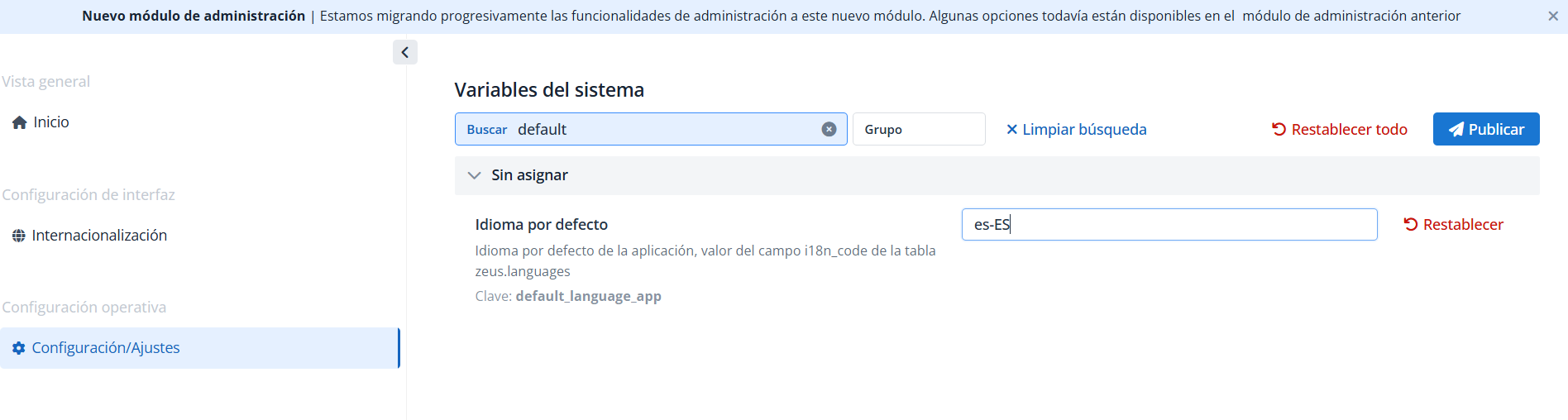
To modify a variable from the new Administration Module:
-
Search for or filter the key to be modified
-
Modify the value
-
Click Publish to update the value in the system.
Notes:
-
After modification:
-
A restart of Portuno is required.
-
In some cases it may be necessary to restart the corresponding microservice (Zeus, Kerno, Minerva…) to which the variable applies.
-
-
Since variables are loaded at startup, the Portuno microservice must be started before other services for the changes to propagate correctly.
-
If a variable is simultaneously configured in
AppConfigurationand in a microservice's YAML, the configuration that applies is the one from the Administration Portal