
At Anjana Data, the metadata attributes are the basic units of information that describe the objects (entities and relationships) governed on the platform. These attributes allow the technical, functional and governance characteristics of each asset to be documented in a structured way, facilitating search, classification and quality control, among other things.
Attributes are configured in the Attribute Definitions table, and can be reused in different metadata templates, although they can never appear more than once in the same template.
Thanks to this modularity, the organization can create a consistent catalog of reusable attributes that support its governance model.
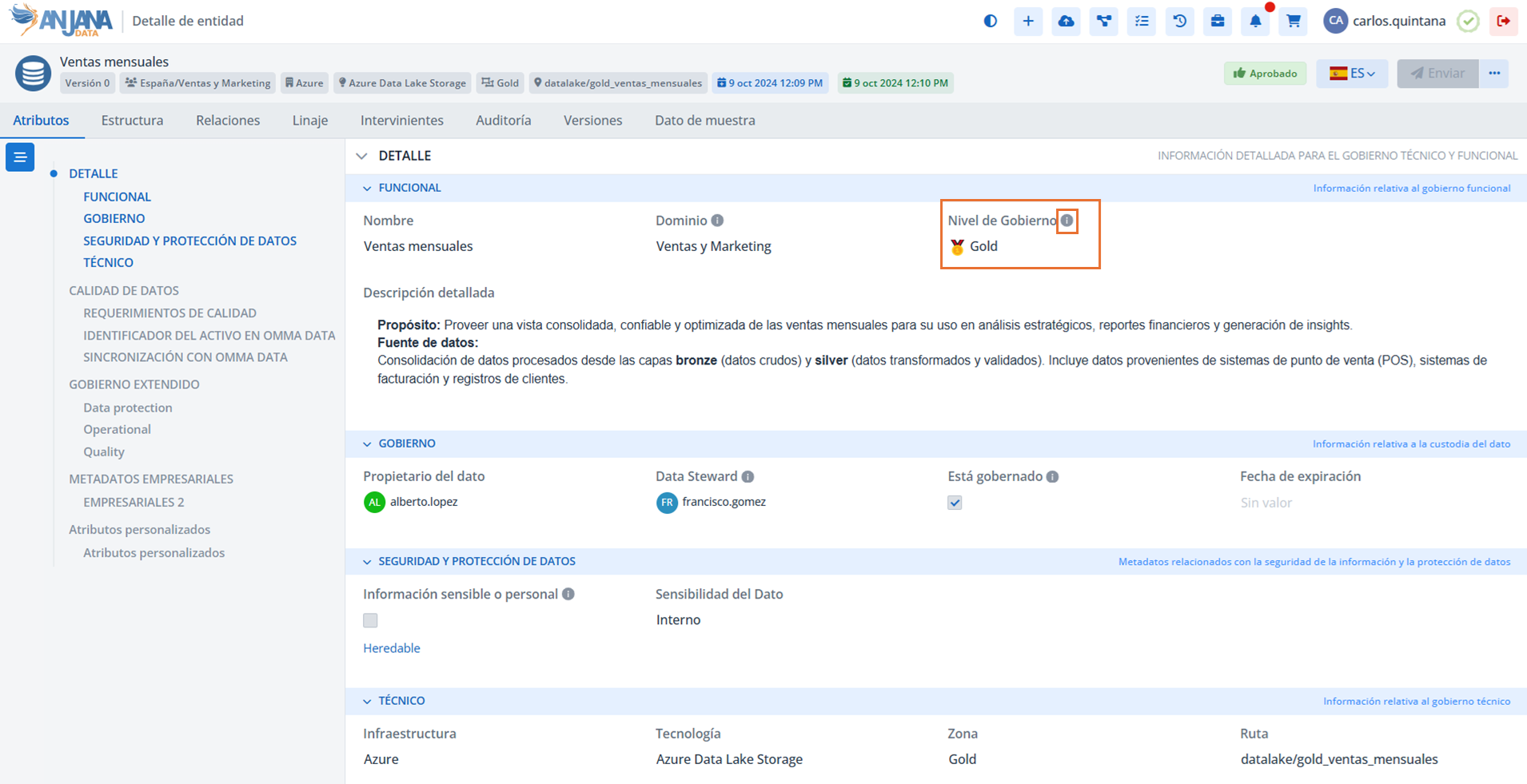
In Anjana Data, the different types of supported metadata attributes are as follows:
-
Array of boolean: attribute to indicate one or more 'true' or 'false' values
-
Array of date: attribute to indicate one or more dates
-
Array of decimal: attribute to indicate one or more decimal numbers
-
Array of entities: attribute to choose one or more entities approved in Anjana
-
Array of file: attribute to attach one or more files
-
Array of number: attribute to indicate one or more integer numbers
-
Array of Organizational Unit: attribute to select one or more organizational units from the list of all of them
-
Array of text: attribute to enter one or more short texts of up to 255 characters
-
Array of URL: attribute to enter one or more links to browsable URLs
-
Array of users: attribute to choose one or more users from the complete list of application users
-
Boolean: 'true' or 'false'
-
Date: date (year, month, day, hour and minutes)
-
Decimal: number with decimals
-
Enriched Text Area: attribute to enter a long text of up to 300 thousand characters enriched with formatting (bold, underline, italics, etc.)
-
Entity Container: attribute to choose an entity approved in Anjana Data and generate native relationships between entities. This attribute can only be used in the DSA, instance and solution entities
-
Entity Search: attribute to choose an entity approved in Anjana Data
-
File: file stored internally in Anjana Data. The file can also be downloaded if the user has read permissions
-
International Text: regular text box available for the different languages available in the application
-
International Text Editor: attribute to enter a long text of up to 300 thousand characters enriched with formatting (bold, underline, italics, etc.) available for the different languages available in the application
-
International Textarea: attribute to enter a long text of up to 300 thousand characters in the different languages available for the application
-
MultiSelect: attribute to select one or more values from a list preconfigured in the Reference Metadata tab
-
MultiSelect with icons: attribute to select one or more icons from a list preconfigured in the Reference Metadata tab
-
MultiSelect with icons and text: attribute to select one or more values (icon+text) from a list preconfigured in the Reference Metadata tab
-
Number: attribute to indicate an integer number
-
Number range: selector for an integer number between a defined minimum and maximum
-
Organizational Unit: attribute to select an organizational unit from the list of all of them
-
Reference Metadata: list of possible values that must be defined for the attribute
-
Selector with icon: list of possible icons that must be defined for the attribute
-
Selector with icon and text: list of possible values (icon+text) that must be defined for the attribute
-
Single taxonomy: taxonomy tree
-
Multiple selection taxonomy: taxonomy tree where one or more values can be selected
-
Text: regular text box
-
Text Area: attribute to enter a long text of up to 300 thousand characters
-
URL: text treated as a URL so the user can click on the attribute and a new tab opens with that URL
-
User: complete list of Anjana Data users
Table Attribute Definitions of the Configuration Panel (Administrator view)
Sections are configured in the Sections table of the Configuration Panel. Defining sections is the second step, after creating the menus, to structure the metadata templates.
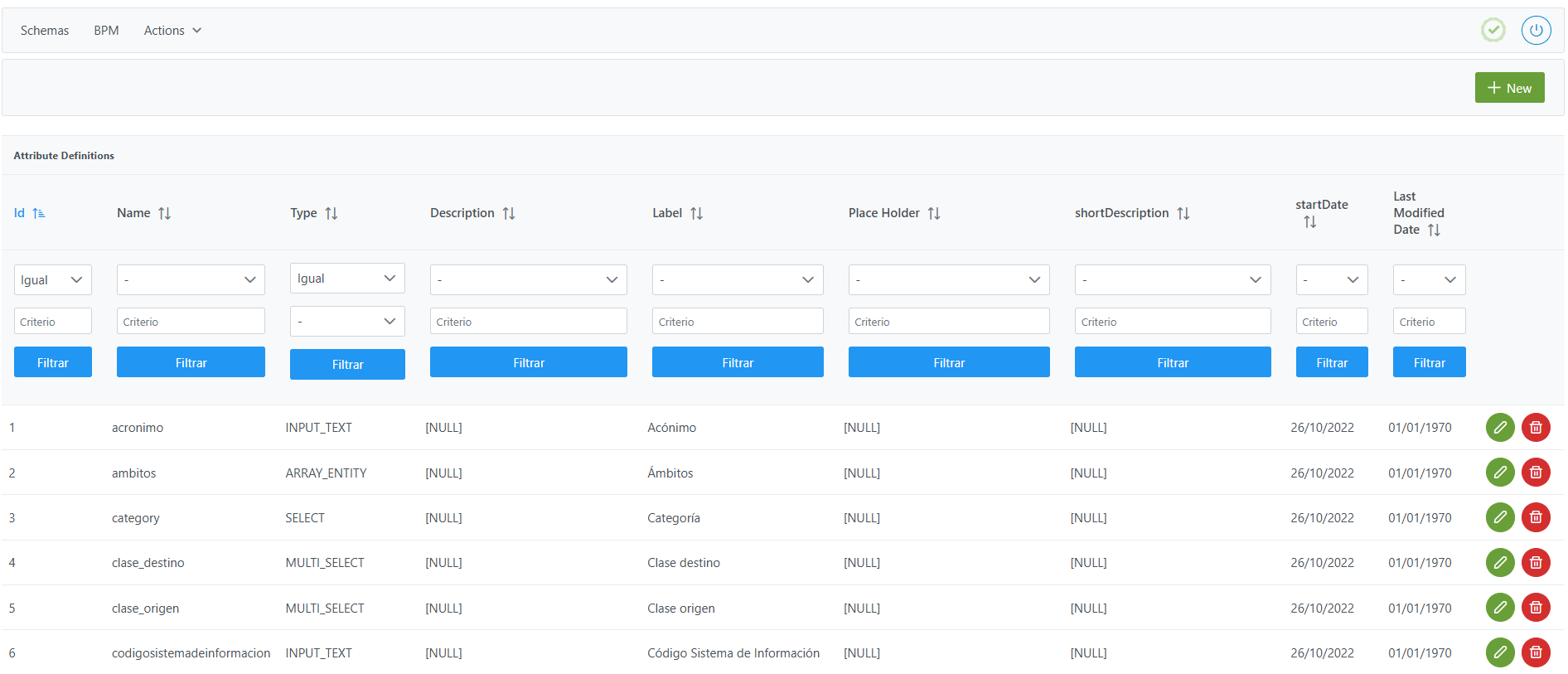
Structure of the Attribute Definitions
Each registered attribute is characterized by the following fields:
-
Id: unique identifier of the attribute.-
It is assigned automatically from the Configuration Panel.
-
-
Name: internal name of the attribute.
Important:
-
Must be unique across the whole table, regardless of case variations (e.g.:
DESCRIPTIONanddescriptionare considered the same). -
Cannot contain spaces or characters such as
#,(,),/or: -
There are reserved values for native capabilities and integrations of Anjana Data Platform
-
Type: type of attribute.-
Determines the nature of the data that can be stored (text, number, date, user, organizational unit, file, taxonomy, etc.).
-
See the equivalence table below.
-
Recommendation: Do not change the type of an existing attribute.
-
It can cause incompatibilities with validations configured in the templates.
-
If there are already created objects that contain values for this attribute, changing the type can generate indexing errors (example: from numeric to alphanumeric).
-
If strictly necessary, check the procedure in the Frequently Asked Questions section.
-
Label: visible label of the attribute in the metadata forms.-
It can be configured for internationalization using its value as
config_keyin thetranslationstable, with one record per active language in the application.
-
Note: The Label cannot be repeated for two different attributes within the same template.
-
Place Holder: example text shown when the field is empty.-
It can be configured for internationalization in
translations.
-
Note: The Place Holder cannot be repeated for two different attributes within the same template.
-
shortDescription: brief description of the purpose of the attribute.-
Optional field, intended to help administrators and validators understand the attribute.
-
-
Descritpion: more extensive description of the attribute.-
It can be used to detail instructions or additional context and is visible within the template in the
icon next to the attribute name.
-
As with
LabelandPlace Holder, it can be configured as a translation key.
-
Special considerations by attribute type
-
Attributes of type SELECT, SELECT_IMG, SELECT_IMG_TXT, TREE_SELECT, MULTI_SELECT, MULTI_SELECT_IMG, MULTI_SELECT_IMG_TXT and TREE_MULTISELECT:
-
They require defining the possible values in the
Attribute Definition Valuetable.
-
-
Attributes of type INPUT_RANGE
-
They must have minimum and maximum validations configured for the range selector to work.
-
In the absence of validations, the default values apply:
-
MIN_RANGE and MAX_RANGE, defined in the
appConfigurationtable of the Configuration Panel.
-
-
-
Attributes of type ENRICHED_TEXT_AREA and ENRICHED_TEXT_AREA_INTERNATIONAL
-
They support uploading files with extensions:
.gif,.png,.jpgwith size restrictions.
-
Primary key attributes
Some entities of the metamodel require a minimum set of attributes that act as a primary key.
-
Dataset:
name,infrastructure,path,technology,zone. -
Dataset field:
name,infrastructure,path,technology,zone. -
DSA:
name. -
Process:
name,infrastructure,path,technology,zone. -
Process instance:
name,processAri,solutionAri. -
Solution:
name. -
Non-native entities defined by the client:
name. -
Relationships:
name,source,destination.
Mandatory attributes
Some attributes are mandatory for Anjana Data to work correctly, since the platform has internal logic associated with them.
-
The
namefield must match exactly the expected names. -
The
attribute_typefield must have a specific value. -
Each mandatory attribute must only be applied to the entities or relationships detailed in the mandatory attributes table.
-
Adding them to other objects can cause errors in the application.
Mandatory attributes for entities
|
Value in the name field |
Applies to |
||||||
|---|---|---|---|---|---|---|---|
|
Native entity |
Non-native entity |
||||||
|
DATASET |
DATASET_FIELD |
DSA |
PROCESO |
INSTANCIA |
SOLUCIÓN |
||
|
description |
✅ |
✅ |
✅ |
✅ |
✅ |
✅ |
✅ |
|
name |
✅ |
✅ |
✅ |
✅ |
✅ |
✅ |
✅ |
|
expirationDate |
✅ |
|
✅ |
✅ |
✅ |
✅ |
|
|
infrastructure |
✅ |
|
|
✅ |
|
|
✅ |
|
isGoverned |
✅ |
|
|
|
|
|
✅ |
|
path |
✅ |
|
|
✅ |
|
|
✅ |
|
physicalName |
✅ |
|
|
|
|
|
✅ |
|
technology |
✅ |
|
|
✅ |
|
|
✅ |
|
zone |
✅ |
|
|
✅ |
|
|
✅ |
|
data_format |
✅ |
|
|
|
|
|
|
|
pi |
✅ |
✅ |
✅ |
|
|
|
|
|
sampleData |
✅ |
|
|
|
|
|
|
|
datasetFields |
✅ |
|
|
|
|
|
|
|
fieldDataType |
|
✅ |
|
|
|
|
|
|
position |
|
✅ |
|
|
|
|
|
|
termCondFile |
|
|
✅ |
|
|
|
|
|
dsaContent |
|
|
✅ |
|
|
|
|
|
isEngine |
|
|
|
✅ |
|
|
|
|
instanceInDataset |
|
|
|
|
✅ |
|
|
|
instanceOutDataset |
|
|
|
|
✅ |
|
|
|
solutionRelatedInstance |
|
|
|
|
|
✅ |
|
Notes:
-
Attributes marked with ✅ are mandatory for the platform to work correctly.
The following table explains the purpose and type of the attributes indicated in the previous table:
|
Value in the name field |
Value in the attribute_type column |
Purpose of the attribute
|
|
description |
ENRICHED_TEXT_AREA_INTERNATIONAL |
Allows entering an extensive description of the object. |
|
name |
INPUT_TEXT |
Stores the logical name of the entity. |
|
expirationDate |
INPUT_DATE |
Stores the date on which the object expires. |
|
infrastructure |
SELECT |
Indicates the environment where the object is located, used together with technology and zone to identify a plugin in case of active governance. Only necessary if the entity is going to have a connection with the source/technology for extraction, data sampling, permission governance… |
|
isGoverned |
INPUT_CHECKBOX |
Indicates whether there is active governance over the object. Only necessary if the entity is going to have a connection with the source/technology for extraction, data sampling, permission governance… |
|
path |
INPUT_TEXT |
Indicates the location of the object. |
|
physicalName |
INPUT_TEXT |
Indicates the physical name of the entity for its active governance. Only necessary if the entity is going to have a connection with the source/technology for extraction, data sampling, permission governance… |
|
technology |
SELECT |
Indicates the technology on which the object is deposited, used together with infrastructure and zone to identify a plugin in case of active governance. Only necessary if the entity is going to have a connection with the source/technology for extraction, data sampling, permission governance… |
|
zone |
SELECT |
Indicates the zone where the object is located, used together with infrastructure and technology to identify a plugin in case of active governance. Only necessary if the entity is going to have a connection with the source/technology for extraction, data sampling, permission governance… |
|
data_format |
INPUT_TEXT |
Indicates the data format of the dataset. |
|
pi |
INPUT_CHECKBOX |
Indicates whether the object contains personal information. It is used for data obfuscation in the dataset data sample functionality. |
|
sampleData |
INPUT_CHECKBOX |
Indicates whether a sample of the dataset's data can be viewed in Anjana. |
|
datasetFields |
INPUT_TEXT |
Indicates whether changes in the dataset_fields affect the dataset itself. This attribute must be configured as hidden in the template (template_attribute) since it is only necessary to be able to version datasets or avoid triggering workflows when the dataset_fields of a dataset are modified. |
|
fieldDataType |
INPUT_TEXT |
Allows selecting the data type contained in the field. |
|
position |
INPUT_NUMBER |
Allows indicating the order of the field within a dataset. |
|
termCondFile |
UPLOAD_FILE or UPLOAD_URL |
Allows including the file or the path to access the license terms of a DSA. |
|
dsaContent |
ENTITY_CONTAINER |
Stores the set of entities to which users are given access through the DSA. |
|
isEngine |
INPUT_CHECKBOX |
Allows indicating whether the process is an engine and therefore can have multiple instances, or whether it is not, in which case only one can be created. |
|
instanceInDataset |
ENTITY_CONTAINER |
Stores the set of datasets that the instance reads for its processing. |
|
instanceOutDataset |
ENTITY_CONTAINER |
Stores the set of datasets that the instance writes after its processing. |
|
solutionRelatedInstance |
ENTITY_CONTAINER |
Stores the set of instances related to the solution. |
Notes:
-
The
piattribute is mandatory because it is shown in the Anjana Data Portal when it is populated in the objects. This attribute must be defined in theAttribute Definitionstable, regardless of whether it is included in any template.
Mandatory attributes for relationships
|
Value in the name field |
Value in the attribute_type column |
Purpose of the attribute |
Applies to |
|
|
ADHERENCE |
Non-native relationship |
|||
|
description |
ENRICHED_TEXT_AREA_INTERNATIONAL |
Allows entering an extensive description of the object. |
❌ |
✅ |
|
name |
INPUT_TEXT |
Stores the logical name of the entity. |
✅ |
✅ |
|
expirationDate |
INPUT_DATE |
Stores the date on which the object expires. |
✅ |
❌ |
|
source |
ENTITY_SEARCH |
Allows indicating the origin of a relationship or one of its ends. |
❌ |
✅ |
|
destination |
ENTITY_SEARCH |
Allows indicating the destination of a relationship or one of its ends. |
❌ |
✅ |
|
pae |
INPUT_TEXT |
Allows internally associating the adherence with the request sent by the user. |
✅ |
❌ |
|
requestReason |
INPUT_TEXT |
Allows storing the reason for the adherence request. |
✅ |
❌ |
Notes:
-
To be able to complete the information of the adherences, it is necessary to define a template with a menu, a section and the attributes indicated in the previous table.
-
Attributes marked with ❌ must not be included in the relationship types indicated in the previous table. Those marked with ✅ are mandatory for the platform to work correctly.
Mandatory attributes not referenced in templates
Some internal and reserved attributes must be included in Attribute Definition for the platform to work correctly.
|
Value in the name field |
Value in the attribute_type column |
Purpose of the attribute
|
|
organizationalUnit |
SELECT_ORGANIZATIONAL_UNIT |
Allows indicating the OU of the entity. This attribute must not be added to any template since it is only necessary to be able to import entities via an Excel file. |
|
processAri |
INPUT_TEXT |
Allows indicating the process of the instance. This attribute must not be added to any template since it is only necessary to be able to import instances via an Excel file. |
|
solutionAri |
INPUT_TEXT |
Allows indicating the owning solution of the instance. This attribute must not be added to any template since it is only necessary to be able to import instances via an Excel file. |
|
source |
ENTITY_SEARCH |
Allows indicating the origin of a relationship or one of its ends. If a non-native relationship template exists, it must be included in the template. If it does not exist, it is only necessary to define the attribute. |
|
destination |
ENTITY_SEARCH |
Allows indicating the destination of a relationship or one of its ends. If a non-native relationship template exists, it must be included in the template. If it does not exist, it is only necessary to define the attribute. |
Important:
Removing any of these attributes from the Attribute Definition table can cause errors in:
-
Downloading the metadata import Excel file.
-
Errors when governing processes, instances and solutions, as well as generating technical lineage.
-
Errors when creating relationships between metamodel entities.
Creating an attribute in the Attribute Definitions
Creating a new metadata attribute involves registering in the Attribute Definitions table a new field that can be reused in different entity or relationship templates.
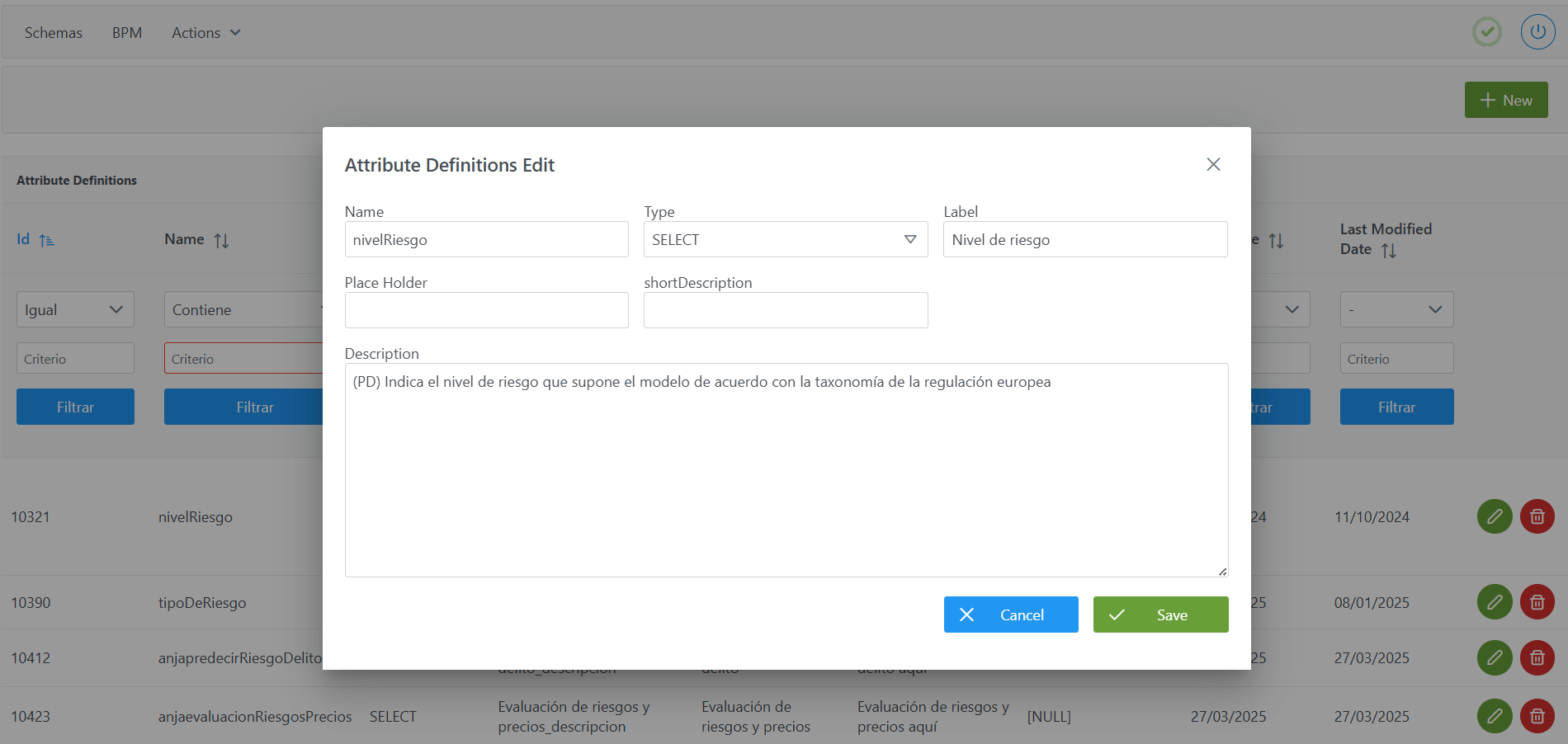
To add a new attribute:
-
Click the New button in the top right corner. This will open a wizard (wizard) with the fields defined in the Structure of the Attribute Definitions table section.
-
Fill in the attribute fields according to the described structure:
-
Name: internal name of the attribute (e.g.:nivelRiesgo). -
Type: type of attribute (e.g.:SELECT). -
Label: label visible in the form. In case of internationalization, it must also be created in thetranslationstable for each language. -
Place Holder: example text when the field is empty (optional). In case of internationalization, it must also be created in thetranslationstable for each language. -
shortDescription: brief description of the attribute (optional). -
Description: more extensive description or usage instructions. In case of internationalization, it must also be created in thetranslationstable for each language. (e.g.: (PD) Indicates the level of risk posed by the model according to the taxonomy of the European regulation).
-
-
Click Save to save the attribute or Cancel to discard it.
Notes:
-
After creating a new attribute, it is necessary to execute the Clear cache action from the new Configuration Panel (
Inicio > Operaciones de reseteo > Vaciar caché) so that the changes are visible in the Data Portal. -
For attributes of type selectors (e.g.:
SELECT,MULTI_SELECT,TREE_SELECT…), the possible values must subsequently be configured in theAttribute Definition Valuestable (see the corresponding section). -
Creating the attribute in
Attribute Definitionsdoes not imply its appearance in the templates; to do so, it must be configuredTemplate Attribute. -
Attention must be paid to the configuration of mandatory attributes, especially in the
nameandTypefields.
Modifying an attribute in the Attribute Definitions
Modifying an attribute in the Attribute Definitions table must be done with special caution, since it can have different impacts on the templates where the attribute is being used and on objects already created in the Data Portal.
Fields that can be modified without high impact:
-
Label,Place Holder,DescriptionandshortDescriptioncan be adjusted, since they are only used as informational support in the forms:-
If internationalization has not been configured, the texts can be modified directly.
-
If internationalization exists, the modification must be done in the
translationstable, ensuring that theconfig_keycorresponding to it (defined from the Label/Place Holder originals) remain consistent.
-
Fields whose modification requires caution:
-
Type: it is not recommended to modify the type of an attribute once it is in use, since:-
It can invalidate validations configured in the templates.
-
It can generate inconsistencies in Solr indexing if the new type is not compatible with the previous one (example: changing a numeric attribute to alphanumeric).
-
If it is absolutely necessary to change it, follow the recommendations in the FAQ section.
-
-
Name: must never be changed if the attribute is already in use in any template, since:-
It can generate inconsistencies in Solr indexing
-
It can generate inconsistencies in the Filters configuration (
Filter Confstable). -
It can generate inconsistencies in the configuration of Depends On type validations (
Template Attribute validationstable). -
Errors could occur in workflows.
-
If it were essential to change it, it would be necessary to execute a Reset data in the new Configuration Panel (
Inicio > Operaciones de reseteo > Reestablecer datos) and reindex all the information.
-
Reset data
Important:
-
After modifying any attribute, execute the Clear cache action from the Configuration Panel (
Inicio > Operaciones de reseteo > Vaciar caché) so that the changes take effect in the Data Portal. -
Modifying translations requires executing the translation upload action from the new Configuration Panel (
Internalización > Publicar) so that the changes take effect in the Data Portal.
Configuring attributes via direct database access (Developer view)
The configuration of metadata attributes can also be done directly on the database, in the anjana.attribute_definition table. This table contains the definition of all the attributes reusable in the entity and relationship templates of the metamodel.
|
Column |
Data type |
Constraints / Notes |
|---|---|---|
|
id_attribute_definition |
int4 (INTEGER) |
PRIMARY KEY. Unique identifier of the attribute. Managed through DB sequences. |
|
description |
varchar(300000) |
Descriptive text of the attribute. Can be used as a translation key for internationalization. |
|
label |
varchar(255) |
Translation key that will be shown as the attribute label in forms. Must exist in the |
|
last_modified_date |
timestamp |
Date of the last modification of the attribute (informational field). |
|
name |
varchar(255) |
Internal name of the attribute. Does not allow spaces, |
|
place_holder |
varchar(255) |
Translation key for the placeholder text. Not mandatory. |
|
short_description |
varchar(255) |
Brief explanation of the attribute, to be shown in forms. |
|
start_date |
timestamp |
Date the attribute was created (informational field). |
|
attribute_type |
varchar(255) |
Type of the attribute, according to the supported types (example: |
Below is an example script to configure a SELECT-type attribute to catalog the risk level of an AI System:
INSERT INTO anjana.attribute_definition
(id_attribute_definition, description, "label", last_modified_date, "name", place_holder, short_description, start_date, attribute_type)
VALUES(10321, '(PD) Indica el nivel de riesgo que supone el modelo de acuerdo con la taxonomía de la regulación europea', 'Nivel de riesgo', '2024-10-11 11:41:09.720', 'nivelRiesgo', NULL, NULL, '2024-10-11 11:41:09.720', 'SELECT');
Important:
-
Once the insert has been executed, run the sequence update for the table. (From the new Configuration Panel at
Inicio > Operaciones de reseteo > Restablecer secuencias de la base de datosthe sequences of all tables can be updated, including this one). -
The entire weight of the configuration logic falls on the developer who executes the SQL queries directly on the tables. It is recommended to carefully review the Table Structure section.