
The Anjana Data Platform plugins are the components that allow connecting the platform with technologies from the organization's data and identity ecosystem (cloud, on-premise, BI, data lakes, technical catalogs, etc.). Each plugin specializes in a specific technology - for example, AWS S3, Azure Storage, GCP BigQuery, Entra ID, Denodo, Tableau or Power BI - and enables native integration capabilities with Anjana Data Platform's governance operating model.
This section documents the plugins available in version 25.2 and their functional behavior. The specific technical configuration for each technology is detailed on its corresponding page.
Common functional capabilities of the plugins
Although each plugin depends on the target technology, most Anjana Data Platform integrations rely on four main capabilities:
1. Metadata extraction
Allows discovering and importing assets from the source technology into Anjana Data Platform (datasets/tables, fields/columns, processes, views, reports, etc.).
The extracted metadata is transformed into entities of the operating metamodel so they can be governed in the Data Portal.
Examples: AWS Glue, Generic JDBC/Oracle/SQL Server/Redshift, Denodo, Azure Storage, GCP BigQuery, Ranger.
2. Sample data
Some plugins allow retrieving a controlled sample of the data associated with a dataset to view it from the "Sample Data" tab of the asset detail.
This capability is subject to permissions, technical limitations of the source platform, and security rules of the operating model (see information about the isGoverned and sampleData attributes).
Examples: Azure Storage, GCP Storage, BigQuery, JDBC engines.
3. Active governance of access permissions
The active access governance plugins materialize, in the external technology, the data or report access decisions established in the governance layer through Data Sharing Agreements (DSA).
Depending on the technology, active governance may involve:
-
Provisioning of groups or roles that represent a DSA.
-
Automatic management of members/users according to adherence and withdrawal.
-
Assignment or revocation of permissions on governed physical structures (tables, views, buckets, paths, etc.).
Examples:
-
Identities: Entra ID, AWS IAM, GCP IAM, LDAP/AD.
-
Data: Azure Storage (via Entra ID), AWS S3 (via IAM), GCP Storage/BigQuery (via IAM), Denodo (via LDAP or Entra ID), Ranger.
-
BI tools: PowerBI (via Entra ID)
Note on decoupled provisioning of groups and roles
The provisioning of groups and roles in external systems is decoupled. This means that, through configuration and metadata of the DSA itself, it is possible to skip the automatic creation and management of groups by Anjana Data Platform.
Specifically, if during the creation of a DSA the physicalName attribute is populated with the identifier of a group that already exists in the organization, the plugin reuses that group instead of creating a new one. From that point on, role and permission provisioning is performed according to the specified physicalName, maintaining active governance over the resources without needing to manage the group's lifecycle from Anjana Data Platform.
This functionality is especially attractive in scenarios such as:
-
When the organization does not want to delegate group creation/deletion to the Anjana Data Platform plugin, but does want to take advantage of the automatic management of members/users (additions and removals due to adherence/withdrawal).
-
When corporate group naming policies do not fit Anjana Data Platform's standard convention (prefix + DSA logical name + version), and pre-existing or externally managed proper names need to be kept.
-
When groups already consolidated in the identity provider exist (for example, departmental or product-based groups) and the DSA must rely on them to avoid duplication and simplify administration.
-
When group management is controlled by internal processes or external tools, and Anjana Data Platform must integrate without interfering with that lifecycle.
-
When historical continuity of access needs to be maintained: reusing an existing group allows audits, traceability, and dependencies in external systems to keep referencing the same identifier.
3.1 Operations on DSAs. Flow overview
Certain actions on Data Sharing Agreements (DSA) trigger plugin actions. From here on, all the actions indicated in this section include having successfully gone through a validation flow.
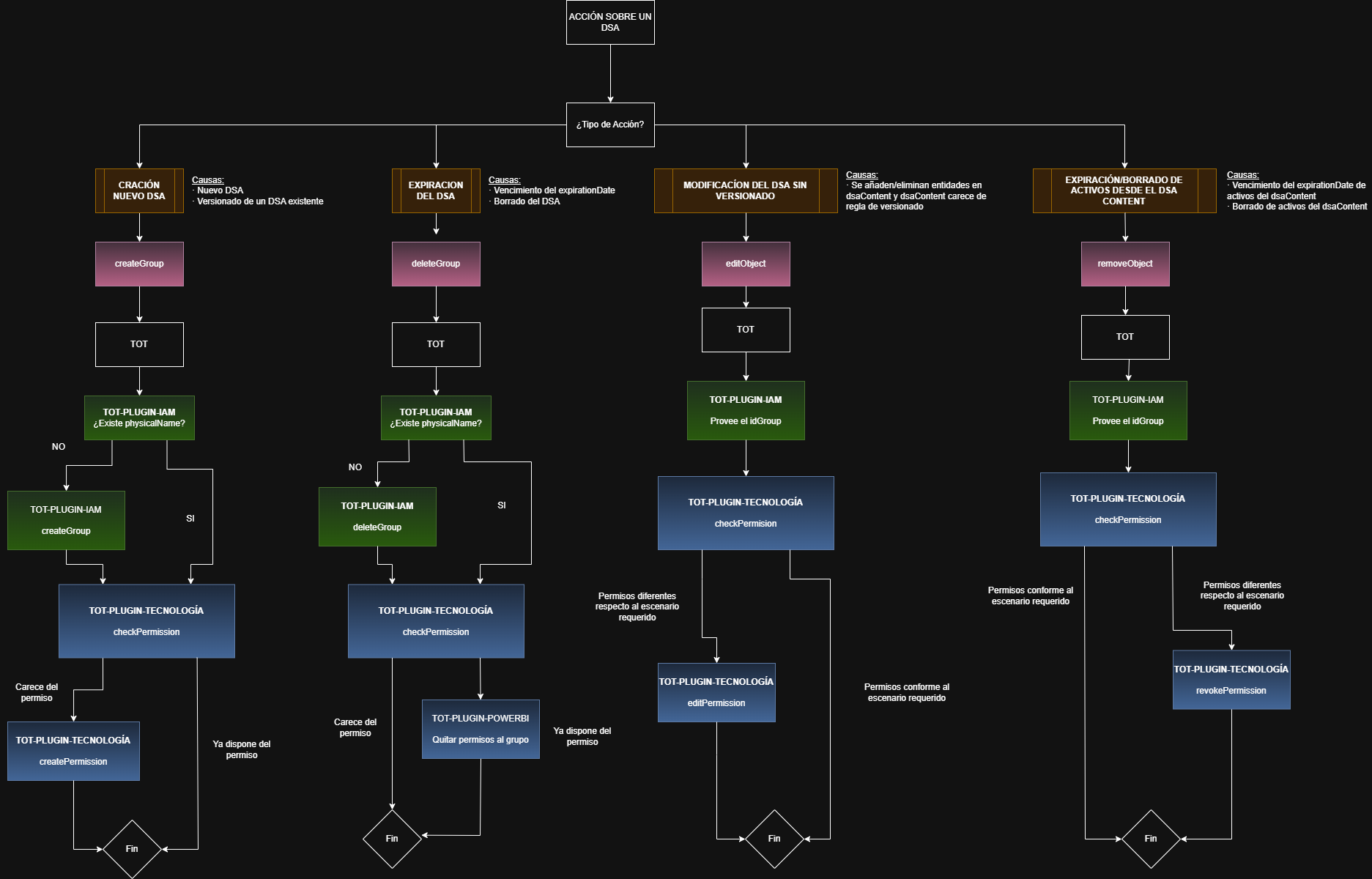
3.1.1 Creation of a new DSA (or versioning of an existing DSA)
The creation and approval of a DSA can result from any of the following actions within the platform:
-
Manual creation, via Excel, or via API of a first version (version 0) of a DSA
-
Creation of a new version of an already existing DSA (versioning).
Functional flow
-
TOT invokes the
createGroupoperation. -
The IAM plugin checks whether the
physicalNameattribute (physical group) is populated in the DSA:-
If it does not exist or is not populated → the group is created.
-
If it is populated → it is not created again (the group indicated in the DSA template's
physicalNameattribute is reused).
-
-
TOT obtains the resulting
groupId. -
TOT invokes the plugin of the corresponding technology on which access permissions will be granted.
-
The technology plugin:
-
Checks whether the group has the required permissions.
-
If it does not have them, it creates them (
createPermission).-
Ensures that a group has the required permission on the assets associated with the DSA (those included in the DSA's
dsaContentattribute)
-
-
If it already has them, it makes no changes.
-
If the group already has permissions that are incompatible with those the plugin must grant, the process ends and the error is returned.
Result
-
The group exists in IAM.
-
The group has the minimum defined permissions on all the DSA's assets.
-
The operation is idempotent: repeating it does not generate errors or duplicates.
3.1.2 Expiration or deletion of a DSA
When it occurs
-
The DSA's
expirationDateis reached. -
When a DSA is deleted
Functional flow
-
TOT invokes the
deleteGroupoperation. -
The IAM plugin checks whether the
physicalNameattribute (physical group) is populated in the DSA:-
If it does not exist or is not populated → the group is deleted.
-
If it is populated → it is not created again (the group indicated in the DSA template's
physicalNameattribute is reused).
-
-
TOT invokes the technology plugin.
-
The technology plugin:
-
Revokes all the group's permissions on the DSA's assets (assets included in the DSA's
dsaContentattribute).
-
Result
-
The group no longer has access to any of the DSA's assets.
-
No residual permissions remain.
-
The operation is best-effort: partial failures do not block the rest.
3.1.3 DSA modification without versioning
When it occurs
-
Assets are added or removed within the DSA (assets included in the DSA's
dsaContentattribute) but no versioning rule is configured for thedsaContentattribute
Functional flow
-
TOT invokes the
editObjectoperation. -
The IAM plugin provides the existing
groupId. -
TOT invokes the technology plugin.
-
The technology plugin:
-
Checks the group's current permissions.
-
If the asset was added during the modification, permissions are added (
editPermission). -
If assets were removed during the modification, permissions are revoked (
editPermission).
-
Result
-
The group maintains updated access according to the DSA's new content.
-
Only the necessary permissions are adjusted, without recreating the group.
3.1.4 Expiration or deletion of assets within the DSA (dsaContent)
When it occurs
-
A specific asset included in the
dsaContent:-
Expires.
-
Is removed from the platform (deletion action).
-
Functional flow
-
TOT invokes the
removeObjectoperation. -
The IAM plugin provides the
groupId. -
TOT invokes the technology plugin.
-
The technology plugin:
-
Revokes only the group's permissions on that specific asset (
revokePermission). -
It does not affect the DSA's other assets.
-
Result
-
The group loses access only to the deleted asset.
-
The rest of the access remains intact.
-
Idempotent operation: if the permission did not exist, it does not generate an error.
4. Synchronization / technical operations
Some plugins, in addition to extracting or governing, can perform technical synchronization operations to maintain consistency: updating tags, policies, etc.
DSA naming convention in identity systems
When a plugin represents a DSA as a group (Entra ID, AWS IAM, LDAP/AD) or as a role (GCP IAM), Anjana Data Platform generates these artifacts by default following a consistent naming convention:
<configurable prefix>_<DSA logical name>_v<DSA version number>
Where:
-
<configurable prefix>identifies the groups/roles managed by Anjana Data within the provider. -
<DSA logical name>is the functional name of the agreement as it appears in Anjana. -
v<version number>allows distinguishing coexisting versions (approved, deprecated, or historical) and maintaining traceability between systems.
This convention applies whenever the DSA does not indicate a pre-existing physical artifact.
In scenarios where it is desired to reuse a group already managed by the organization, the physicalName attribute can be populated during DSA creation. In that case, the plugin does not create a new group, but instead uses the one identified in physicalName and materializes active governance (roles/permissions and memberships) on that artifact.
Each technology may impose additional restrictions on length or valid characters for groups or roles. These restrictions are detailed on each plugin's specific page.
Multi-connection (since version 25.1)
Since version 25.1, plugins that support it allow configuring more than one connection per technology. This facilitates integrations by environment (dev/prod), by region, or by different accounts/projects.
In the functional configuration, a list of connections is defined, each with its own ARI and technology-specific properties. Detailed technical configuration and YAML examples are available in Nexus and on the specific pages of this section.
Extraction path separator (path separator) (since version 25.2)
The extraction path separator (path separator) is a configurable parameter that determines how logical paths (path attribute) are interpreted and constructed during metadata extraction, object location, data sampling, and active governance in the integrated technologies.
By default, Anjana Data Platform uses the / character as the path separator. However, in scenarios where the data structures include this character as part of the name of tables, views, or resources, it is possible to configure an alternative separator to ensure correct extraction.
Separator configuration
For the separator to work consistently, it must be configured with the same value in all the components involved: Kerno, Tot, and the corresponding plugins.
In Kerno
anjana.tot.extraction.pathSeparator: "/"
In Tot
tot.extraction.pathSeparator: "/"
In plugins
-
Power BI and Tableau:
totplugin.pathSeparator: "/"
-
Other plugins:
totplugin.connection.<connectionName>.technology.pathSeparator: "/"
Character restrictions
-
Any character can be used, except
:, due to limitations in some underlying technologies. -
If the
\character is to be used, it must be declared as\\in the YAML file so that it is interpreted correctly.
Important considerations
Note
If the AWS IAM, AWS S3 and/or Azure Storage plugins are used, this parameter must not be explicitly configured in Kerno, Tot, or the plugins. In these cases the default value must be kept.
Important
The path separator is defined during the platform's initial installation and must not be modified afterward, since it is a critical element for:
-
the correct location of objects in the source technologies,
-
metadata extraction,
-
data sampling, and
-
active governance of permissions.
If it were strictly necessary to change this value in an already operational installation (with governed assets), it is recommended to follow this procedure:
-
Download the metadata of the governed assets to Excel before changing the separator (Download for editing)
-
Delete the governed assets before changing the separator
-
Edit the downloaded editing Excel file and modify the separator in the path field according to the new separator
-
Re-catalog the assets by uploading the modified Excel file
If in doubt, it is recommended to contact Anjana Data Support beforehand.
Additional plugin considerations
More information
For specific information, refer to the documentation of each plugin.
For all plugins there are common guidelines gathered in the sections on Technical Configuration and on Tot plugin deployment .
In addition, each plugin has a sample YAML that facilitates its setup. This file includes the description of each property and its default values, so that it can be copied and adapted to the customer's installation.
Plugins that support it allow configuring multiple connections to different instances of the same technology (for example, different accounts, projects, or environments). This capability, as well as its syntax, is also illustrated in the corresponding sample YAML files.
Here you will find all the specific documentation for Anjana Data Plugins:
For all plugins there are some generic guidelines in the Technical Configuration and in Tot plugin deployment .
There is also a sample YAML for each plugin, in order to facilitate configuration, which contains explanations of the properties and default values.
Plugins can connect to several instances of the same technology; this can also be seen in the sample YAML.