Integration Model
Metadata extraction
To extract the metadata of an object, the methods provided by the com.denodo.vdp.jdbc.Driver driver are used, through which the schema and table definitions are accessed.
The plugin extracts the following attributes, which must be named the same in the attribute_definition table, name field, so that they appear in the template:
-
catalog with the catalog value in the database
-
schema with the schema value in the database
-
physicalName and name with the same value, the table name
-
path with the concatenation of the catalog, schema and table values
-
infrastructure with the selected value
-
technology with the selected value
-
zone with the selected value
-
tags are the view-level tags that the tables have.
It also sends the following attributes related to the fields of the requested resource:
-
name and physicalName with the field value
-
defaultValue with the default value defined for the field
-
fieldDataType with the data type defined for the field
-
length with the field size
-
incrementalField indicating whether it is an incremental field
-
position the position occupied by the field
-
precision with the field's precision value
-
nullable indicating whether the field is nullable
-
pk indicating whether the field is a pk
-
description with the value for the field
-
tags are the column-level tags that the tables have.
The attributes to be created in Anjana must have the following types:
|
Attribute name |
Attribute type |
|
Catalog |
INPUT_TEXT |
|
Schema |
INPUT_TEXT |
|
PhysicalName |
INPUT_TEXT |
|
Path |
INPUT_TEXT |
|
Infrastructure |
SELECT |
|
Technology |
SELECT |
|
Zone |
SELECT |
|
Tags |
ARRAY_ALPHANUMERICAL |
|
Name |
INPUT_TEXT |
|
DefaulValue |
INPUT_TEXT |
|
FieldDataType |
INPUT_TEXT |
|
Length |
INPUT_NUMBER |
|
IncrementalField |
INPUT_CHECKBOX |
|
Position |
INPUT_NUMBER |
|
Precision |
INPUT_NUMBER |
|
Nullable |
INPUT_CHECKBOX |
|
Pk |
INPUT_CHECKBOX |
|
Description |
ENRICHED_TEXT_AREA_INTERNATIONAL |
The plugin is able to extract metadata from the following types of Denodo elements:
-
Database table views
-
Interfaces
-
Derived
Tables with characters in the name
This technology allows characters such as "/" in the name; if they are being used, the path-separator must be configured with a character other than "/". See File extraction for more details.
Data sampling
Using the Java com.denodo.vdp.jdbc.Driver driver, a simple SELECT query is executed to access a limited number of table elements in order to retrieve a sample of the stored data. Additionally, the values of sensitive fields are replaced with asterisks.
If any View type is incorrectly defined in Denodo, sampling will not be possible. Likewise, if the implementations associated with Interface-type Views are modified after they have been created, sampling will also fail.
Access permissions management
Through queries, Denodo roles can be created/deleted when a DSA is approved or expires, and the necessary permissions on the table view (Read, Connect) are managed when datasets are added to or expire from a DSA.
The Ldap or Entra ID plugin must be deployed to allow creating the groups.
Permissions management flow
-
DSA creation: The ROLE is created (CREATE ROLE) and read-only permissions are granted (GRANT READ on the views, GRANT CONNECT on the vdb)
-
DSA deletion or expiration: The role is deleted (DROP ROL) and read-only permissions are removed (REVOKE READ on the views, REVOKE CONNECT on the vdb)
-
When an object is removed from the DSA(
dsaContent), expires or is disabled: Permissions on the views are revoked (REVOKE READ)
Object editing
When a non-native entity is activated or deactivated, through queries, permissions on the corresponding tables are granted to or removed from the Denodo roles.
Required credentials
Metadata extraction
User with the necessary privileges to perform SELECT on the views of the tables to be governed (Connect, Metadata and Execute).
Data sampling
User with the necessary privileges to perform SELECT on the views of the tables to be governed (Connect, Metadata and Execute).
Permissions management
To perform active governance operations, the following roles are required for the connection user specified in the yml:
-
create_role -> Required to create roles.
-
assignprivileges -> Required to perform the grant/revoke.
-
drop_role-> Required to delete roles.
Object editing
When a non-native entity is activated or deactivated in Anjana, the plugin will grant or remove the permissions on the corresponding tables. To perform these actions, the connection user specified in the yml must have the permission:
-
assignprivileges -> Required to perform the grant/revoke.
Authentication and authorization
With Ldap
For the Denodo plugin to work, authentication and authorization with Ldap must be enabled in Denodo. To do this, follow these steps:
For both authentication and authorization to work, users must not exist in Denodo, only in Ldap; this way, it connects to Ldap to authenticate and authorize.
With Entra ID
For the Denodo plugin to work, authentication and authorization with EntraID must be enabled in Denodo. To do this, follow these steps:
https://community.denodo.com/kb/en/tag/Azure%20AD
For both authentication and authorization to work, users must not exist in Denodo, only in EntraID; this way, it connects to EntraID to authenticate and authorize.
Tag update
The plugin can automatically update the tags modified in Anjana in Denodo, for all datasets that are governed and are approved or deprecated. This synchronization is performed through a batch process, configured by means of a crontab command that defines how often the action should run.
To perform tag update operations, the following roles are required for the connection user specified in the yml:
-
manage_tags -> Required to create the tags.
-
assign_tags -> Required to assign tags to the columns.
In the following example, the process runs Monday through Friday every hour from 7:00 to 22:00:
totplugin:
  batch:
    tags:
      cron: 0 0 7-22 * * MON-FRI
In addition, the triplet ARI will need to be configured to specify which Anjana objects will be acted upon.
totplugin:
  connection:
    - ...
      aris:
        ari: "anja:totplugin:updateTags:/jdbc/denodo/denodo/"
It is also possible to configure the separator that Anjana uses to retrieve the values of a list-type attribute. This value normally does not need to be changed, but if it does, the following configuration can be modified:
totplugin:
  anjana:
    attributeSeparator: "_-"
The tags attribute of the datasets and dataset fields must have the name 'tags' in the attribute_definition table and be of type ARRAY_ALPHANUMERICAL.
Configuration
Connectivity
The plugin's connectivity is done through:
-
JDBC protocol. The connection URL to the VDP must be provided as explained in the example configuration file
-
Port. The standard VDP port is usually 9999, although this may vary depending on the context in which the plugin is installed
Case-sensitive queries
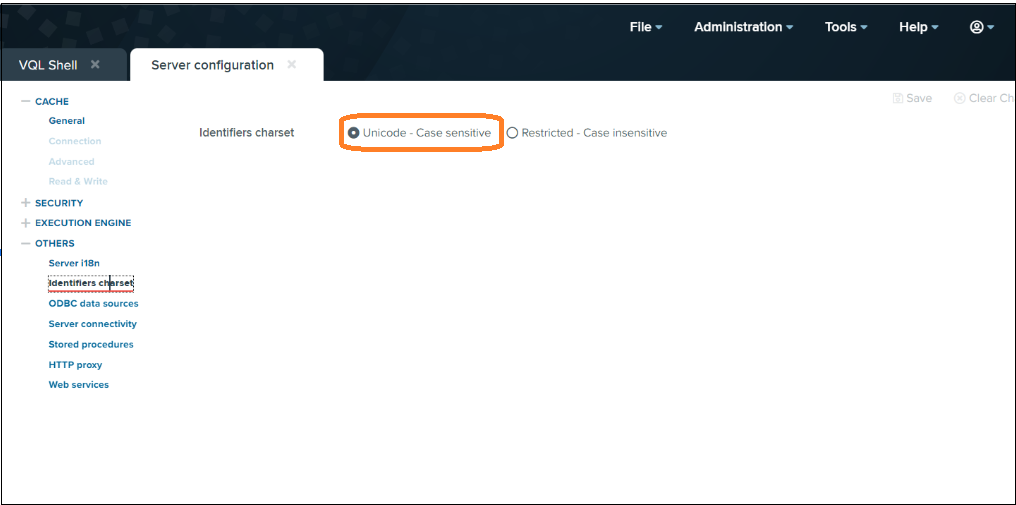
The Denodo plugin runs the queries including the names of tags, roles, schemas and datasources in double quotes so that they are case sensitive, but it is also necessary to configure the following property in the Denodo portal:
Check the tags available in Denodo
There are two options:
-
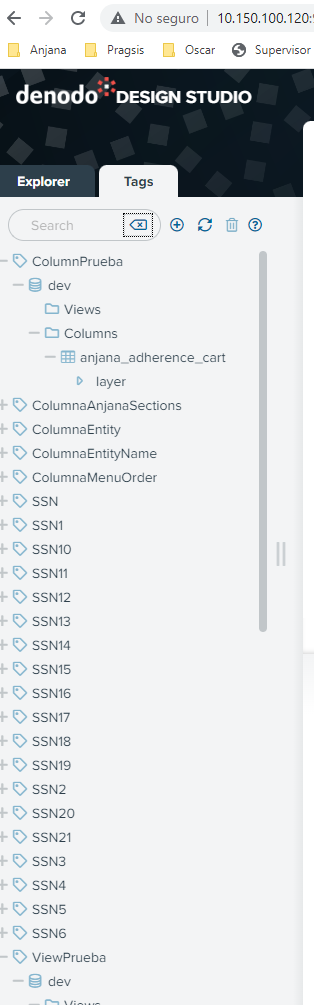
In the tags section of Denodo
-
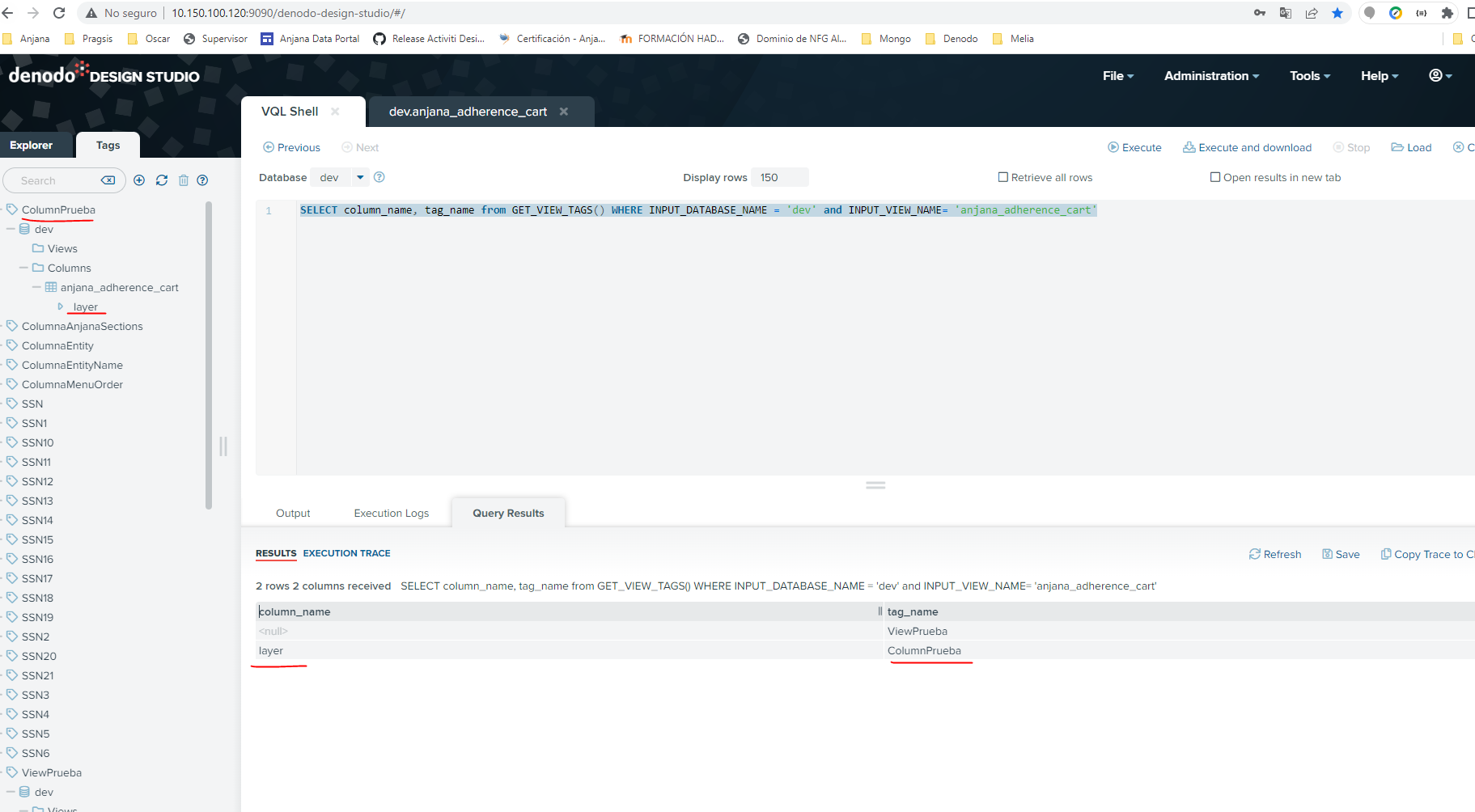
Running this query
SELECT column_name, tag_name from GET_VIEW_TAGS() WHERE INPUT_DATABASE_NAME = 'dev' and INPUT_VIEW_NAME= 'anjana_adherence_cart';
They appear as follows: