
Integration model
Active governance
Access management requires the "Tot plugin Ldap" plugin to generate the groups that represent the DSAs and to add or remove users from those groups.
In turn, Ranger is required to synchronize those groups in order to be able to use them in its policies.
The variables shown in the following screenshots are the properties that will need to be adapted to your LDAP and Ranger configuration.
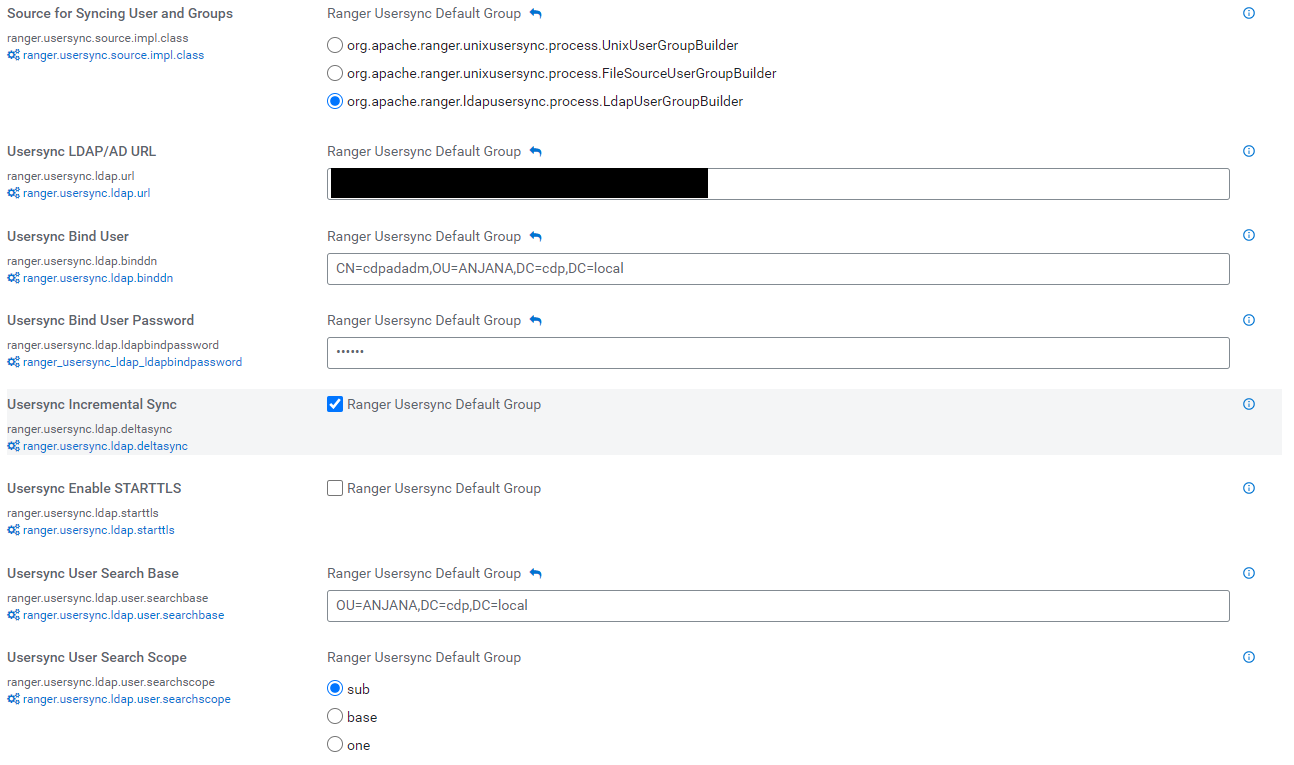
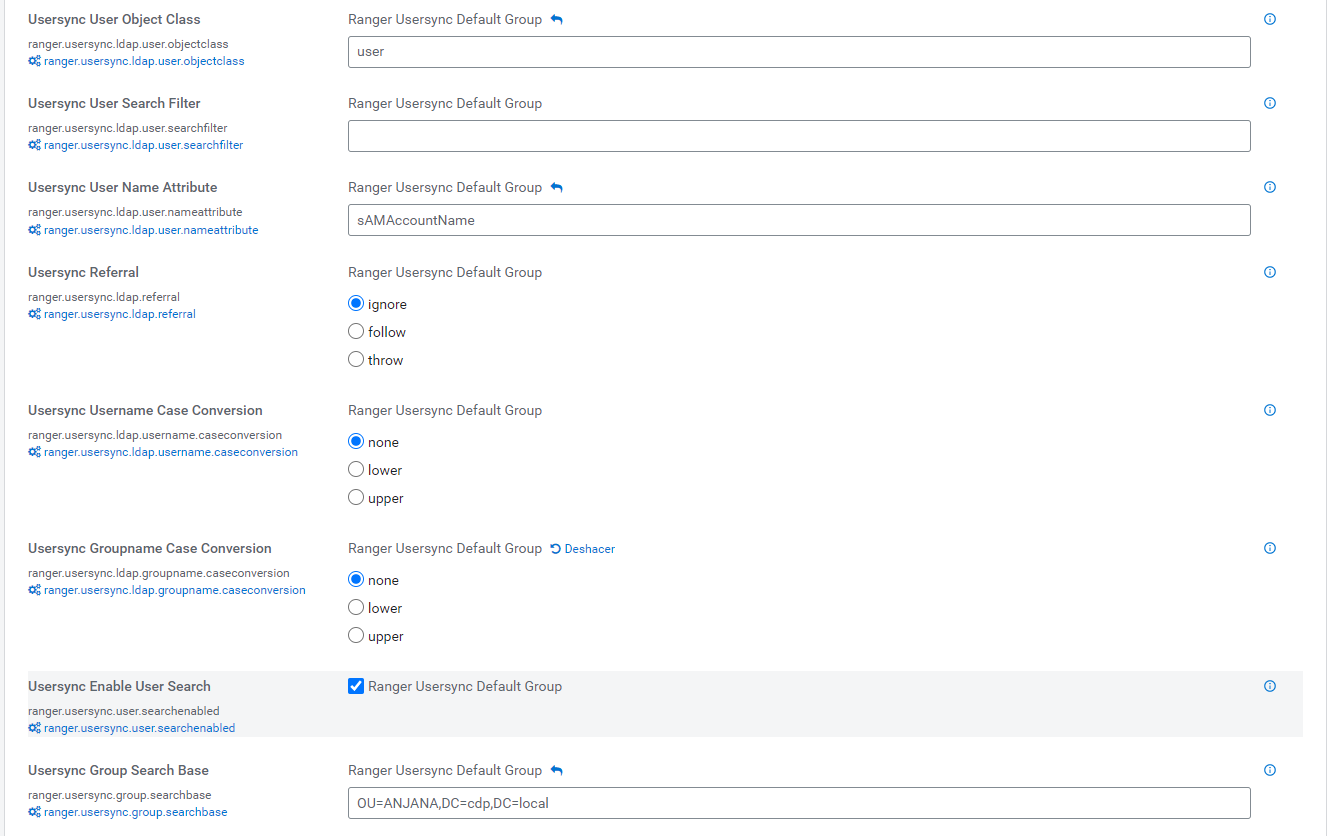
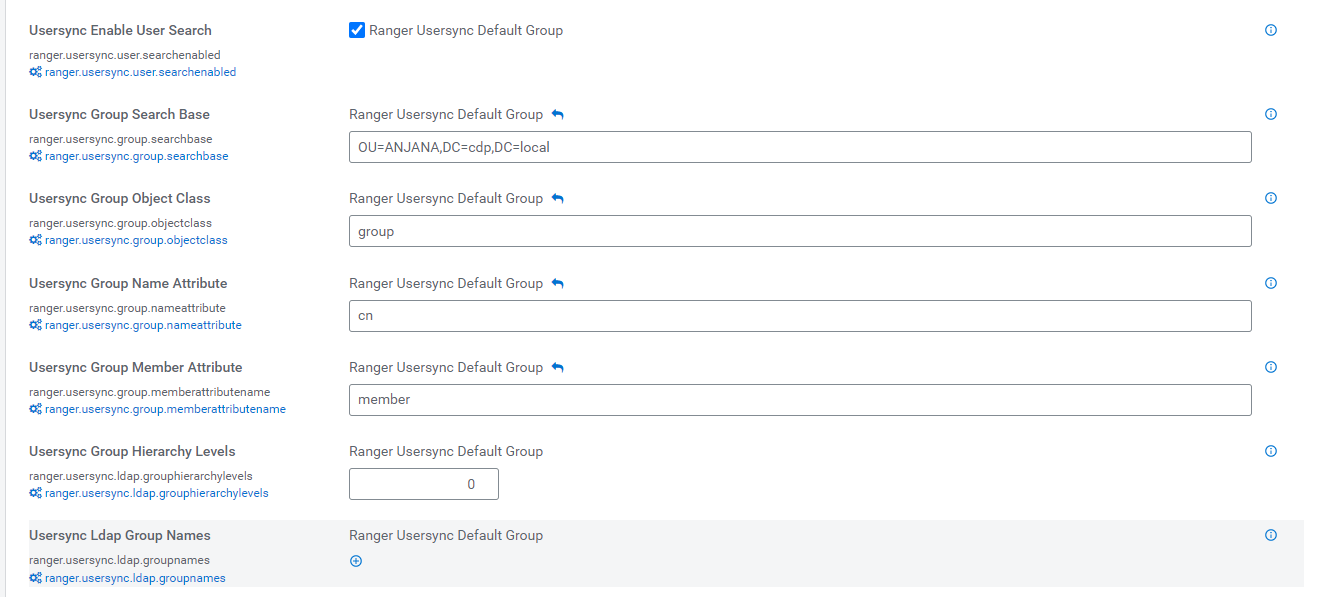

This plugin will create or update HDFS and/or Hive policies to grant or remove permissions for the groups represented by DSAs.
Required credentials
To allow the plugin to connect to Ranger, two things are required: a service user with the corresponding permissions and credentials, and certificates in the JVM to enable the SSL connection to Ranger.
Generation and use of certificates
To allow the connection between the plugin and CDP, it is necessary to carry out a series of prior steps to enable SSL on the cluster and generate the certificates the plugin requires.
SSL/TLS activation process with CDP
Currently with Cloudera it is necessary to activate SSL/TLS in order to make use of Ranger. If the wizard for this process fails, there is a high probability of leaving the cluster completely inoperable.
Preliminaries
During the execution of the wizard, Cloudera Manager must connect, in our case with the root user, to all the servers in the environment, using a password or using public/private keys.
For the public/private key pair, the root public key must be deployed to all nodes, in addition to enabling root login in the SSH server configuration
sed -i 's/#PermitRootLogin prohibit-password/PermitRootLogin yes/g' /etc/ssh/sshd_config
sed -i 's/PasswordAuthentication no/PasswordAuthentication yes/g' /etc/ssh/sshd_config
It is recommended to perform a manual connection test beforehand from Cloudera Manager to all the servers in the Cluster.
Wizard
The wizard consists of two phases
-
Generate the CA
-
Summary screen
When the summary screen is shown, we must only click the finish button on the summary screen once the operation it describes for us to perform has been completed.
The wizard is launched from the Administration > Security > Enable TLS menu
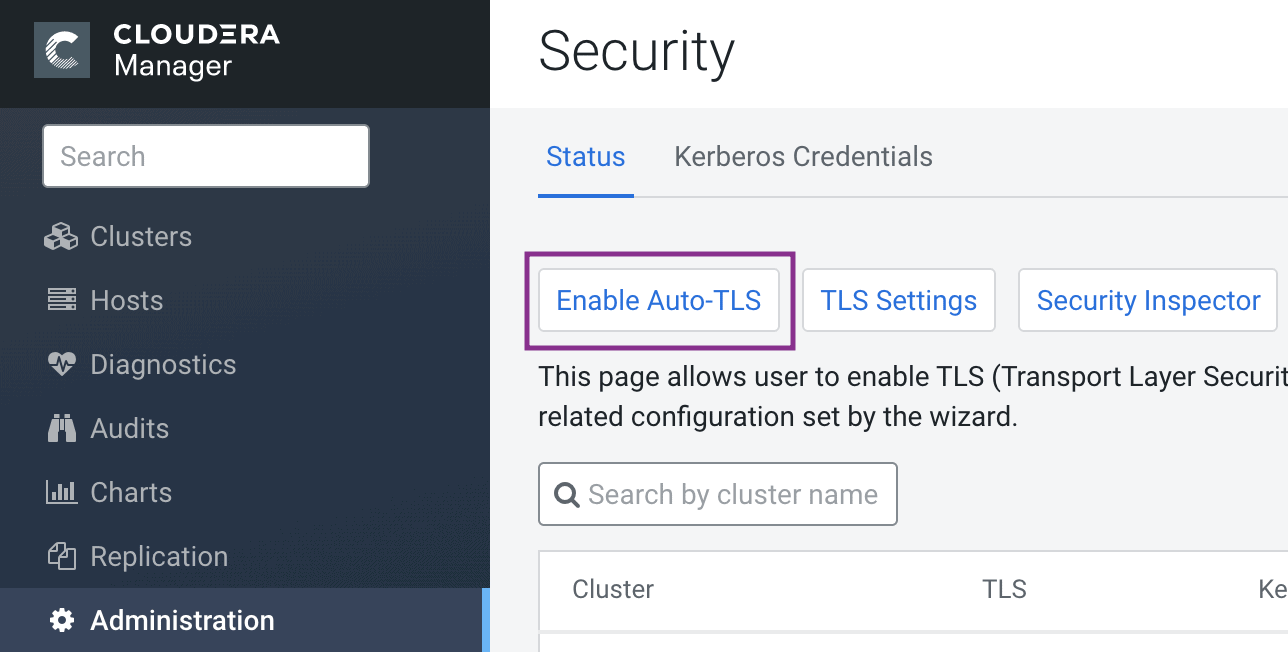
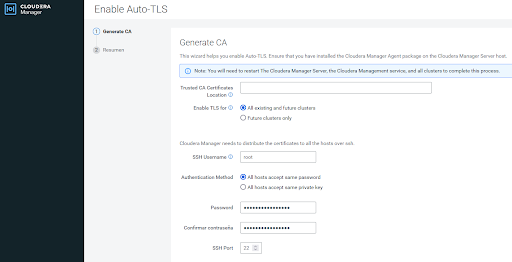
Wizard::Generate the CA
This first screen of the wizard allows us to either use a CA provided to us, or have Cloudera generate a self-signed CA.
In our case we select the options:
-
All existing clusters and future clusters.
-
All hosts accept the same password.
-
ssh user name and password, in our case root
Wizard::Summary
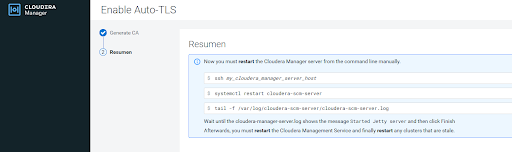
On this screen we must NOT press finish until the operation it shows us is complete.
The operation is:
-
connect to the Cloudera Manager machine
-
Restart Cloudera Manager
-
Check the log for when the restart has finished
Only once the Cloudera Manager server has completely finished restarting will we finish the wizard
Post-installation
After the wizard finishes, we will need to update the obsolete configurations of the clients and applications.
TrustStores and Keystores
Cloudera stores the JKS for certificates and keys at: /var/lib/cloudera-scm-agent/agent-cert
cm-auto-in_cluster_truststore.jks
cm-auto-in_cluster_ca_cert.pem
cm-auto-global_truststore.jks
cm-auto-global_cacerts.pem
cm-auto-host_key_cert_chain.pem
cm-auto-host_key.pw
cm-auto-host_key.pem
cm-auto-host_cert_chain.pem
cm-auto-host_keystore.jks
The password can be obtained using this command:
grep -Eo "Djavax.net.ssl.trutStorePassword=[[:alnum:]]*" $(find /run/cloudera-scm-agent/process/ -name "proc.json" | grep HIVESERVER2 | sort | head -1) | sed 's/Djavax.net.ssl.trustStorePassword=//'
SSL/TLS connection with CDP
The plugin uses a Java library to connect via SSL to Ranger; the plugin needs access to the certificates generated previously in order to connect.
There are two ways to do this:
Include the certificate in the plugin's startup command by including the following JVM variables (they must ):
-Djavax.net.ssl.trustStore={path}\cm-auto-global_truststore.jks
-Djavax.net.ssl.trustStorePassword=****
Install the certificates in the JVM where the plugin runs
User credentials
The creation of a service user of type User is required, either created from Ranger or synchronized from LDAP.
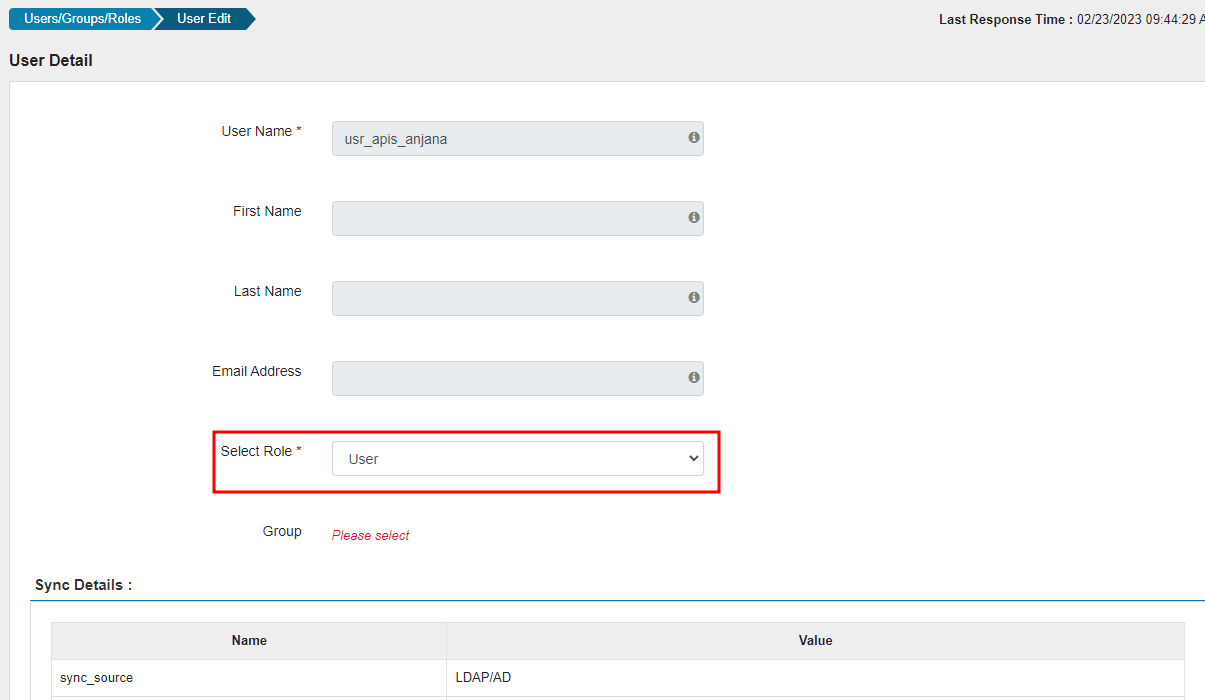
This user needs to be present in certain HDFS and Hive policies that allow it to modify all the elements to be governed.
If you want the policies to be in a particular security zone (configurable), the service user needs to be an administrator of the security zone, either individually or through group membership.
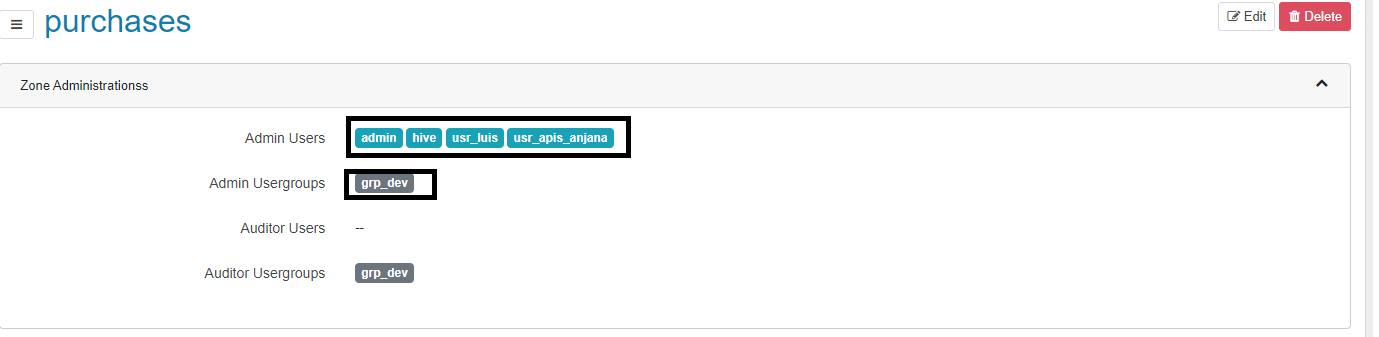
HDFS
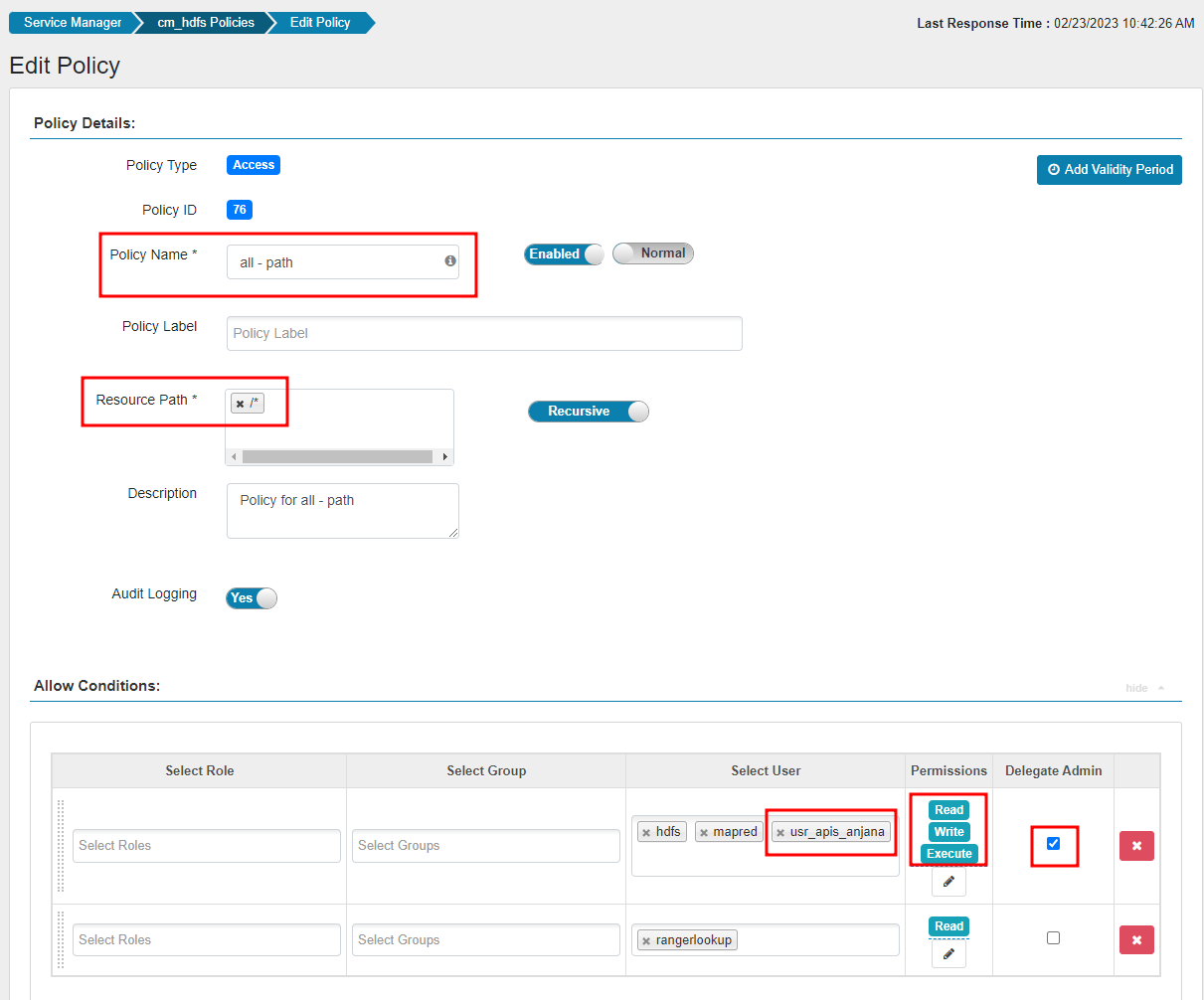
In the default policy "all - path" created by Ranger in HDFS, add the user that Anjana will use, granting them all permissions and checking the "Delegate Admin" option
Hive
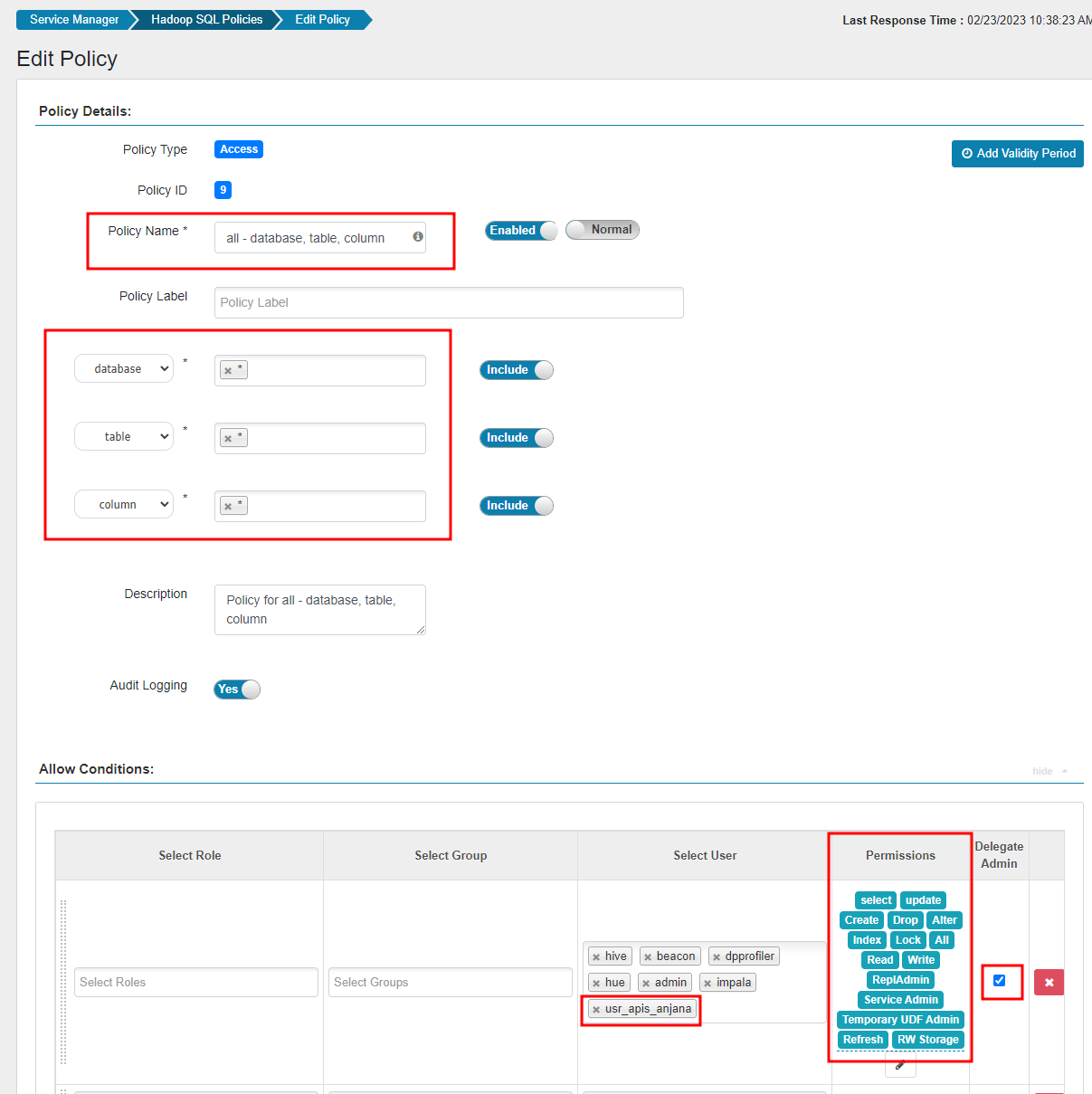
Similarly to HDFS, in the default policy "all - database, table, column" of Hadoop SQL, add the user that Anjana will use, granting them all permissions and checking the "Delegate Admin" option.
Anjana Role
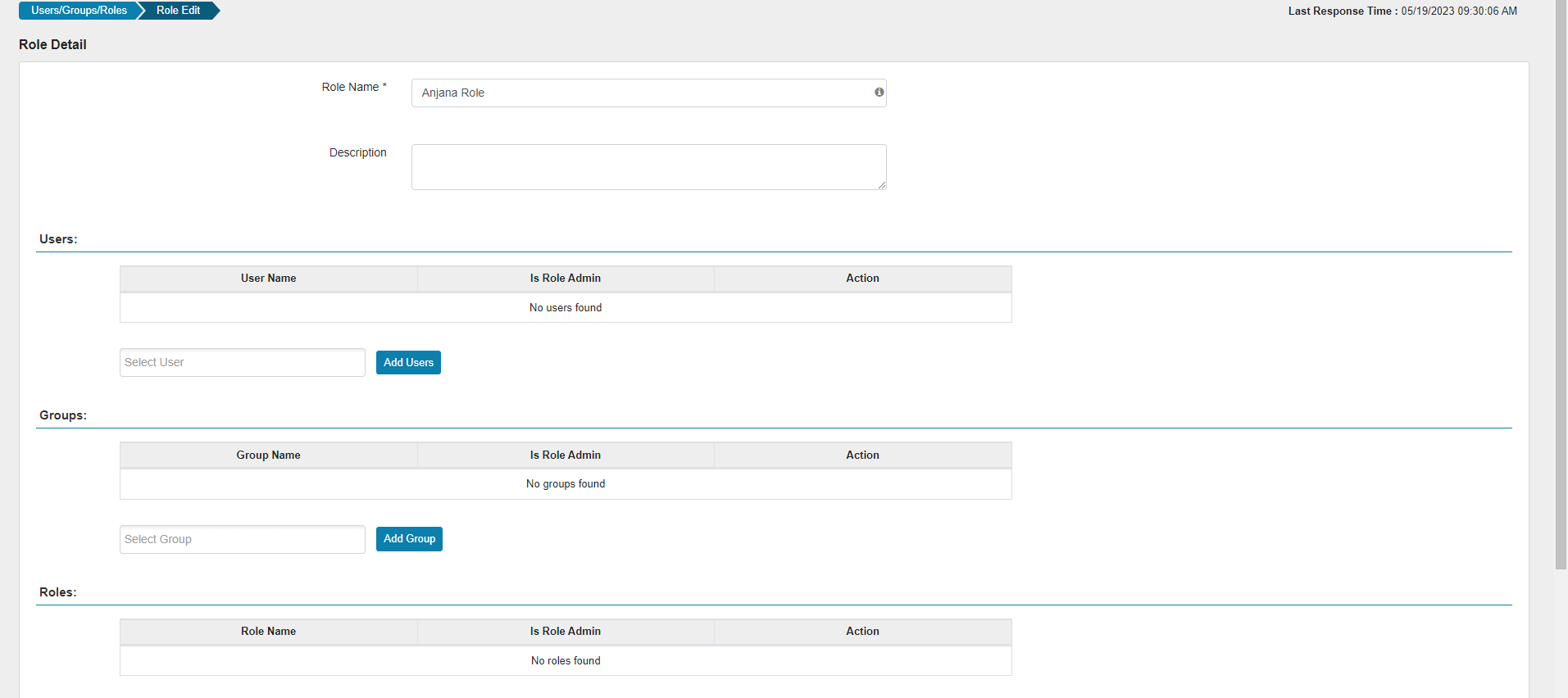
To group the permissions governed by Anjana, it is necessary to create a role in Ranger that does not contain any user, group, or role; in practice it will function as a tag on a permission entry. The role's name must be Anjana Role.
Ranger Limitations
It is only possible to have one policy enabled on a particular set of objects (e.g.: it is not possible to have 2 policies acting on the same file or table at the same time, but it is possible to have one policy acting only on the file and another acting on the file and one more), for that reason the plugin will only act on policies that apply to a single resource, whether a file/folder (HDFS) or a table (Hive).
To make it easier to know which policies the plugin has created/modified, a tag will be applied to the policy (Anjana Governed). In addition, all permissions governed by Anjana will be grouped in a single entry using the empty role created previously.
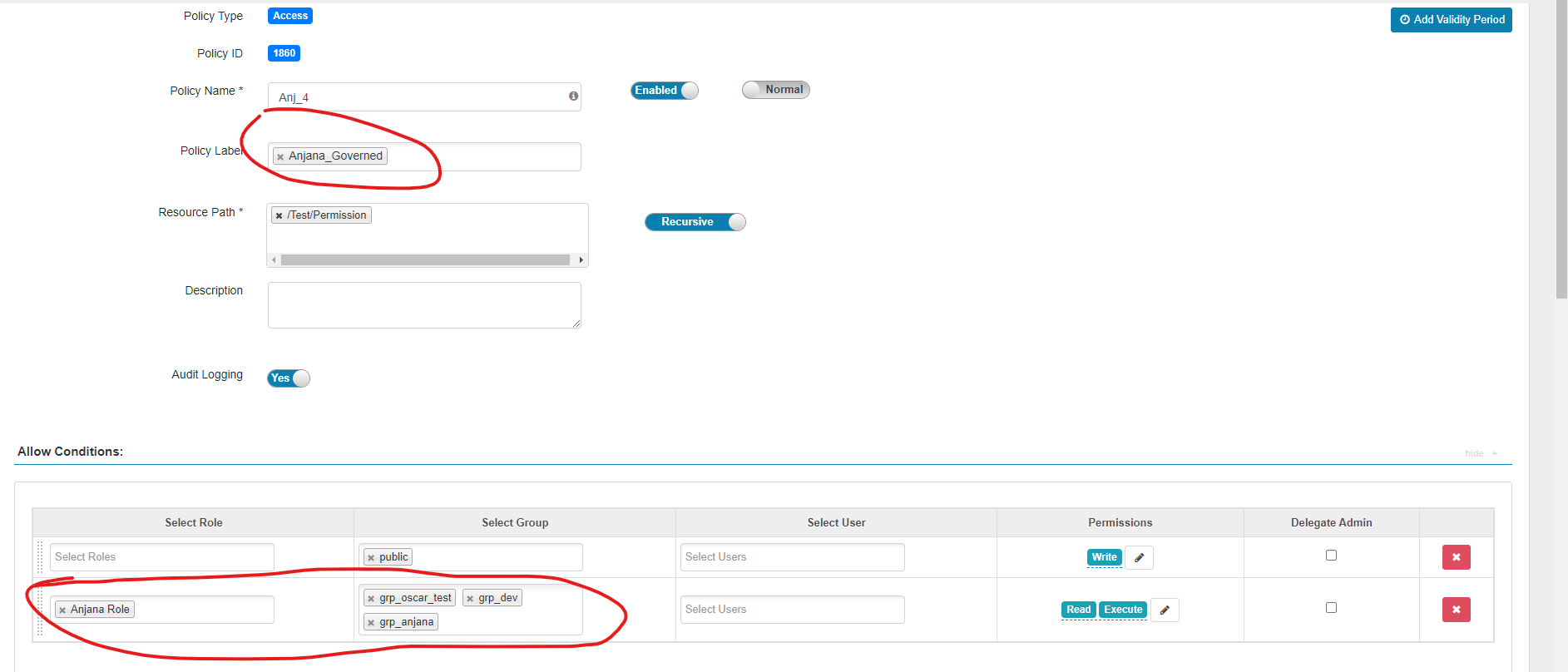
With that tag, it is easy to filter which policies Anjana is affecting and, within them, which permissions are governed by the plugin, so that if it is necessary to modify the policy manually, it can be identified as having been created by the plugin (and that it should not be modified).

Anjana Limitations
Due to path processing at the Hive level, the path of the object in Anjana that represents a Hive table must have its path composed in one of these two ways:
-
catalog or data source/database/table (EX: hive/db1/table1)
-
database/table (EX: db1/table1)
The path separator character "/" being configurable (see the configuration example)
In cases where Active Directory is used and sAMAaccountName is used, due to restrictions of that technology, group names must not be longer than 20 characters.
Plugin actions
Create/Extend policy
This action is executed when a DSA is approved in Anjana that contains a governed object with the triplet configured in the plugin. This action will be executed with a delay configurable in the plugin, because it is necessary to wait for Ranger to synchronize with LDAP the group that was previously created in the Ldap plugin.
As explained in the limitations, the plugin will first check whether a policy exists that acts solely on the resource the object represents; if none is found, one will be created. On this policy, a new access entry will be created for the group the DSA represents, and it will be given the corresponding permissions (read/execute in HDFS and select in Hive), in addition to including the Anjana Governed tag for visibility.
It should be added that every policy from this action will be automatically enabled. If a disabled one already existed on the resource, it will be cleared of any previous permissions or exclusions it had before being acted upon.
In the case of HDFS policies, if the policy pointing to the resource is not recursive, the plugin will make it recursive, leaving it the same as if the plugin had created it.
Delete/reduce policy
This action is executed when a DSA in Anjana expires and it contains a governed object with the triplet configured in the plugin, or when the governed object expires and it is present in a DSA. On the policy associated with the resource, the access entries will be removed.
In cases where access governed by Anjana still remains and the policy is found to be disabled, it will be re-enabled.
In cases where, after removing Anjana's access, accesses managed by the customer still remain, the Anjana Governed tag will be removed to indicate that Anjana no longer governs that resource, and if they were the only existing entries, the policy will also be removed.
Configuration example
server:
 port: 15021

totplugin:
 server:
   urls:
   - http://totserver:15000/tot/
 aris:
   - ari: "anja:totplugin:im:/cloudera/hive/devQA/"
     imAri: "anja:totplugin:im:/ldap/ldap/ldap/"
   - ari: "anja:totplugin:im:/cloudera/hdfs/devQA/"
     imAri: "anja:totplugin:im:/ldap/ldap/ldap/"
   - ari: "anja:totplugin:im:/cloudera/ranger/devQA/"
     imAri: "anja:totplugin:im:/ldap/ldap/ldap/"
 connection:
   urlBaseRanger: "https://ip-10-150-100-136.eu-central-1.compute.internal:6182"
   userRanger: <user>
   pwdRanger: ******
 delayInSeconds: 0
 securityZone: "sales"
 hive:
   hiveService: cm_hive
   valueTechnologyHive: hive
   hiveAuditLogin: true
   replaceHiveClientPolicyByAnjanaPolicyName: true
   pathSplit: "/"
 hdfs:
   hdfsService: cm_hdfs
   valueTechnologyHdfs: hdfs
   hdfsAuditLogin: true
   replaceHdfsClientPolicyByAnjanaPolicyName: true

eureka:
  client:
    serviceUrl:
      defaultZone: http://totserver:15000/tot/eurek
The common configurations must be reviewed in the Anjana Data configuration document 4.4 - DS - Technical configuration of Portal and microservices
Specific configurations:
-
Connection:
-
urlBaseRanger: Access URL to Ranger
-
userRanger: Plugin's service user
-
pwdRanger: Service user's password
-
-
delayInSeconds: Delay in seconds, used in DSA approval; it is recommended to set it a little higher than the LDAP synchronization time configured in Ranger. Its default value is 0.
-
securityZone: Optional field; if filled in, it indicates the security zone where the policies will be created.
-
hive:
-
hiveService: Name of the Hive service within Ranger on which the policies are to be applied.
-
valueTechnlogyHive: The value in the technology field that governed objects must have in order to be identified as Hive and have their policies created on that service.
-
hiveAuditLogin: Optional field, indicates whether the Hive policies created or updated by the plugin should be audited. It is false by default.
-
replaceHiveClientPolicyByAnjanaPolicyName: Optional field, indicates whether the plugin is allowed to modify the name of the Hive policies it updates with the name Anj_<ID of the object representing the table>. It is false by default.
-
pathSplit: Optional field, the character by which the path of a Hive object is processed to obtain its database and which table it represents. (EX: for database/table it would be the / character).
-
-
hdfs:
-
hdfsService: Name of the HDFS service within Ranger on which the policies are to be applied.
-
valueTechnlogyHdfs: The value in the technology field that governed objects must have in order to be identified as HDFS and have their policies created on that service.
-
hdfsAuditLogin: Optional field, indicates whether the HDFS policies created or updated by the plugin should be audited. It is false by default.
-
replaceHdfsClientPolicyByAnjanaPolicyName: Optional field, indicates whether the plugin is allowed to modify the name of the HDFS policies it updates with the name Anj_<ID of the object representing the file(s)>. It is false by default.
-