
This page documents the integration of Anjana Data Platform with Databricks via the tot-plugin-databricks plugin. In its Phase 1, the integration enables the discovery and extraction of technical metadata (read-only mode) of the assets available in Unity Catalog, without performing any mutation on the source system.
Integration model
The tot-plugin-databricks connector integrates with Unity Catalog to discover assets and extract their structured technical metadata, adapting it to the operational metamodel of Anjana Data Platform. It acts as a metadata extractor-type plugin within the Tot architecture: it runs under its orchestration, implements the platform's standard contracts, and returns the information in the required format. The solution is decoupled from the cloud provider (Azure, AWS, and GCP), so that the same code operates against any of them without changes.
The plugin implements the operations defined in the standard interface ExtractMetadataControllerInterface (tot-plugin-lib), corresponding to Tot's two extraction mechanisms: discovery (metadataList) and detail extraction (metadataExtract).
Supported assets
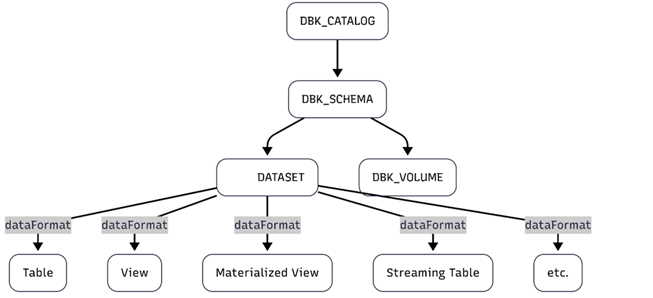
Phase 1 covers the following Unity Catalog asset types:
|
Databricks asset |
Proposed object SubType in Anjana |
Nature |
|
Catalog |
DBK_CATALOG |
Unity Catalog catalog. First-level logical container. |
|
Schema |
DBK_SCHEMA |
Schema within a catalog. Logical container. |
|
Dataset |
DATASET |
Tabular object (table, view, materialized view, streaming table). The specific type is reported in |
|
Volume |
DBK_VOLUME |
Unstructured data asset. Non-tabular and without columns. |
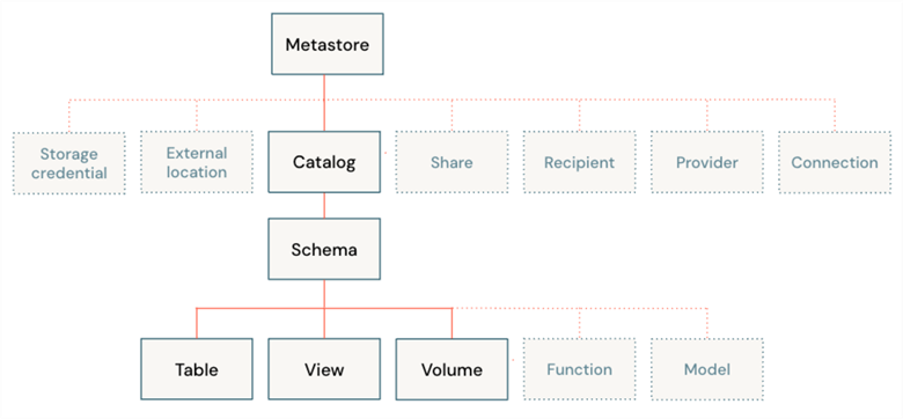
The correspondence between each Unity Catalog asset type and the object subType used to represent it in Anjana is not hard-coded: it is declared in the connector YAML's technology.mapping block. The default values, which it is recom
mended not to modify unless necessary, are:
|
Key in |
Proposed SubType in Anjana |
Notes |
|
|
DBK_CATALOG |
N/A |
|
|
DBK_SCHEMA |
N/A |
|
|
DATASET |
It is proposed to reuse this entity so that the structure of tables, views, and materialized views is represented in Anjana with the |
|
|
DBK_VOLUME |
N/A |
The resulting subType determines both the depth of the traversal in metadataList and the set of attributes extracted in metadataExtract — for example, only DATASET generates DATASET_FIELDS. These names must match the subType values configured in the Anjana metamodel so that assets are associated with the correct template.
Asset discovery (metadataList)
The metadataList operation discovers and lists the assets available in Unity Catalog, allowing the user to explore the hierarchy and select the assets to import into Anjana Data Platform. The traversal follows Unity Catalog's native hierarchy, and its depth depends on the requested subType:
-
DBK_CATALOG, flat list of catalogs (root level).
-
DBK_SCHEMA, two-level tree: catalog > schema.
-
DATASET, three-level tree: catalog > schema > tabular object (table, view, materialized view, streaming table).
-
DBK_VOLUME, three-level tree: catalog > schema > volume.
The listing relies on Unity Catalog's REST APIs (GET /api/2.1/unity-catalog/{catalogs|schemas|tables|volumes}) and applies pagination via max_results and page_token, iterating until next_page_token is exhausted, with a per-operation safety page cap configurable in maxPages (default 1000) to avoid infinite pagination. To limit the cost of massive discovery, the parameters omit_columns=true and omit_properties=true can be used on /tables. The result is returned deterministically sorted by ascending name at each level and deduplicated by technical identifier.
Metadata extraction (metadataExtract)
The metadataExtract operation retrieves the detailed technical metadata of a specific asset, previously selected via metadataList, and transforms it to Anjana's model. The hierarchical path of the asset to extract is parsed using the separator configured in the YAML's pathSeparator and is internally converted to Databricks' fully qualified name (FQN).
For each asset within scope, the plugin retrieves — whenever available via the API — the following metadata:
-
physicalName, the asset's fully qualified technical identifier (FQN).
-
name, the asset's name.
-
path, full hierarchical path (uses
pathSeparator). -
description, description when it exists.
-
owner, the asset's owner.
-
createdAt, creation date (epoch ms), when exposed by the API.
-
tags, asset-level tags.
For tabular assets (DATASET), the plugin also retrieves the column structure as DATASET_FIELDS, including name, native data type, position, nullability, description, and column tags. Column numbering is transformed from base 0 (Databricks) to base 1 (Anjana) during mapping. The operation is atomic: it returns the asset's complete result or an error, with no partial results.
Mapping to Anjana attributes
The extracted attributes are mapped to entityAttributes entries in Anjana. The attributes to be created in Anjana's functional configuration must have the following types (the names must match those in the attribute Definition table, name field, for them to appear in the template).
DATASET (Table, View, Materialized View, Streaming Table.. in Databricks)
|
ANJANA ( |
Attribute name
|
DATABRICKS |
APPLIES TO DATABRICKS ENTITIES |
NOTES |
|
physicalName (native) |
INPUT_TEXT |
full_name |
ALL |
FQN |
|
name (native) |
INPUT_TEXT |
name |
ALL |
Logical name |
|
path (native) |
INPUT_TEXT |
catalog/schema |
ALL |
hierarchical + asset, pathSeparator |
|
datasetId |
INPUT_TEXT |
table_id |
ALL |
Identifier |
|
infrastructure (native) |
SELECT |
resource.infrastructure |
ALL |
DTO |
|
technology (native) |
SELECT |
"Databricks" |
ALL |
Fixed |
|
zone (native) |
SELECT |
resource.zone |
ALL |
DTO |
|
schema (not native but common to other plugins) |
INPUT_TEXT |
schema_name |
ALL |
Container |
|
catalog (not native but common to other plugins) |
INPUT_TEXT |
catalog_name |
ALL |
Container |
|
data_format (native) |
INPUT_TEXT |
table_type |
ALL |
table, view, mv, st… |
|
dataSourceFormat |
INPUT_TEXT |
data_source_format |
TABLE |
Tables only |
|
storageLocation |
INPUT_TEXT |
storage_location |
TABLE, MV, ST |
Not in views |
|
description (native) |
ENRICHED_TEXT_AREA_INTERNATIONAL |
comment |
ALL |
Optional |
|
owner |
INPUT_TEXT |
owner |
ALL |
|
|
createdAt |
|
created_at |
ALL |
|
|
tags |
ARRAY_ALPHANUMERICAL |
/entity-tag-assignments/{type}/{FQN}/tags |
ALL |
Additional API call. key-value |
DATASET_FIELD (Column structure of Databricks tabular entities)
For the fields of tabular assets (DATASET_FIELDS), the following are additionally mapped:
|
ANJANA ( |
Attribute name
|
DATABRICKS |
APPLIES TO DATABRICKS ENTITIES |
NOTES |
|
Name |
INPUT_TEXT |
name |
TABLE, MV, ST |
Column name |
|
fieldDataType |
INPUT_TEXT |
type_name |
TABLE, MV, ST |
Databricks native type |
|
position |
INPUT_NUMBER |
position from 0 to n-1 |
TABLE, MV, ST |
Ordinal position (base 1)
|
|
nullable |
INPUT_CHECKBOX |
nullable |
TABLE, MV, ST |
true/false |
|
description |
ENRICHED_TEXT_AREA_INTERNATIONAL |
comment |
TABLE, MV, ST |
Description, when it exists |
|
tags |
ARRAY_ALPHANUMERICAL |
/entity-tag-assignments/{type}/{FQN}/tags |
TABLE, MV, ST |
Additional API call. For each tag: tag_key = name, tag_value = value |
The tags attribute of datasets and dataset fields must have the name 'tags' in the attribute Definition table and be of type ARRAY_ALPHANUMERICAL. Tags are transformed by concatenating each tag_key=tag_value pair with the character defined in attributeSeparator.
DBK_CATALOG (Catalog in Databricks)
|
ANJANA ( |
Attribute name
|
DATABRICKS |
APPLIES TO DATABRICKS ENTITIES |
NOTES |
|
physicalName (native) |
INPUT_TEXT |
full_name |
Catalog |
Unique catalog identifier |
|
name (native) |
INPUT_TEXT |
name |
Catalog |
Same as PHYSICAL_NAME |
|
path (native) |
INPUT_TEXT |
catalog_name |
Catalog |
Root |
|
infrastructure (native) |
SELECT |
resource.infrastructure |
Catalog |
Sourced from the DTO |
|
catalogId |
INPUT_TEXT |
id |
Catalog |
Identifier |
|
technology (native) |
SELECT |
"Databricks" |
Catalog |
Fixed value |
|
zone (native) |
SELECT |
resource.zone |
Catalog |
Sourced from the DTO |
|
description (native) |
ENRICHED_TEXT_AREA_INTERNATIONAL |
comment |
Catalog |
Optional |
|
owner |
INPUT_TEXT |
owner |
Catalog |
Owner |
|
createdAt |
INPUT_TEXT |
created_at |
Catalog |
Epoch ms |
|
catalogType |
INPUT_TEXT |
catalog_type |
Catalog |
MANAGED_CATALOG, DELTASHARING, etc. |
|
tags |
ARRAY_ALPHANUMERICAL |
/entity-tag-assignments/{type}/{FQN}/tags |
Catalog |
Additional API call. For each tag: tag_key = name, tag_value = value |
DBK_SCHEMA (Schema in Databricks)
|
ANJANA ( |
Attribute name
|
DATABRICKS |
APPLIES TO DATABRICKS ENTITIES |
NOTES |
|
physicalName (native) |
INPUT_TEXT |
full_name |
Schema |
FQN |
|
name (native) |
INPUT_TEXT |
name |
Schema |
Schema name |
|
path (native) |
INPUT_TEXT |
catalog_name |
Schema |
Represents all hierarchical levels+asset uses pathSeparator |
|
infrastructure (native) |
SELECT |
resource.infrastructure |
Schema |
Sourced from the DTO |
|
schemaId |
INPUT_TEXT |
id |
Schema |
Identifier |
|
technology (native) |
SELECT |
"Databricks" |
Schema |
Fixed value |
|
zone (native) |
SELECT |
resource.zone |
Schema |
Sourced from the DTO |
|
description (native) |
ENRICHED_TEXT_AREA_INTERNATIONAL |
comment |
Schema |
Optional |
|
owner |
INPUT_TEXT |
owner |
Schema |
Owner |
|
createdAt |
INPUT_TEXT |
created_at |
Schema |
Epoch ms |
|
catalog (not native but common to other plugins) |
INPUT_TEXT |
catalog_type |
Schema |
Hierarchical relationship |
|
storageLocation |
INPUT_TEXT |
/entity-tag-assignments/{type}/{FQN}/tags |
Schema |
Optional |
|
tags |
ARRAY_ALPHANUMERICAL |
|
Schema |
Additional API call. For each tag: tag_key = name, tag_value = value |
Assets with special characters in the name
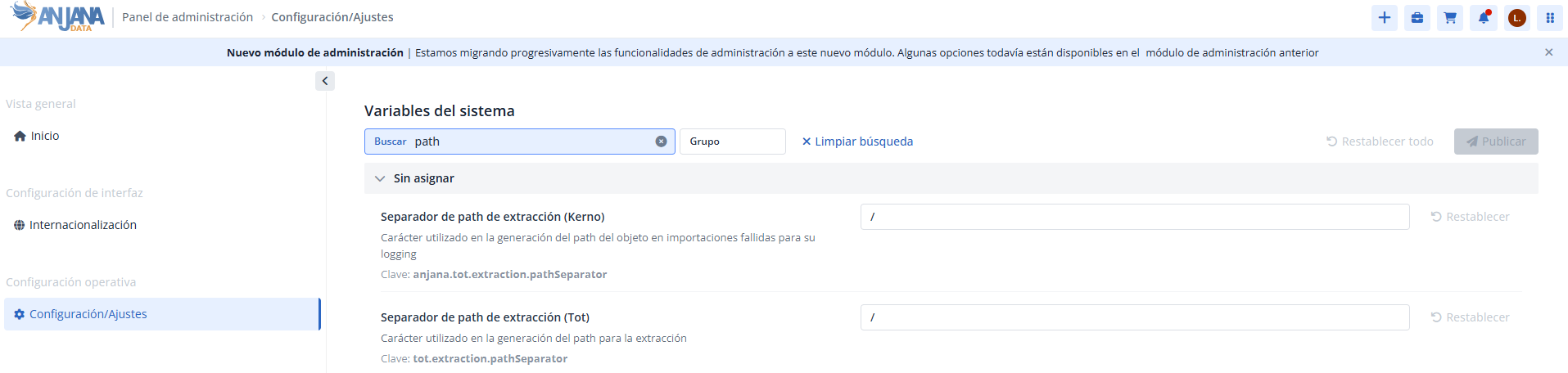
Unity Catalog allows characters such as / in asset names. If used, pathSeparator must be configured with a character other than / to guarantee correct construction of the path attribute. Any character except : can be used.
The Databricks plugin's pathSeparator must match that of the rest of the plugins, as well as the extraction path separator of Kerno and Tot.
Required credentials and privileges
Metadata discovery and extraction
The integration requires a Service Principal with read-only permissions on the assets to be governed. It is the client's responsibility to:
-
Service Principal, with the read privileges on Unity Catalog required for discovery and metadata extraction in Phase 1 (see the detail in Required privileges in Unity Catalog).
-
Governance workspace (playground) and assets accessible to the technical entity used by the plugin (see Provisioning the governance workspace).
-
Correct credential configuration in the connector's YAML.
The effective visibility of assets depends on the Service Principal's hierarchical permissions in Unity Catalog and on the configuration of the workspace from which it operates.
Required privileges in Unity Catalog
Having a Service Principal is not enough: for the Unity Catalog APIs to respond, the identity must have explicitly granted the privileges that allow traversing the hierarchy and reading each asset's metadata. Unity Catalog's privilege model is hierarchical, so reaching a table or a volume requires first being able to traverse its catalog and its schema.
The minimum privileges required by the API are:
|
Unity Catalog privilege |
Granted on |
Necessary for |
|
|
The catalogs to be discovered |
Access the catalog and discover its schemas. Required for all subtypes. |
|
|
The schemas to be discovered |
Access the schema and discover its tables and volumes. Required for DBK_DATASET and DBK_VOLUME. |
|
|
For the objects whose metadata is to be extracted (tables, views, volumes...) |
Recommended |
|
|
The table or view (DBK_DATASET) |
Read the metadata and column structure of tabular objects. |
|
|
The volume (DBK_VOLUME) |
Read the metadata of unstructured data volumes. |
In summary, the credential always needs USE CATALOG and USE SCHEMA to navigate the hierarchy, and additionally SELECT on tables or READ VOLUME on the volumes to be governed, depending on the asset type. Since these are hierarchical privileges, they can be granted at the catalog or schema level so that they cascade over the contained objects.
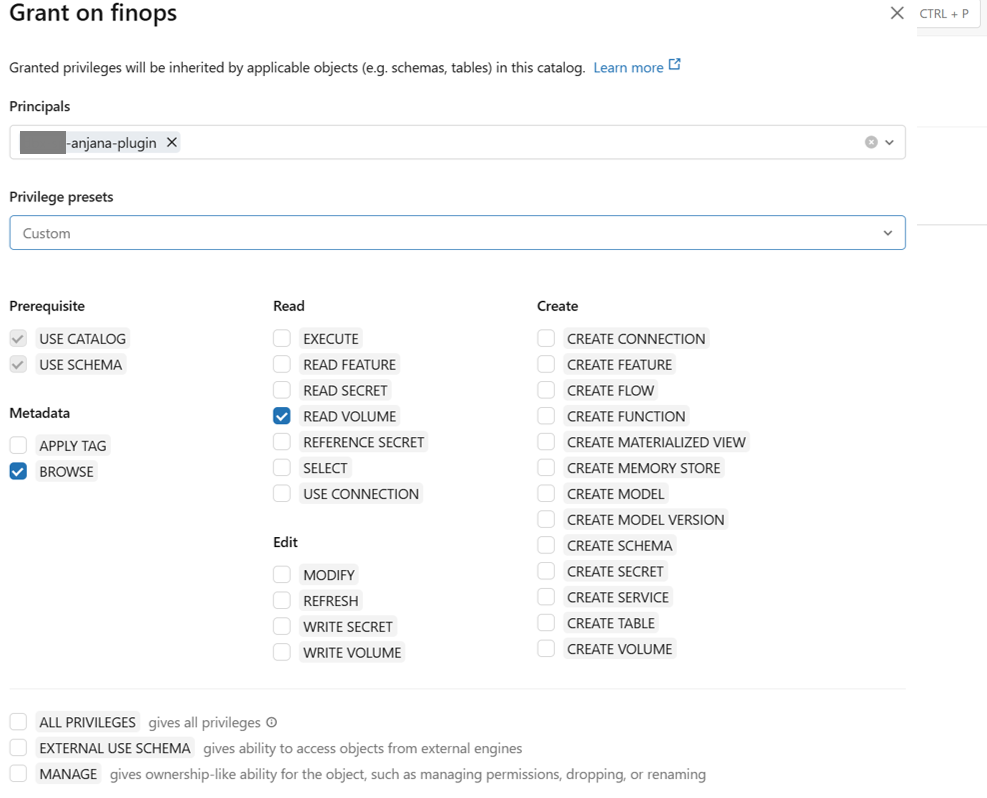
The absence of these privileges does not produce an authentication failure, but an authorization one: in metadataList it results in a 403 that omits the affected scope (WARN), and in metadataExtract a NOT_FOUND ("does not exist or is not accessible"). A correctly authenticated Service Principal without privileges will therefore see an empty catalog.
Provisioning the governance workspace (playground)
The plugin always operates from a Databricks workspace, so its provisioning is a prerequisite as critical as the credentials themselves. It is the client's responsibility to have a governance workspace — commonly called a playground — that acts as the plugin's single point of access to Unity Catalog.
For discovery and extraction to work, that workspace must meet two conditions:
-
Service Principal enablement, the technical identity used by the plugin must be registered and enabled in the governance workspace.
-
Asset accessibility, the catalogs and assets to be governed must be bound and accessible from that workspace. In Unity Catalog, a catalog not bound to the workspace is not visible even if the Service Principal has privileges on it.
The effective visibility of an asset is, therefore, the intersection of two independent conditions: that the Service Principal has the Unity Catalog privileges described in the previous section, and that the asset is accessible from the governance workspace. If either is missing, the asset will not appear in discovery.
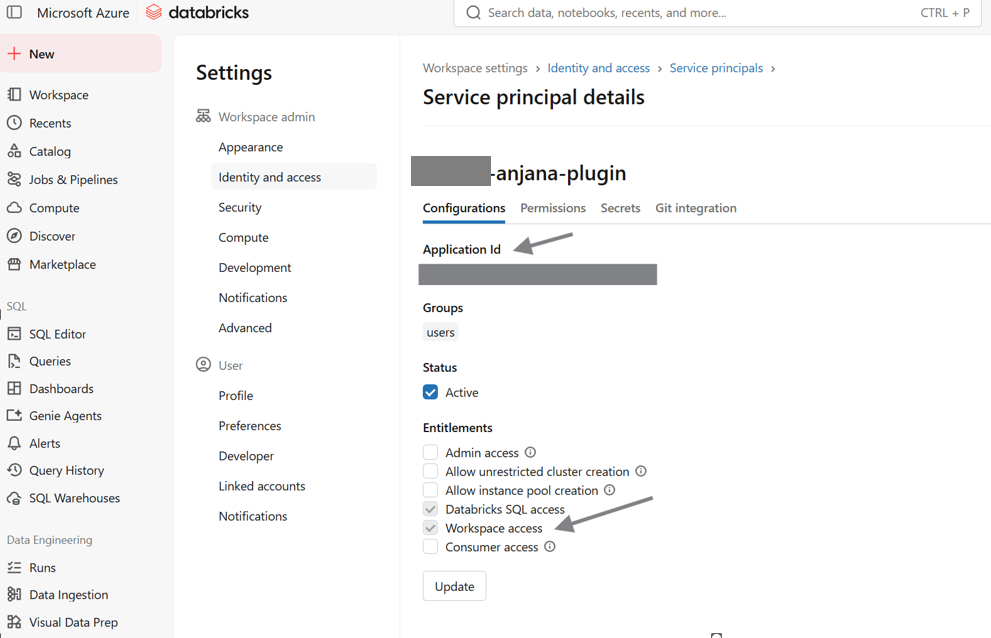
Incomplete workspace provisioning is the most common cause of empty discovery despite having valid credentials. Before reporting an incident, it is advisable to verify that the governance workspace has the catalogs bound and the Service Principal enabled.
Authentication and authorization
The plugin authenticates against Databricks using OAuth 2.0 Client Credentials with Service Principal. The difference between cloud providers is limited to how the Bearer Token is obtained; the functional logic remains decoupled and the strategy is resolved through configuration via the YAML's authType parameter. Personal tokens (PAT) and user credentials are not supported.
|
authType |
Required parameters |
Cloud |
|
|
host, clientId, clientSecret |
Azure, AWS, GCP |
|
|
host, tenant, clientId, clientSecret |
Azure only |
The connection and authentication parameters are defined in technology.credential within each connection of the connector's YAML:
|
Parameter |
Description |
Applies to |
|
|
URL of the Databricks workspace against which the connection operates. |
Both strategies |
|
|
Token acquisition strategy. Supported values: |
Both strategies |
|
|
Service Principal identifier. |
Both strategies |
|
|
OAuth secret associated with the Service Principal. |
Both strategies |
|
|
Azure Entra ID tenant identifier. |
Only |
Any authType value other than the two supported ones causes the PLUGIN_INCOMPLETE error.
Databricks OAuth M2M (primary strategy)
Databricks exposes a native OIDC provider in each workspace, from which the plugin requests the token directly (POST {host}/oidc/v1/token). It is the recommended strategy because it works the same way on Azure, AWS, and GCP, only requires host, clientId, and clientSecret, and does not depend on external providers. It is selected with authType: "databricks-oauth".
Step 1: Create the Service Principal in Databricks
• Access Databricks Account Console → User Management → Service Principals.
• Create a new Service Principal
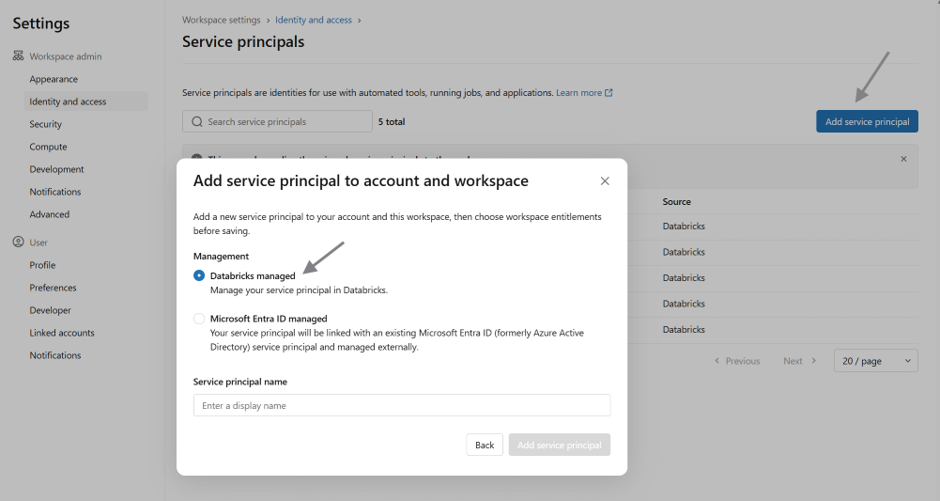
More detail in the official Azure Databricks documentation: https://learn.microsoft.com/en-us/azure/databricks/dev-tools/auth/oauth-m2m
Step 2: Generate OAuth credentials
-
Generate an OAuth Secret for the Service Principal.
-
Note down the following values to add to the YAML:
-
clientId (application Id)
-
clientSecret (create an authentication secret in the Secrets section)
-
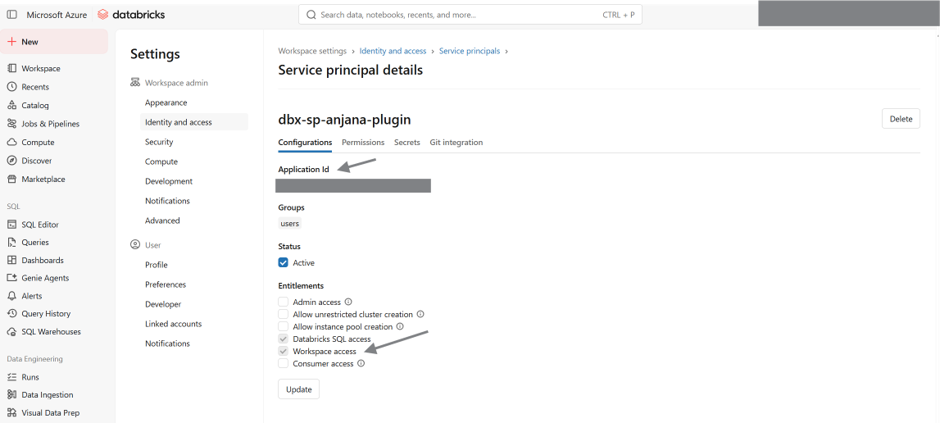
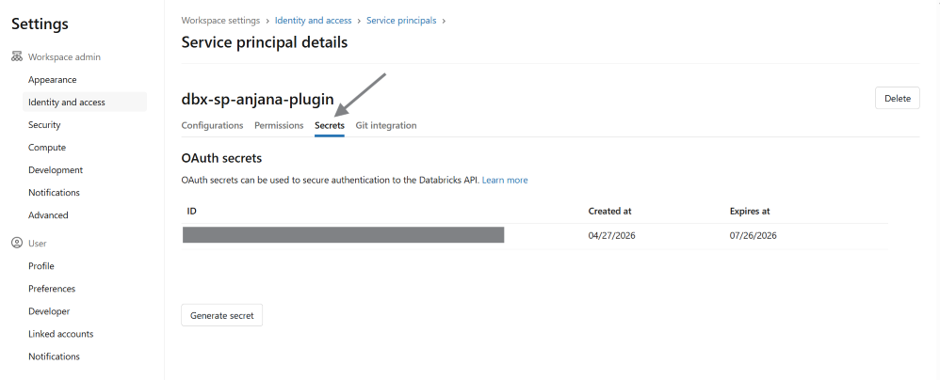
Step 3: Grant minimum privileges on Unity Catalog assets
Grant the privileges indicated in Required privileges in Unity Catalog.
The plugin only queries metadata via the Unity Catalog REST APIs. It does not access the content of tables or volumes, nor does it perform write operations or permission modifications.
The plugin uses Unity Catalog's listing APIs (Catalogs, Schemas, Tables, and Volumes). If authorization errors occur on tables or volumes during discovery, it will be necessary to grant the minimum privileges indicated by Databricks for those resources (USE CATALOG, USE SCHEMA, and SELECT for tables or READ VOLUME for volumes).
These requirements are defined by Unity Catalog's own official API documentation and may vary depending on the permission strategy used by the client.
Step 4: Configure the plugin's YAML
Add to the YAML:
-
Authorization type
authType: "databricks-oauth" -
Host
-
Client ID / Application Id (obtained in Databricks Account in Step 2)
-
Client Secret (obtained in Databricks Account in Step 2)
Azure Entra ID (alternative strategy)
Authentication via Azure Entra ID Service Principal (POST https://login.microsoftonline.com/{tenant}/oauth2/v2.0/token), recommended in exclusively Azure environments that want to reuse an existing identity. It is selected with authType: "azure-sp" and additionally requires the tenant.
The connection and authentication parameters are defined in technology.credential within each connection of the connector's YAML:
Step 1: Create an App Registration in Microsoft Entra ID
• Microsoft Entra ID → App registrations.
• Register a new application.
Step 2: Create a Client Secret
-
Generate a Client Secret.
-
Note down the following values to add to the YAML:
-
tenantId
-
clientId
-
clientSecret
-
Step 3: Register the Service Principal in Databricks
Register the Entra ID application as a Service Principal in Databricks (Account Console or via SCIM/API, depending on the environment's administration) and follow the rest of the steps required by the configuration to register the Service Principal within Databricks
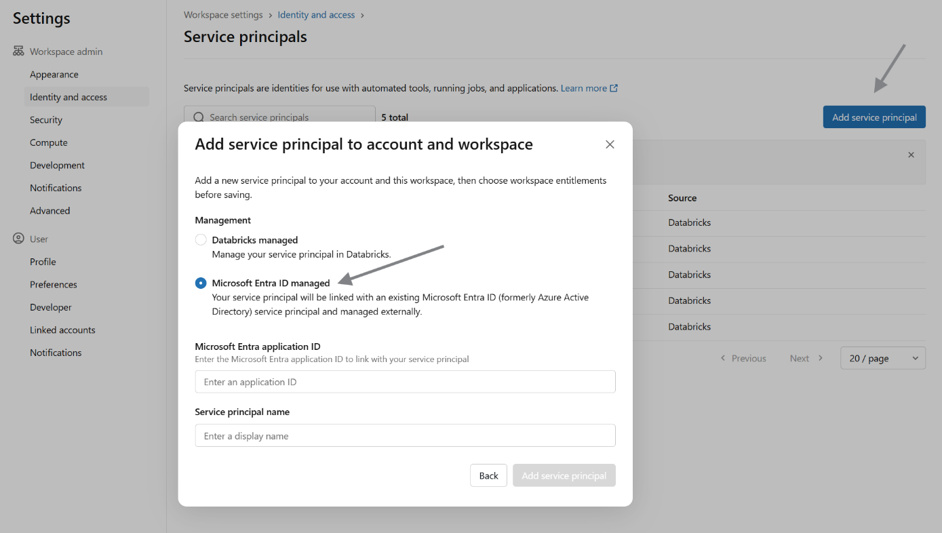
More information at: https://learn.microsoft.com/en-us/azure/databricks/admin/users-groups/manage-service-principals
Step 4: Assign the Service Principal to the Workspace
Add the Service Principal to the corresponding Workspace
Step 5: Grant minimum permissions
Grant the privileges indicated in Required privileges in Unity Catalog.
The plugin only queries metadata via the Unity Catalog REST APIs. It does not access the content of tables or volumes, nor does it perform write operations or permission modifications.
The plugin uses Unity Catalog's listing APIs (Catalogs, Schemas, Tables, and Volumes). If authorization errors occur on tables or volumes during discovery, it will be necessary to grant the minimum privileges indicated by Databricks for those resources (USE CATALOG, USE SCHEMA, and SELECT for tables or READ VOLUME for volumes).
These requirements are defined by Unity Catalog's own official API documentation and may vary depending on the permission strategy used by the client.
Step 6: Configure the plugin's YAML
Add to the YAML:
-
Authorization type
authType: "azure-sp" -
Host
-
Tenant (obtained in Azure in Step 2)
-
Client ID / Application Id (obtained in Azure in Step 2)
-
Client Secret (obtained in Azure in Step 2)
Error handling and retries
The plugin distinguishes between functional errors (input validation, unsupported subType, incorrect element format), which are not retried, and transient technical errors (network, HTTP 5xx, throttling), which are retried according to a configurable policy. In metadataList, partial errors per scope (catalog/schema) are tolerated to maximize discovery coverage; in metadataExtract, partial results are not allowed.
The retry policy is defined per connection via databricksCountRetry (maximum number of retries) and databricksWaitRetry (base wait, in seconds, between retries). On 429 errors with a Retry-After header, the plugin honors that value; in its absence, it applies exponential back-off starting from databricksWaitRetry.
If the error affects a root level of discovery (for example, the inability to list catalogs), it is considered a global error and the operation is aborted.
Configuration
Connectivity
The plugin's connectivity is established against the Unity Catalog REST APIs (/api/2.1/unity-catalog/...) over the host of the Databricks workspace. Domains vary depending on the cloud:
-
Azure:
https://adb-xxxx.azuredatabricks.net -
AWS:
https://xxxx.cloud.databricks.com -
GCP:
https://xxxx.gcp.databricks.com
Multi-connection
The plugin supports multiple connections to different Databricks workspaces or environments. Each connection is uniquely identified by the infrastructure / technology / zone triple (ARI model), where zone acts as a logical discriminator. It is recommended to configure a workspace dedicated to governance (playground) as a central access point under a single ARI.
The separator that Anjana uses to retrieve the values of a list-type attribute (for example, tags) is controlled via attributeSeparator. It is not normally necessary to modify it.
Performance and limits
The plugin regulates the load it places on the Unity Catalog APIs through two YAML blocks, with reasonable default values that normally do not require adjustment:
-
rate-limit, limits the rate of calls with
requests-per-second(requests per second) andtimeout-seconds(maximum wait time per request). -
concurrency, controls the parallelism of discovery and tag retrieval via
listing-threadsandlisting-batch-size(listing) andtags-threadsandtags-batch-size(tags).
Additionally, maxPages limits the maximum number of pages per operation (default 1000), as a safeguard against unbounded pagination.
Common guidelines for all plugins are available in the Technical configuration and Tot plugin deployment sections. In addition, a sample YAML is available to facilitate plugin setup (child page). This file includes the description of each property and its default values, so it can be copied and adapted to the client's installation.
Appendix
More information about the APIs:
https://docs.databricks.com/api/workspace/catalogs/list
https://docs.databricks.com/api/workspace/schemas/list
https://docs.databricks.com/api/workspace/tables/list
https://docs.databricks.com/api/workspace/volumes/list
https://docs.databricks.com/api/workspace/catalogs/list
https://docs.databricks.com/api/workspace/schemas/list