
Introduction
This plugin is used to extract, sample data, and grant and revoke access (together with the AWS IAM plugin) on assets in AWS S3.
Integration model
Metadata extraction
To list the available structures, the list of accessible buckets and all objects are retrieved in order to return a content map. The behavior is slightly different if a bucket is configured in the YML configuration file, since in that case the listing is limited to the content of that bucket.
The value returned in the structure listing is an object with the structure name (which is a concatenation of the infrastructure, technology, and zone) and a list of the objects found within it. In this case, the structure corresponds to the bucket and the object to the object in Amazon S3.
The same tools are used to extract metadata from an object: the object's content is read to extract its metadata and the result is returned.
After running the metadata extraction, an object is obtained with a name (elementName), a list of key-value attributes (such as infrastructure, technology, and zone), and also a list of fields (fields) associated with it, also with their own list of key-value attributes.
For a successful metadata extraction, the attributes must be named the same in the attribute_definition table for the name field, so that they appear on screen:
-
physicalName with the name with the same value as the object
-
path with the concatenation of the object's values in Amazon S3
-
infrastructure with the selected value
-
technology with the selected value
-
zone with the selected value
The attributes to be created in Anjana must have the following types:
|
Attribute name |
Attribute type |
|
physicalName |
INPUT_TEXT |
|
path |
INPUT_TEXT |
|
infrastructure |
SELECT |
|
technology |
SELECT |
|
zone |
SELECT |
|
name |
INPUT_TEXT |
It will also send attributes related to the fields of the requested resource, always depending on the resource's content and type. For more information File System - File Metadata.
Data sampling
For data sampling, the object to be sampled is located (up to the configured maximum number of results), the content of its files is read using Apache libraries according to their type, and the results are returned.
The value returned in the data sampling is an object that contains headers (headers) and values (values).
The headers (headers) include the names of the object attributes that must be returned after the data sampling.
The values (values) include the list of values for each header for each object to be returned. This will allow the plugin to return, in addition to attributes such as the file name or file content, the rest of the data and metadata.
Active governance of structures
In the S3 protocol, paths are emulated, so it is not possible to pre-provision these elements.
Active governance of access
Access management for this technology is performed directly in AWS IAM, so this type of action is delegated to the plugin for that technology, making the presence of this plugin essential in order to have this functionality.
Object editing
Object editing for this technology is performed directly in AWS IAM, so this type of action is delegated to the plugin for that technology, making the presence of this plugin essential in order to have this functionality.
Required credentials
Metadata extraction
If metadata extraction actions are to be performed, a connection to Amazon S3 is required. To establish that connection, an accessKey and a secretKey are needed for the account provided to Anjana to manage data governance. Optionally, a proxy is required if the user does not want a direct connection to Amazon S3.
From the Amazon S3 data, the region where it is located is needed and, optionally, if only a single bucket is to be governed, the desired bucket (if no bucket, is included, all buckets for which the account has permissions are governed).
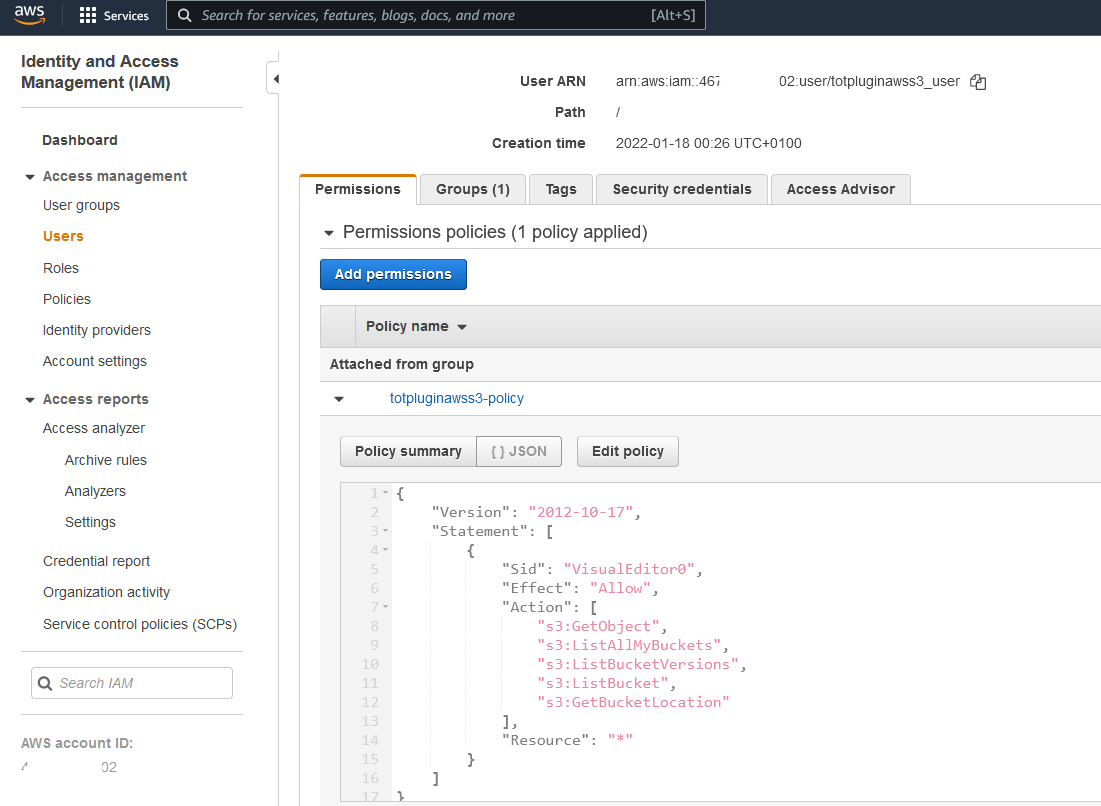
For its part, Amazon S3 defines a set of actions1 that can be specified in a policy and that will help the user with access to the technology obtain the desired information.
For this plugin, the following actions are of interest:
-
s3:ListAllMyBuckets to list all the buckets of the authenticated user.
-
s3:ListBucket to list the content of a bucket.
-
s3:GetBucketLocation to return the region where the bucket resides.
-
s3:GetObject to return objects from Amazon S3. To be able to read the object, read permissions on it are also required.
If the Amazon S3 bucket uses encryption with KMS-managed keys (SSE-KMS), it is necessary to grant additional permissions so that the data key associated with the object can be decrypted and the object decrypted.
-
kms:Decrypt → to be able to decrypt data keys and read content.
-
kms:DescribeKey → to validate the key.
Data sampling
To trigger actions related to data sampling, the same configuration and credentials mentioned above for data extraction are required.
Active governance of structures
In the S3 protocol, paths are emulated, so it is not possible to pre-provision these elements.
Active governance of access
Access management for this technology is performed directly in AWS IAM, so this type of action is delegated to the plugin for that technology, making the presence of the latter essential in order to have this functionality.
Object editing
Object editing for this technology is performed directly in AWS IAM, so this type of action is delegated to the plugin for that technology, making the presence of the latter essential in order to have this functionality.
Limitation on file names
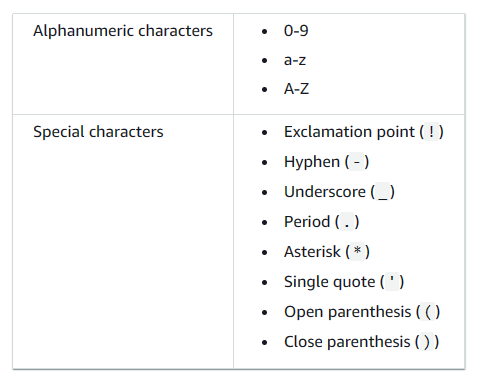
There are certain restrictions in AWS regarding file names for everything to work correctly. The safe characters to use are the following:
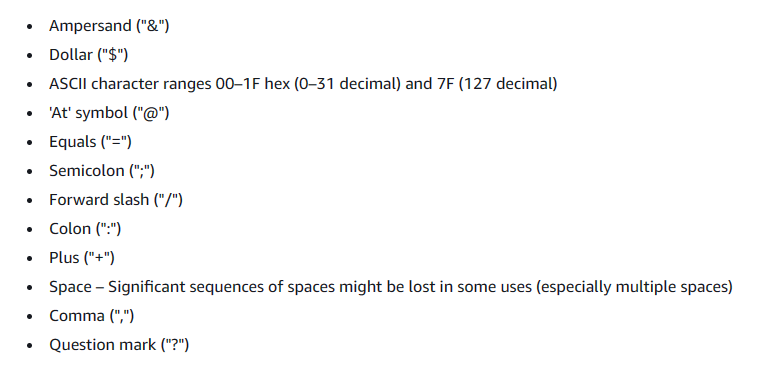
There are also characters that may need special handling, although it is recommended not to use them to avoid problems:
And finally there are characters to avoid that are not supported by AWS https://docs.aws.amazon.com/AmazonS3/latest/userguide/object-keys.html
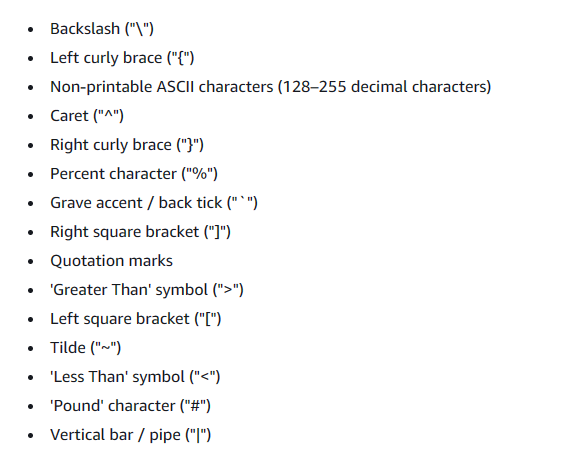
For more information, see the AWS documentation.
1 Actions allowed in Amazon S3: https://docs.aws.amazon.com/AmazonS3/latest/API/API_Operations_Amazon_Simple_Storage_Service.html