
Integration model
Metadata extraction
To extract metadata for an object, the methods provided by the JDBC driver are used, through which the definition of schemas and tables is accessed.
It extracts the following attributes, which must be named the same in the attribute_definition table, name field, in order to appear in the template.
-
catalog with the catalog value in the database
-
schema with the schema value in the database
-
physicalName and name with the same value, the table name
-
path with the concatenation of the catalog, schema and table values
-
infrastructure with the selected value
-
technology with the selected value
-
zone with the selected value
If the metadata is extracted to create a dataset, the following attributes related to the fields of the requested resource will also be extracted in order to populate its structure information:
-
physicalName and name with the same value, the field name
-
defaultValue with the default value set for the field
-
fieldDataType with the data type assigned to the field, if set
-
length with the length of the field, if set.
-
incrementalField
-
position with the value of the position occupied by the field
-
precision with the precision value of the field, if set
-
nullable indicating whether the field is nullable or not (boolean value)
-
pk indicating whether the field is a primary key (boolean value)
-
description the description of the dataset-field
The attributes to be created in Anjana must have the following types:
|
Attribute name |
Attribute type |
|
catalog |
INPUT_TEXT |
|
schema |
INPUT_TEXT |
|
physicalName |
INPUT_TEXT |
|
path |
INPUT_TEXT |
|
infrastructure |
SELECT |
|
technology |
SELECT |
|
zone |
SELECT |
|
name |
INPUT_TEXT |
|
defaulValue |
INPUT_TEXT |
|
fieldDataType |
INPUT_TEXT |
|
length |
INPUT_NUMBER |
|
incrementalField |
INPUT_CHECKBOX |
|
position |
INPUT_NUMBER |
|
precision |
INPUT_NUMBER |
|
nullable |
INPUT_CHECKBOX |
|
pk |
INPUT_CHECKBOX |
|
description |
ENRICHED_TEXT_AREA_INTERNATIONAL |
The plugin is able to extract metadata from the following types of elements:
Database table
Tables with special characters in the name
This technology allows characters such as "/" in the name; if they are being used, the path-separator must be configured with a character other than "/". See File extraction for more details.
Data sampling
Using the JDBC driver, a query with a row limit is executed on the fields defined in the dataset, in which, additionally, the values of sensitive fields are replaced with asterisks.
Fields that are modified after the object is created in Anjana (that is, fields defined in the metadata but not yet incorporated into the physical structure) will appear as unavailable in the sample.
Structure creation
The plugin allows creating physical structures whenever the object is governed. When this happens and the associated workflow is validated, the structure will be created at the specified dataset path. Once created, it will not be modified even if new versions of the dataset are generated, unless a new path is specified.
Access management
The plugin allows managing access to governed structures, by using roles and associating SELECT permissions on the structures to the role.
Editing objects
The plugin allows managing the activation or deactivation of non-native entities, so that when a non-native entity is activated, the corresponding permissions will be granted on the tables, and when it is deactivated, the permissions will be removed.
Supported versions
Support from SQL Server 2016 to SQL Server 2019.
Required credentials
Metadata extraction
User or role with VIEW DEFINITION permissions on the tables or views from which metadata is to be extracted.
It can also be applied directly to schemas or the database, and it will apply to everything it contains.
Data sampling
User or role with SELECT permissions on the tables or views for which a data sample is to be obtained.
It can also be applied directly to schemas or the database, and it will apply to everything it contains.
Structure creation
User with the following permissions/roles required on the catalogs, schemas, and tables to be governed.
CREATE TABLE
The names used to create resources in SQL Server are subject to the restrictions imposed by SQL Server itself for each of them.
Access management
User with the following permissions required on the catalogs, schemas, and tables to be governed.
-
CREATE ROLE
-
ALTER ANY ROLE
-
ALTER ANY LOGIN (required at the master level)
-
CONTROL (optional if role ownership is transferred to a third party)
-
SELECT ON OBJECT
NOTE: The best option for assigning the above permissions, if access management is also going to be performed through Azure AD, is to create a Role with those privileges and assign the service user to that role. This is necessary afterwards, as explained in point 5 of the following section, to assign the Azure Service Principal to the same Role. Example:
ALTER ROLE anjana_service_rol ADD MEMBER anjana_service_user;
Access management via Azure AD
If active governance is going to be carried out with Azure AD, the following steps must be performed:
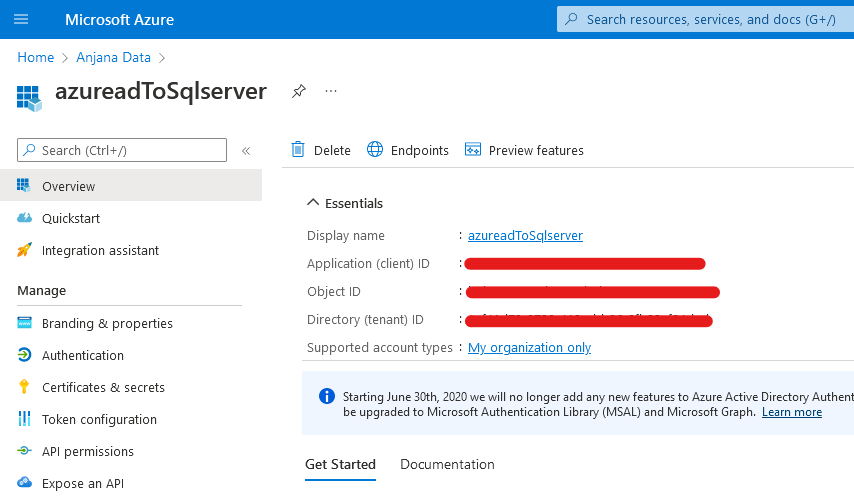
Create an APP in Azure AD to act as the service principal and generate a secret
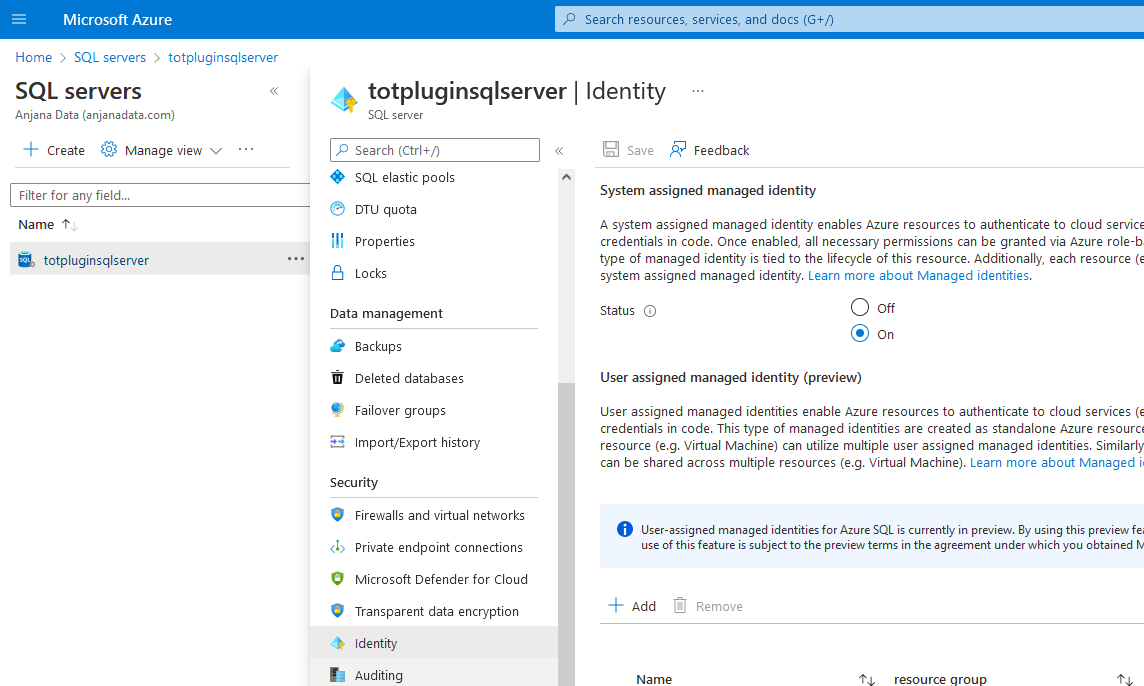
Enable the "System assigned managed identity" option in the Identity settings of the SQL server
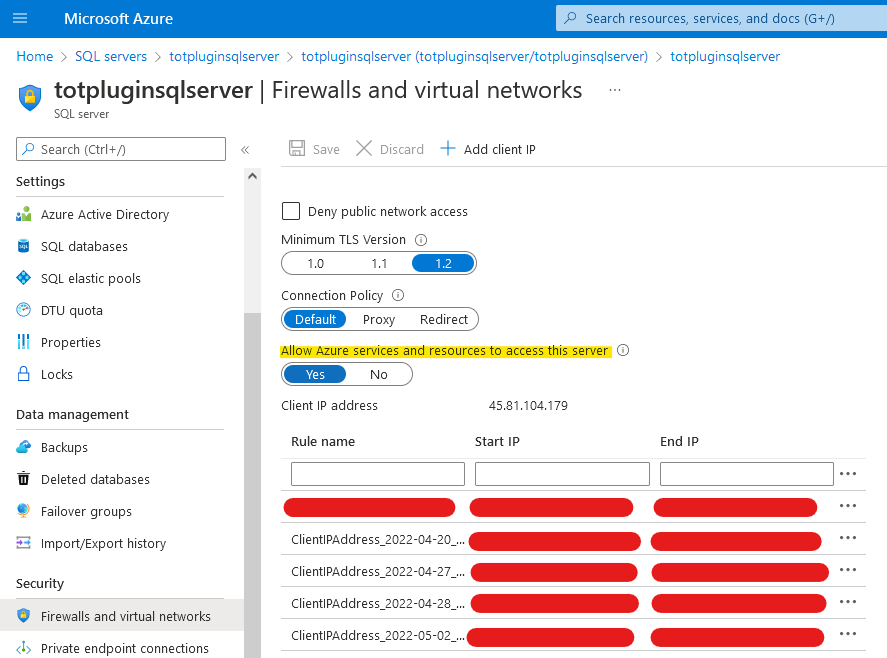
Allow Azure services to access the SQL server
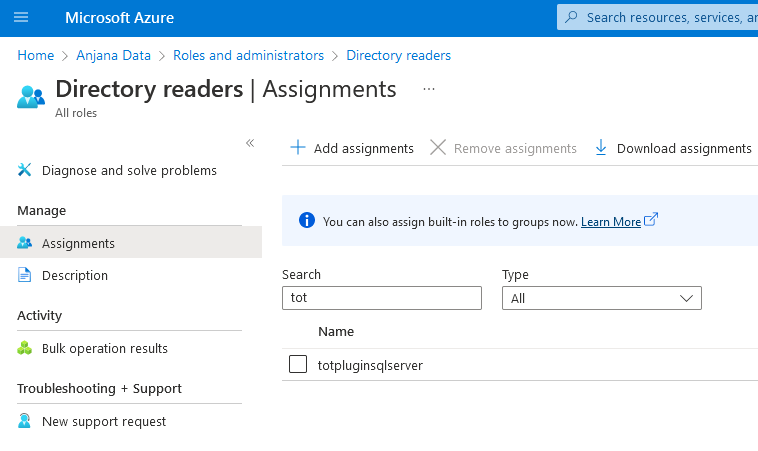
Grant the SQL server identity permission to access the Azure AD directory
In SQL, you must grant permissions to the service principal of the APP used in the Azure AD plugin
-- LOGIN
CREATE USER [<app-name>] FROM EXTERNAL PROVIDER;

-- ADD PERMISSIONS TO [<app-name>]
ALTER ROLE anjana_service_rol ADD MEMBER [<app-name>];
GO
Editing objects
When a non-native entity is activated or deactivated in Anjana, the plugin will grant or remove the permissions on the corresponding tables.
The connection user must have the following permissions on the catalogs, schemas, and tables to be governed.
-
ALTER ANY ROLE
-
SELECT ON OBJECT
-
CONTROL (optional if role ownership is transferred to a third party)
Special considerations:
The credential parameters are divided into two blocks, and both cannot be defined at the same time:
-
Url, user, and password are database connection credentials; they must be used when connecting to a SQL Server.
-
ServerName, databaseName, principalId, and principalSecret are credentials for an Azure SQL Server.
For each configurable connection, Anjana interprets the following in order to know how to communicate with SQLServer:
"using-catalogs" and "using-schemas" determine the level from which SQL Server is governed and how the paths of the structures to be governed from Anjana are interpreted; if both are set to false, only the default schema or the one chosen in the connection URL is shown. (EX: using-catalogs set to false and using-schemas set to true indicate that you want to govern all the schemas you have access to, always within the same catalog or database)
"path-separator" indicates the separator used by Anjana for the path. (EX: If it is "/", the empleados table in the hr schema is expected to arrive from Anjana as hr/empleados). The plugin transforms the path into a structure that is correct for SQL Server, so if it is not specified correctly, it will attempt to create incorrect resources, resulting in an error.
"sampleRows" indicates the number of rows retrieved for the data sampling functionality.
"imType" indicates which type of identity manager external to SQLServer is used; the possible values are:
-
EID for EntraID (formerly AzureAD)
-
AD for Windows AD
-
NONE to use plain SQLServer; this is the default
SQLServer does not have integration with plain LDAP; EntraID or Windows AD must be used.
"imDomain" is used to indicate which identity manager domain will be used; it has no default value and does not need to be used if "imType" is set to NONE.
When creating new roles in SQL Server to assign permissions on the tables to be governed with that role, "rolePrefix" is used to indicate the suffix wanted on the role name. If no suffix is wanted, the variable must be included in the yml without giving it a value.
In the process of creating a role and its permissions there is a series of retries and waits between retries; to configure these retries, "azureCountRetry" and "azureWaitRetry" are used
totplugin:
 sql:
   query-pattern:
     createRole: "CREATE ROLE {0}"
     existRole: "SELECT DATABASE_PRINCIPAL_ID({0})"
     grantSelect: "GRANT SELECT ON {0} TO {1}"
     deleteRole: "DROP ROLE {0}"
     revokeSelect: "REVOKE SELECT ON {0} FROM {1}"
     createFromExternalProvider: "CREATE USER [{0}] FROM EXTERNAL PROVIDER WITH DEFAULT_SCHEMA = [{1}]"
     deleteUser: "DROP USER IF EXISTS [{0}]"
     addMemberRole: "ALTER ROLE [{0}] ADD MEMBER {1}"
     dropMemberRole: "ALTER ROLE [{0}] DROP MEMBER {1}"
The queries executed during the governance cycle are shown above, along with their default values.
-
createRole: Used to create the role
-
existRole: Checks whether the role exists, for error control
-
grantSelect: Grants read permissions on a table to a role
-
deleteRole: Deletes the role
-
revokeSelect: Revokes read permissions on a table from a role
-
createFromExternalProvider: Creates a user with the name of the AD group associated with the table being governed, which will be the identity used when accessing it.
-
deleteUser: Deletes the user corresponding to the name of the associated AD group
-
addMemberRole: Allows adding the created user to the created role.
-
dropMemberRole: Removes the user from the role. The reverse operation of addMemberRole.
Encrypted connection
If you want to connect to the plugin using encryption, it will be necessary to add the following properties to the connection string: encrypt=true;trustServerCertificate=true
totplugin:
  connection:
    - name: dev
      technology:
        url: jdbc:sqlserver://rdbservice:1433;database=<db>;encrypt=true;trustServerCertificate=true
Depending on the server configuration, it may be necessary to change the values of the properties mentioned above. For more information, see Microsoft's documentation: Connection SQLServer
Available ImAri
-
Azure
-
Ldap
By default, the plugin assumes it connects to an Azure AD and links the SQL Server user with Azure AD. If a different AD is used, the following configuration must be specified:
totplugin:
 connection:
    - name: dev
      technology:
        sql:
          query-pattern:
     createFromExternalProvider: "CREATE USER [DOMAIN\{0}] FROM EXTERNAL PROVIDER WITH DEFAULT_SCHEMA = [{1}]"
Where DOMAIN is the AD domain