
Integration Model
Metadata Extraction
The methods provided by the JDBC driver are used to access the schema and table definitions.
The plugin extracts the following attributes, which must be named the same in the attribute_definition table, name field, so that they appear in the template:
-
catalog with the catalog value in the database
-
schema with the schema value in the database
-
physicalName and name with the same value, the table name
-
path with the concatenation of the catalog, schema and table values
-
infrastructure with the selected value
-
technology with the selected value
-
zone with the selected value
It also sends the following attributes related to the fields of the requested resource:
-
name with the value of the corresponding field
-
physicalName with the value of the corresponding field
-
defaultValue with the default value defined for the corresponding field
-
fieldDataType with the data type defined for the corresponding field
-
length with the size of the corresponding field
-
incrementalField indicating whether it is an incremental field
-
position the position occupied by the corresponding field
-
precision with the precision value of the corresponding field
-
nullable indicating whether the corresponding field is nullable
-
pk indicating whether the field is a pk
-
description with the corresponding value for the field
The attributes to be created in Anjana must have the following types:
|
Attribute name |
Attribute type |
|
catalog |
INPUT_TEXT |
|
schema |
INPUT_TEXT |
|
physicalName |
INPUT_TEXT |
|
path |
INPUT_TEXT |
|
infrastructure |
SELECT |
|
technology |
SELECT |
|
zone |
SELECT |
|
name |
INPUT_TEXT |
|
defaultValue |
INPUT_TEXT |
|
fieldDataType |
INPUT_TEXT |
|
length |
INPUT_NUMBER |
|
incrementalField |
INPUT_CHECKBOX |
|
position |
INPUT_NUMBER |
|
precision |
INPUT_NUMBER |
|
nullable |
INPUT_CHECKBOX |
|
pk |
INPUT_CHECKBOX |
|
description |
ENRICHED_TEXT_AREA_INTERNATIONAL |
The plugin is able to perform metadata extraction on the types of elements configured for it. By default, it will attempt to extract Tables (TABLE) and Views (VIEW). If the technology accepts other types, check the YAML mentioned in Configuration.
Generic Java documentation on the fields available in JDBC if a driver does not make its metadata catalog available https://docs.oracle.com/javadb/10.10.1.2/ref/rrefcrsrgpc1.html
Data Sampling
Using the generic Java JDBC driver, a simple SELECT query is executed to access a limited number of table elements in order to retrieve a sample of the stored data. Additionally, the values of sensitive fields are replaced with asterisks.
If the data sample is taken on a table in the default Hive schema (or default database), Anjana may display an error due to a discrepancy between the column names managed by the driver and the names of those same columns in a select query. This discrepancy prevents the value from being correctly associated with the column represented in Anjana.
Available Vendors
For each vendor, the supported versions, the connection format, and the permissions required for the plugin's functionalities (extraction and data sampling) are detailed.
⚠️ Note
If, when running the metadata extraction while connecting to an Oracle database, the following error appears:
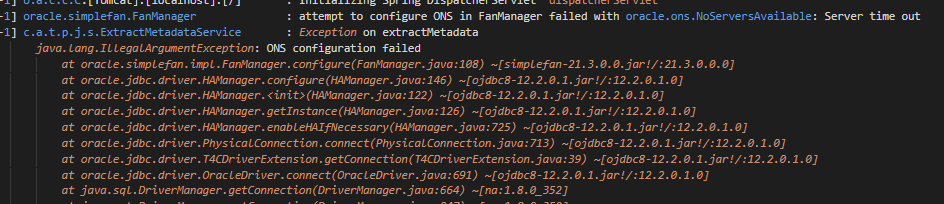
It is necessary to include “-Doracle.jdbc.fanEnabled=false” in the plugin's service descriptor execution command (issue info: https://support.oracle.com/cloud/faces/DocumentDisplay?_afrLoop=190836230347481&_afrWindowMode=0&id=2616175.1&_adf.ctrl-state=qk122q2vr_4)