
Integration Model
Metadata Extraction
The methods provided by the Glue API are used to access the definition of databases and tables.
It extracts the following attributes, which must be named the same in the attribute_definition table, name field, so that they appear in the template.
|
Attribute name |
Attribute type |
Description |
|
physicalName, name |
INPUT_TEXT |
Table name |
|
dataBase |
INPUT_TEXT |
Database name |
|
description |
INPUT_TEXT |
Table description |
|
path |
INPUT_TEXT |
Path to the object, using the pathSeparator property as separator |
|
infrastructure |
SELECT |
Anjana attribute used to extract the table |
|
technology |
SELECT |
Anjana attribute used to extract the table |
|
zone |
SELECT |
Anjana attribute used to extract the table |
|
data_format |
INPUT_TEXT |
Data format of the table |
|
compressed |
INPUT_CHECKBOX |
Whether the table data is compressed |
|
partitionKeys |
ARRAY_ALPHANUMERICAL |
The partition key(s) of the table, if it has been partitioned. It will arrive as a single String using "_-" as separator between values |
|
tableCreatedTime |
INPUT_DATE |
Table creation date |
|
datasourceLocation |
INPUT_TEXT |
Source of the table's data |
|
datasourceInputFormat |
INPUT_TEXT |
Format of the source data of the table |
|
serializationLibrary |
INPUT_TEXT |
Library used in the creation and update of the table |
|
tableType |
INPUT_TEXT |
Table type |
|
tableVersion |
INPUT_TEXT |
Table version |
|
catalogId |
INPUT_TEXT |
ID of the catalog where the table is located |
All extra parameters present in the table's metadata will be included.
It will also send the following attributes related to the fields of the requested resource:
|
Attribute name |
Attribute type |
Description |
|
physicalName, name |
INPUT_TEXT |
Column name of the table |
|
description |
INPUT_TEXT |
Description of the column of the table |
|
fieldDataType |
INPUT_TEXT |
Data type of the column of the table |
|
pk |
INPUT_CHECKBOX |
Whether the column is the primary key of the table |
|
position |
INPUT_NUMBER |
Position of the column in the table |
All extra parameters present in the column's metadata will be included.
The plugin is able to extract metadata from the following types of elements:
Tables from the different databases hosted in the service; always in the same format as it appears in Glue, never in the format of the location of the generated files (S3).
Tables with characters in the name
This technology allows characters such as "/" in the name; if they are being used, the path-separator must be configured with a character other than "/". See File extraction for more details.
Required Credentials
Metadata Extraction
A user with read permissions on the Glue service is required. Among the read permissions*, the following are necessary:
-
glue:SearchTables
-
glue:GetConnection
-
glue:GetTable
-
glue:GetTables
-
glue:GetDatabases
-
glue:GetPartitions
Note: These are the minimum permissions for Amazon Glue to work correctly. Each technology that Glue goes through to obtain the data may require its own permissions in Glue.
If metadata extraction is desired, a connection with Amazon Glue is required. To establish this connection, an accessKey and a secretKey from the AWS IAM account are required. In addition, the region in which it is located is required.
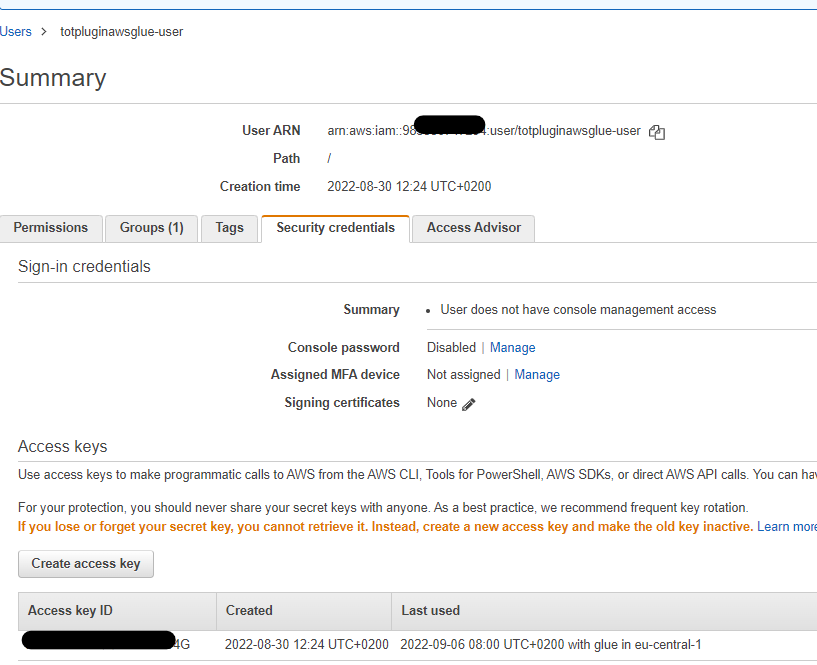
In order to obtain the accesskey and secretkey needed for the installation, a user must be created in AWS IAM and, in the security credentials tab, access keys must be created, which will be entered in the configuration yaml.
An AWS policy must be created and assigned to the group where the user is located.
It must be as follows:
{
    "Version": "2012-10-17",
    "Statement": [
        {
            "Sid": "VisualEditor0",
            "Effect": "Allow",
            "Action": [
                "glue:SearchTables",
                "glue:GetTable",
                "glue:GetConnection",
                "glue:GetTables",
                "glue:GetPartitions",
                "glue:GetPartition",
                "glue:GetDatabases"
            ],
            "Resource": "*"
        }
    ]
}