
Introduction
This plugin is used to extract, sample data, and grant and revoke access (together with the Entra ID plugin) on assets in Azure Storage storage accounts.
Integration Model
Metadata extraction
Using the libraries provided by Azure, it authenticates against the storage account that contains the container to be governed.
Once the connection has been established, the container in question is traversed in order to generate a tree representing all of its content.
To extract the metadata of a given object, the same connection and the same tools provided by the Azure library are used to read the metadata, which will subsequently be sent to Anjana to create the object.
The following attributes are the ones the plugin will extract as metadata.
If you want the object in Anjana to have these attributes, you must create the corresponding field in the attribute_definition table with the same name as in the document, and it must be present in the object's template.
The set of attributes on the extracted object is optional, except for schema, physicalName, path, infrastructure, technology, and zone, in the case where the extracted object is going to be governed by Anjana.
-
schema with the value of the Azure container.
-
physicalName and name with the same value, the name of the file within Azure.
-
path with the path and the name of the resource if it is a file.
-
infrastructure with the selected value
-
technology with the selected value
-
zone with the selected value
-
creationTime with the file's creation date
-
lastModified with the date of the file's last modification
-
eTag with the file's eTag
-
fileSize with the file size in bytes
-
contentType with the file type
-
contentMd5 with the md5 hash of the file content
-
contentEncoding with the file encoding
-
contentDisposition with the file disposition
-
contentLanguage with the file language
-
cacheControl with the file's cache control value
-
leaseStatus with the file's lock status, which can be
-
LOCKED: The file is locked by an operation from some service.
-
UNLOCKED: The file has no lock.
-
-
leaseState with the lock state of the file, which can be
-
AVAILABLE: There is no active lock.
-
BREAKING: Transitioning to BROKEN.
-
BROKEN: It is not being used by another service, but it will be released when the lock expires. Renewing the lock is not allowed.
-
EXPIRED: The previous lock has expired and can be locked again by another service or renewed (in case it was not broken before).
-
LEASED: Locked by another service.
-
-
leaseDuration with the type of lock the file has, which can be
-
FIXED: The current lock has a maximum time
-
INDEFINITE: The current lock has no maximum time; it must be removed manually via a release or break request.
-
-
copyId with the identifier of the last copy operation on the file (if a copy has never been performed or the file has been modified, this property has no value)
-
copyStatus with the status of the last copy operation on the file (if a copy has never been performed or the file has been modified, this property has no value), which can be
-
PENDING: There is an operation in progress
-
SUCCESS: The last operation completed successfully
-
ABORTED: The last operation was aborted
-
FAILED: The last operation failed.
-
-
copySource with the source path of the last copy operation on the file (if a copy has never been performed or the file has been modified, this property has no value)
-
copyProgress with the number of bytes copied and total source bytes of the last copy operation on the file (if a copy has never been performed or the file has been modified, this property has no value)
-
copyCompletionTime with the date of the last time a copy operation was performed on the file (if a copy has never been performed or the file has been modified, this property has no value)
-
copyStatusDescription with the description of the last copy operation on the file if it was aborted or failed (if a copy has never been performed or the file has been modified, this property has no value)
-
isServerEncrypted indicating whether the file is encrypted
-
isIncrementalCopy indicating whether the file is an incremental copy
-
accessTier with the type of access tier of the file, which can be
-
ARCHIVE: The file cannot be read or modified.
-
COOL: The file is expected not to be read or modified frequently.
-
HOT: The file is expected to be read or modified frequently.
-
P4, P6, P10, P15, P20, P30, P40, P50, P60, P70, or P80: These options refer to cases where the medium on which the files are stored is not flexible and has fixed values both in storage capacity and in speed and number of accesses. In some cases they have temporary expansions in case their access is exceeded.
-
-
archiveStatus with the file's rehydration status (only applies if the file is at the ARCHIVE access tier and it is being made accessible again), which can be
-
REHYDRATE_PENDING_TO_HOT: It is in the process of moving from ARCHIVE to HOT
-
REHYDRATE_PENDING_TO_COOL: It is in the process of moving from ARCHIVE to COOL
-
-
encryptionKeySha256 with the key used to encrypt the file
-
accessTierChangeTime with the date when the access tier was last modified
-
isDirectory indicating whether the file is a directory (this can only be true for partitioned files such as avro or parquet)
In addition to these values present in every Azure Storage file, extra properties can be added; all included properties will be collected and extracted.
It will also send attributes related to the fields of the requested resource, always depending on the content and type of the resource. For more information File System - File Metadata.
Data sampling
Using the libraries provided by Azure, it authenticates against the storage account that contains the container to be governed.
Once the connection has been established, the object to be sampled is located, its content is read (up to the configured maximum number of results) using Apache libraries depending on the file type, and the results are returned.
Active governance
Using the libraries provided by Azure, it authenticates against the storage account that contains the container to be governed.
The object on which permissions are to be manipulated is located, and using ACL manipulation tools, the necessary permissions are added to the group on the objects (Read, Execute at all levels from the root to the file representing the object, and in the case of a partitioned file, on all files present at that time) when they are included in a DSA. Additionally, the group's ACL is removed when the group expires or the object itself expires.
The plugin only grants access to files or directories within the blobs of the storage account it governs. Access to the storage account for users must be set up manually. It is recommended to give users the reader role on the storage account (this will allow them to see the blob names but not access their content).
Object editing
Using the libraries provided by Azure, it authenticates against the storage account that contains the container to be governed, in this case to manage the activation or deactivation of non-native entities.
When a non-native entity is activated, the necessary permissions will be given to the group on the objects (Read, Execute at all levels from the root to the file representing the object, and in the case of a partitioned file, on all files present at that time), and when the object is deactivated, the group's ACLs will be removed when the group expires or the object itself expires.
The plugin only grants access to files or directories within the blobs of the storage account it governs. Access to the storage account for users must be set up manually. It is recommended to give users the reader role on the storage account (this will allow them to see the blob names but not access their content).
Required credentials
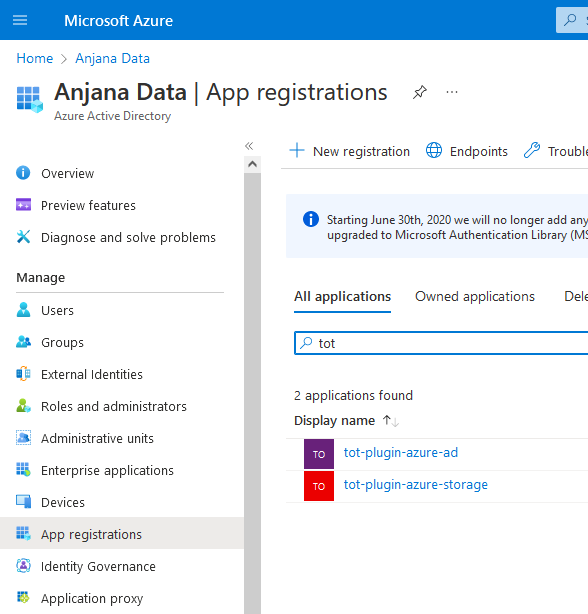
It is necessary to register an application in Entra ID and generate the required clientID and secret so that the plugin can authenticate and acquire the necessary permissions for each functionality.
The plugin has the capacity to handle only one storage account; therefore, it is necessary to create an instance for each of the storage accounts to be managed.
Metadata extraction and data sampling
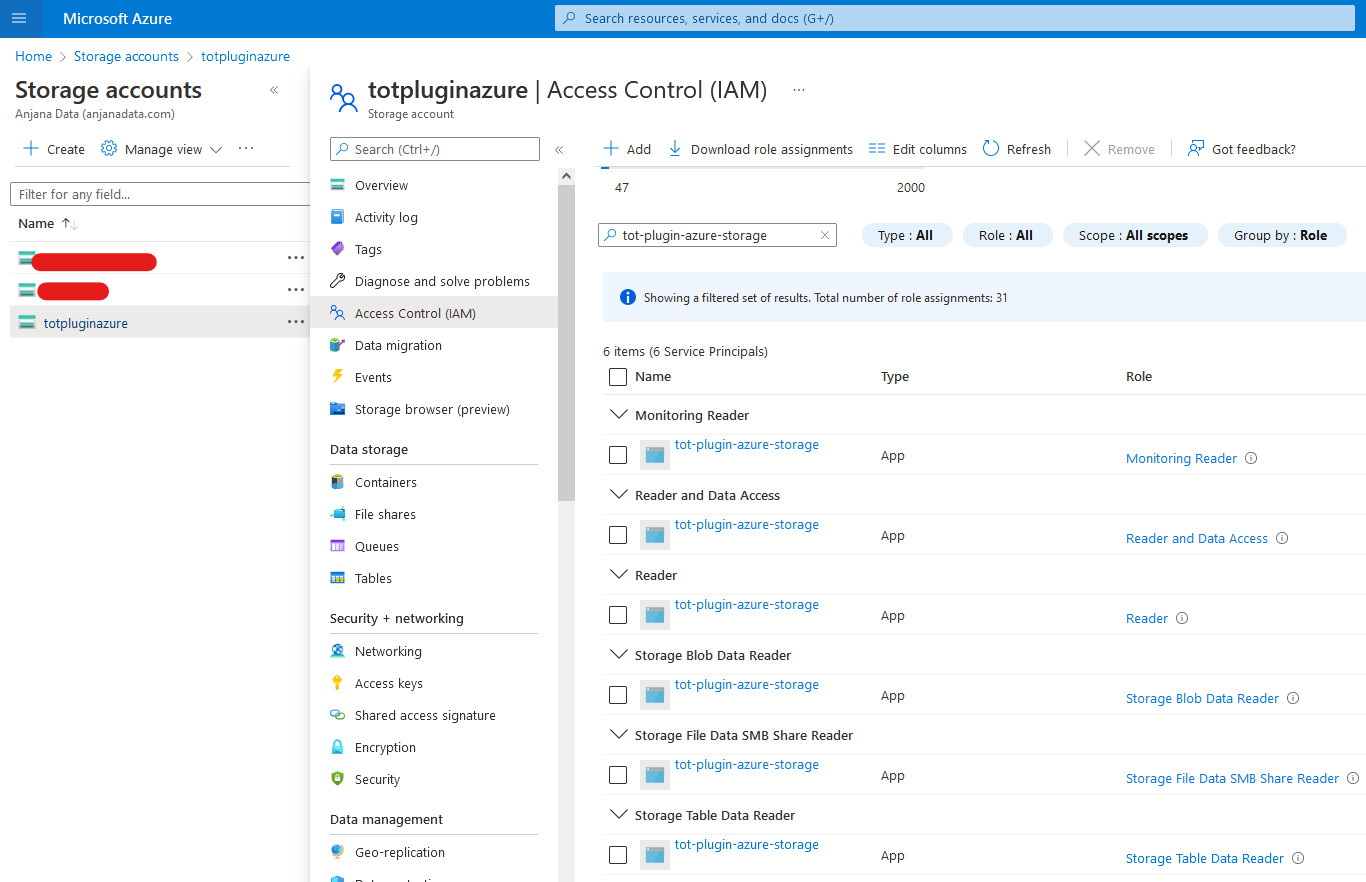
Read permissions are required on the different storage types, as well as on the general configuration of the storage account itself.
-
Reader: Allows reading all resources, but not making any changes.
-
Storage Blob Data Reader: Read access on an Azure Storage Blob Container.
-
Storage File Data SMB Share Reader: Read access on Azure File Share using SMB.
-
Storage Table Data Reader: Read access for Azure Storage tables and entities.
Active governance of access and structures
-
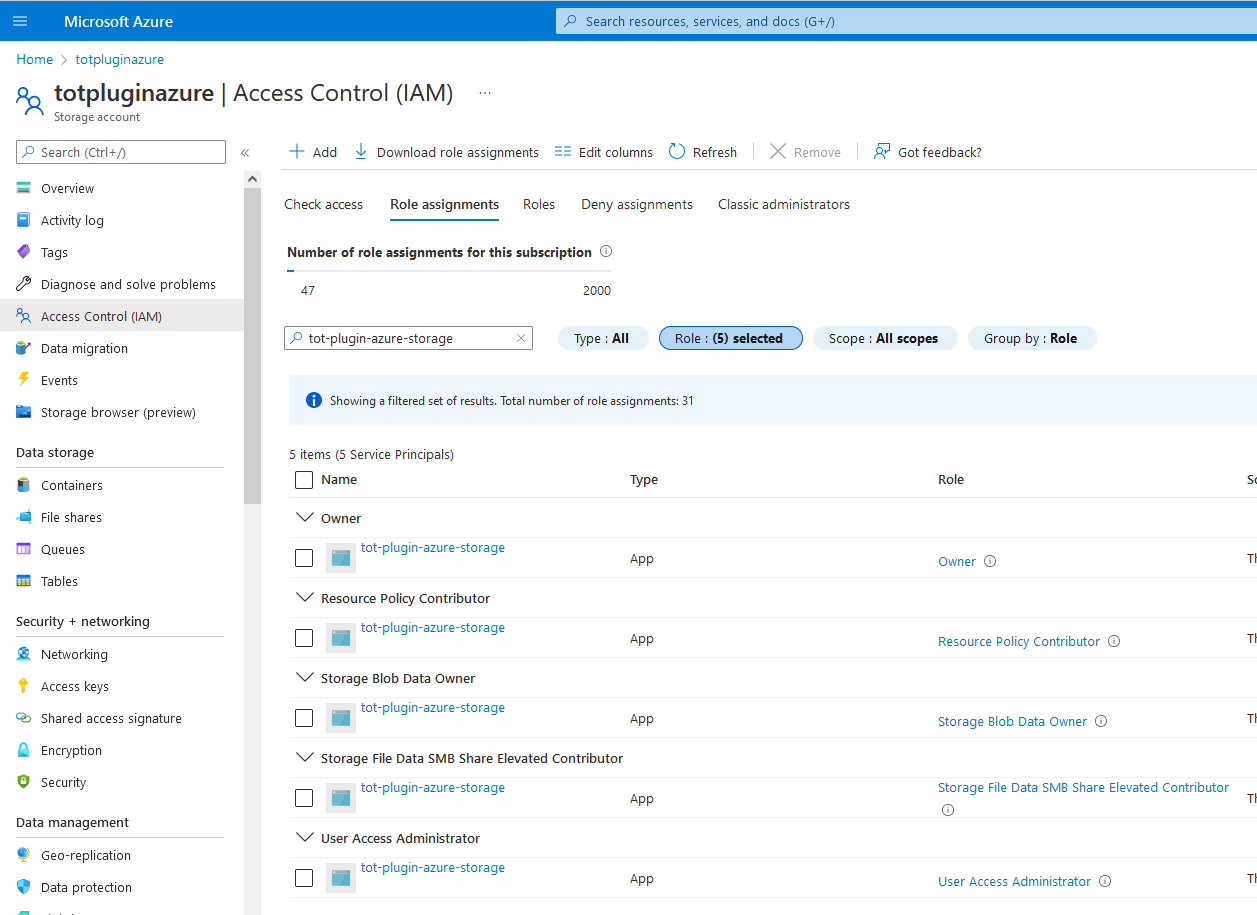
User Access Administrator: Ability to manage user access to Azure resources.
-
Storage Blob Data Owner: Full access to Azure Storage Blob Containers, the data they contain, and access to them. Required to be able to modify ACLs on governed files.
Object editing
-
User Access Administrator: Ability to manage user access to Azure resources.
-
Storage Blob Data Owner: Full access to Azure Storage Blob Containers, the data they contain, and access to them. Required to be able to modify ACLs on governed files.
Limitations
The maximum number of effective ACLs on a file or directory is 28.
In practical terms, this means that a blob can be governed by up to 28 DSAs at most, if no other system applies ACLs to that blob.
When granting permissions to partitioned files, if the files in those partitions change or more are added, they will not contain the permissions that other parts of the same file have.
Given the strict limitations of the technology, it is recommended to deprecate and expire the DSA as soon as possible once all of its governed objects have expired, in order to clean up unused ACLs.