
Integration Model
Metadata extraction
To extract metadata from an object, the following APIs are used:
-
https://learn.microsoft.com/en-us/rest/api/power-bi/admin/apps-get-apps-as-admin
-
https://learn.microsoft.com/en-us/rest/api/power-bi/admin/groups-get-groups-as-admin
-
https://learn.microsoft.com/en-us/rest/api/power-bi/admin/datasets-get-datasets-in-group-as-admin
-
https://learn.microsoft.com/en-us/rest/api/power-bi/admin/reports-get-reports-in-group-as-admin
With these APIs, it is possible to extract the following PowerBI object types:
-
APP
-
Workspace
-
Dataset (data model)
-
Report
-
Dashboard
The plugin extracts the following attributes, which must be named the same in the attribute_definition table, name field, so that they appear in the template:
|
Attribute name |
Attribute type |
Description |
|
physicalName, name |
INPUT_TEXT |
object name |
|
path |
INPUT_TEXT |
path to the object |
|
infrastructure |
SELECT |
selected value |
|
technology |
SELECT |
selected value |
|
zone |
SELECT |
selected value |
Additionally, the Azure API itself allows returning more attributes that, in the same way, in order to appear in Anjana Data, must match attributes defined in the object template with the same name. In case of doubt about the returned value, INPUT_TEXT will always accept inserting any value.
App: https://learn.microsoft.com/en-us/rest/api/power-bi/admin/apps-get-apps-as-admin#adminapp
-
The id field must be represented in Anjana as appId.
Workspace: https://learn.microsoft.com/en-us/rest/api/power-bi/admin/groups-get-groups-as-admin#admingroup
-
The id field must be represented in Anjana as workspaceId.
-
The state field must be represented in Anjana as workspaceState.
-
The dataflows and workbook field is not retrieved as it is a separate data type that will be extracted in future versions.
-
The users field is not retrieved as it has been deprecated by PowerBi
-
Information related to dashboards, datasets, and reports is extracted as a list of names, with a specific field for each.
-
The logAnalyticsWorkspace field is not retrieved due to API limitations.
-
The type field must be represented in Anjana as workspaceType.
Dataset (data model): https://learn.microsoft.com/en-us/rest/api/power-bi/admin/datasets-get-datasets-in-group-as-admin
-
The id field must be represented in Anjana as semanticModelId.
-
The tags field is not retrieved as it is only available in the Fabric API at the time this document was written.
-
The users field is not retrieved as it has been deprecated by PowerBi.
-
The ContentProviderType field is not retrieved as it has been deprecated by PowerBi.
Report: https://learn.microsoft.com/en-us/rest/api/power-bi/admin/reports-get-reports-in-group-as-admin
-
The id field must be represented in Anjana as reportId.
-
The tags field is not retrieved as it is only available in the Fabric API at the time this document was written.
-
The subscriptions and users fields are not retrieved as they have been deprecated by PowerBi.
-
The id field must be represented in Anjana as dashboardId.
-
The displayName field will be included in Anjana as the generic name field.
-
The tags field is not retrieved as it is only available in the Fabric API at the time this document was written.
-
The subscriptions and users fields are not retrieved as they have been deprecated by PowerBi.
Tables with characters in the name
This technology allows characters such as “/” in the name; if they are being used, the path-separator must be configured with a character other than “/”. See File extraction for more details.
Access management
The Power BI Tot Plugin incorporates access management for Power BI assets cataloged in Anjana Data Platform. This functionality allows assigning and revoking effective permissions in Power BI based on the lifecycle of a DSA, using Azure Entra ID groups as the sole authorization unit.
The model guarantees deterministic, idempotent, and traceable behavior, and relies on the following design principles:
-
Group-based authorization, permissions are always granted to Azure Entra ID groups, never to individual users. Any change in group membership is reflected indirectly in Power BI.
-
Separation of responsibilities, identity and group management is handled by the Azure Entra ID Tot Plugin; the Power BI Tot Plugin acts exclusively on the authorization layer of Power BI resources.
-
Least privilege, the permission level granted is fixed per object type and not configurable per DSA, which guarantees consistency across environments.
-
Idempotency, the plugin checks the current state before acting. Repeating an assignment or a revocation produces no side effects or functional errors.
-
Best-effort processing, in operations on multiple objects, failure on one of them does not interrupt processing of the rest; objects with errors are returned identified in the response.
Distribution of responsibilities between plugins
|
Responsibility |
Tot Plugin Azure Entra ID |
Tot Plugin Power BI |
|---|---|---|
|
Create and delete groups in Entra ID |
Yes |
No |
|
Add and remove users from the group |
Yes |
No |
|
Resolve the group identifier |
Yes |
No |
|
Assign permissions on Power BI resources |
No |
Yes |
|
Revoke permissions on Power BI resources |
No |
Yes |
The creation and deletion of groups in Entra ID, user management within groups, direct calls to the Microsoft Graph API, and information persistence are outside the scope of the Power BI plugin.
Scope over Power BI assets
Power BI manages access through a layered security model in which Workspace visibility, Dataset data access, and App publishing are distinct mechanisms. The plugin relies solely on the Workspace and Dataset mechanisms, which are the only ones that can be automated through the Power BI REST API.
|
Power BI object |
Plugin action |
Permission granted |
Access mechanism |
|---|---|---|---|
|
Workspace |
Direct assignment and revocation via REST API |
Viewer |
Direct permission on the Workspace |
|
Dataset / Semantic model |
Direct assignment and revocation via REST API |
Read |
Direct permission on the Dataset |
|
Report |
Not applicable |
— |
Inheritance from the containing Workspace |
|
Dashboard |
Not applicable |
— |
Inheritance from the containing Workspace |
|
App |
Not applicable |
— |
Inheritance from the Workspace from which it is published |
Permissions granted on a Workspace are automatically propagated to all content it hosts. Datasets and semantic models also inherit from the Workspace, but additionally support isolated assignment.
Objects of type Report, Dashboard, and App included in a DSA are ignored by the plugin without generating an error, since the Power BI REST API does not allow complete and consistent permission management at that level. Their effective access is obtained through inheritance from the Workspace.
Configuration in Anjana Data Platform
This section covers the actions the client must perform in Anjana Data Platform for access management on Power BI to operate correctly.
Prerequisites
-
Azure Entra ID Tot Plugin, deployed and configured, since it is responsible for creating and resolving the groups that the Power BI plugin uses as the authorization unit.
-
Cataloged assets, Power BI objects must have been previously incorporated into the Catalog through metadata extraction.
Access granting and revocation procedure
-
Create a DSA and include in it entities of type WORKSPACE or DATASET/SEMANTIC_MODEL.
-
Approve the DSA. The plugin assigns the associated group the Viewer permission on the Workspaces and Read on the included datasets or semantic models.
-
Expire the DSA when access must be revoked. The plugin revokes the permissions previously granted on the DSA's objects.
Including entities of type REPORT, DASHBOARD, or APP in a DSA has no effect: the plugin ignores them without error. To grant access to these assets, the Workspace that contains them must be included in the DSA, as it is the minimum manageable permission level.
Use of pre-existing corporate groups (physicalName)
When the DSA reports the physicalName attribute, the associated group is considered pre-existing and externally managed. In this scenario, the Azure Entra ID Tot Plugin does not create or delete the group, it only resolves its identifier, while the Power BI plugin evaluates the current state of the permissions before applying any change.
It is the client's responsibility to ensure that the reused group meets the following conditions:
-
No incompatible prior permissions, on the Power BI resources included in the DSA.
-
No higher roles than those provided for by the least-privilege model.
-
No conflicting permissions on the same resources.
If incompatible permissions are detected, the plugin rejects the operation on the affected object and logs it as an error.
Modeling recommendations
-
Granularity, since the minimum manageable level is the Workspace, access segregation must be planned by organizing content into separate Workspaces.
-
Dependencies between Workspaces, it is advisable to verify that the reports and apps included in the scope do not consume datasets hosted in other Workspaces, since those dependencies are not covered automatically.
This section is aimed primarily at functional administrators of the platform and those responsible for administering the Power BI tenant.
Known limitations and considerations
-
Granularity limited to the Workspace and the Dataset, Power BI does not allow direct management of permissions on reports, dashboards, and apps. Access to these objects is obtained through inheritance from the Workspace and granular control per individual object is not guaranteed.
-
Dependencies between Workspaces, the current version does not detect when a report, dashboard, or app consumes datasets hosted in other Workspaces, nor does it issue functional warnings. A user may have access to the Workspace and not be able to correctly view certain content due to lack of permissions on external datasets.
-
Synchronization between Entra ID and Power BI, the propagation of a newly created group is not instantaneous. The plugin automatically retries on transient errors associated with this delay, according to the configured policy.
-
Power BI API throttling, the standard limit is approximately 120 requests per minute per Service Principal. When a throttling response is received, the plugin retries according to the countRetry and waitRetry parameters.
-
Expiration on report and dashboard, is out of scope. The minimum applicable expiration level is the Workspace or the dataset/semantic model.
-
Traceability with correlationId, end-to-end propagation of a correlation identifier is out of scope for the current version.
Error classification
The plugin normalizes the result of each processed element and classifies errors into the following categories, returning objects with errors identified in the response.
|
Category |
Common cause |
Handling |
|---|---|---|
|
AUTH |
Expired token, missing scope, or Service Principal without an adequate role in the Workspace |
Token renewal and retry if recoverable; otherwise requires manual configuration intervention |
|
VALIDATION |
Invalid identifiers or payload; synchronization delay between Entra ID and Power BI |
Retry only in the transient synchronization case |
|
NOT_FOUND |
Group not yet visible in Power BI, or resource nonexistent or already deleted |
Retry in the transient case; on revocation, the state is considered already reached |
|
CONFLICT |
The group already has the requested permission |
It is treated as a state already reached and considered a successful operation |
|
THROTTLED |
Requests-per-minute limit exceeded |
Retry with configurable wait |
|
UNKNOWN |
Internal Power BI error |
It is logged and marked as a technical error of the element |
Required credentials
Metadata extraction
The following permissions are required:
-
Be an administrator of the workspaces from which metadata is to be extracted.
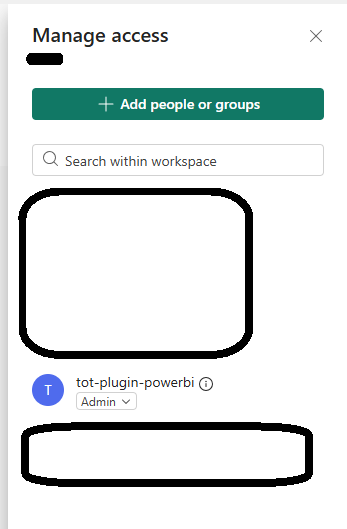
These permissions must be granted on the service principal that will be used for the plugin's purpose. These permissions cannot be admin consent; they must be delegated permissions:
-
Configuring the App Registration
-
Go to the Azure Portal.
-
Navigate to Azure Active Directory > App registrations > + New registration.
-
Provide a name for the application and select the account type (the most common is Accounts in this organizational directory only).
-
Access management
Access management runs with the same technical identity as metadata extraction: an Azure Entra ID Service Principal that authenticates against the Power BI REST API using OAuth2 client credentials. The credentials (clientId, clientSecret, and tenantId) are configured in application-default.yaml.
Permissions in Azure Entra ID
-
User.Read.All, configured on the App Registration used by the plugin.
Requirements in Power BI
Entra ID permissions are not sufficient on their own: the effective management capability depends on Power BI's internal authorization model. Additionally required:
-
Generate a security group in Azure specific to consuming the PowerBI APIs
-
Add the generated APP to the group
-
Add the group to the following existing option in PowerBI (see screenshot)
-

-
Service Principal enablement, in the Power BI admin portal, the option «Allow service principals to use Power BI APIs» must be enabled, with the security group that contains the application included in that option.
-
Admin role on the Workspace, the Service Principal must be assigned as Admin on each target Workspace on which the plugin will assign, revoke, or query permissions.
OAuth scopes do not replace Power BI's internal authorization model. If the Service Principal does not have the appropriate role in the Workspace, or the Service Principal is not enabled in the admin portal, the calls return 403 Forbidden. This error is not retried and requires manual configuration intervention.
Configuration summary by responsible party
|
Configuration |
Where it is performed |
Responsible party |
|---|---|---|
|
App Registration and User.Read.All permission |
Azure Portal — Entra ID |
Client (tenant administrator) |
|
Security group with the application and service principal enablement |
Power BI admin portal |
Client (Power BI administrator) |
|
Service Principal Admin role on each target Workspace |
Power BI — Workspace configuration |
Client (Workspace Owner) |
|
clientId, clientSecret, tenantId, and retry policy (countRetry, waitRetry) |
|
Anjana Data Platform installation |