
The next step in configuring the governance operating model in Anjana Data is to define the notifications that inform users about events, validation flows (workflows), or platform incidents.
Notifications are a key mechanism for ensuring traceability and communication within data governance, as they alert users or entire roles about actions such as the expiration of an object, the creation of a workflow, an adherence failure, a policy modification, or a license expiration.
In Anjana Data, notifications are configured in the Notifications table of the configuration panel and will subsequently be available in the data portal for affected users.
Table Notifications in the Configuration Panel (Administrator View)
Notifications are configured in the Notifications table of the configuration panel. Defining notifications is an essential step to be able to configure workflows in the BPM and for key users to receive notifications relevant to them.
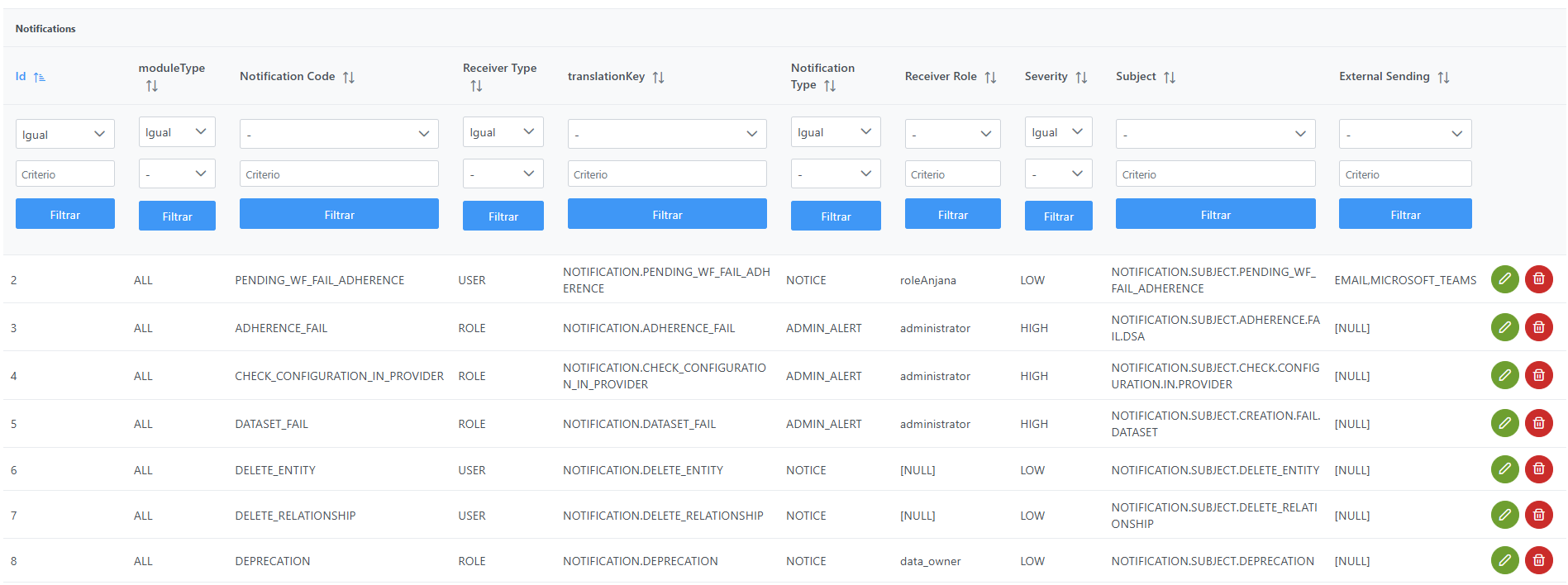
Structure of the Notifications table
Each notification registered in the table is characterized by the following fields:
-
id: unique identifier of the notification (PK). -
moduleType: module to which the notification applies. This is currently an informational (legacy) field inherited from older versions. Possible values:-
"BG"→ Business Glossary -
"DC"→ Data Catalog -
"ALL"→ applies to the entire platform (recommended option).
-
-
notificationCode: alphanumeric code that identifies the notification and allows it to be invoked from the platform's functionalities. -
notificationReceiverType: defines the type of recipient. Possible values:-
"USER"→ the notification is sent to a specific user. -
"ROLE"→ the notification is sent to all users assigned the indicated role.
-
-
translationKey: translation key that links to the message text in theInternalTranslationtable. The text can contain variables that will be substituted when the notification is issued. -
notificationType: type of notification. Possible values:-
"ALERT"→ alert -
"NOTICE"→ notice -
"ADMIN_ALERT"→ alert directed at administrators
-
-
receiverRole: recipient role of the notification (ifnotification_receiver_typeis ROLE). Must match thenamein theRolestable. -
severity: criticality level of the notification. -
subject: translation key that links to the message text in theInternalTranslationtable containing the notification's subject. -
externalSending: allows enabling notification sending through external channels. To activate it, include the keys of the external providers separated by commas. For example, to send to the available providers:EMAIL, SLACK, MICROSOFT_TEAMS, GOOGLE_CHAT. If empty, it will not be sent to any external provider. See the list of available providers.
Notification codes (notificationCode)
For the application to function correctly, the Notifications table must contain records that correspond to a series of predefined notificationCode values.
|
Notification code |
Purpose |
|
ADHERENCE_FAIL |
Indicates the reason why the adherence failed. |
|
CHECK_CONFIGURATION_IN_PROVIDER |
Error retrieving a user's information from the indicated provider. |
|
COMPLETED_AUTOMATIC_METADATA |
Indicates that the automatic metadata import has finished. |
|
DATASET_EXPIRATION_TOT_FAIL |
Failure deleting permissions when a dataset expires. |
|
DATASET_FAIL |
Failure creating a dataset in third-party systems. |
|
DEACTIVATION |
Deactivation notice to the corresponding roles and user |
|
DELETE_ENTITY |
Notifies of the deletion of an entity. |
|
DELETE_RELATIONSHIP |
Notifies of the deletion of a relationship. |
|
DEPRECATION |
Notifies all users of a role that the object is going to be deprecated. |
|
DEPRECATION_ADHERED |
Notifies the user that the object they were adhered to (dataset or DSA) is going to be deprecated. |
|
DISADHERENCE |
Indicates that the disadherence was completed successfully. |
|
DISADHERENCE_FAIL |
Failure in the disadherence, indicating the reason. |
|
DISADHERENCE_LIST |
Reports the details of the outcome of the disadherence process. |
|
DISADHERENCE_LIST_OK |
Indicates the list of objects for which the disadherence was successful. |
|
DSA_FAIL |
Creation of a DSA has failed, indicating the reason. |
|
DSA_TRANSFER_FAIL |
Notifies the administrator that the DSA's organizational unit change could not be performed. |
|
ENRICHED_BAD_CONFIGURATION |
Error notification when the configuration of an enriched field is incorrect (they cannot have MIN_LENGTH validations). |
|
ERROR_AUTOMATIC_METADATA |
A failure occurs during metadata import. |
|
EXCEL_IMPORT |
Notification with the error notice for a creation/edit via Excel |
|
EXCEL_PREPROCESSING |
Notice of completion of the preprocessing of an edit Excel file |
|
EXPIRATION |
The object is expiring. |
|
EXPIRATION_OBJECT_FAIL |
Notifies of a failure in the expiration of an object and the reason |
|
EXPIRATION_ADHERED |
The object to which the user is adhered has expired. |
|
EXPIRATION_WARNING |
Notice sent to the object's owners because its expiration is approaching. |
|
EXPIRATION_WARNING_ADHERED |
Notice sent to users adhered to the object indicating that its expiration is approaching. |
|
FORM_FAIL |
Errors found in the object's form. |
|
INDEX_FAIL |
An error occurred during indexing. |
|
INDEX_RELATIONSHIP_FAIL |
Indexing error in relationships. |
|
LICENSE_EXPIRED |
The license has expired. |
|
LICENSE_EXPIRING |
Notice that the license, although still valid, is close to expiring. |
|
MUST_DELETE_RELATIONSHIPS_FIRST |
Notice of the need to delete relationships beforehand before deleting an entity |
|
MUST_DELETE_RELATIONSHIPS_STRUCTURE_FIRST |
Notice of the need to delete a dataset's fields' relationships beforehand before deleting it |
|
NEW_DSA |
When the user requests the creation of a new DSA. |
|
PENDING_WF_FAIL_ADHERENCE |
Indicates the failure in the creation of a workflow |
|
POLICY_MODIFICATION |
Notifies of a policy modification on an object. |
|
REQUIRED_FIELDS |
Notifies of errors in the template configuration. |
|
TAXONOMY_BAD_CONFIGURED |
Notifies of an error in the taxonomy configuration of an object subtype. |
|
TRANSLATION_FILE_UPLOAD_FAIL |
Notifies that there was an error uploading the translations file to Minio or S3. |
|
USER_CROSS_ROLE_FAIL |
Indicates the users who have not been configured as cross. |
|
WORKFLOW_DELETE_FAIL |
A workflow could not be deleted. |
|
WORKFLOW_INFO_FAIL |
Error in the workflow because it did not have an associated workflow info; the last steps of the workflow can be executed via the administrative API so it does not remain in a bad state if this error occurs. |
|
WORKFLOW_OK |
The workflow has been created. |
|
WORKFLOW_FAIL |
Indicates the reason why the creation of a workflow failed. |
|
WORKFLOW_TASK_FAIL |
Failure in the validation of a workflow step |
Variables for the Key of InternalTranslation as part of the notification body
Additionally, the bodies of notification messages defined via translation keys (Key field of the Translations table) can contain dynamic variables delimited by ##. These variables will be automatically replaced with the corresponding values when the notification is generated and sent.
For example:
"An error occurred while deleting the workflow with id #OBJECT_ID#".
If a variable is included in a message where it has no applicable value, it will be replaced with N/A.
The following are the different variables supported by Anjana Data for use in notifications:
|
Variable |
Purpose |
|
ACTION |
Action performed |
|
EXPIRATION_DAYS |
Days until an object's expiration (it is a negative number if the date is in the past). Only allowed in notifications for upcoming expiration warnings and deprecation |
|
OBJECT_ID |
Object identifier |
|
OBJECT_LIST |
List of objects, used in notifications such as requests for the creation of a new DSA |
|
OBJECT_NAME |
Object name |
|
OBJECT_SUB_TYPE |
Object subtype |
|
ORGANIZATIONAL_UNIT |
Object's organizational unit |
|
ORGANIZATIONAL_UNIT_CHANGED |
Target unit of the object in an OU transfer |
|
REASON |
Reason for approval/rejection of the workflow |
|
REQUEST_REASON |
Reason for the action request (for notifications such as DSA creation requests or adherence requests, for example) |
|
RESULT |
Result of the action |
|
ROLE |
Role of the user who must perform the action or receives the notification |
|
TYPE_OBJECT |
Object type |
|
USER_NAME |
User who performed the action |
|
VERSION |
Object's version number |
|
WORKFLOW_TYPE |
Type of workflow launched |
Native notifications
Anjana Data natively includes a large number of ROLE-based notifications to cover the main data governance events (creation, deletion, expiration, workflows, errors, etc.).
It is the responsibility of the functional administrator to correctly configure the receiver_role field in each notification, so that messages reach the appropriate stakeholders according to the governance operating model defined by the organization.
An incorrect or incomplete assignment can cause users not to receive critical alerts or, conversely, to be overloaded with notifications that do not apply to them.
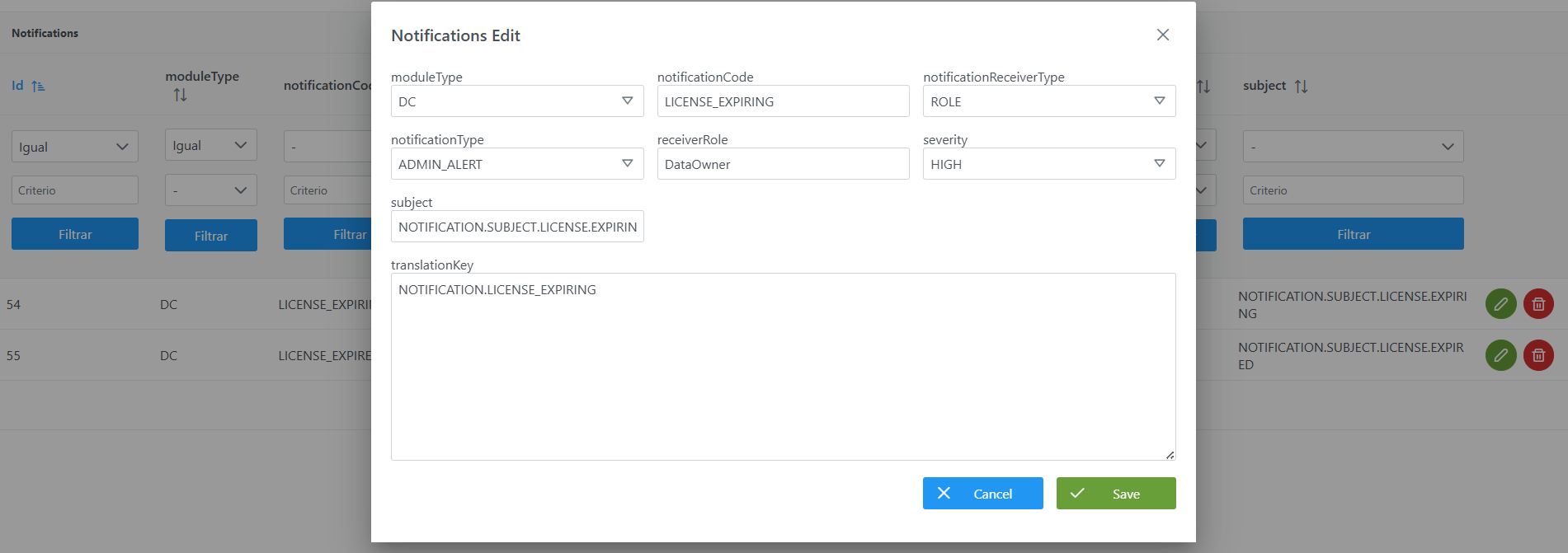
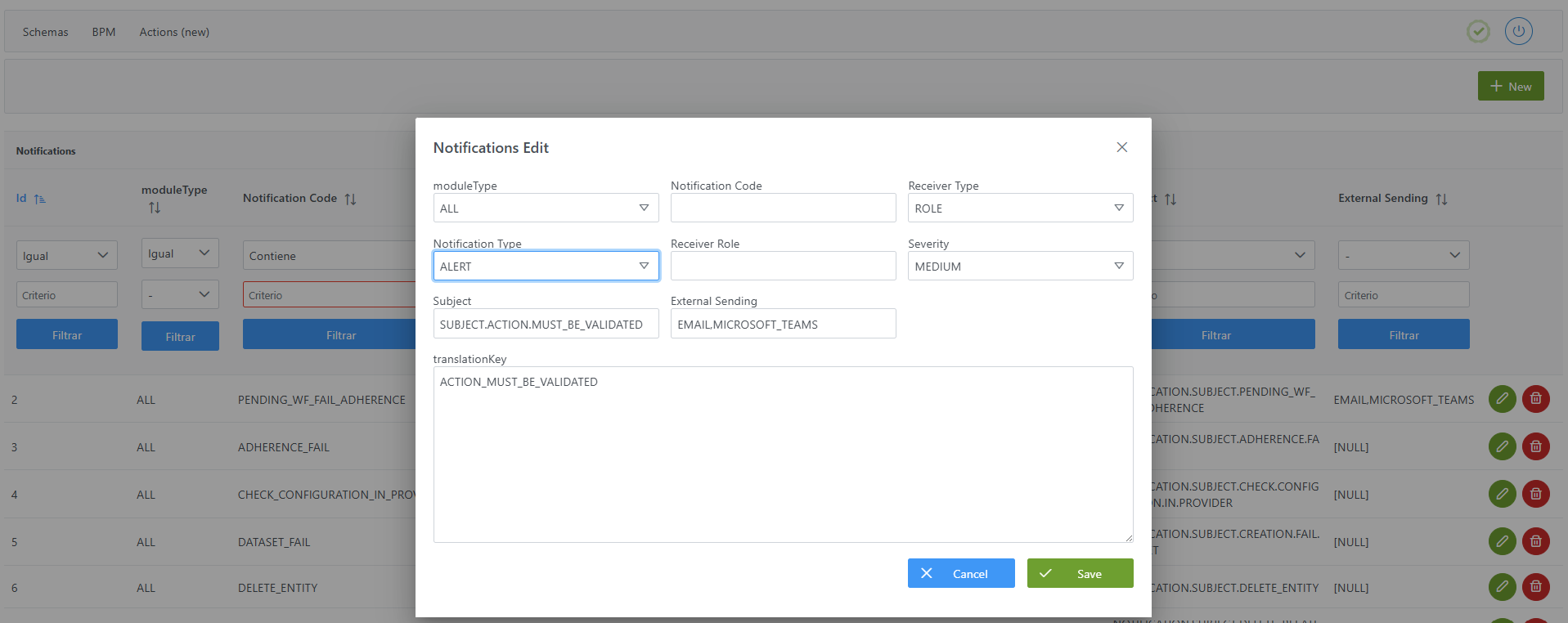
Creating a new Notification in the Notifications table
Creating a new notification (for example, an alert to validate a workflow step) involves:
-
Adding a record in the
Notificationstable with the notification's basic data. -
Configuring the translation keys associated with the notification (
translationKeyandsubject) in theInternalTranslationtable, for all the languages used by the organization in Anjana Data (Languagestable).
To add the record in the Notifications table and create a new notification:
-
Click the New button in the top-right corner. This will open a wizard with the fields defined in the Structure of the
Notificationstable section. -
Fill in the notification fields according to the structure described in the previous section.
-
Click Save to save the notification or Cancel to discard it.
Configuring translations for notifications
Once the notification has been created in the Notifications table, the texts the user will receive must be defined: the message body (translationKey key) and the subject (subject key), in each of the languages configured on the platform.
This configuration is done from the Administration Portal, in the Internationalization section, accessible from the Data Portal's navigation menu.
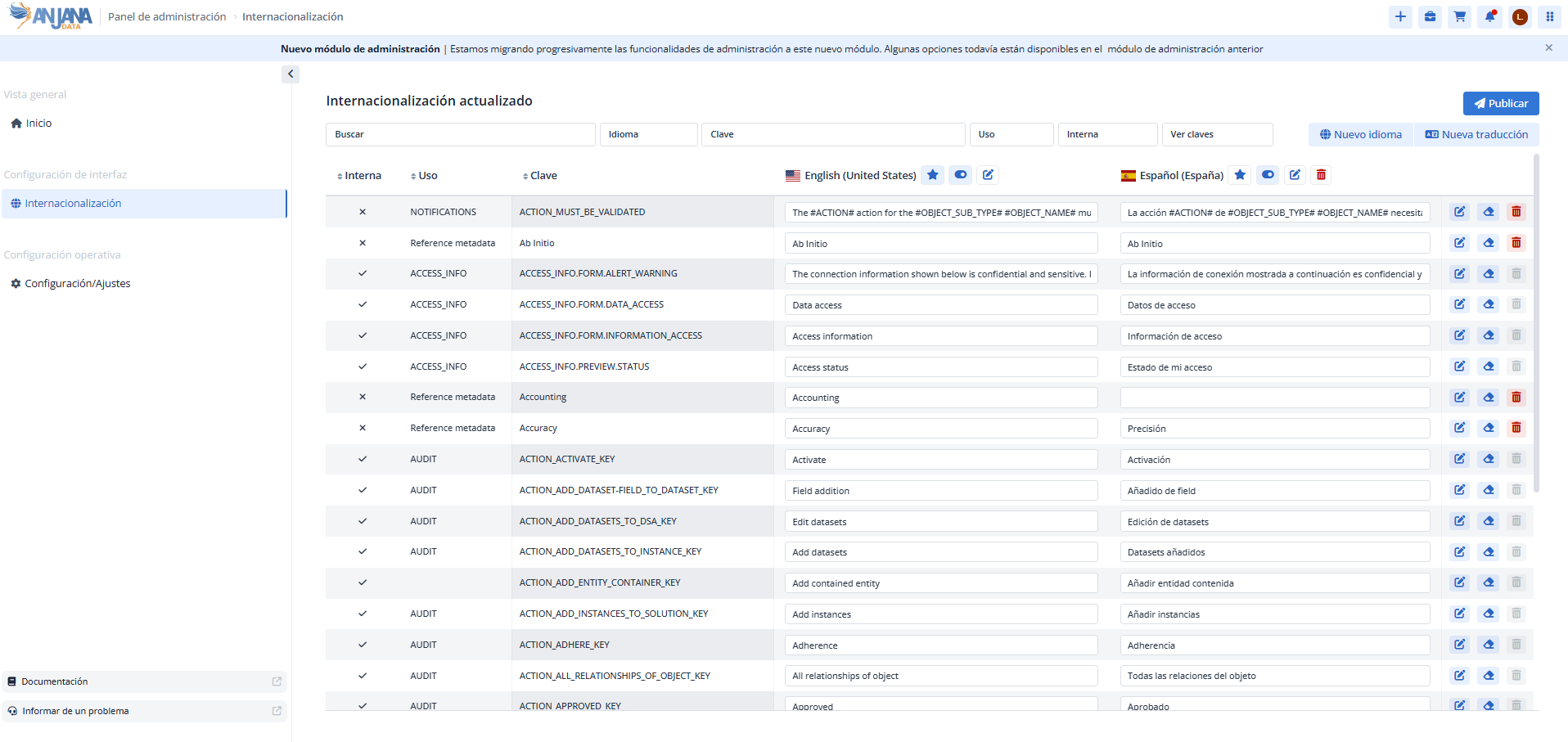
For each notification, a translation is created for both the body and the subject, filling in the following fields:
-
Key: must match the value defined in the notification (
translationKeyfor the body andsubjectfor the subject). -
Usage: descriptive text that helps identify that the translation corresponds to a notification. It is recommended to define a naming standard to maintain a common reference vocabulary.
-
Language (English and other configured languages): text that the user will receive according to the language set in their profile.
The message body supports dynamic variables delimited by # (for example, #OBJECT_ID#), as described in previous sections.
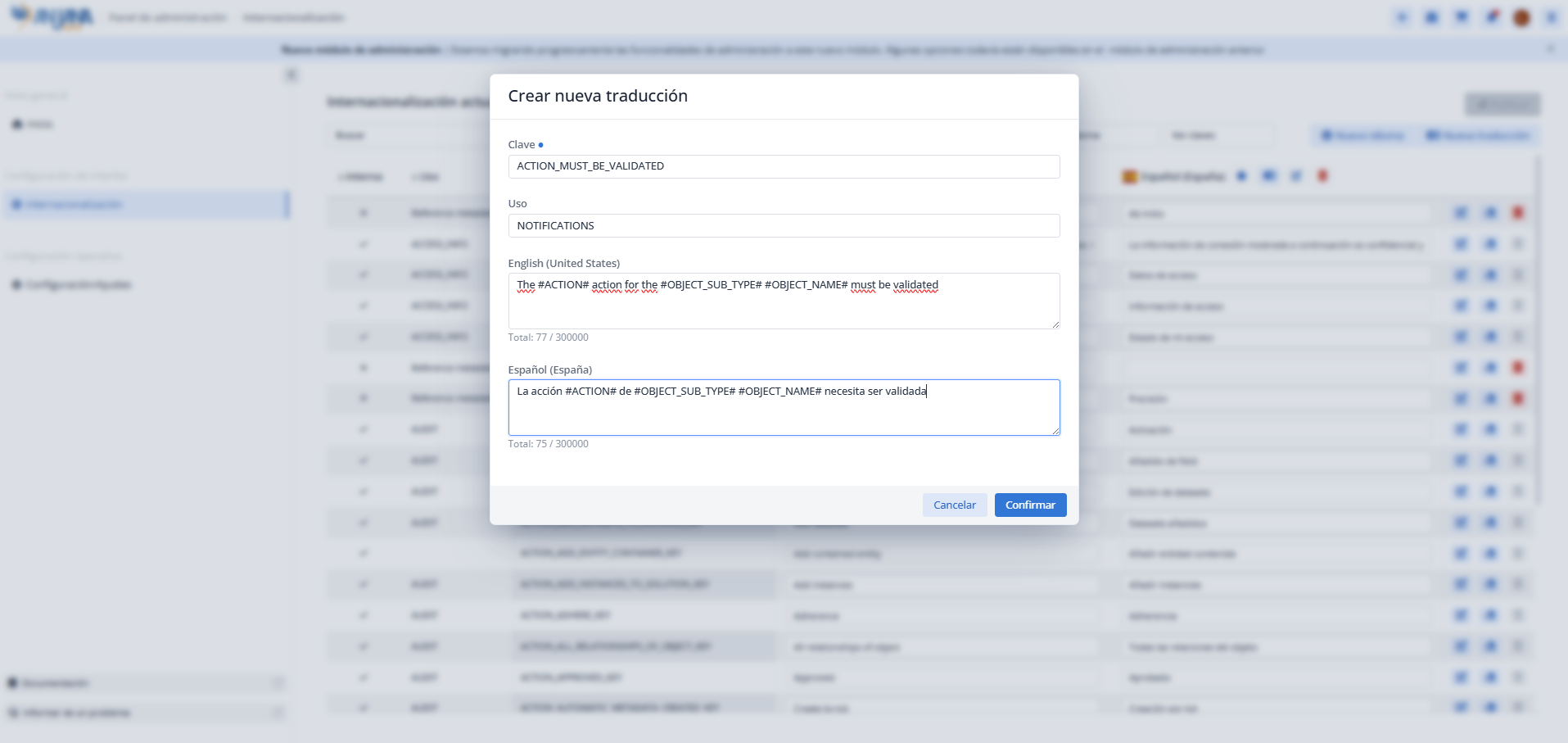
Important: after adding all the translations, it is necessary to Publish for them to take effect.
Modifying a Notification
Modifying the subject or body of a notification has no impact on the configuration, as long as the translation keys (translationKey or subject) are not altered. In that case, it is enough to update the text for the corresponding language, from the Internationalization section of the Administration Portal, using one of these two options:
-
Direct editing of the text in the editable field.
-
Editing via wizard: clicking the pencil icon opens a wizard that allows editing the texts in the different languages.
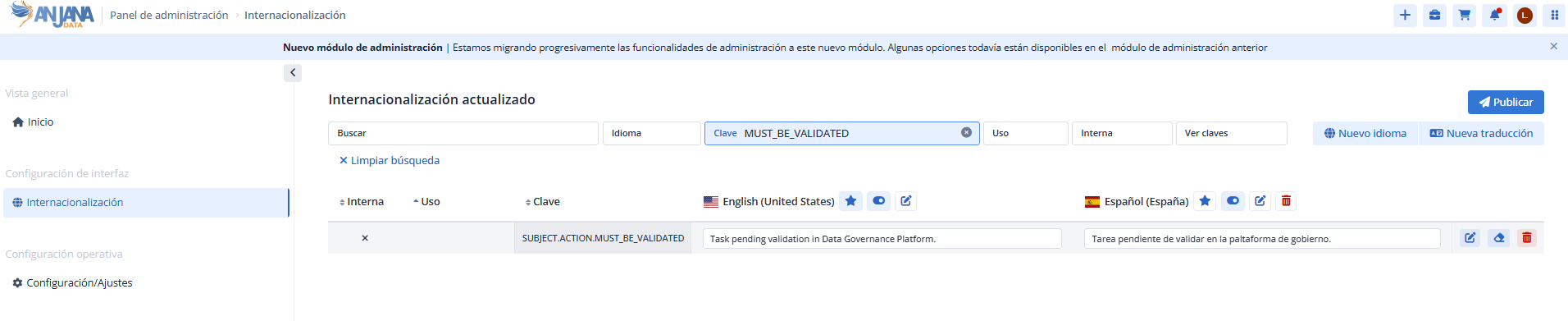
If, on the other hand, it is necessary to modify the translation keys (translationKey or subject), the changes must be applied both to the notification (Notifications table) and to its translations.
Important:
-
Modifications to the body or subject are applied retroactively, also affecting notifications already received.
-
After modifying the translations, it is necessary to Publish the changes.
-
It is also recommended to clear the cache to remove cached texts.
Querying and using notification data in the database (Developer View)
In addition to being configured from the configuration panel, notification information is stored in the database and can be queried in read-only mode for analytical purposes. For example, it allows the client to build their own data mart, dashboards, or reports on their platform's notification configuration (which events are notified, to which roles, with what criticality, through which channels, etc.).
This section is intended for querying (read-only) the information. Creating and modifying notifications must always be done from the configuration panel (administrator view), as described in the previous sections; writing directly to the tables is not recommended.
Table hermes.notification
The configuration of each notification is stored in the hermes.notification table. Its columns, available for querying, are:
|
Field |
Data type |
Description / Purpose |
|---|---|---|
|
|
|
Unique identifier of the notification. Primary key. |
|
|
|
Module to which the notification applies. Possible values: |
|
|
|
Alphanumeric code that identifies the notification and allows it to be invoked from Anjana's functionalities. |
|
|
|
Defines the recipient: |
|
|
|
Translation key for the message body in the |
|
|
|
Type of notification. Possible values: |
|
|
|
Role that receives the notification when |
|
|
|
Criticality level of the notification (for example, |
|
|
|
Translation key for the message subject in the |
|
|
|
External providers to which the notification is sent, separated by commas (for example, |
Related tables for enriching queries
To get a more complete view, the notifications table can be joined with other tables in the model:
-
InternalTranslation: contains the text of the body and subject of each notification per language. It is joined by linking
translation_keyandsubjectwith the table'skeyfield, filtering by the desired language (languagefield). Allows retrieving the final message seen by the user. -
Roles: allows resolving the
receiver_rolewith the recipient role's details (linking with itsnamefield). -
Languages: list of languages configured on the platform, useful for narrowing text queries by language.
Query examples
Full list of configured notifications, with their type, recipient, and criticality:
SELECT id_notification,
       module_type,
       notification_code,
       notification_receiver_type,
       receiver_role,
       notification_type,
       severity,
       external_sending
FROM hermes.notification
ORDER BY id_notification;
Notifications directed at a specific role:
SELECT notification_code, notification_type, severity
FROM hermes.notification
WHERE notification_receiver_type = 'ROLE'
  AND receiver_role = 'DataOwner';
Count of notifications by module and type (useful as a metric for a data mart):
SELECT module_type,
       notification_type,
       COUNT(*) AS total
FROM hermes.notification
GROUP BY module_type, notification_type
ORDER BY module_type, notification_type;
Notifications with external channel sending configured:
SELECT notification_code, notification_type, external_sending
FROM hermes.notification
WHERE external_sending IS NOT NULL
  AND external_sending <> '';
Important:
-
Use a database user with read-only permissions for these queries. Creating and modifying notifications must always be done from the configuration panel, in order to maintain the integrity of translations, sequences, and caches.
-
Schema, table, and column names may evolve between versions of Anjana Data; it is advisable to validate them before building a data mart or reports based on this information.