
The third step in establishing the organization's governance model in Anjana Data, after defining organizational units and roles, is setting up the permissions configuration.
Permissions are what enable each role to perform low-level actions on the platform. They constitute the link between the defined role and the effective actions that users can perform on the different objects and modules of Anjana Data.
Thanks to them, it is possible to granulate operational control and ensure that the responsibilities associated with each role are materialized in accordance with the organization's governance model.
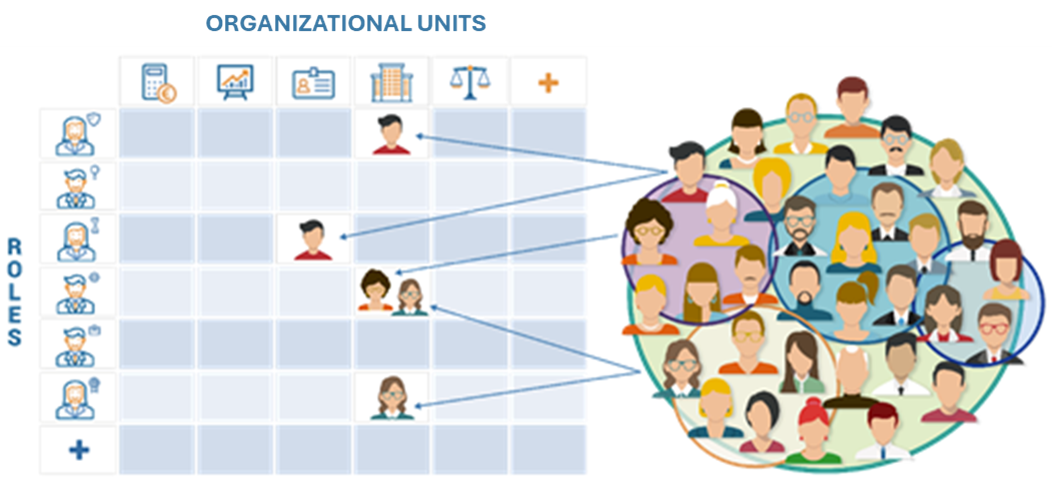
Concept of Permissions in Anjana Data
Each permission specifies what a role can do on an object or set of objects on the platform. There are permissions that apply in two ways:
-
Permissions specific to entity or relationship type:
They apply based on the metamodel (e.g. Dataset, Business Terms, Reports, AI Models…) and determine which operations can be performed on each type of object (Creation and modification, status change, deprecation, organizational unit change and organizational unit owner). -
Global application permissions:
They apply transversally across the platform, regardless of the domain or entity (e.g.PLATFORM_ACCESS,ADMIN_ACCESS,LINEAGE_ACCESS).
Types of Permissions
1. Permissions by entities and relationships (metamodel)
-
AUTOMATIC_METADATA: assisted creation of entities or relationships in the creation wizard of the data portal through automatic discovery and import via plugin. -
CHANGE_STATUS: activate or deactivate non-native entities or relationships. -
CHANGE_OU: modify the organizational unit of an entity to change the custody of the asset. -
CREATION_MODIF: create, modify and submit entities or relationships for validation. -
DELETE_ALL: delete entities or relationships, regardless of the creator. -
DELETE_MY_OBJ: delete entities or relationships created by the user themselves. -
DEPRECATION: manually deprecate native entities. -
EDIT_ACCESS_INFO: edit the access information of an object to which the user is adhered -
ORGANIZATIONAL_UNIT_OWNER: act as the owner of entities within the assigned Organizational Unit (OU).-
Users with this permission will appear on the Stakeholders screen as Owner.
-
When creating and approving a DSA, these users may be automatically added to the corresponding access group (this automation will depend on the technical configuration of the plugin that manages the adherences)
-
2. Global platform-level permissions
-
ADHERENCE_ACCESS: access to the marketplace for viewing objects (for theALLsubtype) that enables the use of the cart. -
ADMIN_ACCESS: access to the administration panel. -
API_ADMIN: use of the administrative API, use of bulk editing of objects in the data portal and use of the administration panel actions (Actions) . -
API_DOC: access to view the API documentation through the application. -
CATALOG_ACCESS: access to the catalog where the inventory of governed assets is displayed.
The CATALOG_ACCESS (action) ALL (subType) permission is required to be able to use the filtering functionalities of entity-type attributes (ENTITY_SEARCH)
-
CREDENTIAL_ADMIN: management of credentials for authentication (by database) and authorization (access to theUsersandUser-OU-Rolestables) and access to technical configuration (theappConfigurationstable of the configuration panel). -
GOV_AUDIT_ACCESS: access to the governance audit -
JOBS_ACCESS: access to the jobs module -
LINEAGE_ACCESS: viewing of lineage in the data portal. -
SEC_AUDIT_ACCESS: access to the security audit
SEC_AUDIT_ACCESS will not have practical use until 26.2
-
OBJ_AUDIT_ACCESS: access to an object's audit tab -
OBJ_RELATIONS_ACCESS: access to an object's relations tab -
OBJ_SAMPLE_DATA_ACCESS: access to an object's data sample tab -
OBJ_STAKEHOLDERS_ACCESS: access to an object's stakeholders tab -
OBJ_VERSIONS_ACCESS: access to an object's versions tab -
PLATFORM_ACCESS: access to the data portal for viewing objects (for theANJANAsubtype) -
WORKFLOW_ACCESS: access, approval or rejection of validation workflows in the data portal. -
WORKSPACE_ACCESS: access to the Workspace module
Permissions Table in the Configuration Panel (Administrator View)
Permissions are configured in the Permissions table of the configuration panel. Defining permissions is an essential step to be able to access the platform (data portal or configuration panel) and perform actions within it.
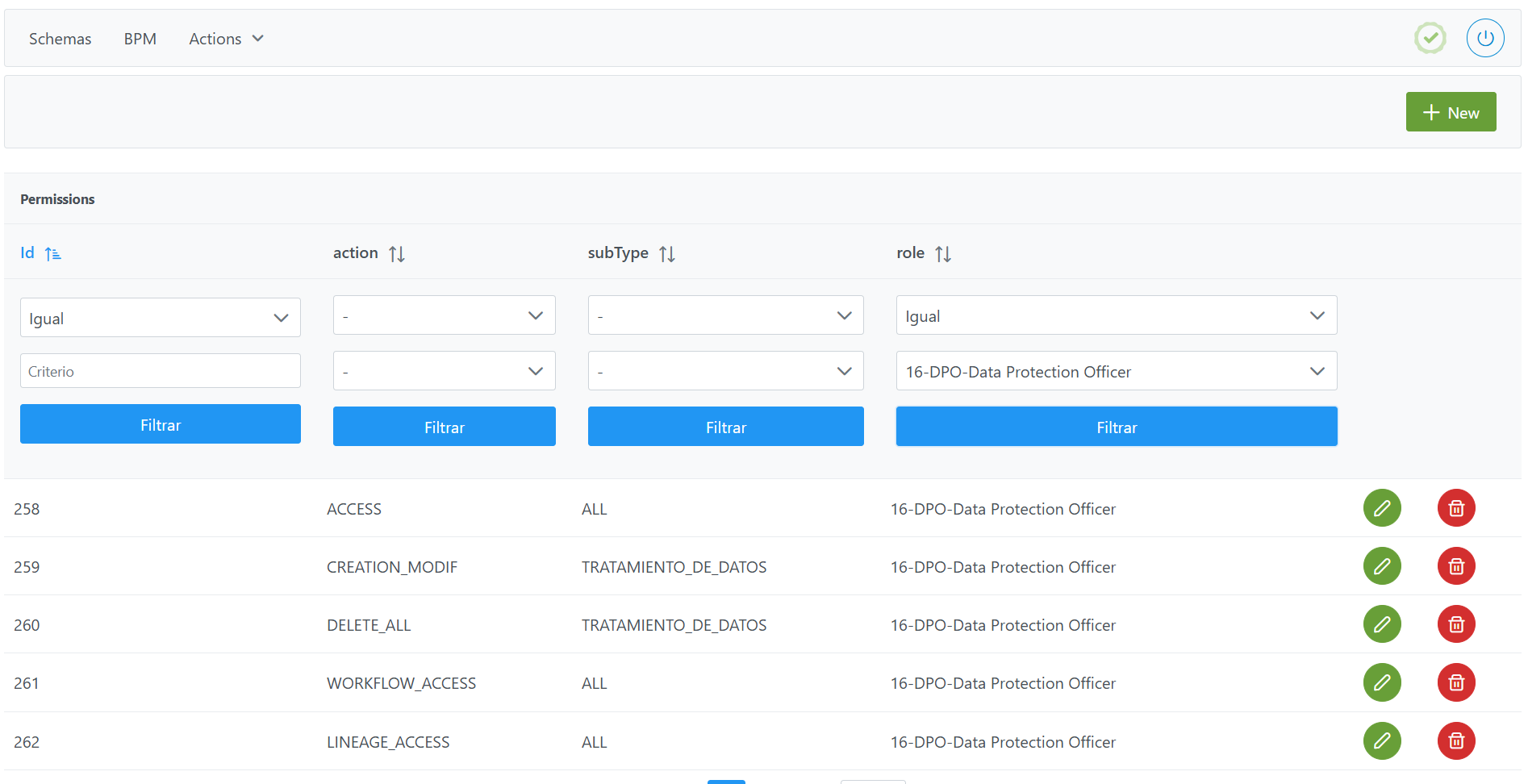
Structure of the Permissions table
Each registered permission is characterized by the following fields:
Each record in the table defines a permission and consists of the following fields:
-
id: unique identifier of the permission within the table.-
It is assigned automatically based on the database sequences.
-
-
action: specific action being authorized.-
To assign actions, see the possible combinations in the permissions table
-
-
subType: object or entity of the metamodel to which the allowed action applies.-
To assign actions, see the possible combinations in the permissions table
-
-
role: reference to the role to which the permission is assigned.-
The selection combo shows the roles configured in
Roles. If the expected role does not appear, check theRolesconfiguration.
-
Combinations of action and subType:
|
Permission_action |
Sub_type |
|---|---|
|
API_ADMIN |
ALL |
|
ADHERENCE_ACCESS |
|
|
LINEAGE_ACCESS |
|
|
WORKFLOW_ACCESS |
|
|
API_DOC |
|
|
JOBS_ACCESS |
|
|
WORKSPACE_ACCESS |
|
|
SEC_AUDIT_ACCESS (Not currently in use) |
|
|
GOV_AUDIT_ACCESS |
|
|
CATALOG_ACCESS |
|
|
OBJ_RELATIONS_ACCESS |
|
|
OBJ_STAKEHOLDERS_ACCESS |
|
|
OBJ_VERSIONS_ACCESS |
|
|
OBJ_AUDIT_ACCESS |
|
|
OBJ_SAMPLE_DATA_ACCESS |
|
|
PLATFORM_ACCESS |
ANJANA |
|
ADMIN_ACCESS |
|
|
CREDENTIAL_ADMIN |
|
|
AUTOMATIC_METADATA |
Native entity (1) (2) |
|
CREATION_MODIF |
|
|
DELETE_ALL |
|
|
DELETE_MY_OBJ |
|
|
ORGANIZATIONAL_UNIT_OWNER |
|
|
CHANGE_OU (3) |
|
|
DEPRECATION |
|
|
AUTOMATIC_METADATA |
Non-native entity (1) |
|
CREATION_MODIF |
|
|
DELETE_ALL |
|
|
DELETE_MY_OBJ |
|
|
ORGANIZATIONAL_UNIT_OWNER |
|
|
CHANGE_OU |
|
|
CHANGE_STATUS |
|
|
AUTOMATIC_METADATA |
Relationship (1) |
|
CREATION_MODIF |
|
|
DELETE_ALL |
|
|
DELETE_MY_OBJ |
|
|
CHANGE_STATUS |
|
(1): Name of the object_subtype table
(2): Permissions should not be defined for DATASET_FIELD since the DATASET permissions apply to it
(3): CHANGE_OU cannot be used for INSTANCE
Creating a Permission in the Permissions table
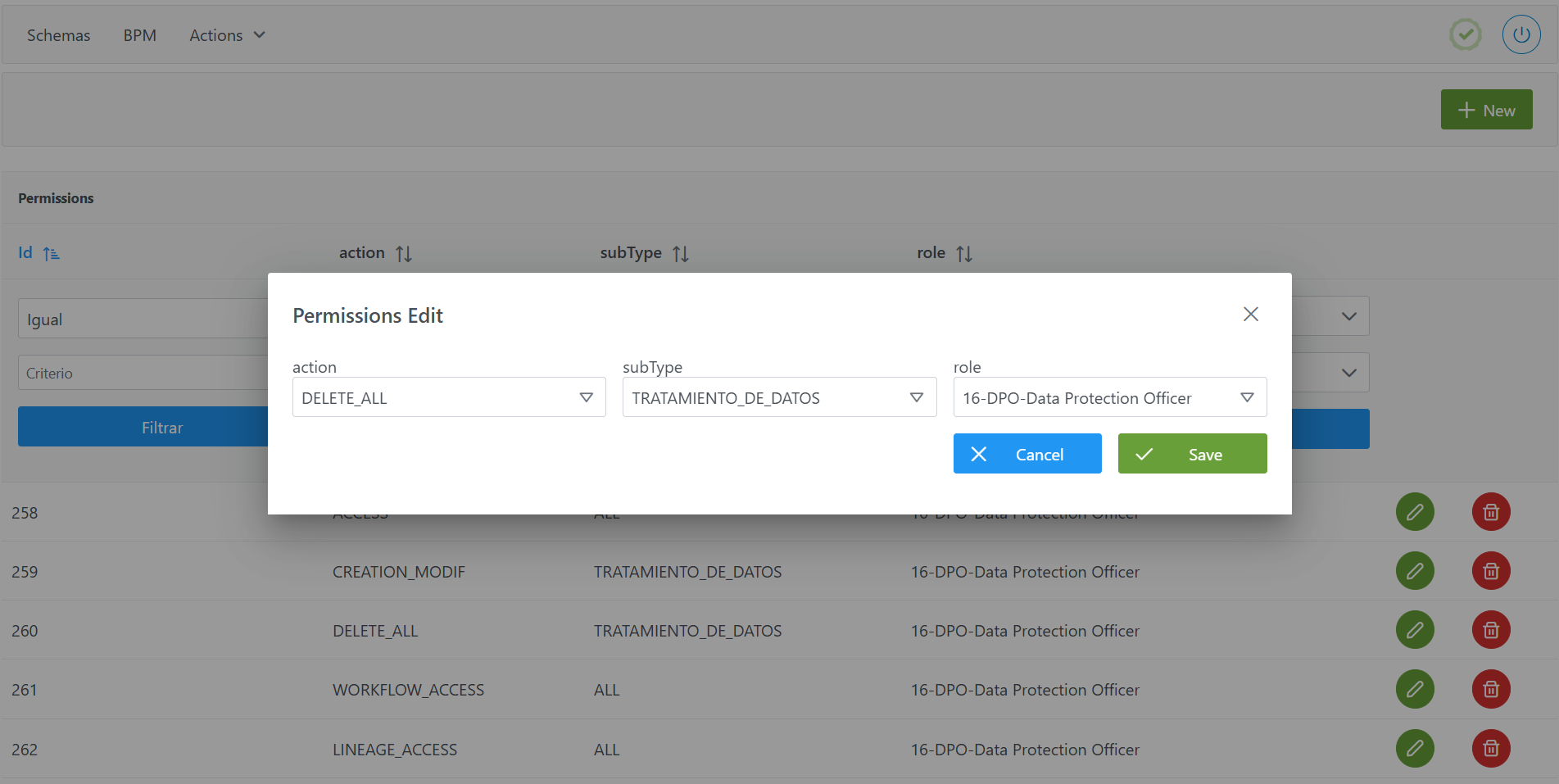
Creating a new permission for a role (for example, the deletion of data processing records created by any user) involves adding a new record to the Permissions table.
To add the record and create a new permission:
-
Click the New button in the upper right corner. This will open a wizard with the fields defined in the Structure of the
Permissionstable section. -
Complete the permission fields according to the structure described in the previous section.
-
Click Save to save the permission or Cancel to discard it.
Important: once the permission is created, for it to take effect immediately, the caches must be cleared from the new administration panel ( Home > Reset Operations > Clear cache) and the user must log out and log back in.
Modifying a Permission in the Permissions table
Modifying the action, subType or role fields must be done with caution, as it can impact:
-
The capabilities of users within the platform.
-
The workflow validation, since if the validating user does not have access to the module, they will not be able to perform the validation step.
Querying and Exploiting Permissions in the Database (Developer View)
In addition to being configured from the Configuration Panel, permission information is stored in the database and can be queried in read-only mode to exploit it for analytical purposes. For example, it allows the client to build their own data mart, dashboards or reports on their platform's permission model (role / action / subtype matrix, number of permissions per role, etc.).
This section is oriented towards querying (read-only) the information. The creation and modification of permissions must always be carried out from the Configuration Panel (administrator view), as described in the previous sections; writing directly to the tables is not recommended.
zeus."permission" table
The configuration of each permission is stored in the zeus."permission" table. Its columns, available for querying, are:
|
Column |
Data type |
Description |
|---|---|---|
|
|
|
Unique identifier of the permission (primary key). |
|
|
|
Action granted by the permission (for example, |
|
|
|
Object or entity of the metamodel to which the permission applies (for example, |
|
|
|
Role to which the permission is assigned (foreign key to |
Related tables to enrich queries
To obtain a more complete view, the permissions table can be joined with other tables in the model:
-
zeus."role": resolves the
id_roleto the role name (role_name). -
object_subtype: resolves the
sub_typeto the metamodel object subtype (namefield). -
User-OU-Roles: when combined with the roles, it allows analyzing the effective permissions of each user by organizational unit.
Query examples
List of permissions with the role they are assigned to:
SELECT p.id_permission,
       r.role_name,
       p.permission_action,
       p.sub_type
FROM zeus."permission" p
JOIN zeus."role" r ON p.id_role = r.id_role
ORDER BY r.role_name, p.permission_action;
Permissions assigned to a specific role:
SELECT p.permission_action, p.sub_type
FROM zeus."permission" p
JOIN zeus."role" r ON p.id_role = r.id_role
WHERE r.role_name = 'DPO'
ORDER BY p.permission_action;
Count of permissions per role (useful as a metric for a data mart):
SELECT r.role_name,
       COUNT(*) AS total_permisos
FROM zeus."permission" p
JOIN zeus."role" r ON p.id_role = r.id_role
GROUP BY r.role_name
ORDER BY total_permisos DESC;
Important:
-
Use a database user with read-only permissions for these queries. The creation and modification of permissions must always be carried out from the Configuration Panel, to maintain the integrity of sequences and caches (and avoid leaving users without access or with improper access).
-
Schema, table and column names may evolve between versions of Anjana Data; it is advisable to validate them before building a data mart or reports based on this information.