
The first step in landing the organization's governance model in Anjana Data is to establish the data domain structure, also known as organizational units.
A data domain is the mechanism by which custody and responsibility over data assets is established, allowing the organization's reality to be represented in terms of functional or semantic domains. Data assets are classified into these units, and users who hold a governance role in a domain are responsible for the objects that belong to it.
Each data domain also acts as the foundation of the authorization mechanisms, determining which users can exercise which roles over the associated assets.
The structure can be configured in two ways:
-
As a flat hierarchy, with a single level.
-
As a multi-level hierarchy, which allows different levels of granularity in governance to be reflected.
Once the hierarchy has been defined, names must be assigned to each unit according to the organization's governance model.
Important note: data domains should not be confused with the organizational hierarchy or the company's org chart. While the hierarchical structure tends to change frequently, data domains should remain relatively stable over time, since they reflect the organization's semantics and business logic.
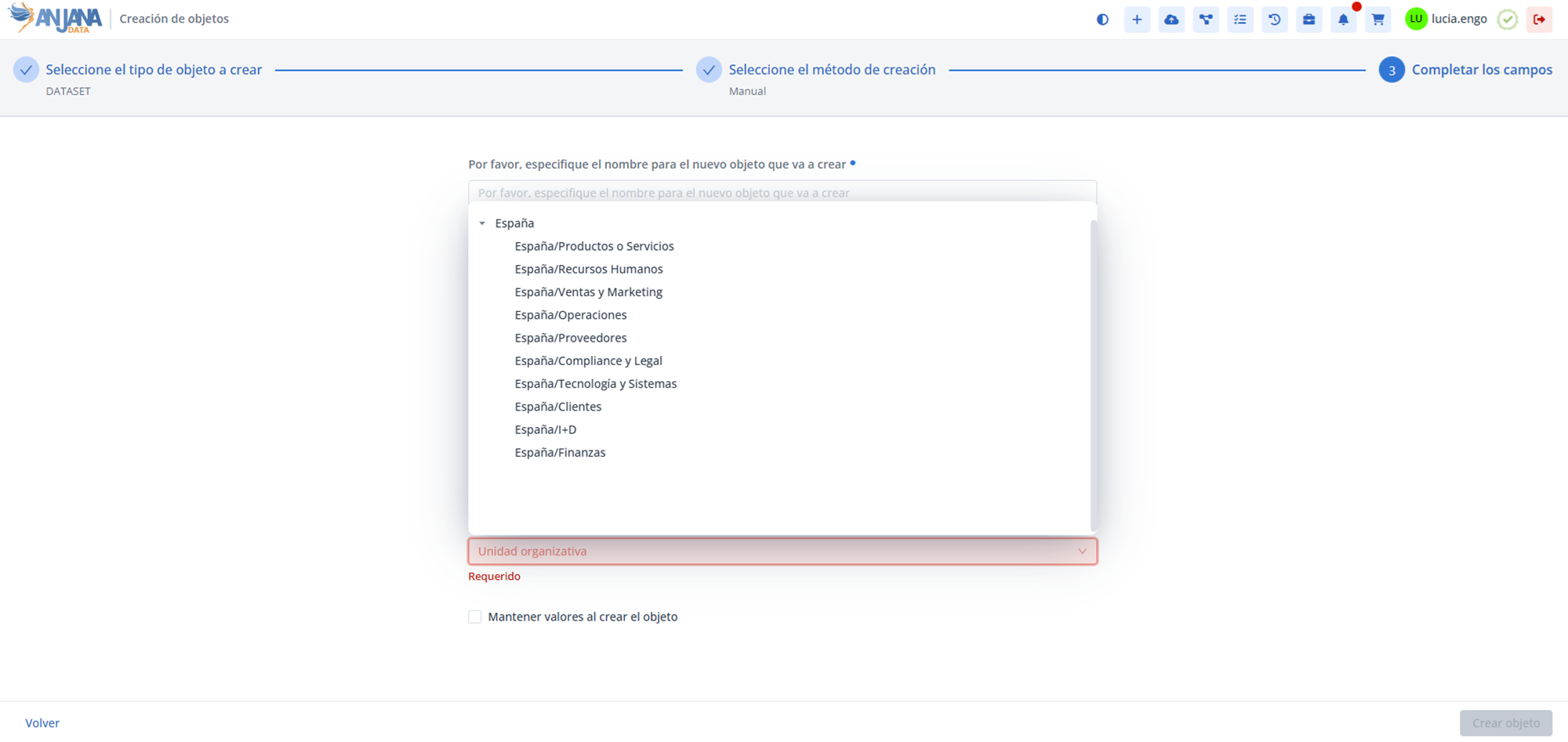
In Anjana Data, organizational units are configured in the organizational_unit table and will subsequently be available on the object creation screens.
The Organizational Unit Table in the Configuration Panel (Administrator view)
Data domains (organizational units) are configured in the Organizational Unit table. Defining these units is an essential prerequisite for configuring authorization, that is, the assignment of roles to users within specific organizational units, which is managed in the User-Ou-Roles table.
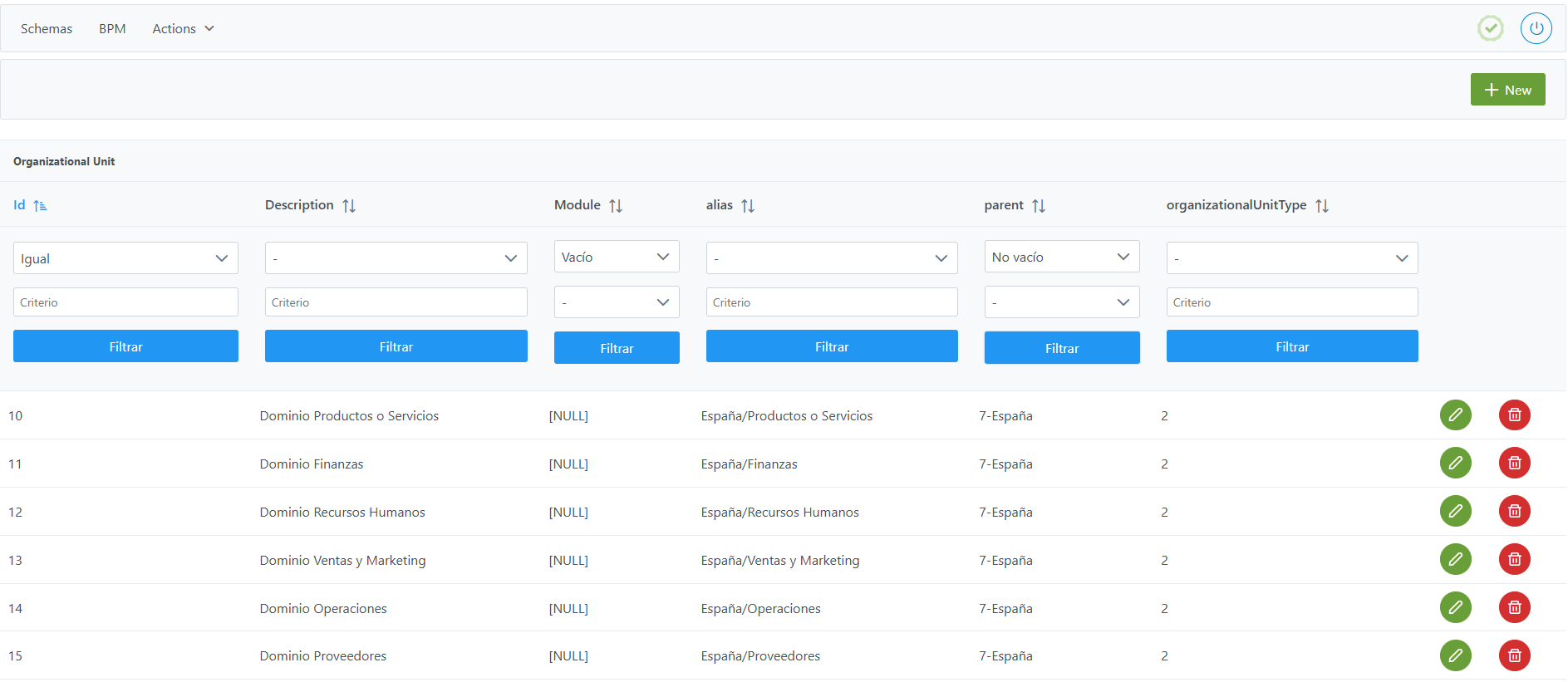
Within this table there is a fictitious organizational unit called Cross that allows authorizing users with cross-cutting roles without needing to assign them the role in each of the existing units. Although this organizational unit is created by the platform itself, it can be deleted and recreated at any time.
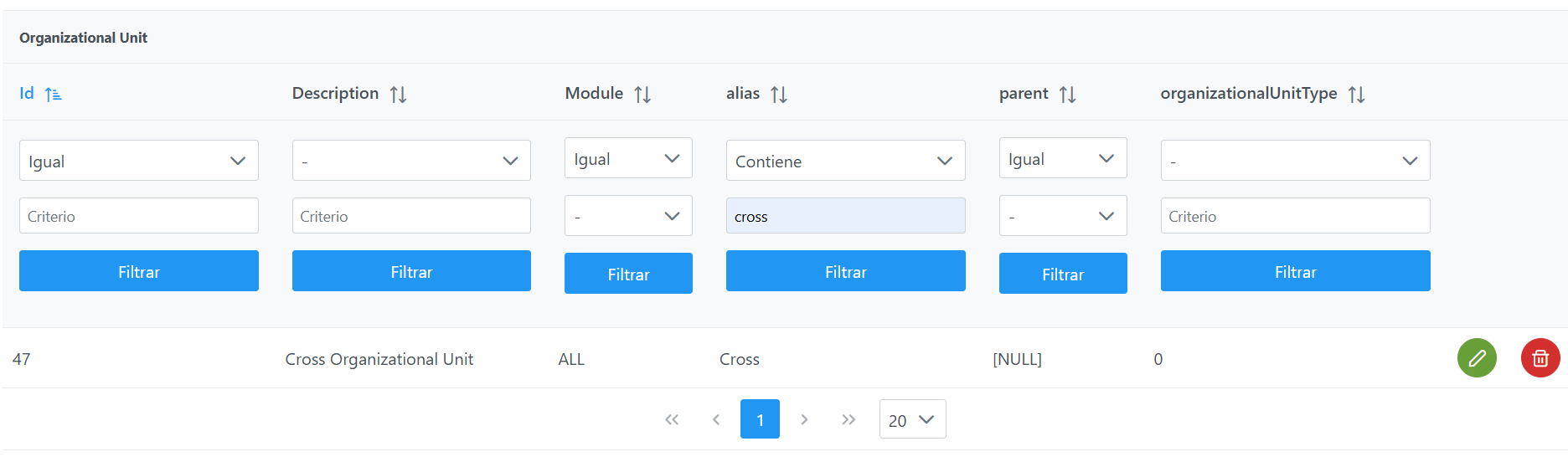
Structure of the Organizational Unit table
Each registered organizational unit is characterized by the following fields:
-
id_organizational_unit: unique identifier of the organizational unit.-
It is assigned automatically from the Configuration Panel, based on database sequences.
-
-
description: textual description of the organizational unit.-
It is an informational, internal field, with no direct functionality within the platform.
-
-
module: field that is purely informational (legacy, inherited from older versions). It is currently deprecated, although it retains three possible values:-
"BG"→ Business Glossary -
"DC"→ Data Catalog -
"ALL"→ applies to the entire platform (recommended option).
-
-
alias: alias of the organizational unit.-
It must include the full hierarchy path (example:
Parent/Child/ChildOfChild). -
It is used as the translation key, which allows translations to be added in the
translationstable of the configuration panel using the sameconfig_keyas the alias.
Each of the parts that make up the organizational unit's alias are concatenated with "/" (for example:Parent/Child/ChildOfChild). This concatenation will be the translation key if you want to display the unit names in the application's different languages.In other words, the Alias must be equivalent to the full hierarchical path from the root node to the organizational unit's own node.
-
Important:
-
Organizational unit aliases must not contain the characters: ":" or "#" so as not to interfere with Anjana Data's internal identifiers.
-
The alias "Cross" is reserved for the fictitious organizational unit that allows authorizing users with cross-cutting roles without needing to authorize users who hold a cross role in every organizational unit.
Notes:
-
The separator between the different levels that make up an organizational unit, in this table, will always be "/". Therefore, in the case of a flat hierarchy (a single level), using "/" in the alias should be avoided.
-
Two organizational units with the same alias are not allowed.
-
-
parent: reference to the alias of the immediate parent organizational unit in the case of a multi-level hierarchy.-
If the hierarchy is flat or it is a root level, this field is left empty.
-
It can only reference aliases of organizational units that have been previously created.
-
Example: if the hierarchy Parent/Child/ChildOfChild is configured, when registering ChildOfChild the value of parent will be Child, not Parent/Child.
-
organizationalUnitType: informational field indicating the hierarchical level to which the organizational unit belongs.
Creating an Organizational Unit in the Organizational Unit table
Creating a new organizational unit (understood as the complete hierarchy, for example Parent/Child/ChildOfChild) involves registering as many records in the Organizational Unit table as there are levels in the hierarchy (unless one already exists previously).
To add each record:
-
Click the New button in the upper right corner. This will open a wizard with the fields defined in the Structure of the
Organizational Unittable section. -
Fill in the fields according to the structure described in the previous section.
-
Click Save to save the organizational unit or Cancel to discard it.
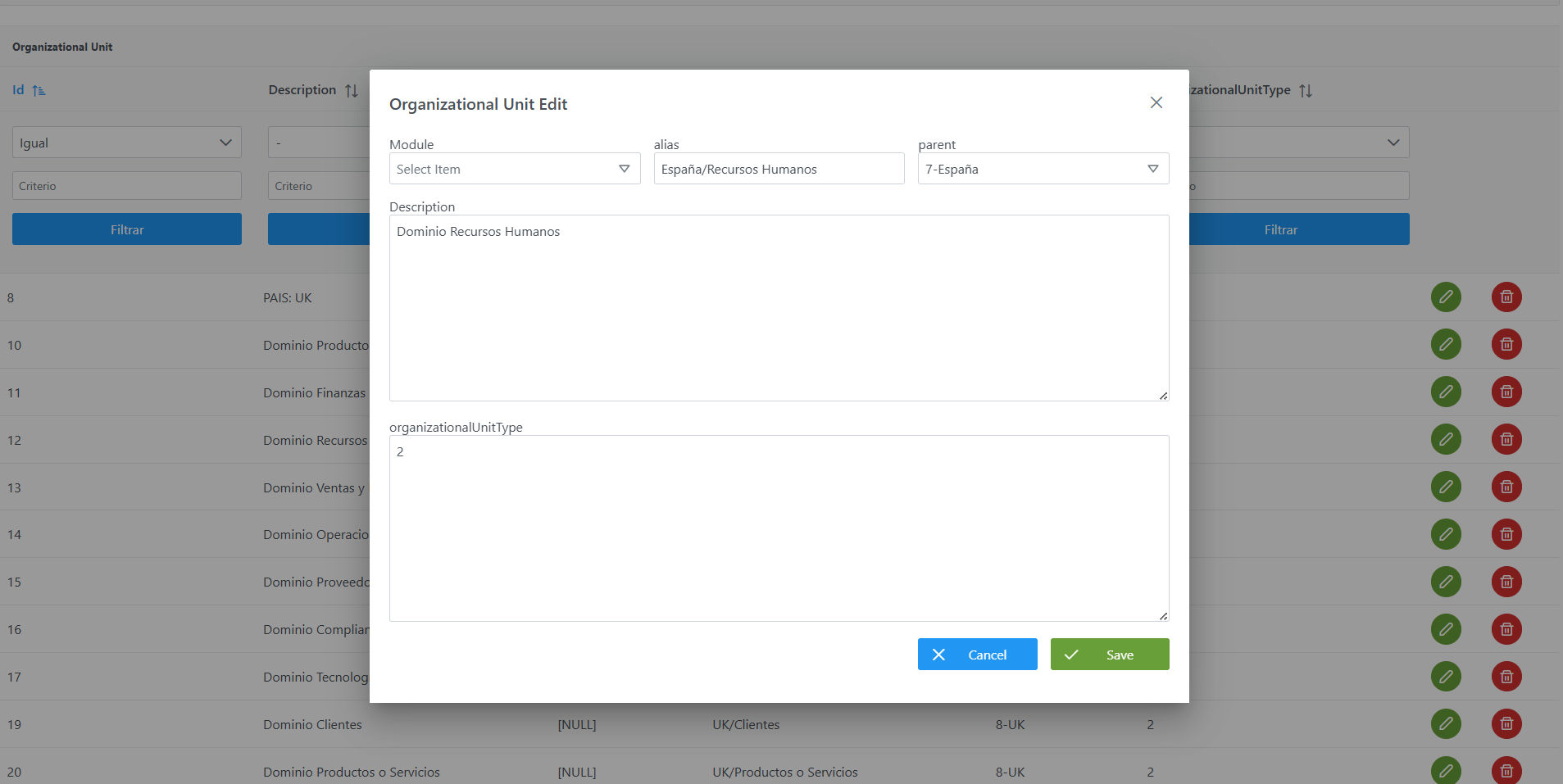
Example: Configuring the Parent1/Child1/Child1OfChild1 unit
-
First level
-
Module: ALL
-
Alias: Parent1
-
Parent: (empty)
-
Description: (administrator's choice)
-
OrganizationalUnitType: Level 1 (administrator's choice)
-
-
Second level
-
Module: ALL
-
Alias: Parent1/Child1
-
Parent: Parent1 (select it from the dropdown)
-
Description: (administrator's choice)
-
OrganizationalUnitType: Level 2 (administrator's choice)
-
-
Third level
-
Module: ALL
-
Alias: Parent1/Child1/Child1OfChild1
-
Parent: Parent1/Child1 (select it from the dropdown)
-
Description: (administrator's choice)
-
OrganizationalUnitType: Level 3 (administrator's choice)
-
Modifying an Organizational Unit in the Organizational Unit table
Modifying the Alias and Parent fields should only be done if there are no objects associated with those organizational units or their descendants in the data portal.
If you need to change the hierarchical structure of the organizational units in use within the data portal, you must first perform a data deletion from the configuration panel menu (Actions > Clear data).
Important: Modifying the organizational unit structure can impact other configuration elements, such as:
-
The assignment of roles to users
-
The validation flows (workflows)
-
The translations
If you need to change the Organizational Unit to which an object belongs, it is recommended to:
Option 1:
Change the translation key for the translation value of the alias in the translations table.
Option 2:
Follow these steps
-
Create a new Organizational Unit with the new hierarchy of values
-
Transfer custody of the objects assigned to the old Organizational Unit using the change of Organizational Unit feature, using a user with a Role that has
CHANGE_OUpermissions. -
Check whether there are attributes of type Organizational Unit in the template of any object. If so, perform a bulk edit using a user with a Role that has
API_ADMINpermissions to remove the value. -
Once custody of all objects has been transferred, it is recommended to:
-
Remove user authorization in the old Organizational Unit
-
(Optional) The Organizational Unit can be deleted from the
Organizational Unittable
-
Querying and Leveraging Organizational Units in the Database (Developer view)
In addition to being configured from the Configuration Panel, organizational unit information is stored in the database and can be queried in read-only mode to leverage it for analytical purposes. For example, it allows the client to build their own data mart, dashboards, or reports on their platform's data domain structure (hierarchy, levels, number of domains per branch, etc.).
This section is focused on querying (read-only) the information. Creating and modifying organizational units must always be done from the Configuration Panel (administrator view), as described in the previous sections; writing directly to the tables is not recommended.
The zeus.organizational_unit table
The configuration of each organizational unit is stored in the zeus.organizational_unit table. Its columns, available for querying, are:
|
Column |
Data type |
Description |
|---|---|---|
|
|
|
Unique identifier of the organizational unit (primary key). |
|
|
|
Unique alias of the unit. Includes the full hierarchical path separated by "/" (for example, |
|
|
|
Textual description of the unit (informational field). |
|
|
|
Legacy informational field, deprecated ( |
|
|
|
Reference to the |
|
|
|
Hierarchical level to which the unit belongs. |
Related Tables to Enrich Queries
To get a more complete view, the organizational units table can be joined with other tables in the model:
-
Itself (self-join): linking
parentwithid_organizational_unitresolves the parent domain's alias and reconstructs the hierarchy. -
Translations: contains the translated text of the alias by language (joined using the
aliasasconfig_key). -
User-Ou-Roles: relates users, roles, and organizational units; allows analyzing authorization (which users hold which roles in each domain).
Query Examples
List of domains with their hierarchy and level:
SELECT id_organizational_unit,
       alias,
       parent,
       organizational_unit_type
FROM zeus.organizational_unit
ORDER BY alias;
Resolving the parent domain through a self-join:
SELECT ou.alias           AS unidad,
       padre.alias        AS unidad_padre,
       ou.organizational_unit_type AS nivel
FROM zeus.organizational_unit ou
LEFT JOIN zeus.organizational_unit padre
       ON ou.parent = padre.id_organizational_unit
ORDER BY ou.alias;
Count of domains by hierarchical level (useful as a metric for a data mart):
SELECT organizational_unit_type AS nivel,
       COUNT(*) AS total
FROM zeus.organizational_unit
GROUP BY organizational_unit_type
ORDER BY organizational_unit_type;
Important:
-
Use a database user with read-only permissions for these queries. Creating and modifying organizational units must always be done from the Configuration Panel, in order to maintain the integrity of sequences, translations, authorization, and caches.
-
Schema, table, and column names may evolve between versions of Anjana Data; it is advisable to validate them before building a data mart or reports based on this information.