
In Anjana Data, user authorization is based on the assignment of roles to people within organizational units (OUs). This combination determines which actions each user can perform and in which scopes within the platform.
Table User-Ou-Roles in the Configuration Panel (Administrator view)
The management of these assignments is carried out through the Users-OU-Roles table, which acts as the central mechanism for permission control.
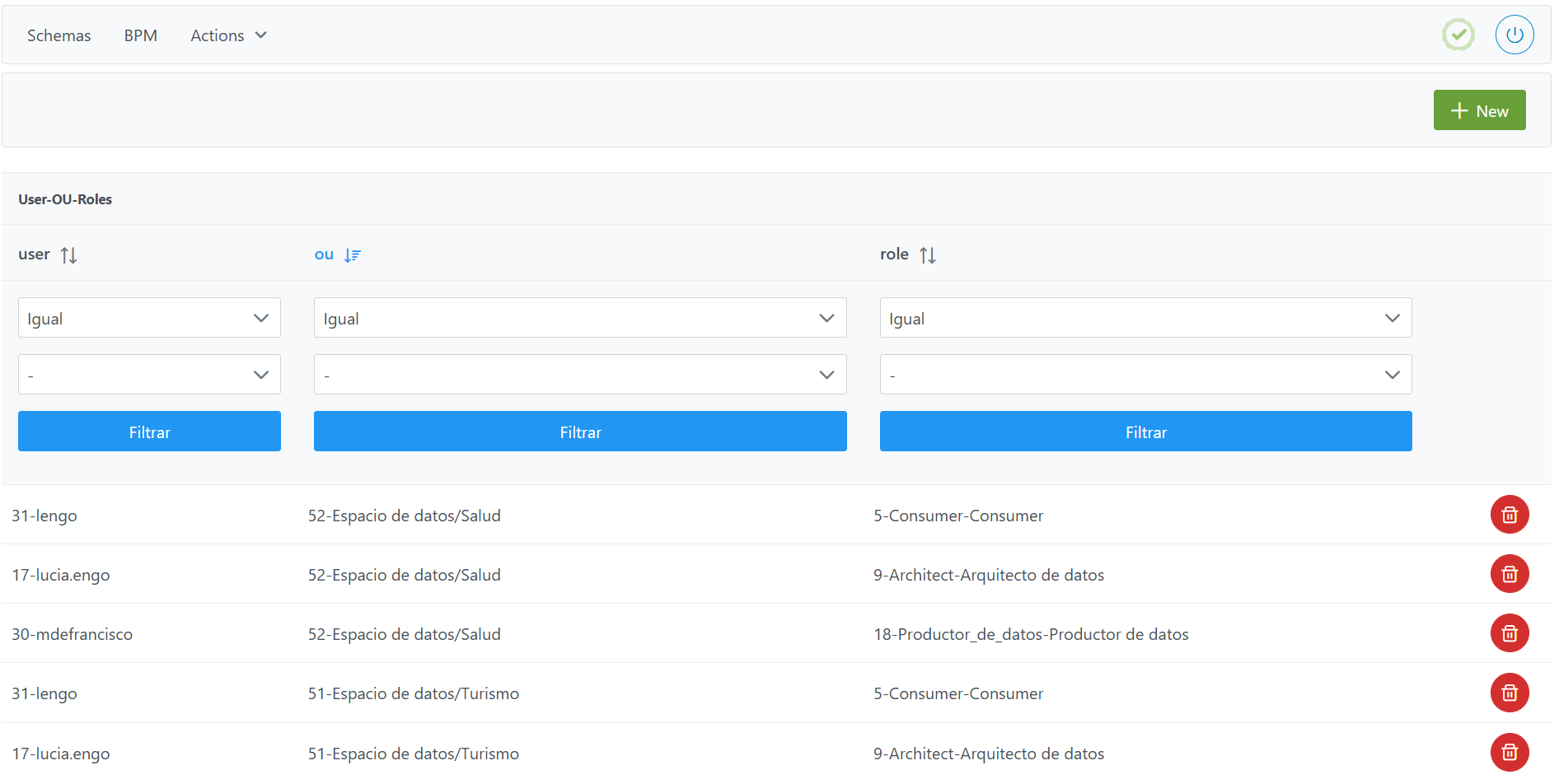
Users-OU-Roles table for assigning roles to users in OUs
Structure of the Roles table
Each record in the users_ou_role table defines a unique assignment between a user, an organizational unit and a role.
The elements that characterize this assignment are:
-
user: unique identifier of the user.-
Corresponds to the
idfield of theUserstable.
-
-
ou: unique identifier of the Organizational Unit.-
Corresponds to the
idfield of theOrganizational Unittable.
-
The assignment must be made at a leaf organizational unit, never at an intermediate or root level. For example, if the unit "Data space/Tourism" has been configured, roles should never be assigned at the "Data space" level
-
role: unique identifier of the role.-
Corresponds to the
idfield of theRolestable.
-
Assigning roles to users
Assigning cross roles
To assign a user a role that has been configured as Cross (see configuration of the Roles table) the following steps must be followed:
-
Click the New button in the top right corner. This will open an assistant (wizard) with the fields defined in the Structure section.
-
Fill in the fields as follows:
-
user: Select the user identifier. If the user does not exist, it must be created beforehand. -
ou: Select the default Cross unit. This OU is created internally by the platform; however, if it has been deleted manually, it must be created in order to authorize cross roles. -
role: Select the role from among the previously configured roles. If the role does not exist, it must be created beforehand.
-
-
Click Save to save the role or Cancel to discard it.
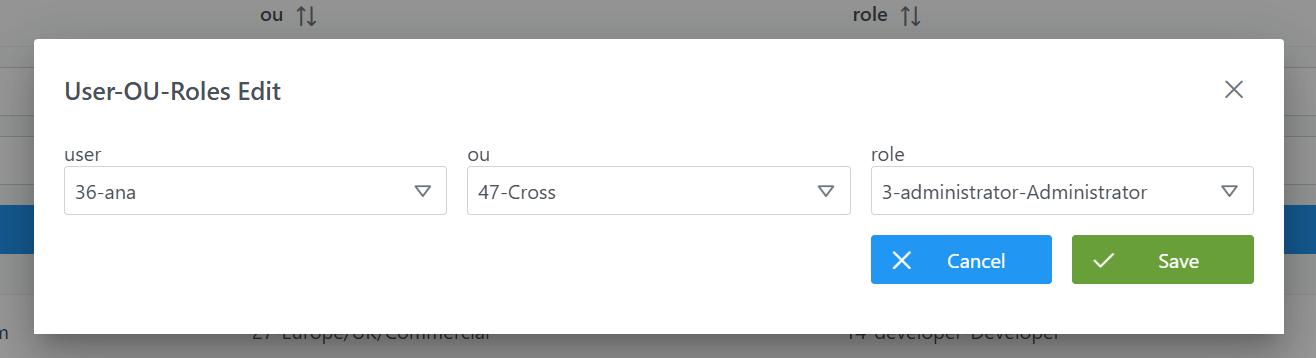
Assigning vertical roles
To assign a user a vertical role that has not been configured as cross (see configuration of the Roles table), the following steps must be followed:
-
Click the New button in the top right corner. This will open an assistant (wizard) with the fields defined in the Structure section.
-
Fill in the fields as follows:
-
user: Select the user identifier. If the user does not exist, it must be created beforehand. -
ou: Select the corresponding leaf organizational unit. If it does not exist, it must be created beforehand. -
role: Select the role from among the previously configured roles. If the role does not exist, it must be created beforehand.
-
-
Click Save to save the role or Cancel to discard it.
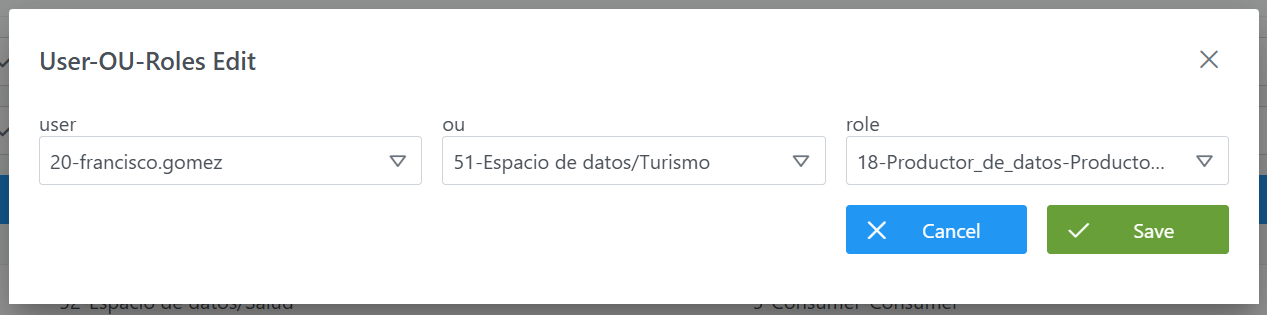
Modifying authorizations
To modify the assignment of roles to users in organizational units, this can be done by deleting a record and creating a new one.
Querying and using authorization data in the database (Developer view)
In addition to being configured from the Configuration Panel, the assignment of roles to users is stored in the database and can be queried in read-only mode to use it for analytical purposes. For example, it allows the customer to build their own data mart, dashboards or reports on the authorization of their platform (which users hold which roles in which data domains).
This section is intended for the querying (read-only) of the information. The creation and modification of authorization must always be carried out from the Configuration Panel (administrator view), as described in the previous sections; writing directly to the tables is not recommended.
Table zeus.user_ou_role
The assignment of roles to users is stored in the zeus.user_ou_role table. Each record represents a unique user-organizational unit-role assignment. Its columns, available for querying, are:
|
Column |
Data type |
Description |
|---|---|---|
|
user_id |
int4 (INTEGER) |
Identifier of the user (foreign key to |
|
ou_id |
int4 (INTEGER) |
Identifier of the organizational unit (foreign key to |
|
rol_id |
int4 (INTEGER) |
Identifier of the role (foreign key to |
|
unique_idx |
— |
UNIQUE constraint (user_id, ou_id, rol_id). Ensures that no duplicate assignments exist for the same user-OU-role combination. |
Related tables (foreign keys)
The table is joined with the following model tables to resolve identifiers and enrich queries:
|
Column |
Referenced table |
Referenced field |
Description |
|---|---|---|---|
|
|
|
|
Resolves the assigned user. |
|
|
|
|
Resolves the organizational unit (alias / hierarchy). |
|
|
|
|
Resolves the assigned role ( |
Query examples
Resolved authorizations (user, organizational unit and role):
SELECT uor.user_id,
       ou.alias      AS unidad_organizativa,
       r.role_name   AS rol
FROM zeus.user_ou_role uor
JOIN zeus.organizational_unit ou ON uor.ou_id = ou.id_organizational_unit
JOIN zeus."role" r            ON uor.rol_id = r.id_role
ORDER BY uor.user_id;
Roles assigned to a specific user (by their identifier):
SELECT ou.alias AS unidad_organizativa,
       r.role_name AS rol
FROM zeus.user_ou_role uor
JOIN zeus.organizational_unit ou ON uor.ou_id = ou.id_organizational_unit
JOIN zeus."role" r            ON uor.rol_id = r.id_role
WHERE uor.user_id = 2;
Count of assignments by role (useful as a metric for a data mart):
SELECT r.role_name,
       COUNT(*) AS asignaciones
FROM zeus.user_ou_role uor
JOIN zeus."role" r ON uor.rol_id = r.id_role
GROUP BY r.role_name
ORDER BY asignaciones DESC;
Important:
-
Use a database user with read-only permissions for these queries. The creation and modification of authorization must always be carried out from the Configuration Panel, in order to maintain referential integrity (users, units and roles) and the caches.
-
Schema, table and column names may evolve between versions of Anjana Data; it is advisable to validate them before building a data mart or reports on this information.