
In this section, the basic concepts that the user can work with in Anjana Data will be described. However, you can find a Glossary at the end of this manual with the main definitions.
Data Domain, Organizational Unit or Business Unit
It is the mechanism through which data custody is established within the Business Glossary or Data Catalog, allowing the organization's reality to be represented in terms of functional data domains or semantics.
It is important not to confuse an organization's hierarchical structure or organizational chart with data domains. The hierarchical structure of organizations changes constantly, whereas data domains should be fairly static.
Data assets are classified into the different Organizational Units (or data domains) that have been identified in the organization. In this way, users who perform a role in an organizational unit are responsible for the data assets that belong to their unit/domain.

Anjana Metamodel
The set of entities and relationships that can be governed from the Anjana Data Platform is what is known as the Metamodel. This metamodel is fully configurable, meaning the organization must carry out the exercise of defining a governance strategy in which, among other things, it defines which entities it wants to govern and what types of relationships it wants to establish between the different entity types to offer an end2end view of the data.
Entity
It is the representation of any data element within the organization's semantic map. Depending on the nature of the entities, they are classified as Business Glossary entities (if they are more related to the Business) or Data Catalog entities (more related to IT).
In Anjana Data it is possible to create as many entity types as you wish to define.
Some examples of entities can be business terms, metrics, dimensions, reports, business processes or data quality rules.

In addition, it is also possible to define entities that represent physical assets such as datasets, processes or DB schemas.

Some of these entities are native to Anjana and the application carries out certain logic on them, specified later:
-
Dataset and dataset_fields
-
DSA
-
Process and process instance
-
Solution
Relationship
It is the mechanism that Anjana Data provides to establish a link between entities that are somehow connected, whether by association, involvement, membership, etc. For example, relationships between business terms that allow a metric to be calculated, or data quality rules that apply to a given report.
Through relationships it is possible to establish the end2end data lifecycle, that is, it is possible to govern technical lineage (how data flows through the different IT systems and what transformations it undergoes), how data is used for analytical purposes, the semantics associated with the data, where quality checkpoints are applied to verify data conformity, or even which users are consuming certain data.
Relationships allow linking Business Glossary entities to each other, but also relating Business Glossary entities to Data Catalog entities to locate, for example, where a given business term is stored.
As with entities, in Anjana it is possible to configure as many relationship types as needed, which will coexist with the set of native (or internal) relationships of the application. These native relationships associate native entities with each other and are not created from the object creation wizard but through functionalities specific to these entities. These relationships are:
-
STRUCTURE: Relationship between a dataset and its dataset_fields
-
DSA_CONTENT: Relationship between a DSA and the entities it contains
-
INSTANCE_PROCESS: Relationship between a process and its instances
-
INSTANCE_DATASET_IN: Relationship between an instance and its input datasets
-
INSTANCE_DATASET_OUT: Relationship between an instance and its output datasets
-
SOLUTION_RELATED_INSTANCE: Relationship between a solution and its related instances
-
SOLUTION_OWNED_INSTANCE: Relationship between a solution and its own instances
Data Catalog Metamodel Objects
Despite the flexibility of the Anjana Data metamodel and, therefore, the ability to create as many entities as you wish to represent, the Data Catalog metamodel is based on the following main objects: datasets (and their dataset_fields), DSAs, processes (and their instances) and solutions, together with their relationships, metadata and lineage.
Dataset
This refers to any physical asset that contains or represents data, whether structured or unstructured, persisted or not persisted. It can be a file, a table, a document, of any type and format.
It is the main object to be governed within the Data Catalog. What differentiates the Catalog from any Data Dictionary is that it can be enriched with technical and functional metadata.
Dataset_field
If the dataset is structured, it is made up of a set of dataset_fields. Each dataset_field is a field or column of the dataset that contains its own metadata.
DSA (Data Sharing Agreements)
It is a logical asset that can include one or several entities to facilitate the grouping of physical data assets at a level closer to information consumption.
It is the mechanism through which access to governed data is facilitated and allows data to be shared between providers and consumers by means of signing a contract whereby the user agrees to comply with certain conditions of data use.
It is enriched with business metadata.
Process
It corresponds to groups of functions defined to extract data from the sources, move it, transport it, transform it, exploit it and/or generate new data (ETLs, transformation scripts, quality control executions, report generation…).
Process Instance
A process can have one or more instances depending on the different execution scenarios based on possible configurations it may take, in order to execute the software modules developed in different situations or platforms.
An instance is a specific execution of a process with a parameterization and a set of input and output datasets. It allows the definition of the pieces of a framework without the need to create a process for each of them. Once defined, each execution is auditable.
Solution
The solution represents the "data contract" that authorizes the movement of data through processes. In this way, it guarantees that authorizations exist for the movement of data between systems or applications. Therefore, it is a logical asset that encompasses several process instances together with their related datasets to have an end-2-end view of the executions.
A solution has a person responsible for its administration and maintenance who guarantees its execution.
The solution's metadata can be enriched with business metadata.
The difference between solutions and DSAs is that solutions enable consumption by IT processes and applications, while DSAs govern consumption by consumer users.
Object Lifecycle
Anjana Data's native objects have their own lifecycle, so that governed objects pass through different states that allow moving from traditional passive governance to active governance with impact management.
Below is the lifecycle that objects go through in Anjana.
Lifecycle of Anjana's Native Entities
Anjana's native entities have a different lifecycle than non-native entities. This section presents the states that a native entity can go through:

-
Imported: Entities created using Automatic Metadata Extraction remain in Imported status.
-
Draft: If an Imported entity is modified to fill in its data, it moves to Draft status.
If it is created via Excel Upload or Manual creation (either using the API or the portal itself), a native entity is created in Draft status.
If an Approved entity is modified, a new version is created with Draft status.
If a Rejected entity is modified, it moves to Draft status.
-
Pending: Once the entity is submitted for validation, it moves to Pending status.
-
Approved: If all validators approve an entity, it moves to Approved status. If it is edited again, an entity with those changes is generated in Draft status.
An entity with Deactivated status can return to Approved status after it is activated.
-
Rejected: If any validator rejects the validation of an entity, it moves to Rejected status. If it is edited again to correct the reasons for rejection, it returns to Draft status.
-
Deprecated: If significant modifications are made to a native entity (enough to trigger versioning of it), once the new version of the entity is approved, the previous version automatically moves to Deprecated status.
-
The rules that decide which changes generate a new version are fully configurable, as will be seen later.
-
In addition, it is possible to deprecate an entity to indicate that, after a certain time, it will expire.
-
Expired: Once the expiration date set on a native entity is reached, it automatically moves to Expired status.
Versioning
The versioning of assets has two fundamental objectives:
-
Having an impact control mechanism from the point of view of interoperability, quality, security, data protection, etc.
-
Having a version history with the most significant changes.
The organization establishes which changes in the metadata templates of Anjana's native entities should generate a new version of it.
Any of the following cases can be configured:
-
That a new version of an object be generated when any change occurs in significant attributes of an object's template.
-
That a DSA is versioned when the entities it grants access to change.
-
That an instance is versioned when the instance's input or output datasets change.
-
That a solution is versioned when its related instances change.
-
-
That versioning occurs when an attribute acquires a specific value.
-
That a new version of the dataset be generated when a certain attribute of a dataset field changes, or a dataset field is added or removed.
-
That a deprecated or expired entity for which there is no more current approved version be edited.
Deprecation
The deprecation of Anjana's native entities triggers a series of changes in the objects and the sending of notices to users related to them.
-
DATASET:
-
Its dataset_fields will be deprecated
-
The DSAs in which it is included will NOT be deprecated
-
The instances with which it is associated will NOT be deprecated
-
A notice will be sent to the dataset owners
-
A notice will be sent to the DSA members and their owners
-
A notice will be sent to the owners of the related instances
-
-
DSA:
-
A notice will be sent to the DSA owners
-
A notice will be sent to the owners of the entities the DSA contains
-
A notice will be sent to the DSA members
-
-
PROCESS:
-
The instances associated with the process will be deprecated
-
A notice will be sent to the process owners
-
-
PROCESS INSTANCE:
-
The process related to an instance will NOT be deprecated
-
The instance's own solution will NOT be deprecated
-
Related solutions will NOT be deprecated
-
A notice will be sent to the process owners
-
A notice will be sent to the owners of the related solutions
-
A notice will be sent to the owners of the instance's own solutions (who are the instance owners)
-
A notice will be sent to the owners of the datasets the instance writes (DATASET_OUTPUT)
-
A notice will be sent to the users who are members of the datasets the instance writes (DATASET_OUTPUT)
-
-
SOLUTION:
-
Own instances will NOT be deprecated
-
Related instances will NOT be deprecated
-
A notice will be sent to the solution owners
-
Expiration
The expiration of Anjana's native entities triggers a series of changes in the objects and the sending of notices to users related to them.
-
DATASET:
-
If it is governed, its access permissions that were included via DSAs will be removed
-
Its dataset_fields will be expired
-
The DSAs in which it is included will NOT be expired
-
The instances with which it is associated will NOT be expired
-
A notice will be sent to the dataset owners
-
A notice will be sent to the members of the DSA containing the dataset and to their owners
-
A notice will be sent to the owners of the related instances
-
A notice will be sent to the owners of the entities related to the dataset and of the DSAs that contain the dataset
-
-
DSA:
-
If it contains governed entities, the group and all the permissions it had will be removed
-
A notice will be sent to the DSA owners
-
A notice will be sent to the owners of the entities the DSA contains
-
A notice will be sent to the DSA members
-
A notice will be sent to the owners of the entities related to the DSA
-
-
PROCESS:
-
The instances associated with the process will be expired
-
A notice will be sent to the process owners
-
A notice will be sent to the owners of the entities related to the process
-
-
PROCESS INSTANCE:
-
The process related to an instance does NOT expire
-
The instance's own solution does NOT expire
-
The related solution does NOT expire
-
A notice will be sent to the process owners
-
A notice will be sent to the owners of the related solutions
-
A notice will be sent to the owners of the instance's own solutions (who are the instance owners)
-
A notice will be sent to the owners of the datasets the instance writes (DATASET_OUTPUT)
-
A notice will be sent to the users who are members of the datasets the instance writes (DATASET_OUTPUT)
-
A notice will be sent to the owners of the entities related to the instance
-
-
SOLUTION:
-
Own instances do NOT expire
-
Related instances do NOT expire
-
A notice will be sent to the solution owners
-
A notice will be sent to the owners of the entities related to the solution
-
Lifecycle of Anjana's Non-Native Entities
Anjana's non-native entities go through the following states in their lifecycle:

-
Imported: Entities created using Automatic Metadata Extraction remain in Imported status.
-
Draft: If an Imported entity is modified to fill in its data, it moves to Draft status.
If it is created via Excel Upload or Manual creation (either using the API or the portal itself), a non-native entity is created in Draft status.
If an Approved entity is modified, a new version is created with Draft status.
If a Rejected entity is modified, it moves to Draft status.
-
Pending: Once the entity is submitted for validation, it moves to Pending status.
-
Approved: If all validators approve an entity, it moves to Approved status. If it is edited again, an entity with those changes is generated in Draft status.
An entity with Deactivated status can return to Approved status after it is activated.
-
Rejected: If any validator rejects the validation of an entity, it moves to Rejected status. If it is edited again to correct the reasons for rejection, it returns to Draft status.
-
Deactivated: If the non-native entity no longer makes sense, it can be deactivated, moving from Approved status to Deactivated status.
Lifecycle of Relationships
Relationships go through the following states in their lifecycle:
-
Imported: Relationships created using Automatic Metadata Extraction remain in Imported status.
-
Draft: If an Imported relationship is modified to fill in its data, it moves to Draft status.
If it is created via Excel Upload or Manual creation (either using the API or the portal itself), a relationship is created in Draft status.
If an Approved entity is modified, a new version is created with Draft status.
If a Rejected entity is modified, it moves to Draft status.
-
Pending: Once the relationship is submitted for validation, it moves to Pending status.
-
Approved: If all validators approve a relationship, it moves to Approved status. If it is edited again, a relationship with those changes is created in Draft status.
A Deactivated relationship can return to Approved status after it is activated.
-
Rejected: If any validator rejects the validation of a relationship, it moves to Rejected status. If it is edited again to correct the reasons for rejection, it returns to Draft status.
-
Deactivated: If the relationship no longer makes sense, it can be deactivated, moving from Approved status to Deactivated status.
Workflows
What are they?
Workflows represent the sequence of steps that must be followed so that an action initiated in Anjana by a user can be validated by other users, establishing a collaborative work environment based on roles.
Workflows make it possible to implement the procedures of the organization's governance model and ensure that all roles involved in the processes exercise their responsibility, are informed and/or consulted.
These are some of their characteristics:
-
Workflows are configurable and each one has its own state diagram
-
When a user submits a request in Anjana, the workflow corresponding to the user's role and the request made is automatically generated, unless there are configured rules that prevent it
-
In each workflow, a user from each assigned role must validate the request for it to become approved. If a user rejects the validation, the workflow will automatically be cancelled
-
Each workflow state involves the review and validation of the request by one or more users depending on their roles and the type of request. This review is materialized by the validator's approval or rejection of the workflow
-
Validations will always be accompanied by a comment from the user indicating the reason for their response
-
Workflows may be launched in Anjana with more steps than will ultimately be validated. The participants in the approval flow may vary depending on:
-
The role of the user who launches the validation flow
-
The user who launches the validation
-
The type of action under validation
-
The type of object under validation
-
The subtype of the object under validation
-
Attributes of the object's template under validation
-
The validator's decision
-
The object's organizational unit
-
The object's version
-
Object identifiers
-
Object names
-
-
All actions carried out in workflows will be audited, making it possible to identify the different validators, dates, comments and responses.
Thanks to the use of workflows in Anjana, Governance procedures can be automated in an agile and simple way, guaranteeing full monitoring and traceability of each request.
Workflows to Configure
The workflows used in Anjana are configurable by object type (entity type or relationship type), action (creation, modification, adherence…) and by the role that submits the request.
In order to implement Anjana's complete logic, it is necessary to define the following workflows:
-
Workflows for the creation of any defined ENTITY and RELATIONSHIP
-
Workflows for manual deprecation of DATASET, DSA, PROCESS, PROCESS INSTANCE AND SOLUTION (Anjana's native entities)
-
Workflows for adherence to the DSA
-
Workflows for modification (with or without versioning) of any defined ENTITY and RELATIONSHIP
-
Workflows for changing the organizational unit of any defined ENTITY
-
Workflows for activation and deactivation of any defined ENTITY and RELATIONSHIP
Types of Workflows
The validation steps that make up the workflow are identified at the moment it begins to run and mark the order of acceptance of an item by different roles.
A sequential workflow is a workflow in which there are no branches and the order of validations is always the same. This is why, at the moment this type of workflow starts, it is known in advance which roles will take part in the validation. Below is an example of a linear sequence of the hierarchical acceptance process in the Anjana Data tool.

If the workflow includes conditions to be evaluated based on the object being validated, it is not sequential. When a workflow of this type starts, all the roles involved are known, but as the workflow progresses it will become apparent which roles will have to validate and which will not.
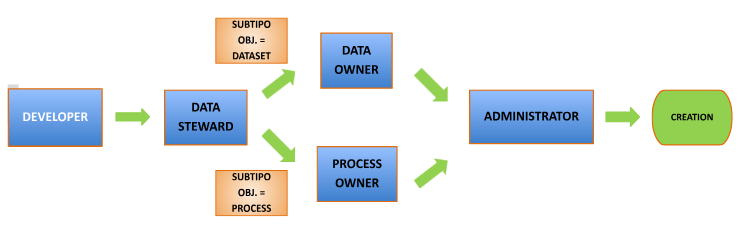
For cases in which multiple users have to validate a workflow step because their role depends on a specific business unit and they are not transversal to the organization, the validations in that step will be executed in parallel, so that the step will be considered finished once all users have validated it.
You can find more information about workflow configuration in the Functional Configuration Guide and in the Workflow Configuration Guide.
Contracts
A contract is a written agreement between data producers and consumers that facilitates the regulated sharing, use and consumption of data.
They specify the license terms, incorporate the data usage conditions and the additional requirements established by both parties (e.g.: quality conditions, availability, etc).
The DSAs in which contracts are included have an expiration date for lifecycle management, together with versions and impacts.
Before adhering to a DSA, the consumer user is required to download the contract, read it and sign it.
Transfer of Data Rights, Responsibilities and Uses
Establishing legal contracts for DSAs and Solutions allows data owners to transfer both rights and responsibilities over the information under legal coverage, while at the same time facilitating the exchange, use and consumption of data.
Use of Contracts
A contract applies to both DSAs and Solutions and represents a legal agreement for the use of data.
Each contract has two groups of counterparties (providers and consumers), a person responsible and a legal figure who validates the contract, if so defined in the data governance model.
The contract includes the terms of use to be applied and a validity date of the contract for the counterparties' signature. This information remains unchangeable during the life of the contract under the signed conditions and, if a modification is desired, the acceptance of each and every counterparty will be required.
Characteristics of DSA Contracts
When a DSA is created, the owners of the contained entities (data structures such as datasets, reports, KPIs, quality rules…) 'hand over' responsibility for them to the DSA owner.
By adhering to a DSA, the user accepts compliance with the contract under the license terms specified when the DSA was created. The DSA owner is responsible for ensuring that the contract conditions are met by all parties.
It is possible to group several data structures into the same DSA to request access through a single adherence request under the same legal agreement.
In addition, an entity can be included in different DSAs covered by different legal contracts (for different use cases, different license terms, different validity dates…)
Data Governance
Passive data governance is an approach to data management and oversight characterized by the observation, recording and auditing of information without actively interfering with the flow of data or users' daily operations.
Active governance, in contrast, seeks to implement policies, rules and controls that intervene directly and immediately in the use, access and handling of data within an organization. In this way, data management tasks are declared on the governance platform and, once the corresponding approvals are in place, they are executed on the data platforms or in the identity management systems.
Anjana Data offers different native functionalities for the governance of structures thanks to plugins, which are the connectors that allow communication with data systems.
Passive Governance
Metadata Extraction
This functionality allows extracting metadata from the structures located in the data systems to incorporate them into the Data Catalog or the Business Glossary, generating the corresponding objects.
You can find more information about how to extract metadata in the Creation Wizard > Automatic Metadata section of this User Guide.
External Audit
External audit is the result of monitoring the audit logs returned by the data platforms, which allows visualizing, for example, ungoverned access or changes in data structures that have not previously been declared in the tool.
This audit is not provided by Anjana; it only enables its exploitation.
You can find more information in the Dataset > Audit, Process Instance > Audit, Functionality Menu > Audit and User Profile > Audit sections of this User Guide.
DSA Reuse
Although Anjana can manage identity manager groups, as seen in the Data Structure Management section, it is possible that groups already exist in the environment with which Anjana interacts.
In that case, and to allow Anjana to manage permissions automatically thanks to adherences, DSAs can be "reused" by including the name of the already existing group in the physicalName attribute of its template. With this, when the DSA is approved in Anjana, the corresponding structure will not be created, but it will be used when users request adherence and it is granted to them.
It should be noted that pre-existing groups used in this way by Anjana enter the natural lifecycle of groups governed by DSAs, which includes their deletion once the DSA that uses it expires.
Active Governance
Data Structure Management
This functionality allows automation to be performed on data structures by retrieving their metadata from Anjana.
In this way, for example, when a new dataset located in a SQLServer is created in the application and the validation flow finishes with approvals, Anjana's plugin can automatically create the corresponding structure.
Or, when creating a DSA that includes a dataset and a report marked as governed in its template and it is approved in the validation flow, Anjana's plugin can create the corresponding group in the identity manager. In this way, Anjana creates the group in Azure AD to which access is granted to the data of the dataset and the report in Azure Storage, for example.
It should be noted that, due to Anjana's operating model, if you want to modify the group corresponding to the DSA, it is necessary to version the DSA so that a new group is created and permissions are granted. That is, if data structures are added to an already existing DSA, or one of the included structures changes and becomes governed without having been so before, it is necessary for a new version of the DSA to be created and, with it, for the new group to be created with the new data access permissions. The created group will be named the same as the value provided in the DSA "name" attribute, concatenated with "_V" and its version.
Data Sample
This is a very useful functionality for data sharing. If the owner of a governed dataset enables the checkbox in its template to allow data sampling and the triplet allows for it, Anjana users will be able to view a sample of the dataset's data in which fields marked as PI will appear obfuscated.
You can find more information about this functionality in the Dataset > Sample Data section of this User Guide.
Data Access Permission Management
This functionality enables data sharing by managing data access permissions directly at the source, without virtualization, copying or moving data.
In Anjana, permission management is carried out through the shopping cart, from which the user requests access to data structures or DSAs.
When the adherence request is approved, it is therefore possible to include the requesting user in the group corresponding to the DSA to which they have adhered, so that they "inherit" the permissions the group has. Continuing with the example introduced in the Structure Management section for the creation of a DSA in Azure AD, the user would be added to that same group so that they gain access permissions to the data of the datasets in Azure Storage.
In order to carry out active governance of the structures, it is necessary for them to have the infraestructura, tecnología, zona, path and is_governed attributes configured in their templates.
You can find more information in the Functionality Menu > Shopping Cart section of this User Guide.
Other Integrations
It is also possible to integrate Anjana with data ingestion services, data platforms, identity management systems and data consumption services through plugins.

Roles and Permissions
The definition of user roles and their capabilities within the organization are configurable in Anjana Data so that each organization can establish the governance model according to its needs.
The roles defined must match those defined within the organization's Data Governance.
These roles can be:
-
Vertical: the people who perform the role do so only over a specific data domain (organizational unit). For the rest of the domains, other people will perform the same role as them, having the same responsibilities but over a different set of data assets
-
Cross or transversal: the people who perform the role will always have the same permissions over the assets of all the organization's data domains.
Each of the defined roles must have a permission package. Permissions can be applied by object type (metrics, dataset, terms, DSAs…), by action type (creation, modification, searches…) and by specific modules (audit, lineage, history…).
If an Anjana user does not have a specific role assigned from those configured in the platform, it is possible to grant the user the permissions corresponding to a configured default role, which will be assigned to anyone who accesses the Data Portal.