
Introduction
This glossary gathers the concepts, screens and components specific to Anjana Data mentioned throughout the official documentation. Its purpose is to make the tool easier to understand for all user profiles - both technical and business - by providing a clear, accessible definition aligned with the company's data governance model.
Each entry describes in simple terms what the term means within the context of Anjana Data, what its main function is and, when useful, practical usage examples. This ensures that any reader, regardless of their prior experience, can correctly interpret references to the product and relate them to their own role within the organization.
The glossary is designed as a quick reference point and a common vocabulary framework, reinforcing the consistency of the documentation and improving both the learning and usage experience of the platform.
Object Search
This is the screen in the Data Portal that allows you to quickly locate any governed object in Anjana Data (datasets, APIs, reports, business terms, AI models...). It offers a semantic search engine, and customizable filters help find information efficiently, even in large and complex catalogs.
Usage example: a Data Steward uses the Object Search to locate all datasets associated with the Billing domain.
Translation keys
The translation keys are identifiers that allow the application to be configured for multiple languages, so that each element of Anjana Data can be displayed in the language selected by each user.
These keys apply to all configurable components of the platform, including:
-
Roles and domains
-
Menus and sections of the metadata templates
-
Attributes and descriptions
-
Notifications and system messages
Thanks to the use of translation keys, the platform ensures a consistent user experience adapted to each person's preferred language, making it easier to adopt the governance model in multilingual organizations.
Configuration Panel
This is the interface reserved for users with an administration or functional configuration role. From the Configuration Panel, key aspects of the operating model (roles, permissions, data domains, workflows, notifications), the metamodel (entities and relationships) and the metadata templates are defined.
It is sometimes known internally as Portuno, since this is the name of the microservice associated with the platform's configuration capabilities.
🔑 Access: accomplished through the domain URL followed by /configpanel/login. Example: https://<mydomain>.anjanadata.net/login
Usage example: an administrator accesses the Configuration Panel to create a new workflow for modifying AI models.
Data Portal
This is the main interface of Anjana Data aimed at business users. From the Data Portal users can search, collaborate in building the catalog/glossary, and request access to data assets and information of the organization. Its purpose is to make access to the organization's centralized metadata repository easier, reducing friction between business and technology.
🔑 Access: accomplished through the domain URL followed by /login. Example: https://<mydomain>.anjanadata.net/login
Usage example: a business user accesses the Data Portal to search for customer information and request access to a dataset.
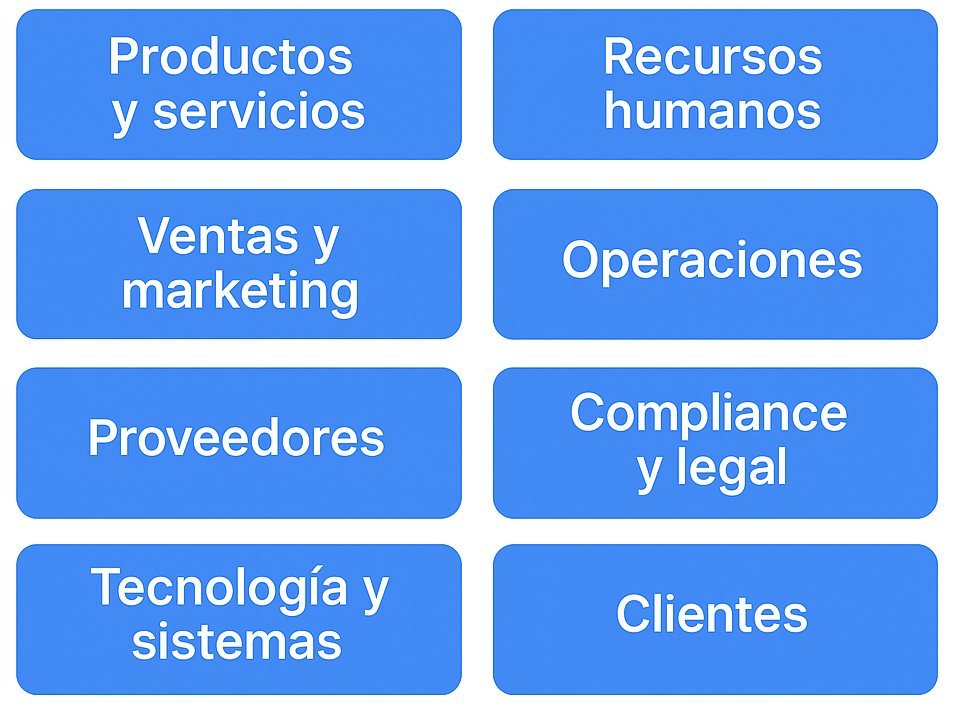
Data domain / functional domain / business domain / organizational unit
A data domain is the mechanism through which stewardship of data assets is established within the Business Glossary or the Data Catalog, making it possible to represent the organization's reality in terms of functional or semantic data domains.
The data assets are classified into the different Organizational Units (or data domains) that have been identified within the organization. In this way, users who play a governance role in an organizational unit are responsible for the data assets belonging to that domain.
Each domain also acts as the basis for the authorization mechanisms, determining which users can exercise which roles over the associated data assets.
⚠️ Important note: do not confuse data domains with a company's organizational hierarchy or org chart. While the hierarchical structure tends to change, data domains must remain relatively stable over time, since they reflect the organization's semantics and business logic.
Anjana Metamodel
The set of entities and relationships that can be governed from the Anjana Data Platform is known as the Metamodel. This metamodel is fully configurable, meaning the organization must go through the exercise of defining a governance strategy in which, among other things, it defines which entities it wants to govern and what types of relationships it wants to establish between the different entity types in order to provide an end-to-end view of the data.
Entity
This is the representation of any data element within the organization's semantic map. Depending on their nature, entities are classified as Business Glossary entities (when more closely related to the business) or Data Catalog entities (more closely related to IT).
In Anjana Data, it is possible to create as many entity types as needed.
Some examples of entities can be business terms, metrics, dimensions, reports, business processes or data quality rules.

In addition, it is also possible to define entities that represent physical assets such as datasets, processes or database schemas.

Some of these entities are native to Anjana, and the application carries out certain logic on them, specified further below:
-
Dataset and dataset_fields
-
DSA
-
Process and process instance
-
Solution
Relationship
This is the mechanism that Anjana Data provides to establish a link between entities that are connected in some way, whether by association, involvement, membership, etc. For example, relationships between business terms that make it possible to calculate a metric, or the data quality rules that apply to a given report.
Relationships make it possible to establish the end-to-end lifecycle of the data - that is, to govern technical lineage (how data flows through the different IT systems and what transformations it undergoes), how data is used for analytical purposes, the semantics associated with the data, where quality checkpoints are applied to verify data conformity, or even which users are consuming certain data.
Relationships make it possible to link Business Glossary entities to each other, but also to link Business Glossary entities with Data Catalog entities in order to locate, for example, where a given business term is stored.
Just as with entities, Anjana allows as many relationship types as needed to be configured, which will coexist with the application's set of native (or internal) relationships. These native relationships link native entities with each other and are not created from the object creation wizard, but rather through functionalities specific to these entities. These relationships are:
-
STRUCTURE: Relationship between a dataset and its dataset_fields
-
DSA_CONTENT: Relationship between a DSA and the entities it contains
-
INSTANCE_PROCESS: Relationship between a process and its instances
-
INSTANCE_DATASET_IN: Relationship between an instance and its input datasets
-
INSTANCE_DATASET_OUT: Relationship between an instance and its output datasets
-
SOLUTION_RELATED_INSTANCE: Relationship between a solution and its related instances
-
SOLUTION_OWNED_INSTANCE: Relationship between a solution and its own instances
Native metamodel objects
Despite the flexibility of the Anjana Data metamodel, and therefore the ability to create as many entities as desired, the Data Catalog metamodel is based on the following main objects: datasets (and their dataset_fields), DSAs, processes (and their instances) and solutions, along with their relationships, metadata and lineage.
DATASET
In Anjana Data, a dataset is a metamodel entity that represents a set of data, regardless of its technical nature or physical format.
A dataset can represent structured data (e.g. tables in relational databases such as Oracle, SQL Server or MySQL), semi-structured data (e.g. files in data lakes in formats such as CSV, JSON, Parquet) or unstructured data (e.g. documents, images, audio or video).
Likewise, a dataset can be persistent (stored stably in a repository or system) or transient (generated temporarily during the execution of a process or workflow).
In this way, the concept of a dataset in Anjana Data acts as a unified abstraction, which makes it possible to govern data assets of different types and origins in a consistent way, ensuring traceability, lineage and the application of governance policies over them.
DATASET FIELD
A dataset field is the smallest unit of a structured dataset. It represents a field or column within the dataset, and it has its own metadata (name, data type, format, validation rules, classifications, etc.), which allows the information to be governed at a more granular level of detail.
In Anjana Data, dataset fields are entities used to document and manage the individual characteristics of a dataset's attributes, making processes such as search, classification, lineage and data quality control easier.
DSA (Data Sharing Agreements)
This is a logical asset that can include one or more entities in order to facilitate grouping physical data assets at a level closer to information consumption.
It is the mechanism through which access to governed data is facilitated, allowing data to be shared between providers and consumers by signing a contract in which the user agrees to comply with certain data usage conditions.
It is enriched with business metadata.
Process
This corresponds to groups of defined functions used to extract data from sources, move it, transport it, transform it, exploit it and/or generate new data (ETLs, transformation scripts, quality control runs, report generation, etc.).
Process Instance
A process can have one or more instances depending on the different execution scenarios based on the possible configurations it can take, in order to run the software modules developed in different situations or platforms.
An instance is a specific execution of a process with a given parameterization and a set of input and output datasets. It allows the pieces of a framework to be defined without having to register a process for each one of them. Once defined, each execution is auditable.
Solution
The solution represents the "data contract" that authorizes the movement of data through processes. This ensures that authorizations exist for the movement of data between systems or applications. It is therefore a logical asset that encompasses several process instances along with their related datasets, in order to have an end-to-end view of the executions.
A solution has a person responsible for its administration and maintenance, who ensures its execution.
The solution's metadata can be enriched with business metadata.
The difference between solutions and DSAs is that solutions enable consumption by IT processes and applications, while DSAs govern consumption by consumer users.
Object lifecycle
Native Anjana Data objects have their own lifecycle, so governed objects pass through different states that make it possible to move from traditional passive governance to active governance with impact management.
The following is the lifecycle that objects go through in Anjana.
Lifecycle of Anjana native Entities
Anjana native entities have a different lifecycle than non-native entities. This section presents the states that a native entity can go through:

-
Imported: Entities created using Automatic Metadata Extraction remain in the Imported state.
-
Draft: If an Imported entity is modified to fill in its data, it moves to the Draft state.
If it is created via Excel Upload or Manual creation (either using the API or the portal itself), a native entity is created in the Draft state.
If an Approved entity is modified, a new version is created in the Draft state.
If a Rejected entity is modified, it moves to the Draft state.
-
Pending: Once the entity is sent for validation, it moves to the Pending state.
-
Approved: If all validators approve an entity, it moves to the Approved state. If it is edited again, an entity with those changes is generated in the Draft state.
An entity in the Deactivated state can become Approved again after it is activated.
-
Rejected: If any validator rejects the validation of an entity, it moves to the Rejected state. If it is edited again to correct the reasons for rejection, it returns to the Draft state.
-
Deprecated: The Deprecated state is applied to a native entity when, after significant modifications that generate a new version, the previous version is automatically marked as obsolete once the new version is approved.
-
The term comes from the English word deprecated, and although it does not exist as such in Spanish, in Anjana Data it is used to reflect the planned obsolescence of a data asset ahead of a migration process or relevant changes to its definition or behavior.
-
The rules that determine which modifications generate a new version - and therefore cause the previous one to move to the Deprecated state - are configurable within the platform.
-
In addition, it is possible to deprecate an entity to indicate that, after a certain time, it will expire.
-
Expired: Once the expiration date set on a native entity is reached, it automatically moves to the Expired state.
Versioning
Versioning of assets has two fundamental purposes:
-
To have an impact control mechanism from the point of view of interoperability, quality, security, data protection, etc.
-
To have a version history with the most significant changes.
The organization determines which changes to the metadata templates of Anjana native entities should generate a new version of them.
Any of the following cases can be configured:
-
That a new version of an object be generated whenever any change occurs in significant attributes of an object's template.
-
That a DSA be versioned when the entities it grants access to change.
-
That an instance be versioned when its input or output datasets change.
-
That a solution be versioned when its related instances change.
-
-
That versioning occur when an attribute takes on a specific value.
-
That a new version of the dataset be generated when a given attribute of a dataset field changes, or when a dataset field is added or removed.
-
That a deprecated or expired entity be edited when there is no more recent approved version.
Deprecation
Deprecating Anjana native entities triggers a series of changes in the objects and the sending of notifications to users related to them.
-
DATASET:
-
Its dataset_fields will be deprecated
-
The DSAs it is included in will NOT be deprecated
-
The instances it is associated with will NOT be deprecated
-
A notification will be sent to the dataset owners
-
A notification will be sent to those who have adhered to the DSA and to its owners
-
A notification will be sent to the owners of the related instances
-
-
DSA:
-
A notification will be sent to the DSA owners
-
A notification will be sent to the owners of the entities contained in the DSA
-
A notification will be sent to those who have adhered to the DSA
-
-
PROCESS:
-
The instances associated with the process will be deprecated
-
A notification will be sent to the process owners
-
-
PROCESS INSTANCE:
-
The process related to an instance will NOT be deprecated
-
Its own solution will NOT be deprecated
-
The related solutions will NOT be deprecated
-
A notification will be sent to the process owners
-
A notification will be sent to the owners of the related solutions
-
A notification will be sent to the owners of its own solutions (who are the owners of the instance)
-
A notification will be sent to the owners of the datasets the instance writes to (DATASET_OUTPUT)
-
A notification will be sent to the users adhered to the datasets the instance writes to (DATASET_OUTPUT)
-
-
SOLUTION:
-
Its own instances will NOT be deprecated
-
The related instances will NOT be deprecated
-
A notification will be sent to the solution owners
-
Expiration
The expiration of Anjana native entities triggers a series of changes in the objects and the sending of notifications to users related to them.
-
DATASET:
-
If it is governed, its access permissions that were granted through DSAs will be removed
-
Its dataset_fields will be expired
-
The DSAs it is included in will NOT be expired
-
The instances it is associated with will NOT be expired
-
A notification will be sent to the dataset owners
-
A notification will be sent to those adhered to the DSA that contains the dataset, and to its owners
-
A notification will be sent to the owners of the related instances
-
A notification will be sent to the owners of the entities related to the dataset and of the DSAs that contain the dataset
-
-
DSA:
-
If it contains governed entities, the group and all its permissions will be removed
-
A notification will be sent to the DSA owners
-
A notification will be sent to the owners of the entities contained in the DSA
-
A notification will be sent to those adhered to the DSA
-
A notification will be sent to the owners of the entities related to the DSA
-
-
PROCESS:
-
The instances associated with the process will be expired
-
A notification will be sent to the process owners
-
A notification will be sent to the owners of the entities related to the process
-
-
PROCESS INSTANCE:
-
The process related to an instance does NOT expire
-
Its own solution does NOT expire
-
The related solution does NOT expire
-
A notification will be sent to the process owners
-
A notification will be sent to the owners of the related solutions
-
A notification will be sent to the owners of its own solutions (who are the owners of the instance)
-
A notification will be sent to the owners of the datasets the instance writes to (DATASET_OUTPUT)
-
A notification will be sent to the users adhered to the datasets the instance writes to (DATASET_OUTPUT)
-
A notification will be sent to the owners of the entities related to the instance
-
-
SOLUTION:
-
Its own instances do NOT expire
-
The related instances do NOT expire
-
A notification will be sent to the solution owners
-
A notification will be sent to the owners of the entities related to the solution
-
Lifecycle of Anjana non-native Entities
Anjana non-native entities go through the following states in their lifecycle:

-
Imported: Entities created using Automatic Metadata Extraction remain in the Imported state.
-
Draft: If an Imported entity is modified to fill in its data, it moves to the Draft state.
If it is created via Excel Upload or Manual creation (either using the API or the portal itself), a non-native entity is created in the Draft state.
If an Approved entity is modified, a new version is created in the Draft state.
If a Rejected entity is modified, it moves to the Draft state.
-
Pending: Once the entity is sent for validation, it moves to the Pending state.
-
Approved: If all validators approve an entity, it moves to the Approved state. If it is edited again, an entity with those changes is generated in the Draft state.
An entity in the Deactivated state can become Approved again after it is activated.
-
Rejected: If any validator rejects the validation of an entity, it moves to the Rejected state. If it is edited again to correct the reasons for rejection, it returns to the Draft state.
-
Deactivated: If the non-native entity no longer makes sense, it can be deactivated, moving from the Approved state to the Deactivated state.
Lifecycle of Relationships
Relationships go through the following states in their lifecycle:
-
Imported: Relationships created using Automatic Metadata Extraction remain in the Imported state.
-
Draft: If an Imported relationship is modified to fill in its data, it moves to the Draft state.
If it is created via Excel Upload or Manual creation (either using the API or the portal itself), a relationship is created in the Draft state.
If an Approved entity is modified, a new version is created in the Draft state.
If a Rejected entity is modified, it moves to the Draft state.
-
Pending: Once the relationship is sent for validation, it moves to the Pending state.
-
Approved: If all validators approve a relationship, it moves to the Approved state. If it is edited again, a relationship with those changes is created in the Draft state.
A Deactivated relationship can become Approved again after it is activated.
-
Rejected: If any validator rejects the validation of a relationship, it moves to the Rejected state. If it is edited again to correct the reasons for rejection, it returns to the Draft state.
-
Deactivated: If the relationship no longer makes sense, it can be deactivated, moving from the Approved state to the Deactivated state.
Workflows/Validation Flows
What are they?
Workflows represent the sequence of validation steps that must be followed so that an action performed in Anjana Data by a user can be validated by other users, establishing a collaborative work environment based on roles.
Workflows make it possible to put the organization's governance model procedures into practice and ensure that all roles involved in the processes exercise their responsibility, and are informed and/or consulted.
These are some of their characteristics:
-
Workflows are configurable, and each one has its own state diagram
-
When a user submits a request in Anjana, the workflow corresponding to the user's role and the request made is automatically generated, unless there are configured rules that prevent it
-
In each workflow, a user from each assigned role must validate the request for it to become approved. If a user rejects the validation, the workflow will be automatically canceled
-
Each workflow state involves the review and validation of the request by one or more users depending on their roles and the type of request. This review is reflected in the validator's approval or rejection of the workflow
-
Validations will always be accompanied by a comment from the user indicating the reason for their response
-
Workflows in Anjana may be launched with more steps than will ultimately be validated. The participants in the approval flow can vary depending on:
-
The role of the user who launches the validation flow
-
The user who launches the validation
-
The type of action under validation
-
The type of object under validation
-
The subtype of object under validation
-
Attributes of the template of the object under validation
-
The validator's decision
-
The organizational unit of the object
-
The version of the object
-
Object identifiers
-
Object names
-
-
All actions carried out in workflows will be audited, making it possible to identify the different validators, dates, comments and responses.
Thanks to the use of workflows in Anjana, governance procedures can be automated in an agile and simple way, ensuring full tracking and traceability of each request.
Workflow validation step
A validation step is a stage of a workflow in Anjana Data (represented as a "box" within the BPM) in which a user with a specific role - previously configured in the step itself - must review an action related to a data or information asset (entity or relationship of the metamodel).
During this step, the validating user is responsible for:
-
Reviewing the proposed action or change.
-
Deciding whether to approve or reject the action.
-
Leaving comments as part of the decision, to ensure traceability and context in the governance process.
The validation step can behave in two ways:
-
Manual validation: carried out by a user with the role configured in the validation step, within the domain to which the asset belongs.
-
Automatic validation: when the person who triggers the workflow already holds the role configured in the validation step within the corresponding domain, the action is automatically approved without additional intervention.
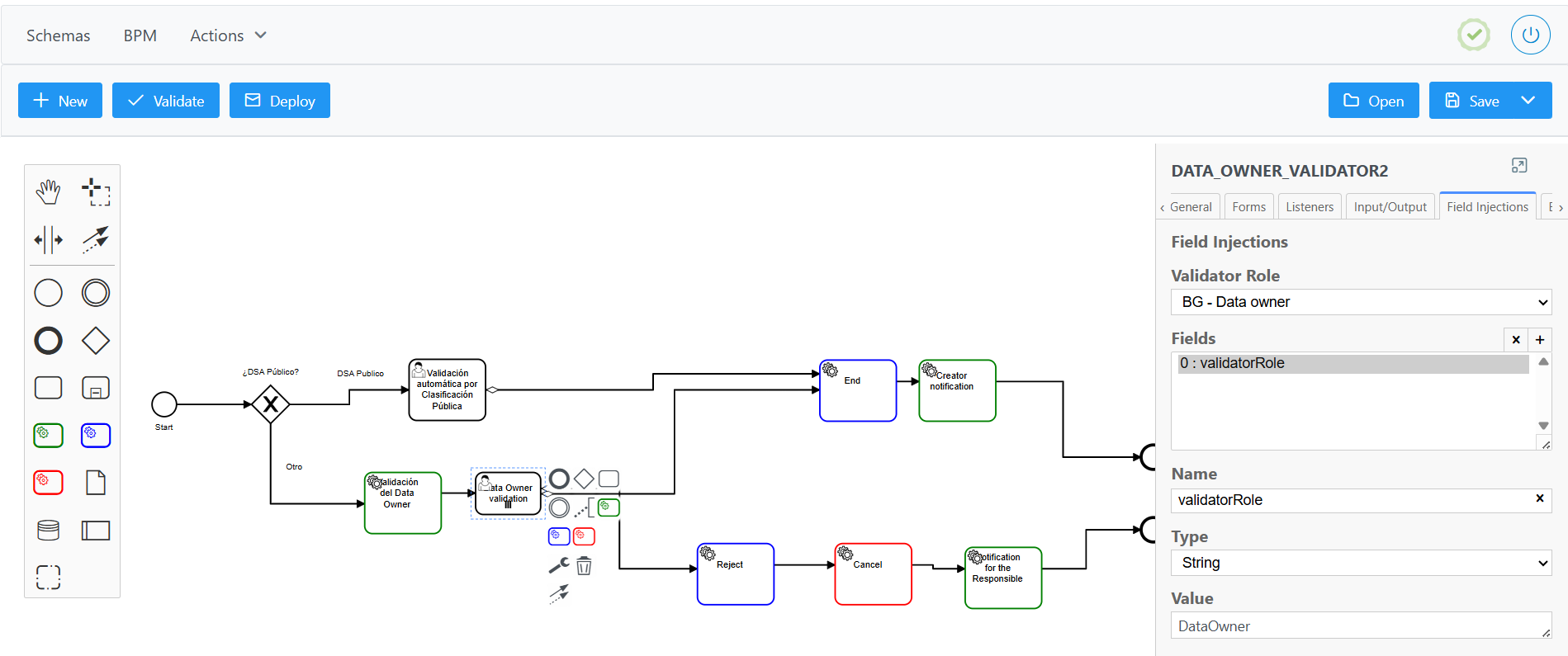
In this way, validation steps ensure that data governance processes have control, oversight and traceability, reinforcing quality and compliance in the management of data assets.
Workflows to be configured
The workflows used in Anjana are configurable by object type (entity type or relationship type), action (creation, modification, adherence, etc.) and by the role that submits the request.
In order to implement Anjana's full logic, the following workflows must be defined:
-
Workflows for the creation of any defined ENTITY and RELATIONSHIP
-
Workflows for the manual deprecation of DATASET, DSA, PROCESS, PROCESS INSTANCE and SOLUTION (Anjana native entities)
-
Workflows for adherence to the DSA
-
Workflows for modification (with or without versioning) of any defined ENTITY and RELATIONSHIP
-
Workflows for changing the organizational unit of any defined ENTITY
-
Workflows for activating and deactivating any defined ENTITY and RELATIONSHIP
Types of workflows
The validation steps that make up the workflow are identified when it starts running, and they mark the order in which an element is accepted by different roles.
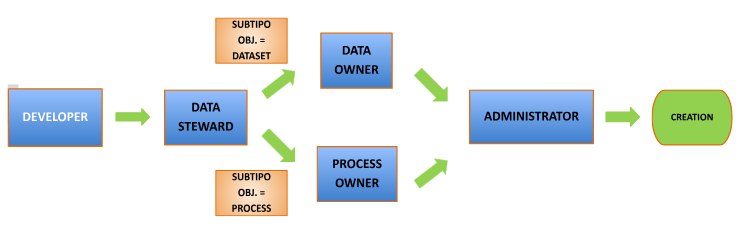
A sequential workflow is a workflow with no branching, where the order of validations is always the same. This is why, at the moment this type of workflow starts, it is already known in advance which roles will take part in the validation. Below is an example of a linear sequence of the hierarchical acceptance behavior in the Anjana Data tool.

If the workflow includes conditions to be evaluated based on the object being validated, it is not sequential. When this type of workflow starts, all the roles involved are known, but which roles will have to validate and which will not is discovered as the workflow progresses.
For cases where multiple users have to validate a workflow step because their role depends on a specific business unit and they are not transversal to the organization, the validations in that step will run in parallel, so that the step will be considered finished once all users have validated it.
You can find more information about workflow configuration in the Functional Configuration Guide and in the Workflow Configuration Guide.
Contracts
A contract is a written agreement between data producers and consumers that facilitates the regulated sharing, use and consumption of data.
They specify the license terms, incorporate the data usage conditions and the additional requirements established by both parties (e.g. quality conditions, availability, etc.).
DSAs that include contracts have an expiration date for lifecycle management, along with versions and impacts.
Before adhering to a DSA, the consuming user is required to download the contract, read it and sign it.
Transfer of data rights, responsibilities and uses
Establishing legal contracts for DSAs and Solutions allows data owners to transfer both rights and responsibilities over the information under legal coverage, while also making it easier to exchange, use and consume data.
Use of contracts
A contract applies to both DSAs and Solutions and represents a legal agreement on data usage.
Each contract has two groups of counterparties (providers and consumers), a person responsible for it, and a legal figure that validates the contract, if defined that way in the data governance model.
The contract includes the applicable terms of use and a validity date for the counterparties to sign. This information remains unchanged throughout the life of the contract under the signed conditions, and if it needs to be modified, acceptance from each and every counterparty will be required.
Characteristics of DSA contracts
When a DSA is created, the owners of the contained entities (data structures such as datasets, reports, KPIs, quality rules, etc.) "hand over" responsibility for them to the DSA owner.
By adhering to a DSA, the user agrees to comply with the contract under the license terms specified when the DSA was created. The DSA owner is responsible for ensuring that the contract's conditions are met by all parties.
Several data structures can be grouped into the same DSA so that access can be requested through a single adherence request under the same legal agreement.
In addition, an entity can be included in different DSAs covered by different legal contracts (for different use cases, different license terms, different validity dates, etc.)
Data governance
Passive data governance is an approach to data management and oversight characterized by observing, recording and auditing information without actively interfering in the data flow or in users' daily operations.
Active governance, by contrast, seeks to implement policies, rules and controls that intervene directly and immediately in the use, access and handling of data within an organization. In this way, data management tasks are declared in the governance platform and, once the corresponding approvals are obtained, they are executed in the data platforms or in the identity management systems.
Anjana Data offers different native features for governing structures thanks to plugins, which are the connectors that allow communication with data systems.
Passive governance
Metadata extraction
This feature makes it possible to extract metadata from structures located in data systems in order to add them to the Data Catalog or the Business Glossary, generating the corresponding objects.
You can find more information on how to extract metadata in the section Creation Wizard > Automatic Metadata in this User Guide.
External audit
External audit is the result of monitoring the audit logs returned by the data platforms, which makes it possible to view, for example, ungoverned access or changes to data structures that had not previously been declared in the tool.
This audit is not provided by Anjana, it only makes it possible to exploit it.
You can find more information in the sections Dataset > Audit, Process Instance > Audit, Features Menu > Audit and User Profile > Audit in this User Guide.
Reuse of DSAs
Although Anjana can manage the groups in identity managers, as shown in the Data Structure Management section, it is possible that groups already exist beforehand in the environment Anjana interacts with.
In that case, and in order to allow Anjana to manage permissions automatically through adherences, DSAs can be "reused" by including the name of the existing group in the physicalName attribute of its template. This means that when the DSA is approved in Anjana, the corresponding structure will not be created, but it will be used when users request adherence and are granted it.
It is worth noting that existing groups used in this way by Anjana enter the natural lifecycle of groups governed by DSAs, which includes their deletion once the DSA that uses them expires.
Active governance
Data structure management
This feature makes it possible to automate actions on data structures by retrieving their metadata from Anjana.
For example, when a new dataset located in a SQL Server is created in the application and the validation flow finishes with approvals, the Anjana plugin can automatically create the corresponding structure.
Or, when a DSA that includes a dataset and a report marked as governed in their template is created and approved in the validation flow, the Anjana plugin can create the corresponding group in the identity manager. In this way, Anjana creates the group in Azure AD that is granted permission to the data of the dataset and the report in Azure Storage, for example.
It is worth noting that, due to how Anjana operates, if you want to modify the group corresponding to the DSA, the DSA must be versioned so that a new group is created and permissions are granted. In other words, if data structures are added to an existing DSA, or one of the included structures changes and becomes governed without having been before, a new version of the DSA must be created, and with it, the new group with the new data access permissions. The group created will be named the same as the value entered in the DSA's "name" attribute, concatenated with "_V" and its version number.
Data sample
This is a very useful feature for data sharing. If the owner of a governed dataset enables the checkbox in its template to allow data sampling, and the triplet supports it, Anjana users will be able to view a sample of the dataset's data, in which fields marked as PI will appear obfuscated.
You can find more information about this feature in the section Dataset > Sample Data in this User Guide.
Data access permission management
This feature enables data sharing by managing data access permissions directly at the source, without virtualization, copying or moving data.
In Anjana, permission management is carried out through the shopping cart, from which the user requests access to data structures or DSAs.
When the adherence request is approved, the requesting user can therefore be added to the group corresponding to the DSA they adhered to, so that they "inherit" the permissions the group has. Continuing with the example introduced in the Structure Management section for creating a DSA in Azure AD, the user would be added to that same group so that they gain access permissions to the data of the datasets in Azure Storage.
In order to carry out active governance of structures, it is necessary for them to have the attributes infrastructure, technology, zone, path and is_governed configured in their templates.
You can find more information in the section Features Menu > Shopping Cart in this User Guide.
Other integrations
It is also possible to integrate Anjana with data ingestion services, data platforms, identity management systems and data consumption services through plugins.

Anjana Data Plugin
In Anjana Data, a plugin is an integration piece that allows the platform's functionality to be extended and connected with external systems.
Plugins are modules that can be developed by any organization or user through the official Anjana Data SDK, which makes it easier to adapt them to specific needs.
Each plugin communicates with TOT, the Anjana Data microservice responsible for plugin orchestration, which manages their execution and interaction with the rest of the platform.
Main plugin functionalities
-
Metadata extraction (via
AUTOMATIC_METADATApermission)-
Assisted creation of entities or relationships in Anjana Data.
-
Automatic discovery and import of metadata from source systems.
-
-
Data sample viewing (
sampleData)-
Allows objects to display a representative subset of real data.
-
Configurable through the
sampleDataattribute in the metadata template.
-
-
Tag injection
-
Ability to automatically assign tags to entities or relationships, if the plugin supports it.
-
-
Access permission management
-
Through adherence to DSAs, plugins make it possible to enable access under governance control.
-
Requires the
ACCESSpermission on theADHERENCEsubtype.
-
Roles
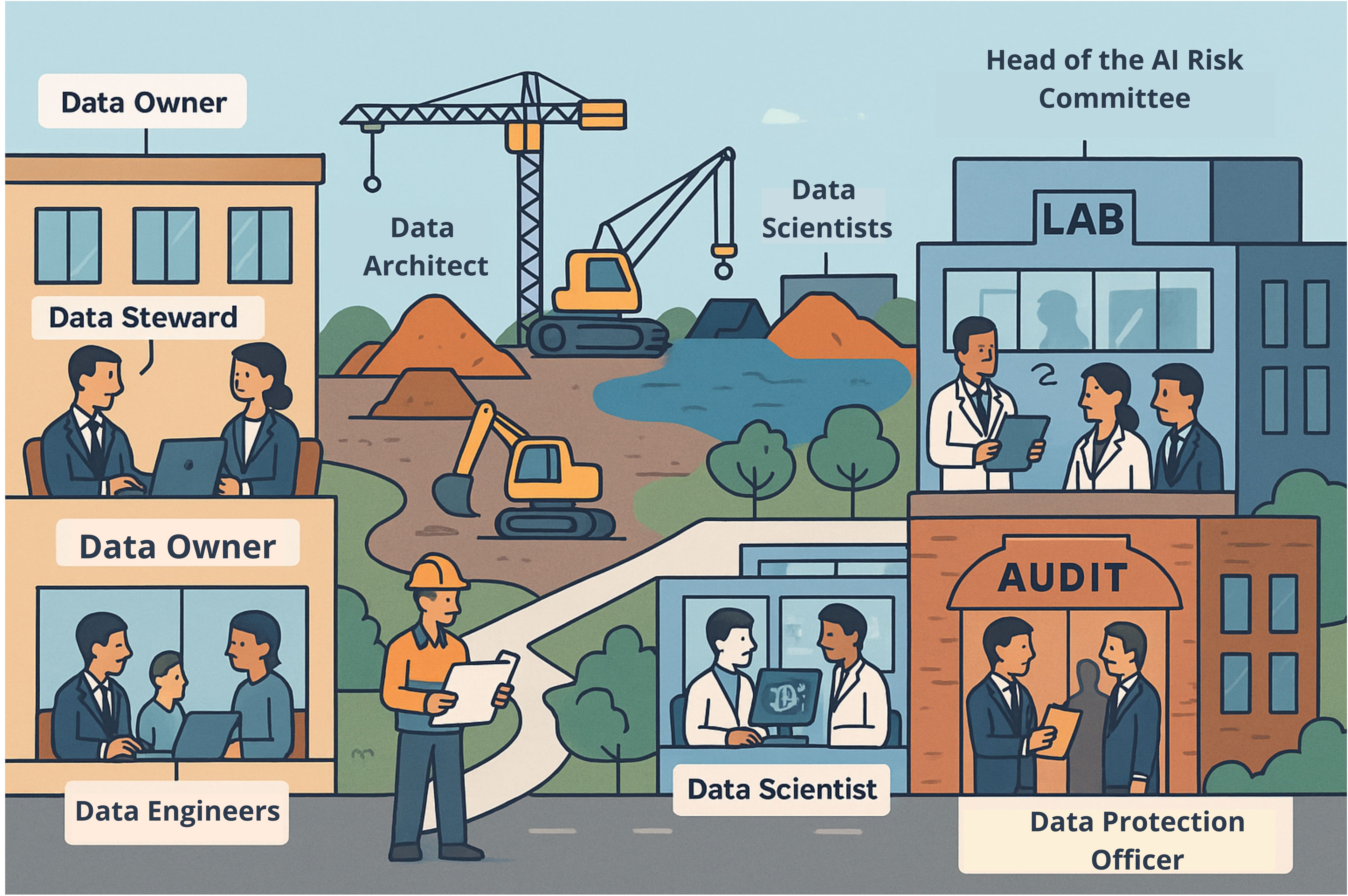
The roles define the functions and capabilities that users can exercise within Anjana Data. They are configurable so that each organization can establish a governance model aligned with its own needs, ensuring consistency with the roles defined in the organization's Data Governance.
There are two main types of roles:
-
Vertical: apply only to a specific data domain (organizational unit). For other domains, there will be different users performing the same role, with identical responsibilities but over different assets.
-
Cross or transversal: exercised globally, always keeping the same permissions over data assets across all of the organization's domains.
If a user does not have a specific role assigned among those configured in the platform, it is possible to grant them the permissions corresponding to a default role, which will be automatically assigned to anyone who accesses the platform.
Object type
Object subtype
The object subtype in Anjana Data corresponds to the specific categories within each object type of the metamodel. While the object type distinguishes between entity and relationship, the subtype specifies exactly what kind of entity or relationship it is.
-
Examples of entity subtypes: Dataset, Data Domain, Business Glossary, Term, KPI, DSA, Metric.
-
Examples of relationship subtypes: Dependency, Aggregation, Reference, Belongs to, Uses, Is composed of.
Object subtypes make it possible to define more granular rules, templates and permissions, tailored to the reality of each organization's governance model.
Permissions
The permissions in Anjana Data are the authorizations that determine which actions a user can perform on the platform's objects, based on the governance role assigned to them and the domain in which they operate.
In Anjana Data, permissions are organized as follows:
-
Create / Modify: a single permission enables both the creation of new objects and the editing of existing ones.
-
Delete: allows objects to be removed from the platform.
-
Change organizational unit: authorizes reassigning an object to another unit/domain.
-
Request data access: enables the initiation of access requests over assets.
-
Organizational Unit Owner (Owner of organizational unit): establishes the user/role as the owner of the domain's objects, granting them ownership and the associated responsibilities (approvals, accountability, prioritization).
Permissions can be configured granularly by object type (dataset, report, term, DSA, etc.) and by module/functionality (workflows, lineage, marketplace, configuration panel, etc.). This model applies the principle of least privilege, ensuring that each user only has the capabilities necessary for their role.
User
A user in Anjana Data is any person with access to the platform, associated with one or more governance roles that determine their capabilities within the organization's data model.
The permissions a user receives are additive: this means that the user will have the sum of all the permissions associated with each of the roles assigned to them. This means that the greater the number of roles assigned, the greater their scope of action on the platform will also be.
Each user can:
-
Authenticate in the Data Portal or in the Configuration Panel, depending on their permissions.
-
Act on different data objects (datasets, metrics, terms, DSAs, etc.), according to the permissions granted by their roles.
-
Request, approve or manage access and governance processes, depending on their role in each data domain.
The proper management of users, roles and permissions ensures the principle of least privilege, allowing each person to have exactly the capabilities they need to fulfill their responsibilities within the data governance model.
If a user does not have a specific role assigned among those configured in the platform, it is possible to grant them the permissions corresponding to a default role, which will be automatically assigned to anyone who accesses the platform.