
This page documents the system variables configured in the App Configuration table. These variables are loaded by each module (Kerno, Hermes, Minerva, Zeus…) at startup and allow defining global behaviors such as validation limits, queue configurations, connections, batch process scheduling, internationalization, among others.
The correct management of these properties is fundamental for the operation of Anjana Data, both for administrators and developers.
Table AppConfiguration in the Configuration Panel (Administrator view)
The system variables configured in the App Configuration table.
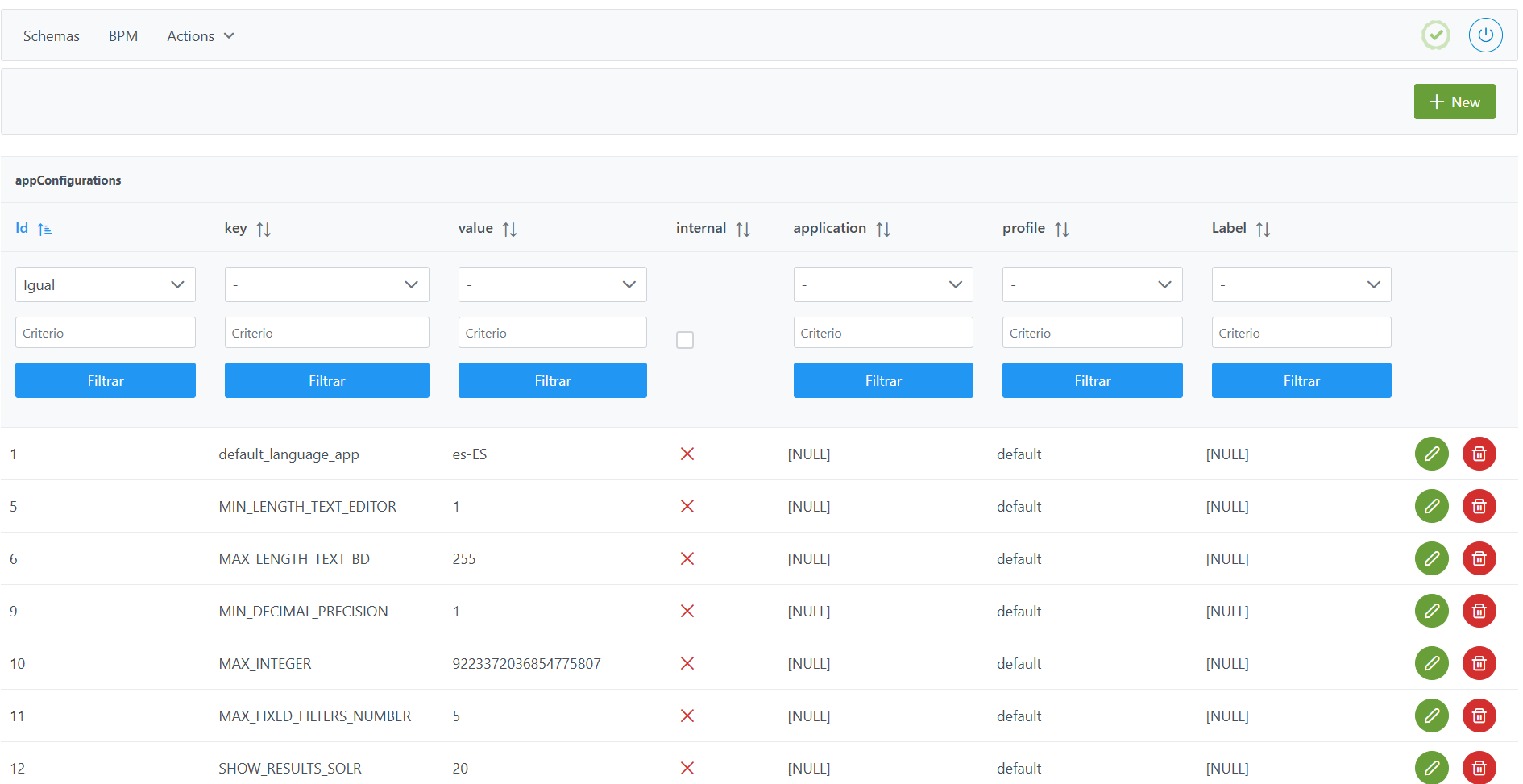
Structure of the AppConfiguration table
Each registered variable is characterized by the following elements:
-
Id: unique table identifier. It is automatically assigned from the Configuration Panel. -
Key: property to be configured according to the available variables table. -
Value: value assigned to the property indicated in thekeyfield. -
Internal: boolean indicating whether the property is visible from the public API (ifinternal = false, it must not be displayed in plain text). -
Application: module to which it applies (kerno,hermes,minerva,zeusornull→ applies to all). To assign the correct value, refer to the available variables table. -
Profile: execution profile in which the configured value applies. -
Label: informational field to organize variables.
Available variables table
The following table shows all available system variables.
|
key |
value |
application |
description |
|---|---|---|---|
|
anjana.activiti.data |
true |
hermes |
Flag to import WFs on Hermes startup |
|
anjana.activiti.input |
DC_WF, BG_WF |
hermes |
Folders to use for importing WFs. If a new folder is created in the BPM editor of the Configuration Panel to store workflows, it must be included in the |
|
anjana.activiti.output |
/data/WF |
hermes |
Temporary path of the file directory for processing WFs |
|
anjana.async.db.corePoolSize |
5 |
kerno |
Database connection pool size |
|
anjana.async.db.maxPoolSize |
20 |
kerno |
Maximum database connection pool size |
|
anjana.async.db.queueCapacity |
100 |
kerno |
Queue size for database executions |
|
anjana.async.hermes.corePoolSize |
5 |
kerno |
Thread pool size for Hermes executions |
|
anjana.async.hermes.maxPoolSize |
10 |
kerno |
Maximum thread pool size for Hermes executions |
|
anjana.async.hermes.queueCapacity |
1000 |
kerno |
Queue size for Hermes executions |
|
anjana.async.minerva.corePoolSize |
5 |
kerno |
Thread pool size for Minerva executions |
|
anjana.async.minerva.maxPoolSize |
20 |
kerno |
Maximum thread pool size for Minerva executions |
|
anjana.async.minerva.queueCapacity |
100 |
kerno |
Queue size for Minerva executions |
|
anjana.async.pool.corePoolSize |
5 |
hermes |
Hermes asynchronous processing pool size |
|
anjana.async.pool.maxPoolSize |
20 |
hermes |
Maximum Hermes asynchronous processing pool size |
|
anjana.async.pool.queueCapacity |
100 |
hermes |
Hermes processing queue size |
|
anjana.combinations.max |
10 |
kerno |
Maximum number of combinations to display in the adherence cart |
|
anjana.expiration.days |
7 |
kerno |
Number of days added to the current date to set as the expiration date for the object that is deprecated when versioned via Excel |
|
anjana.group.enableCrossGrouping |
true |
zeus |
Enables grouping of Cross role OUs into a single OU called “Cross” |
|
anjana.internationalization.separatorNameColumnsExcel |
_ |
kerno |
Character to use as a separator for multi-valued attribute values in Excel |
|
anjana.last-execution.maxRetry |
0 |
hermes |
Number of retries in LastExecution steps of WFs, where 0 means infinite retries |
|
anjana.last-execution.waitRetry |
300 |
hermes |
Wait time between retries in LastExecution steps of WFs |
|
anjana.mail.aws[0] |
|
zeus |
Provider property from which to retrieve the email; multiple values can be set by numbering the properties with ‘[number]’ (see anjana.mail.azure[x] or anjana.mail.google[x] properties) |
|
anjana.mail.azure[0] |
|
zeus |
Provider property from which to retrieve the email; multiple values can be set by numbering the properties with ‘[number]’ |
|
anjana.mail.azure[1] |
otherMails |
zeus |
Provider property from which to retrieve the email; multiple values can be set by numbering the properties with ‘[number]’ |
|
anjana.mail.azure[2] |
userPrincipalName |
zeus |
Provider property from which to retrieve the email; multiple values can be set by numbering the properties with ‘[number]’ |
|
anjana.mail.db[0] |
|
zeus |
Provider property from which to retrieve the email; multiple values can be set by numbering the properties with ‘[number]’ |
|
anjana.mail.google[0] |
primaryEmail |
zeus |
Provider property from which to retrieve the email; multiple values can be set by numbering the properties with ‘[number]’ |
|
anjana.mail.google[1] |
emails |
zeus |
Provider property from which to retrieve the email; multiple values can be set by numbering the properties with ‘[number]’ |
|
anjana.mail.ldap[0] |
|
zeus |
Provider property from which to retrieve the email; multiple values can be set by numbering the properties with ‘[number]’ |
|
anjana.notification.expiration |
4 |
kerno |
Number of advance notice days for notifications indicating the upcoming expiration of an object |
|
anjana.numberDatasetFieldsForWarning |
100 |
kerno |
Number of dataset_fields to consider a Dataset as large, in which case actions performed by users will redirect them to the Portal instead of making them wait for completion |
|
anjana.numberEntitiesToSubmit |
50 |
kerno |
Number of entities to send for validation at once during Excel import |
|
anjana.provider.primary |
Database |
zeus |
Property to indicate whether a primary provider should be pre-selected on login screens and which one it should be. This value must match the security.authentication.<provider> property and the name of the chosen provider instance. For database and Ldap the values are ‘Database’ and ‘Ldap’ respectively. |
|
anjana.retries |
5 |
kerno |
Retries in case of communication failure during reindexing |
|
anjana.role.defaultRole |
default |
|
Role applied to users when registering in Anjana. Allows access to users without a specified role in the application. |
|
anjana.scheduling.enabled |
true |
kerno |
Flag to enable Kerno batches |
|
anjana.scheduling.expiration |
0 0 0 ? * * |
kerno |
Scheduling of object expiration (every day at 00:00h) |
|
anjana.scheduling.licenseNotification |
0 0 0 ? * * |
zeus |
Scheduling of the license expiration warning scheduled task (every day at 00:00) |
|
anjana.scheduling.lineageObjectsPerPacket |
1000 |
kerno |
Number of objects per packet for processing lineage |
|
anjana.scheduling.notification |
0 45 7 ? * * |
kerno |
Scheduling of the notification for entities about to expire (every day at 7:45h) |
|
anjana.scheduling.notification |
0 0 0 ? * * |
zeus |
Scheduling of the cross role review scheduled task |
|
anjana.scheduling.objectsPerPacket |
500 |
kerno |
Number of objects to process per packet in Anjana internal processing |
|
anjana.scheduling.threads |
2 |
kerno |
Number of threads for batches |
|
anjana.scheduling.threadScheduleSeconds |
15 |
kerno |
Delay in seconds between indexing packets |
|
anjana.separatorAttribute |
_- |
kerno |
Character used as a separator for multi-valued attributes in the database |
|
anjana.tot.createCustom |
false |
kerno |
Flag so that, when metadata extraction with a plugin retrieves an attribute not found in the template, it is created as a custom attribute of the object |
|
anjana.waitRetry |
10 |
kerno |
Wait time between each retry in case of communication failure during reindexing |
|
anjana.workflow.launchIfCustomChanges |
true |
kerno |
Flag to consider custom attributes when checking for changes in an object to determine whether or not to launch the workflow |
|
ARI_OBJECT_SEPARATOR |
: |
|
Character used to separate keywords in the ARI name of files uploaded to Minio or S3 |
|
default_language_app |
en-US |
|
Default language of the application, value of the i18n_code field from the zeus.languages table |
|
MAX_DECIMAL_PRECISION |
16 |
|
Maximum number of digits in the decimal part of an input_decimal (or array) allowed |
|
MAX_INTEGER |
9223372036854775807 |
|
Maximum number for an integer, decimal, array or range type attribute |
|
MAX_LENGTH_TEXT_BD |
255 |
|
Maximum number of characters allowed in the database for input_text type fields and their multilingual counterparts, such as in workflow validation or adherence request |
|
MAX_LENGTH_TEXT_EDITOR |
300000 |
|
Maximum number of characters allowed for a text_area, enriched_textarea attribute type and multilingual versions of both |
|
MIN_DECIMAL_PRECISION |
0 |
|
Minimum number of digits in the decimal part of an input_decimal (or array) allowed |
|
MIN_INTEGER |
-9223372036854775808 |
|
Minimum number for an integer, decimal, array or range type attribute |
|
MIN_LENGTH_TEXT_EDITOR |
1 |
|
Minimum number of characters allowed for an input_text, text_area, enriched_textarea attribute type and multilingual versions of all three |
|
MIN_LENGTH_SEARCH_USER |
0 |
|
Minimum number of characters for the user search to start returning results |
|
solr.module.kerno.collection |
kerno |
minerva |
Name of the Solr collection for Anjana objects |
|
solr.module.kerno.generate |
true |
minerva |
Flag to create the objects collection in Solr, if it does not exist, at startup |
|
solr.module.kerno.replication |
1 |
minerva |
SolR replication of the objects collection |
|
solr.module.kerno.shards |
1 |
minerva |
SolR sharding of the objects collection |
|
solr.module.recommendations.collection |
recommendations |
minerva |
Name of the Solr collection for Anjana Data assistive pills |
|
solr.module.recommendations.generate |
true |
minerva |
Flag to create the recommendations collection in Solr, if it does not exist, at startup |
|
solr.module.recommendations.replication |
1 |
minerva |
SolR replication of the recommendations collection |
|
solr.module.recommendations.shards |
1 |
minerva |
SolR sharding of the recommendations collection |
|
solr.multivalued-separator |
_- |
minerva |
Character used to concatenate multi-valued attributes, which must match anjana.separatorAttribute in Kerno |
|
wf.async.waiter |
20000 |
hermes |
Wait time in ms for Activiti internal tasks |
|
wf.validation.automatic |
true |
hermes |
Flag to enable automatic validation of tasks without requiring human action |
Exceptions
Due to database limitations or the behavior of certain attributes, in some cases the values in AppConfiguration take precedence over those configured in Template Attribute Validations.
|
Validation in |
Validation in |
Prevailing validation |
|---|---|---|
|
|
|
If the MAX value is greater than MAX_INTEGER, the MAX_INTEGER validation takes precedence. |
|
|
|
If the MIN value is less than MIN_INTEGER, the MIN_INTEGER validation takes precedence. |
|
|
|
If the MAX_DECIMAL_PRECISION value is greater than MAX_DECIMAL_PRECISION in |
|
|
|
If the value in |
|
|
|
If the MAX_LENGTH value in
|
|
|
|
If the MIN_LENGTH value in |
Adding/Modifying a variable in the AppConfiguration table
Adding or modifying a variable involves adding or editing a record in the AppConfiguration table.
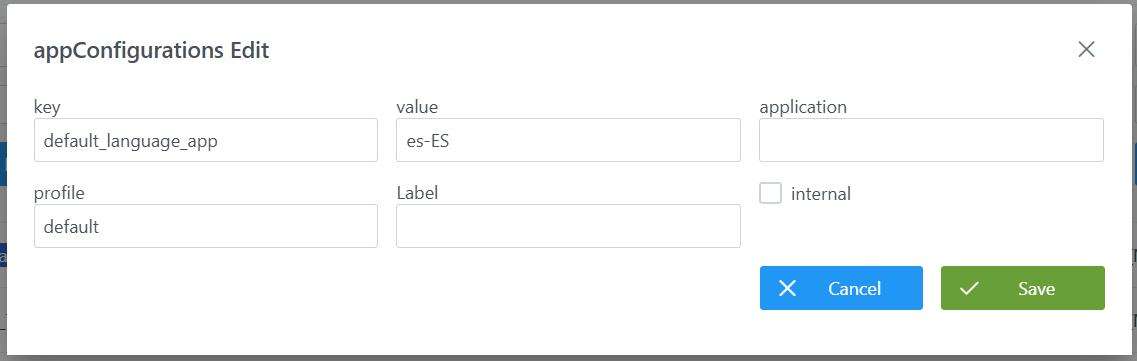
To add a record from the Configuration Panel:
-
Click the New button or the Edit Pencil as appropriate.
-
Fill in the fields:
-
Key: key corresponding to one of the records in the available variables table (e.g.: default_language_app to set the default language). -
value: value corresponding to the variable; in the example, the i18n language code configured inLanguages(e.g.: es-ES). -
internal: boolean as appropriate (e.g.: false). -
application: value according to the variable as per the available variables table. (e.g.: empty). -
profile: execution profile in which the configured value applies (e.g.: default). -
Label: informational (e.g.: empty).
-
-
Click Save to save the record or Cancel to discard.
Notes:
-
After adding/modifying:
-
It is necessary to run the Clear cache action from the Configuration Panel (
Actions > Clear cache) for the changes to be applied and visible in the Data Portal. -
In some cases it may be necessary to restart the corresponding microservice (Zeus, Kerno, Minerva…)
-
-
Since variables are loaded at startup, the Portuno microservice must be started before other services for the changes to propagate correctly.
-
If a variable is simultaneously configured in
AppConfigurationand in the YAML of a microservice, the configuration that applies is the one inAppConfiguration.