
HashiCorp Vault Configuration
For the configuration to be retrieved from HashiCorp Vault, only the configuration of the Horus module is required.
Required credentials
For correct configuration, the token corresponding to the user is needed and must be set in the environment variable VAULT_HASHICORP_TOKEN in the /etc/systemd/system/horus.service.d/env.conf file.
There are 2 ways to obtain that token:
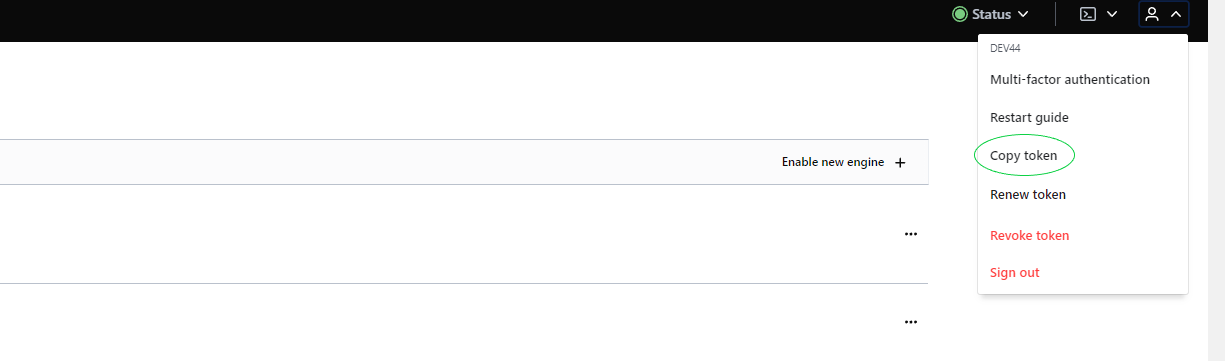
Using the user's own token. From our user account we can go to Vault and once logged in, the option to copy the token will appear.
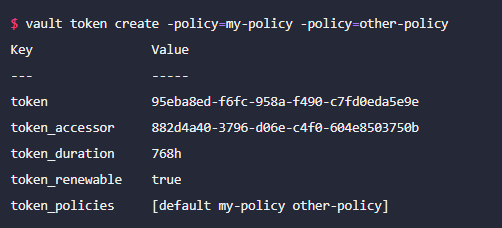
Using a command line. With this command we can create a token without needing to create a user. The command is vault create token. Below is an example, where parameters can be configured as needed (more information in the documentation):
Things to keep in mind:
-
When restarting the HashiCorp environment it becomes locked, and to unlock it 3 keys need to be entered.
-
Tokens have a maximum validity limit of 10h (for now).
Required microservice configuration
For the service configuration, this configuration must be set in the corresponding YAML:
|
spring.cloud.config:
|
The meaning of the properties is:
-
order: If there is more than one property source, this property sets the priority relative to others.
-
host: Server where Vault is hosted. Default: 0.0.0.0
-
port: Port of the server where Vault is hosted. Default: 8200
-
token: Authorisation token
-
kv-version: Vault key-pair version
-
authentication: Vault supports several authentication types; in this case we have opted for token. For more information see the documentation
-
backend: prefix of the folder where the properties are stored. Default: secret
In addition, when starting the service, it must be done by adding the active vault profile.
Things to keep in mind:
Although vault is installed in the current environment for local use, the cluster where it is installed appears to be external and cannot be called from horus using localhost; the IP address must be used.
AWS Secret Manager Configuration
For the configuration to be retrieved from AWS Secret Manager, each microservice must be configured.
Required credentials
Required microservice configuration
The following configuration has been included in the microservice bootstrap:
aws:
  secretsmanager:
    enabled: true
    region: eu-central-1
In the microservice startup command, the following properties must be removed:
--spring.config.import=configserver:http://horusserver:8888
--spring.cloud.config.failFast=true
Within AWS Secret Manager, secrets are stored with the prefix '/secret', followed by the microservice name and the Spring profile separated by '_' (default AWS Secret Manager configuration).
For example, to configure kerno with the default profile, the secret will be /secret/kerno_default and its value will be the properties required for it to work.
GCP Vault Configuration
The following details how to configure the microservice to call the GCP vault to retrieve properties.
Required credentials
Required microservice configuration
The following must be included in the microservice configuration file:
spring.cloud.gcp:
 core:
   enabled: true
 secretmanager:
   enabled: true
   project-id: 623609426553 # Código del proyecto gcp secret management
   credentials:
     location: file:*******.json # Fichero que contiene las credenciales gcp
In the microservice startup command, the following properties must be removed:
--spring.config.import=configserver:http://horusserver:8888
--spring.cloud.config.failFast=true
For each microservice, a single GCP secret management project must be created. In this case it does not depend on the active profile or the application name.
To retrieve properties, the prefix 'sm://' must be added.
Azure Vault Configuration
The following details how to configure the microservice to call the Azure vault to retrieve properties.
Required credentials
Required microservice configuration