
I can create objects but, when entering the Action, no entity or relationship subtypes appear as available
It is necessary to check the role permissions. It is likely that, in the permission table, that role does not have any CREATION_MODIF or AUTOMATIC_METADATA permission but, however, it does have the WIZARD permission. In this case, the WIZARD permission must be removed so that the creation option disappears from the Anjana Data front end.
An attribute of an object does not appear filled in on the Anjana Data Portal
In this case it is necessary to verify that the attribute has the same attribute_definition name as the one indicated in Required Attributes.
If it is correct, it is advisable to reindex all objects from Portuno and check again. If after reindexing the attribute appears correctly filled in, it is possible that some downtime occurred in Solr or some unavailability in the Minerva service.
An error appears when submitting an adherence request
In case of receiving an error when sending an adherence request, the problem is likely that the required attributes for this relationship are missing.
It is mandatory to define the ADHERENCE relationship in the object_subtype table and the attributes marked as Required for it must be added in template_attribute.
Attributes that should not be there appear in an entity or relationship form
If you have configured the templates and see incorrect attributes in the form, it may be due to an incorrect mapping of the attributes to the section of the displayed object.
That is, it is advisable to review the anjana.template_attribute table to check whether the attributes are in the correct section.
I need to remove an attribute from a template for which I already have created objects
In this case, to avoid leaving objects corrupted with a value for a deleted attribute, instead of deleting it, Anjana Data recommends deactivating the attribute in the template.
To do this, in the template_attribute table, the active flag will be changed to false in the record corresponding to that attribute in that template.
With this, the objects continue to retain the value they had for the attribute even though it is not visible in the form and, therefore, is neither editable nor queryable. Thus, if you want to activate it later, you simply need to change the active flag to true and, again, its value can be queried for the objects that had a value.
I need to change the type of a template attribute
If you need to change the type of a template attribute and already have objects of that subtype previously created, it is advisable to:
-
Delete the Kerno collection from Solr (Refer to “How to completely delete a Solr collection?” on this page if in doubt)
-
Restart Minerva
-
Re-index all records from the Administration Portal
-
Check whether the validations and the attribute value are compatible with the new changed type
I need to change the reference values of a template attribute
If you need to modify the reference values of a template attribute and already have objects of that subtype previously created, it is advisable to:
-
Add the new reference value in anjana.attribute_definition_value
-
Perform a bulk edit of the objects to change the value of their attribute and use the new one
-
Once all attribute values have been changed to the new ones, delete the old values that will no longer be used (anjana.attribute_definition_value)
An error appears in Portuno when trying to create a record in a table
If, in Portuno, while editing the Anjana Data configuration, a 500 “Internal Server Error” appears, it is advisable to check whether the table being modified is attempting to create duplicates or records with some required field empty. This error can appear, for example, when creating an object_subtype with the same name as an existing one, when including the same attribute twice in a section of a template, when creating a permission without assigning a role…
It is also possible that the table sequence is broken; in that case it is recommended to run the Portuno action Reset DB Sequences.
An error appears when uploading a file to a template
If when uploading a file to a template attribute the “Embarrassing Error” screen appears, it may be due to the default configured file size limit.
To change this configuration and increase the limit, it is necessary to edit the Kerno yml adding the following:
|
spring.servlet.multipart.max-file-size: 10MB |
After the change, Kerno must be restarted for the configuration to take effect.
How to configure a new template in Anjana Data?
-
Define the object to be configured (table anjana.object_subtype)
-
Define the menus that will complete its dynamic form and the sections of these (tables anjana.menu and anjana.sections)
-
Define or reuse the attributes (and their values, if they are reference values) that will make up the template (tables anjana.attribute_definition and anjana.attribute_definition_value)
-
Organize the attributes into the template sections (table anjana.template_attribute)
-
Define the attribute validations for the template (whether the attribute is required, whether it depends on another, whether it is editable…) (table template_attribute_validation)
-
Define the versioning rules that identify the template attributes that generate a version (in the case of native Anjana Data entities: dataset, dataset_field, process, instance or solution)
-
Define the workflow launch rules in case any role should not send a workflow when any attribute of the object templates changes
-
Complete anjana.object_subtype with the information of the workflows that will be launched with each action
-
Configure, validate and deploy the workflows from the Administration Portal.
How to configure a layer for lineage?
To configure a lineage layer it is necessary to complete the following tables in the following order:
-
Define the layer to be configured (table anjana.layer) and determine whether it will be the default layer in the lineage or not
-
Include the object subtypes that will appear in the lineage layer (table anjana.layer_subtype)
-
Configure the relationships between entities that can be viewed in any of the lineage layers as aggregation in any of the layers (table anjana.grouping_lineage).
For a metamodel relationship (non-native) to actually function as aggregation, in the anjana.object_subtype table the relationship must have the Parental flag enabled.
Define which grouping relationships from anjana.grouping_lineage act as aggregation relationships in the layer being configured.
When sending an object for validation it does not seem to do anything despite having the permissions and template correctly configured and the workflows deployed
In this case, you need to check whether the object_subtype table has a record for the template with the name of the configured workflows.
I have uploaded some workflows but I am not sure they have been deployed correctly
The act_re_procdef table in the hermes schema is native to Activiti and it is where deployed workflows are recorded.
If the workflows have been uploaded by uploading xml files and the workflows are not deployed, check that the file extension is bpmn20.xml.
I have launched a validation workflow and all the workflow steps have remained in Waiting status and without assignment to a role
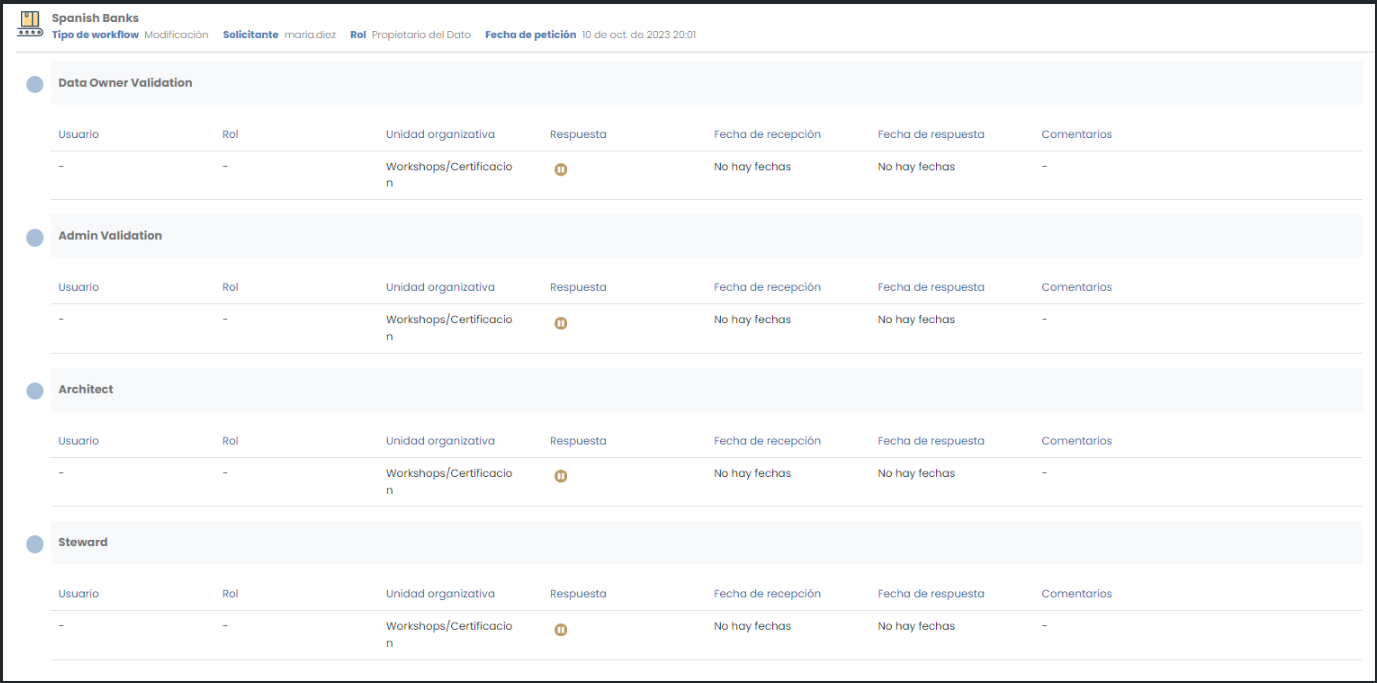
This is due to an error in the workflow configuration. To resolve it, it is necessary to access Portuno and, in the BPM section, open the workflow corresponding to the launched action (review the configuration of the object subtype in the object_subtype table) and review the states and conditions between them. For more detail, access the workflow configuration Guide.
The error may be due to an error in the name of the attribute used, the absence of quotation marks, a badly defined jump condition…
In any case, the launched workflow that has remained in this state is not recoverable. The option to be able to approve or reject the associated object is to clone it and, once the workflow is fixed, saved, validated and deployed from Portuno, launch it for this new object. The object associated with the erroneous workflow can be deleted with the DELETE_ALL or DELETE_MY_OBJ permission.
How to completely delete a Solr collection?
If after deleting a Solr collection and starting Minerva it is observed that a schema associated with the collection has been recreated, it is because Zookeeper saves the configuration of those collections and it has not been correctly deleted.
The complete deletion of the collection is achieved with the command:
http://<SOLR_URL>:<SOLR_PORT>/solr/admin/configs?action=DELETE&omitHeader=true&name=<COLLECTION_NAME>.AUTOCREATED
A “Error 500: Internal Server Error” appears when downloading an Excel file
Excel download errors for import, reimport or with metadata can have various causes:
-
Errors in the translations associated with the translation keys of the README texts (Error 500: Internal Server Error). It is recommended to review the Translations configuration to ensure that all translation keys are configured in the languages configured in Languages and that there are no errors in the translation values, paying special attention to the number and format of the “%s“.
-
Validation configuration errors for metadata attributes that form the primary key (Error: The configuration of the primary keys or PKs is incorrect). It is recommended to review the Template Attribute Validations table, ensuring that the validations (required, not editable…) have been configured on the metadata that form part of the object's ARI (name, source, destination…). To facilitate the detection of these configuration errors, the administrator can use the “Validate fields” action available within the Configuration Panel. When clicked, they will receive a notification in the Data Portal indicating which metadata of each entity and relationship have configuration errors regarding the PKs.
-
Cache cleanup: It is possible that even though the configurations are correct, they may not have been updated in all the microservices of the platform. Cache cleanup can be forced from the Configuration Panel, using the “Clear cache” action.
Composition Relationships (DSA_CONTENT) between DSAs and contained assets (dsaContent) are not visible/created
The composition relationships shown in the Relationships tab of the Data Portal are based on relationships of type “DSA_CONTENT”. These relationships are native relationships that have a DSA as origin and any subtype configured as accepted in the dsaContent attribute of the DSA as destination.
To establish composition relationships (“DSA_CONTENT” relationship) the following functional configuration is required:
-
In Attribute Definition the attribute with name “dsaContent” must exist and must be of type “ENTITY_CONTAINER”
-
In Template Attribute the “dsaContent” attribute (of type “ENTITY_CONTAINER”) must be declared as active (“active“ = true) within some section of the “DSA” entity subtype
-
In Template Attribute Validations a validation must exist for the “dsaContent” declared in the DSA with key “RELATIONSHIP_TYPE“ and params “DSA_CONTENT”