
DEPRECATED This page describes the legacy SSO configuration for Microsoft Azure AD. For new installations or migrations, see SSO OIDC (OpenID Connect).
Migration equivalences
Mapping table between the legacy properties and the new OIDC configuration:
|
Legacy property |
New property / Action |
|---|---|
|
|
Remove - discovered automatically. Replace with |
|
|
|
|
|
|
|
|
Remove |
|
|
Remove - the default applied is |
|
|
Remove - generated automatically as |
|
|
Remove - Azure AD v2 does not expose |
|
|
Remove |
|
|
|
|
|
Migrate to |
|
|
Available under |
Integration model
Authentication (OAuth2)
Anjana Data integrates through the standard flow for "Web apps", as described by the vendor in the following documentation:
https://docs.microsoft.com/en-us/azure/active-directory/develop/v2-oauth2-auth-code-flow
https://docs.microsoft.com/en-us/azure/active-directory/develop/app-sign-in-flow
https://docs.microsoft.com/en-us/azure/active-directory/develop/authentication-flows-app-scenarios
The Microsoft Graph API is used to retrieve information about the user's profile and groups:
https://docs.microsoft.com/en-us/graph/overview
It is important to consider that the usage capacity of this API directly corresponds to the quota Microsoft has assigned to the client's account under its license. In general, Microsoft limits requests as follows:
-
Resource Manager limit https://learn.microsoft.com/en-us/azure/azure-resource-manager/management/request-limits-and-throttling
-
Graph API limit (15 calls within a 5-second span) https://learn.microsoft.com/en-us/azure/governance/resource-graph/concepts/guidance-for-throttled-requests#understand-throttling-headers
This functionality is directly embedded in the Zeus authentication management microservice; it is enabled and configured through that microservice's configuration file.
Authentication configuration
The different authentication providers in use are configured under the security.authentication property.
For Azure, the following properties must be configured:
security:
 authentication:
    oidc:
      providers:
        azure:
          # Provider name as it will appear on the login page
          name: Anjana Azure
          # Provider URL to authorize Anjana Portal users (use variables in the URL)
          authorize-url: https://login.microsoftonline.com/${security.authentication.oidc.providers.azure.tenant-id}/oauth2/v2.0/authorize?client_id=${security.authentication.oidc.providers.azure.client-id}&response_type=code&response_mode=query&scope=${security.authentication.oidc.providers.azure.scopes}&redirect_uri=${security.authentication.oidc.providers.azure.redirect-uri}
          # Provider URL to authorize Portuno users (use variables in the URL)
          authorize-url-portuno: https://login.microsoftonline.com/${security.authentication.oidc.providers.azure.tenant-id}/oauth2/v2.0/authorize?client_id=${security.authentication.oidc.providers.azure.client-id}&response_type=code&response_mode=query&scope=${security.authentication.oidc.providers.azure.scopes}&redirect_uri=${security.authentication.oidc.providers.azure.redirect-uri-portuno}
          # Provider URL to manage token creation
          token-url: https://login.microsoftonline.com/<tenant>/oauth2/v2.0/token
          # Scope of the provider's authentication
          scopes: openid profile email user.read
          # Client identifier for authentication with the provider
          client-id: <client-id>
          # Client secret for authentication with the provider
          client-secret: <client-secret>
          # Provider's authentication method
          client-authentication-method: POST
          # URI the browser must redirect to after a successful login with the provider in the Anjana Portal
          redirect-uri: https://<host>/authorized
          # URI the browser must redirect to after a successful login with the provider in the admin portal (Portuno)
          redirect-uri-portuno: https://<host>/configpanel/authorized
          # Field where the username is found in the provider
          username-claim: preferred_username
          # Authentication type according to the OAuth2 definition
          workflowType: IMPLICIT
          # Provider type
          type: AZURE
          # Scope URL, usually: https://graph.microsoft.com/.default
          default-scopes: https://graph.microsoft.com/.default
          allowed-host: graph.microsoft.com
          # Tenant identifier from which users are retrieved and authenticated
          tenant-id: <tenantId>
name: the name that will be displayed on the login screen
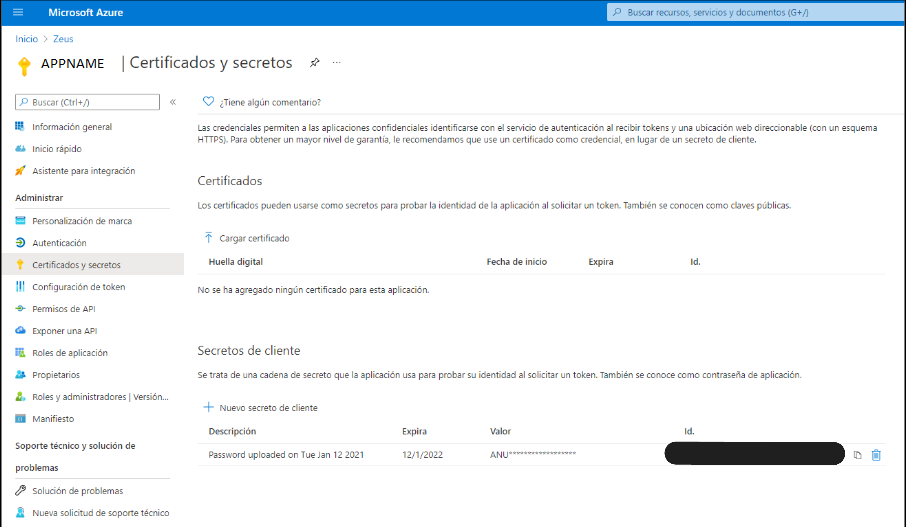
client-id is found on the Overview screen under the "Application (client) id" property, and client-secret in Manage > Clients & Secrets > Client secrets; when you create one, it will be the "value"
Active governance
The plugin to deploy that will perform the active governance tasks that need to provision elements on Azure AD is "Tot plugin Azure AD".
The Microsoft Graph API is used to provision user groups to which access permissions to data resources governed by the product are subsequently assigned:
Required credentials
The credential can be a single one combining the permissions of both, but it is recommended to keep them separate to make it easier to monitor and audit the activity performed by them.
Authentication (OAuth2)
This functionality is directly embedded in the Zeus authentication management microservice; it is enabled and configured through that microservice's configuration file.
-
For web authentication, the URLs must be configured according to the domain name that routes to the Anjana Data front end; two URLs must be registered, plus the log out URL:
-
https://<host>:<port>/authorized
-
https://<host>:<port>/login
-
https://<host>:<port>/logout
-
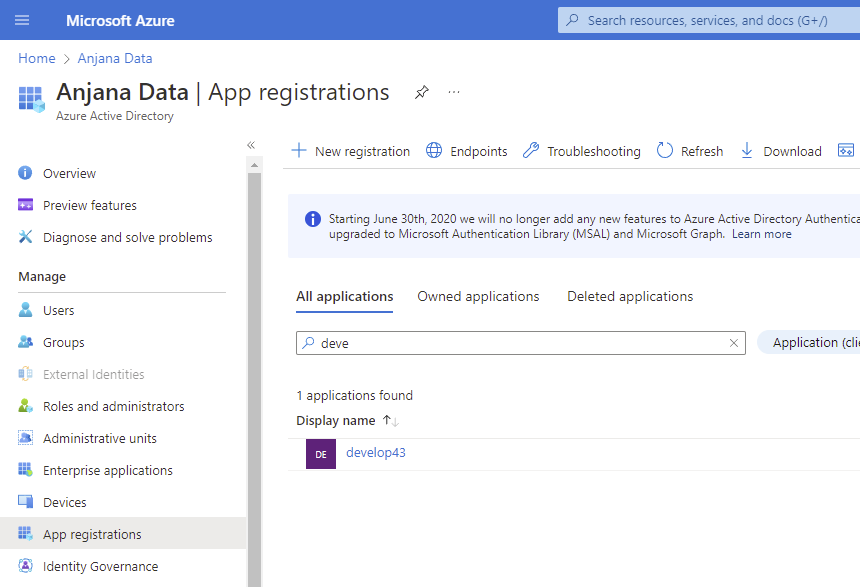
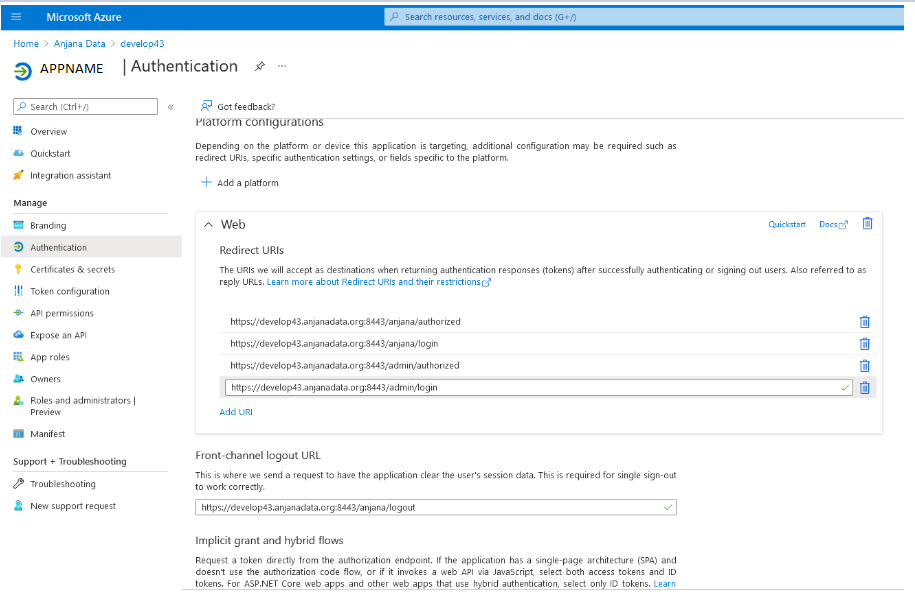
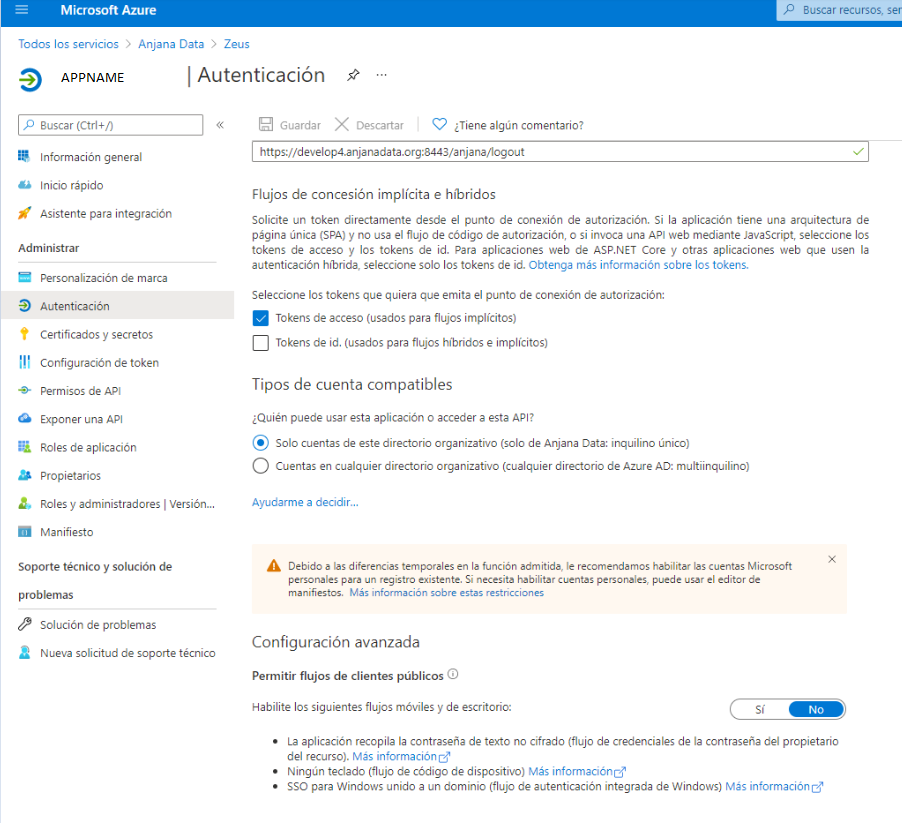
Adjust the options as needed; they are generally as follows:
After that, it is necessary to create a client and secret that will later be configured in the product:
Assign the read permissions needed to collect the user's information and memberships, which will be automatically mapped to roles and organizational units in the product:

Assign users to the Azure AD groups.
Active governance
The plugin to deploy that will perform the active governance tasks that need to provision elements on Azure AD is "Tot plugin Azure AD"; its documentation describes the required credential.
SSO emulation via OAuth2
The OAuth2 protocol supports transparent authentication whenever possible; to achieve this, the user only needs to be redirected to https://<host>/provider=<zeus provider identifier>. If the user is already logged in with that provider and the policies configured for that provider mean the credential does not need to be validated again, the user will be authenticated in Anjana Data in a fully transparent way.