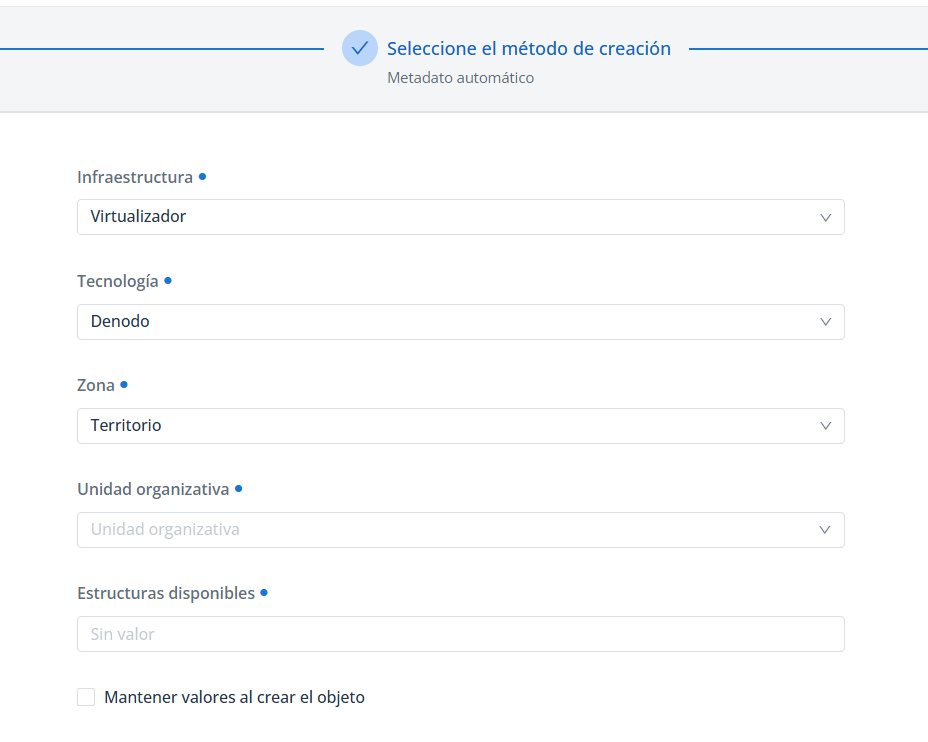
In Anjana Data, a triplet is a tag made up of three parts that identifies a specific point within a technology or plugin.
Example:
Virtualizador/Denodo/Territorio
-
Virtualizador → general category of the technology within the organization's data architecture
-
Denodo → specific tool/technology
-
Territorio → scope or domain within that tool
The triplet works like a postal address: it indicates where Anjana Data's functionalities (metadata extraction, sampling, tag updates, permission management, etc.) should be applied.
This way, each platform action is combined with a triplet so that Anjana Data knows what it has to do and where it has to do it.
Design and definition of Triplets
The activation of a plugin for metadata extraction, data sampling and/or access permission management is based on the definition and use of a triplet.
These triplets are made up of a set of three values formed by the reference metadata (Attribute Definition Values) that the following attributes (Attribute Definitions) take on:
-
Infrastructure. For example: "Azure", "AWS", "Virtualizador", "DWH", "Reporting"
-
Technology. For example: "Azure Storage, "Amazon S3", "Denodo", "Oracle", "Tableau"
-
Zone. For example: "Silver", "Gold", "Territorio"
Triplets are characterized by the following:
-
They are 100% customizable; each organization can establish the logic of the collections using any set of three reference values for the infrastructure/technology/zone attributes.
-
Each triplet must be unique, meaning the sets of three values cannot be repeated in the configuration of more than one plugin.
-
Each triplet resolves a connection to a technology through credentials that have permissions for metadata extraction, data sampling and/or access permission management, among others. This is configured in the YAML of each plugin.
🔎 Example of a triplet to connect to virtualized data in Denodo:
-
Triplet:
Virtualizador/Denodo/Territorio -
Plugin: JDBC Denodo
-
Enabled functions: metadata extraction, sampling, access permission management and tag management.
-
YAML fragment showing how the triplet resolves a single connection and enables a variety of functionalities:
-
The ari is the YAML property that links the triplet with the plugin's functionalities (updateTags, sample, extract…)
-
The ari must be configured with the values set in the
namefield ofAttribute Definition Values, not with the translation values (valueofTranslations)YAMLconnection: - name: pro technology: driver: com.denodo.vdp.jdbc.Driver url: jdbc:vdb://entornodenodo.anjanadata.org:9999/poc?ssl=true user: password: imType: "LDAP" sampleRows: 15 path-separator: "/" obfuscation-string: "*****" aris: - ari: "anja:totplugin:updateTags:/Virtualizador/Denodo/Territorio/" # Tripleta sirve para actualización de tags - ari: "anja:totplugin:sample:/Virtualizador/Denodo/Territorio/" # Tripleta sirve para sampleo - ari: "anja:totplugin:extract:/Virtualizador/Denodo/Territorio/" # Tripleta sirve para extracción de metadatos - ari: "anja:totplugin:edit:/Virtualizador/Denodo/Territorio/" # Tripleta sirve para edicion - ari: "anja:totplugin:im:/Virtualizador/Denodo/Territorio/" # Tripleta sirve para gestión de permisos de acceso, creación del rol en Denodo imAri: "anja:totplugin:im:/ldap/ldap/ldap/" # Tripleta sirve para gestión de permisos de acceso, creación del grupo en el AD via protocolo LDAP
-
Take the YAML configuration fragment as an example for configuring triplets. The technical configuration should be reviewed in the plugin's own documentation.
Triplet configuration
Once the triplets have been designed and defined, the functional configuration must be carried out. To do this, review the configuration of Metamodel and metadata templates where it is explained how to configure:
-
The infrastructure, technology and zone attributes in
Attribute Definitions. -
Configure the values that the infrastructure, technology and zone attributes can take in
Attribute Definition Values. -
Assign the attributes in the metamodel object templates in
Template Attribute. -
Configure the dependency validation between infrastructure --> technology --> zone in
Template Attribute Validation. -
Configure the relationships between the triplet values in
Attribute Relationships.
Once the functional configuration has been done, the technical configuration must be carried out, including the configuration of the triplets that have been defined at the functional level. To do this:
-
Open the plugin's configuration YAML
-
Configure the YAML's ari linking the plugin's functionality with the triplet. The ari must be configured with the values set in the
namefield ofAttribute Definition Values, not with the translation values (valueofTranslations)
An ari is a property within the YAML configuration that links a specific plugin functionality (extract, sample, updateTag…) with a triplet.
Each functionality (sampling, metadata extraction, permissions, tags, etc.) needs its own ari within the plugin's configuration file (YAML).
Important:
If during metadata import in the Data Portal creation wizard, an error appears when selecting a triplet indicating "No plugin exists for extract", the error is likely due to one of the following reasons:
-
The ari is not properly configured in the plugin's YAML:
-
The ari must exactly match the values set in the
namefield ofAttribute Definition Values, never the translation values (valueofTranslations)
-
-
The translation values selected by the user in the wizard do not correspond to the plugin's values.
-
Check that the
keyvalues in theLanguagestable corresponding to the translations selected in the wizard (value) match thenamevalues in theAttribute Definition Valuetable. -
Check that the
namevalues in theAttribute Definition Valuetable match those configured in the ari.
-

Activating functionalities
Once the plugin has been deployed and the triplet configured, Anjana Data automatically validates the context in which each functionality should be activated.
-
Metadata extraction: activated when creating an object with "automatic metadata" in the Object Creation wizard of the Data Portal, allowing the discovery of source structures.
-
Sample Data: when accessing the Sample Data tab of a DATASET, it runs queries to bring back data samples, obfuscating the content of the fields (DATASET_FIELD) marked with the
piattribute set to true. -
Access management: includes the following capabilities:
-
Upon completion of a DSA creation workflow, it creates a group in the AD, IAM or identity management system to which user authentication for the enabled technology is delegated, and a role with permissions in the technology.
-
For example, creation of a group in the AD with a name formed by <prefix configured in the plugin><DSA name><DSA version>
-
For example, creation of the role and assignment of permissions in Denodo with a name formed by <prefix configured in the plugin><DSA name><DSA version>
-
-
Upon completion of an adherence workflow, the adhering user is added to the group and granted the role. This way, when the user accesses Denodo, they can run queries on the DATASETs included in the DSA they have adhered to.
-
Conditions for enabling plugin functionalities
For the data sampling, access permission management, tags, etc. functionalities enabled in the plugin's YAML to run on an asset governed in Anjana Data Platform, the following is necessary:
-
The governed object must have been created with the plugin's triplet values
-
The object must be in Approved status.
-
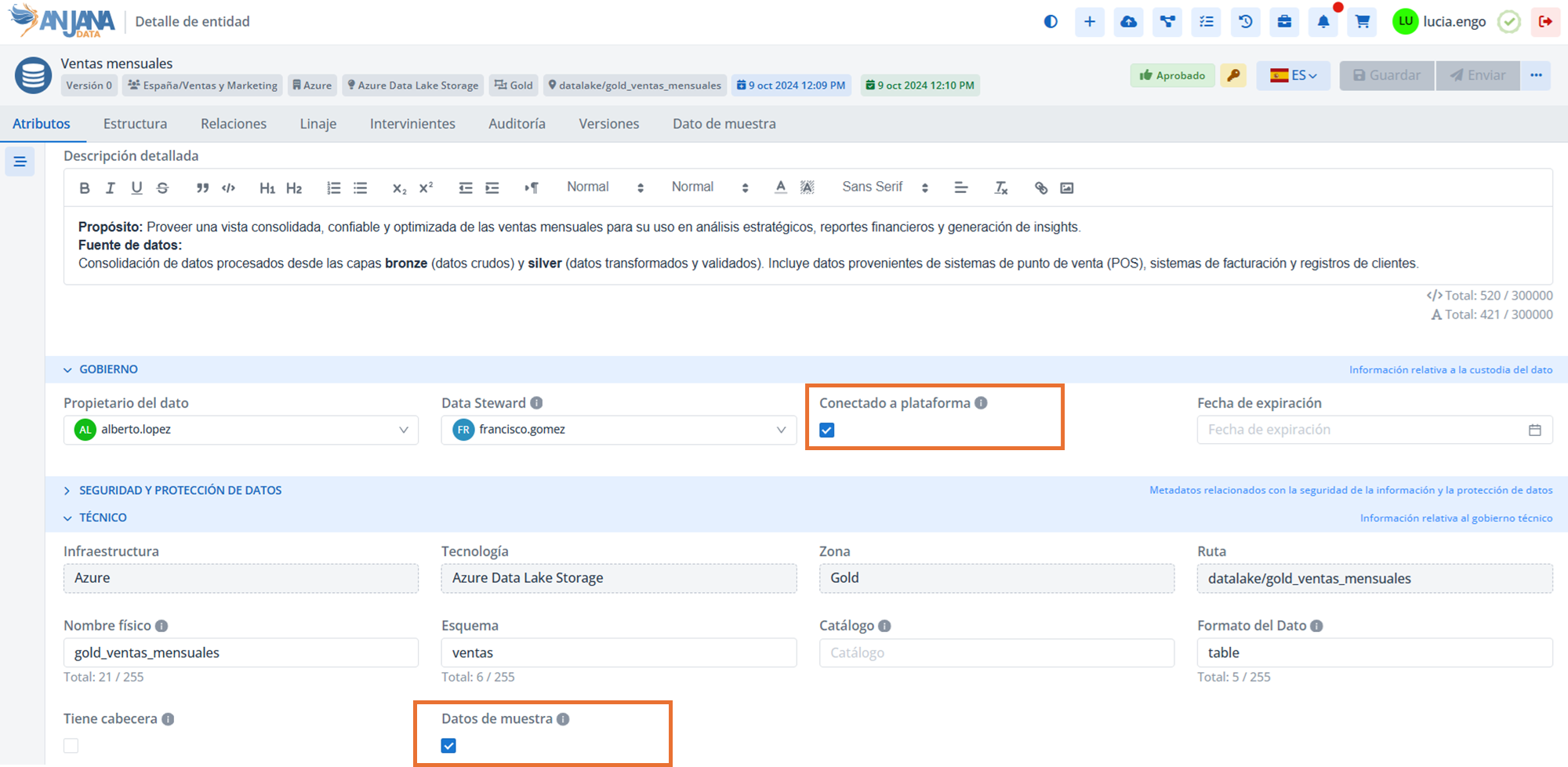
The
isGovernedattribute must be enabled in the template (indicates that the asset is connected to the platform). -
To enable the Sample Data tab, the
sampleDataattribute must additionally be enabled in the template.