
This guide describes how to work with the Anjana Data Platform MCP from an AI assistant: which operations it offers, how to phrase requests for the most common workflows and which good practices to follow. It assumes an AI client already configured and authenticated as described in MCP Installation.
Principles of use
Before starting, keep three ideas in mind; they explain most of the results obtained with the MCP:
-
The role determines the result, the assistant acts with the identity and permissions of the authenticated user. Two people can send the same request and get different answers.
-
The MCP feeds governance, it does not replace it, everything created or modified starts in
DRAFTstatus and is submitted for validation. Approval is always performed by an authorized person from the platform. -
Everything is recorded, actions are attributed to the user and appear in the audit log just as if they had been done from the Data Portal.
Available operations
The assistant chooses the operations automatically based on the request; there is no need to know their names. Even so, knowing what exists helps to phrase requests better and to understand what the assistant has done:
|
Area |
Operation |
What it does |
|---|---|---|
|
Discovery and query |
|
Searches assets by free text, with type and status filters. It is usually the first step, because it returns the identifiers. |
|
|
Returns all the attributes of an asset, its metadata (author, dates, version, status), owners and adherents. |
|
|
|
Shows the editable attributes, their types, allowed values and validation rules. |
|
|
Lineage and relationships |
|
Returns the upstream and downstream connections of an asset. |
|
|
Returns the relationships of an asset: direct, composition and indirect. |
|
|
Cataloging |
|
Creates an asset in |
|
|
Updates attributes of an existing asset. |
|
|
|
Submits a draft asset to the approval workflow, indicating the role of the request. |
|
|
|
Compares the last two approved versions of an asset and indicates which attributes changed. |
|
|
Relationship management |
|
Creates a relationship between two approved assets, in |
|
|
Returns the details of a relationship: attributes, status, source and target. |
|
|
|
Shows the editable attributes of a relationship. |
|
|
|
Updates attributes of a relationship. |
|
|
|
Submits a relationship for approval, with an optional expiration date. |
|
|
Access requests (DSA) |
|
Returns the contractual information of the DSA: validity period and attached document. |
|
|
Lists the adhered users and, with the |
|
|
|
Returns the roles the user can use when requesting an adherence. |
|
|
|
Requests the user's adherence to a DSA with a specific role. |
|
|
|
Withdraws one's own adherence, or that of another user with administration permissions. |
|
|
Audit |
|
Searches audit events by user, asset, action type and time range. |
The available operations may vary between platform versions. To see those of the installed version, simply ask the assistant to list the MCP capabilities.
Common workflows
The following workflows cover the most frequent uses, with example requests. Requests can be freely adapted: the assistant interprets the intent, not a fixed syntax.
Discover information in the Catalog
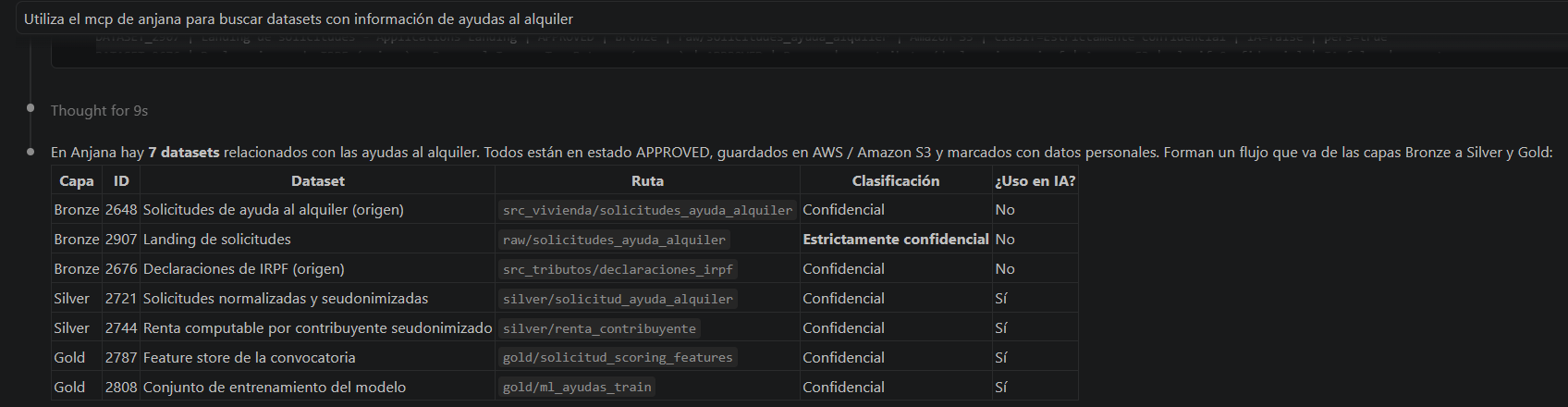
To explore a topic, ask about the subject rather than a specific asset, and ask for any type of information. The assistant combines several searches and follows the relationships of the assets found, so it also locates those that do not contain the term in their name.
Search the catalog for any type of information about “rental assistance”.
Get the full context of an asset
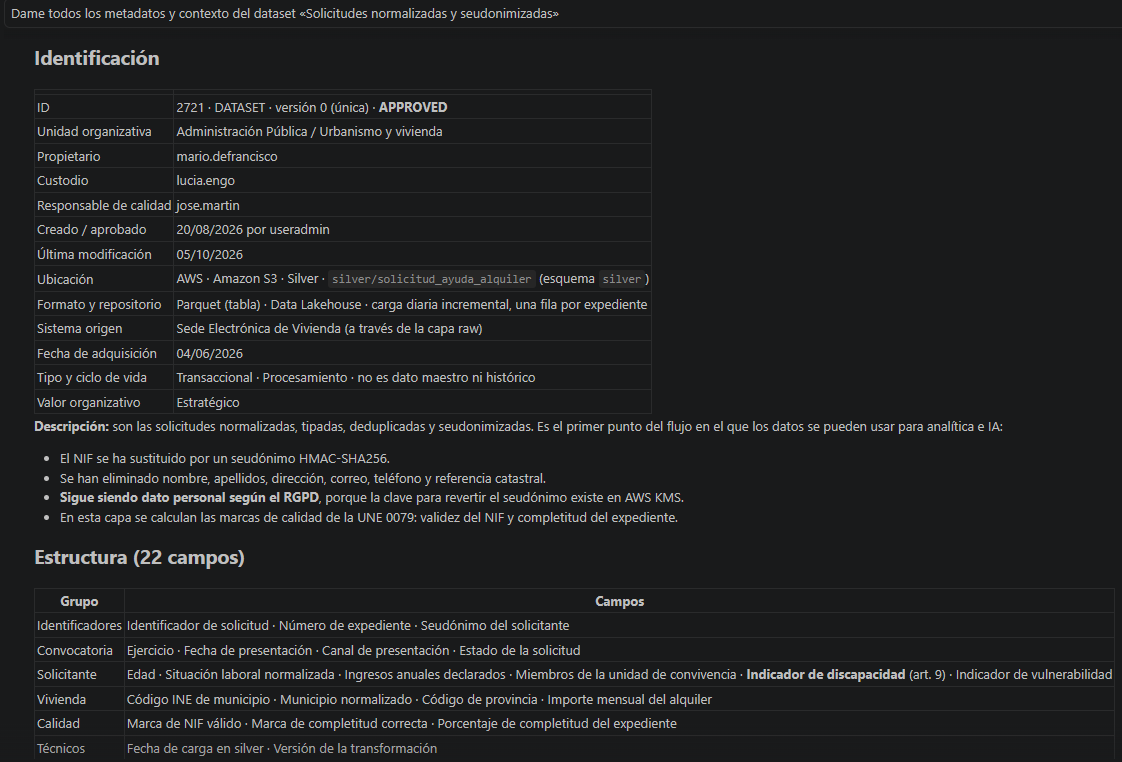
Explicitly asking for “all metadata and context” makes the assistant go beyond the name and path, and return identification, physical location, description, schema, classification, versions and status. Within the same conversation, assets can be referred to loosely; in a new conversation, it is best to give the full name or identifier.
Give me all the metadata and context of the dataset “Normalized customers”.
Query lineage and relationships
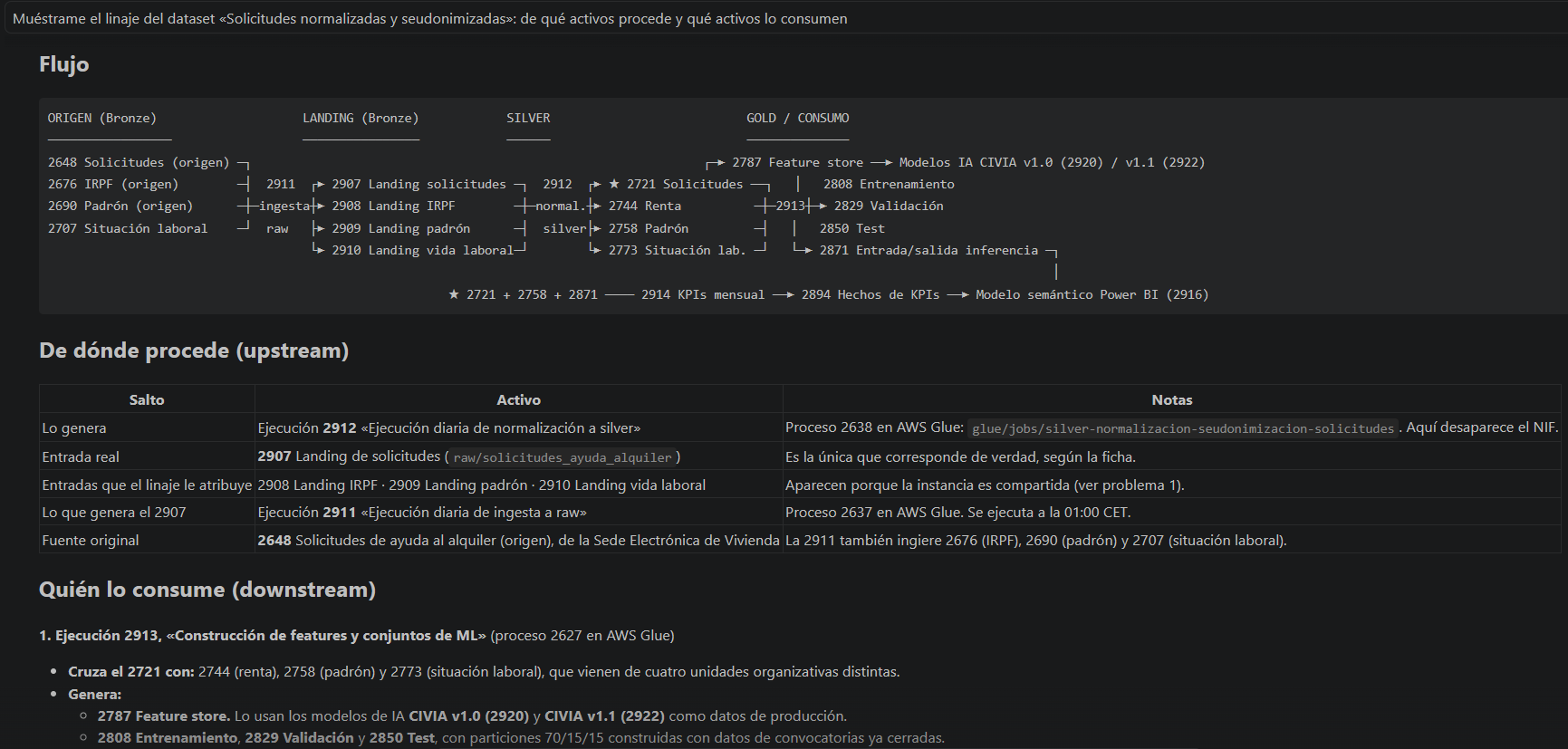
Show me the lineage of the dataset “Normalized customers”: which assets it comes from and which assets consume it.
Catalog and enrich metadata
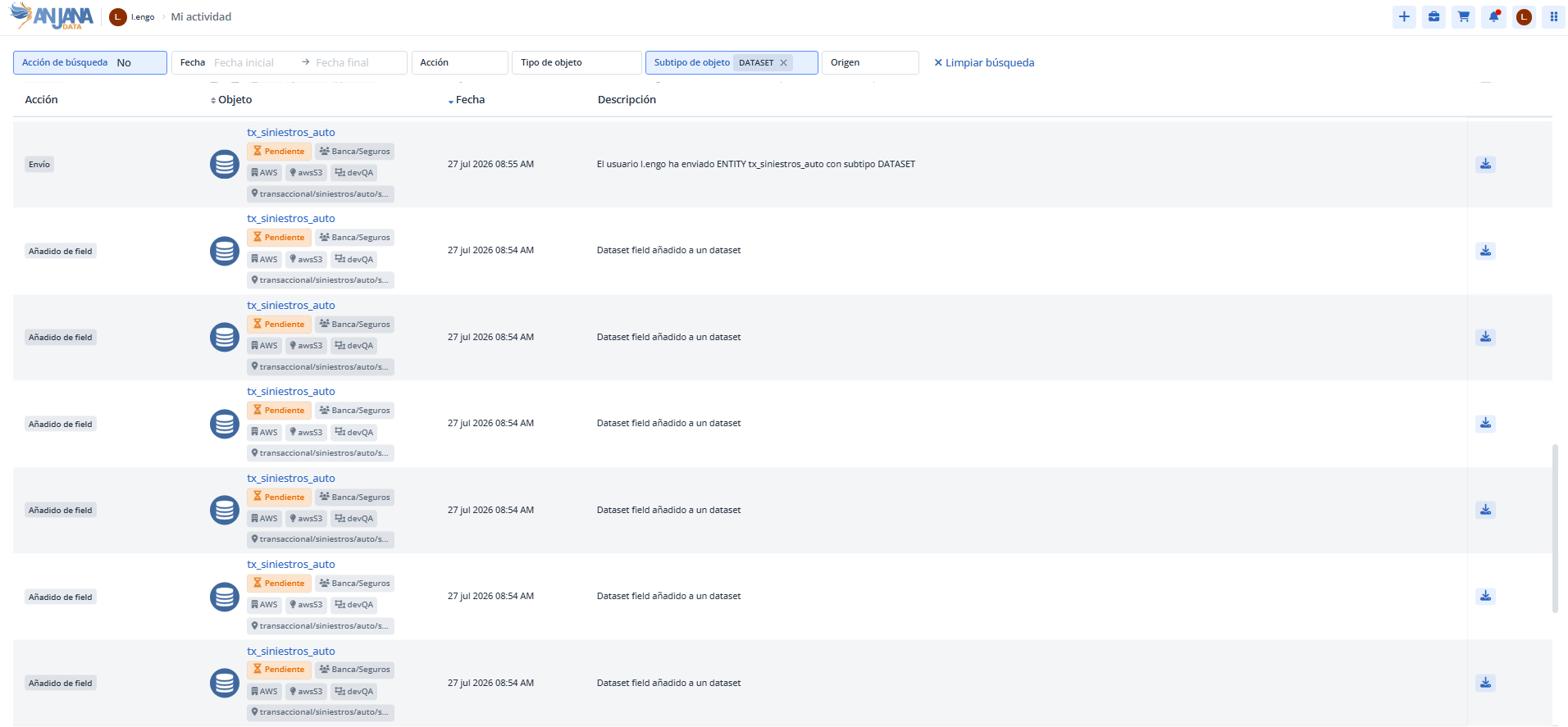
The assistant first checks the asset form to learn the editable attributes and their allowed values, and then applies the changes. Created or modified assets remain in DRAFT until they are submitted for validation.
Fill in the description, domain and sensitivity of the dataset “Monthly sales” based on its fields and submit it for validation with the steward role.
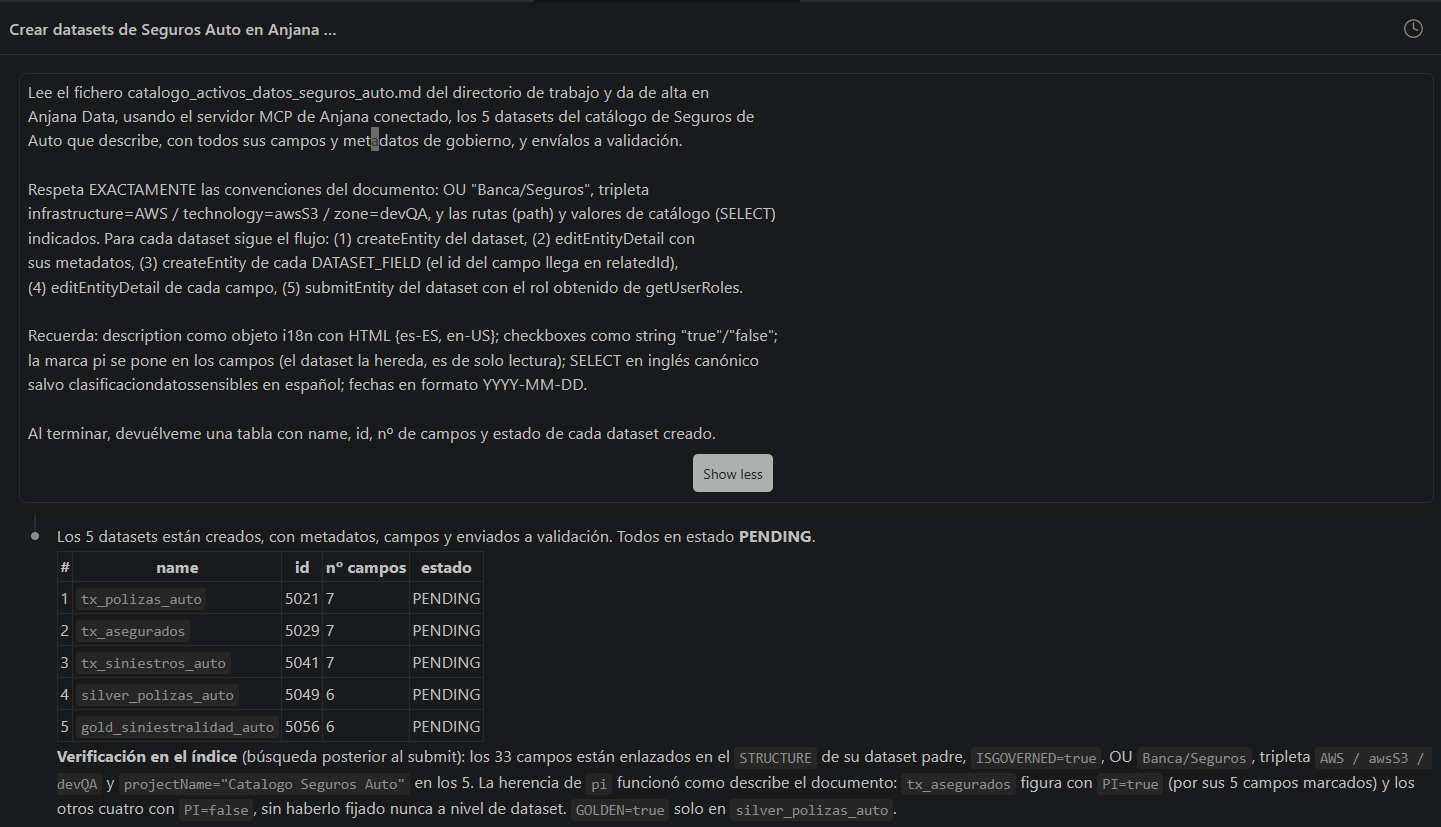
The result can be checked in the User Activity of the Data Portal, where the assets created and submitted for validation are shown:
Review before submitting for validation
The assistant can suggest descriptions and classifications based on the available context. Review what it has generated before asking it to submit for validation, or ask it to show the proposed changes first.
Create relationships between assets
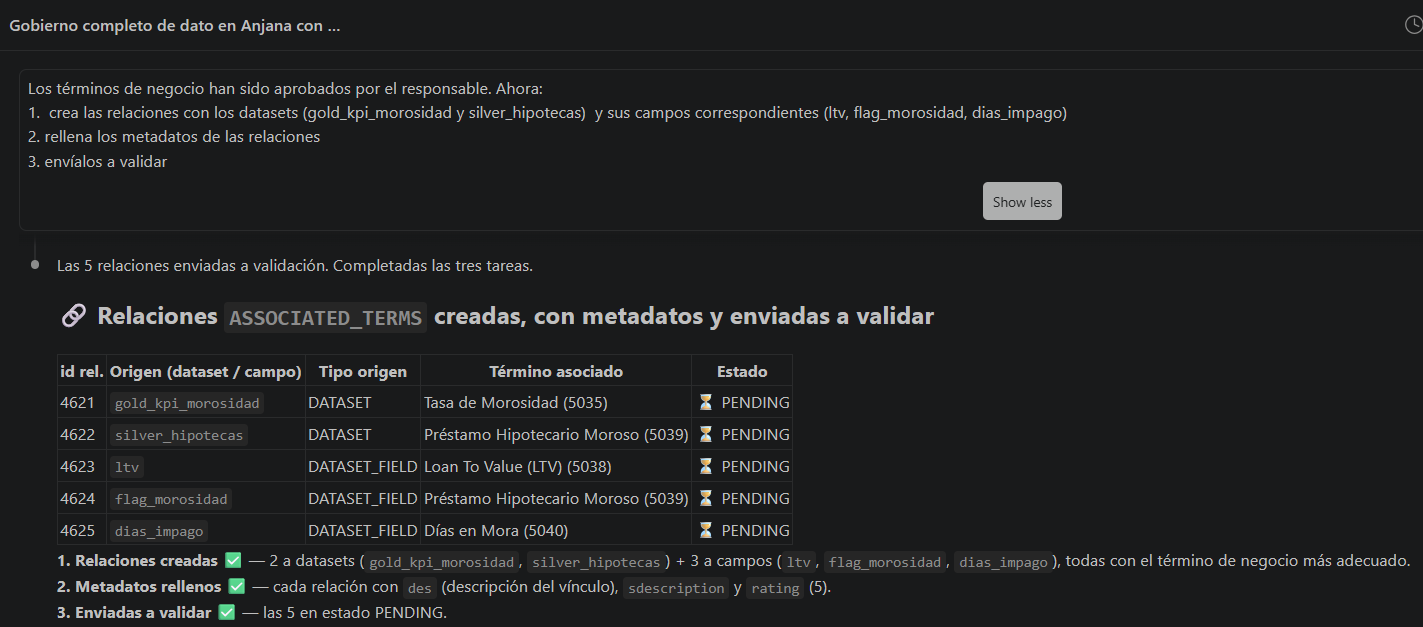
Relationships have their own lifecycle and their own approval. Only assets in APPROVED status can be related.
Link the business term “Active customer” to the dataset “Normalized customers” and submit the relationship for validation.
Check and request access to data
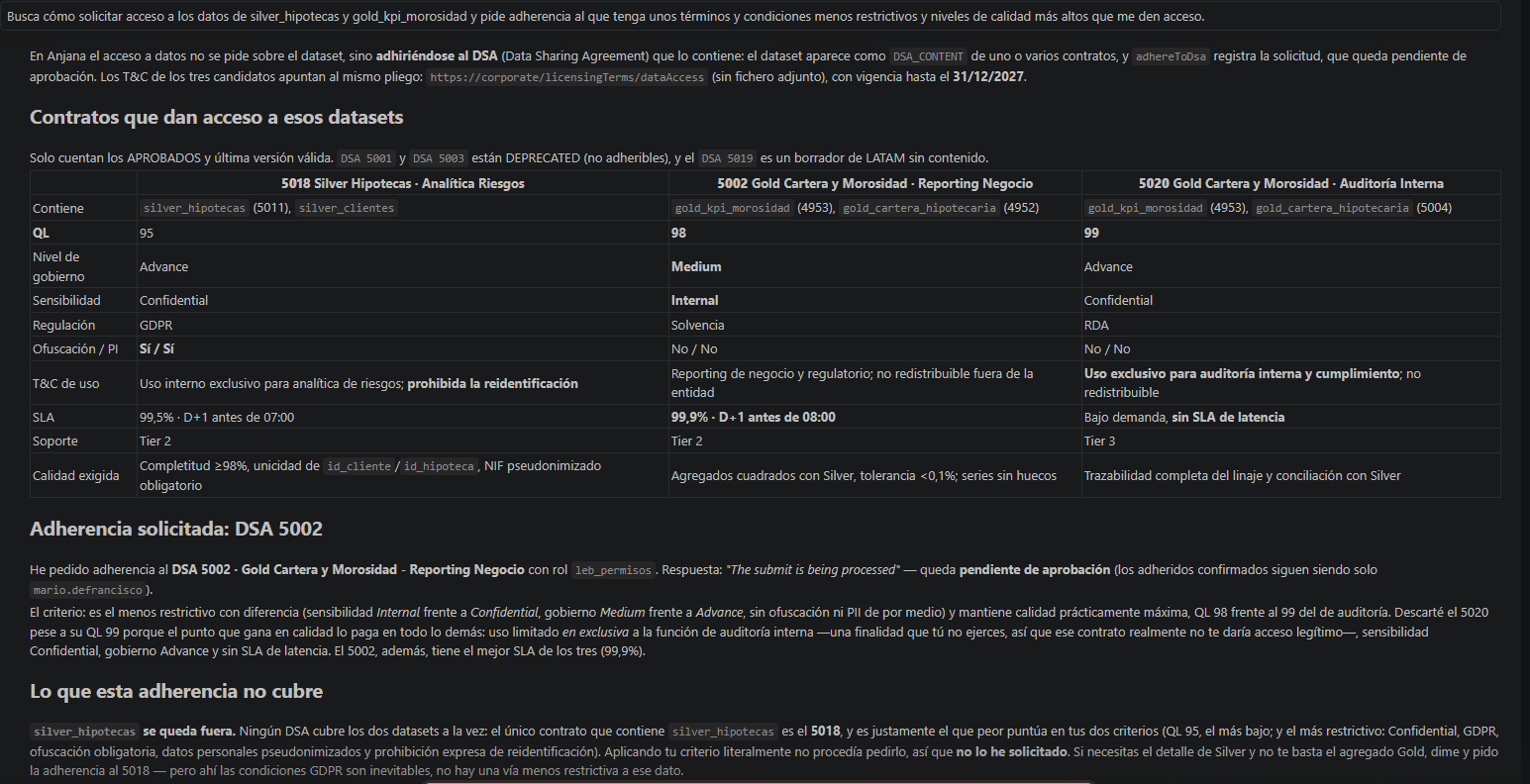
A conditional request handles the check and the alternative in a single step. When requesting an adherence, always state the role and the purpose, because they are recorded in the request and read by the person who approves it.
Check whether I have access to the dataset “Normalized customers”. If I don't, tell me which DSAs include it and what their conditions are.
Request adherence to the DSA “Commercial analytics” with the consumer role, for the second-quarter customer churn analysis.
A registered request is not granted access
After the request, the user is added to the list of pending adherences. Access is obtained when an authorized person approves the adherence from the platform; the MCP does not allow approving it. The status can be checked at any time by asking the assistant whether the adherence is still pending.
Audit changes and access
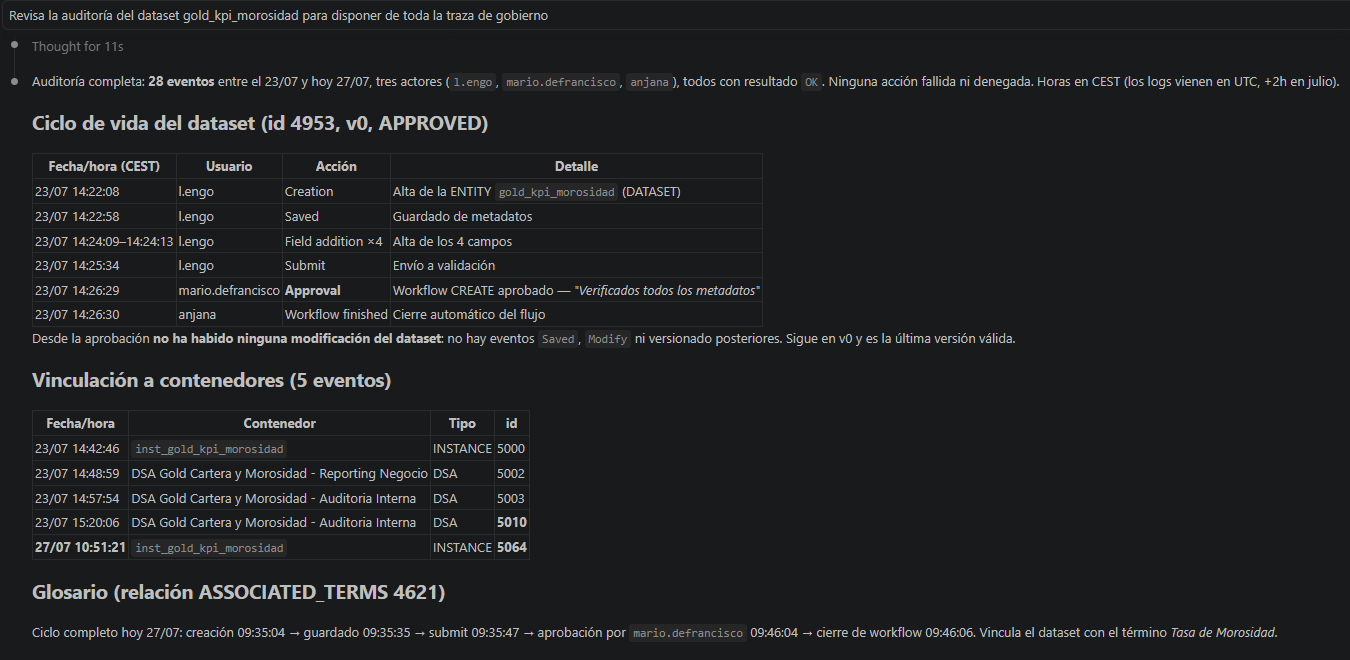
Who has modified the dataset “Monthly sales” in the last 30 days and which attributes have changed?
When the audit log does not detail the modified attributes, the assistant can compare the last two approved versions of the asset.
Workflows by profile
|
Profile |
Main goal |
Most useful workflows |
|---|---|---|
|
Data or AI governance lead |
Catalog and enrich assets quickly. |
Cataloging, relationship management, submission for validation, lineage and change auditing. |
|
End user (data consumer) |
Find data, understand it and request access. |
Discovery, asset context, lineage and access requests. |
|
Auditor / risk control officer |
Verify who did what and who accesses which data. |
Audit, version comparison, DSA adherents and lineage. |
MCP and Data Portal: when to use each
The MCP and the Data Portal work on the same information, but address different needs:
|
Need |
Recommended channel |
|---|---|
|
Exploring a topic without knowing exactly what to look for, or gathering information spread across data, AI, privacy and BI |
MCP |
|
Reading and summarizing the content of several asset records, or detecting missing relationships and assets |
MCP |
|
Repetitive cataloging and enrichment workloads |
MCP |
|
Obtaining exact and reproducible figures, with explicit filters |
Data Portal |
|
Visually navigating lineage or saving featured searches |
Data Portal |
|
Approving or rejecting assets, relationships and adherences |
Data Portal |
The recommended way of working combines both: explore with the MCP and keep the relevant identifiers, verify critical metadata in the Data Portal and go back to the MCP to carry out the cataloging tasks.
Good practices
-
Ask about the topic, not the asset, an open request takes advantage of the relationship graph; a closed one is limited to what you already knew how to search for.
-
State the scope, “all metadata and context” produces a very different answer from “give me the dataset”.
-
Always state the role, when submitting for validation or requesting an adherence, so the assistant does not have to choose it.
-
Review what is written on the user's behalf, descriptions, attributes and access justifications are signed by the user, not by the assistant.
-
Double-check before decisions with consequences, the assistant interprets the information and may be imprecise; before a relevant decision, confirm in the Data Portal.
-
Tell environments apart, if several MCPs are configured, check which environment each request targets before creating or modifying assets.
Limitations
-
The MCP does not approve assets, relationships or adherences; it only allows creating, enriching, requesting and submitting them for validation.
-
Creating relationships and instances requires the assets involved to be in
APPROVEDstatus. -
Version comparison requires at least two approved versions and does not reflect changes between saves of the same draft.
-
The visibility of certain information, such as the pending adherences of a DSA, depends on the user's permissions.
-
The figures provided by the assistant may not match those of the Catalog if it has broadened the search on its own; compare the queries before comparing the results.
This guide is intended for data and AI governance leads, end users who discover and request access to Catalog assets, and auditors and risk control officers who work with Anjana Data Platform through an AI assistant.