
Introduction
The creation of metadata in Anjana has a specific lifecycle across the usual channels (Web App, API). This lifecycle consists of generating an object with DRAFT status (or IMPORTED if it was created by importing data with automatic metadata from TOT), moving to PENDING while the validation workflow is in progress until its final approval or rejection.
Swagger
This document presents the different operations that can be performed to follow the cycle proposed by Anjana, exposed through an API. For more technical information, or information needed to make the call, check the endpoint at https://wiki.anjanadata.com/es/integraciones/26.1/kerno-api
Each endpoint or group of endpoints specifies which module it belongs to, which is the module to check in Swagger to see the details.
It also includes instructions and examples of the mechanism to use to introduce metadata into Anjana that will not follow that standard cycle, as well as how to obtain filtered listings of the existing metadata.
Tools
Since these are simple APIs, any tool capable of making a REST request is valid.
In this document, in cases that include a screenshot or where a specific action is required in the REST calls, the Postman tool is used.
Multi-language
For requests dealing with multi-language text or translations (retrieving an object's metadata, Solr search, etc.), the language in which the information should be returned can be specified (the clearest case is obtaining an object's metadata with its values translated into a specific language).
To do this, the header "x-language" must be included, with a value matching one of the i18n codes configured in the application, as shown in the following example:
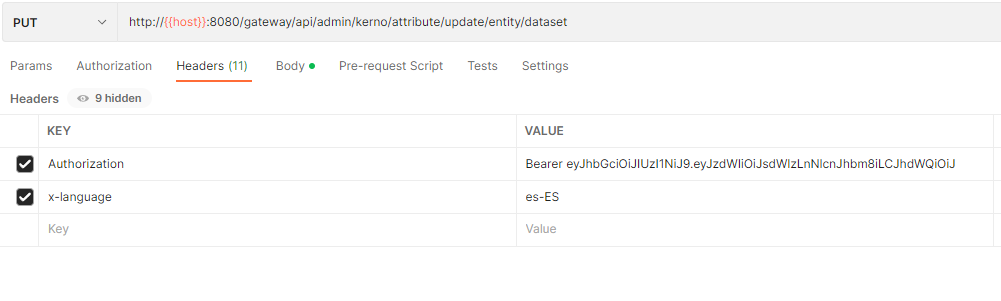
Note that the header is entirely optional; if it is not received, results will be returned in the language of the user making the request, or, if that does not exist, in the application's default language.
SSL
Like the rest of its interface, Anjana secures its API with certificates signed by recognized public certificate authorities (Let's Encrypt, DigiCert, etc. See https://wiki.anjanadata.com/es/seguridad/26.1/mecanica-de-certificados .
Since these are certificates from a public CA, any HTTP client (curl, Postman, code) trusts them by default, with no need to specify any additional certificate.
Only in environments with a self-signed certificate or one issued by a private CA (for example, some On-Premise/IaaS deployments) is it necessary to explicitly indicate the trusted CA:
curl --cacert my-ca.crt https://{url_request}
Only for testing and development can SSL verification be disabled in cURL with the -k option, since this results in a connection without security validation.
Glossary
Every URL will include variables that must be replaced when executing the call. Below is an explanation of what to put in each one.
-
host: the IP or alias where Anjana is deployed (e.g. google.com)
-
provider: the identity management provider to be used, with the name configured in Zeus's yml file (e.g. azure)
-
objectType: the type of the object involved in the request (e.g. ENTITY)
-
objectSubType: the subtype of the object involved in the request (e.g. DATASET)
-
idObject: the id of the object involved in the request (e.g. 21)
-
state: the state of the object involved in the request (e.g. APPROVED)
-
workflow: workflow type (e.g. CREATE).
-
target: the Solr collection to index into (e.g. KERNO).
Minio/S3
Introduction
For managing files as metadata (UPLOAD_FILE and ARRAY_UPLOAD_FILE), Anjana uses Minio or S3 to store the files.
Installation and use
Installing a MinIO client is required to interact directly with the internal S3 without going through the Anjana portal.
To use the MinIO client, install it as follows:
wget https://dl.min.io/client/mc/release/linux-amd64/mc
then grant it execute permissions
chmod +x mc
and establish the connection with the server
./mc alias set minio https://{{host}}:9000 {{user}} {{password}} --api S3v4
to finally copy the file to the corresponding bucket
./mc cp xxxxx.pdf minio/dsa
Login
Obtaining a token
Before performing any operation on the APIs, an access token is required. This token is obtained upon logging in.
Depending on the identity manager being used, there are different endpoints to obtain the token.
All these endpoints are found in the Zeus module.
The payload to send in all cases will be the following:
{
  "u": "usuario",
  "p": "contraseña"
}
Where both "u" and "p" must be encoded in base64.
LDAP
It consists of a call
POST https://{{host}}/gateway/public/v4/auth/login/ldap
This endpoint connects to the corresponding LDAP using the credentials sent, and returns the token needed for the rest of the calls, along with information about the user and their permissions (which vary depending on the license status).
Database
It consists of a call
POST https://{{host}}/gateway/public/v4/auth/login/local
This endpoint connects to the Zeus database using the credentials sent, and returns the token needed for the rest of the calls, along with information about the user and their permissions (which vary depending on the license status).
Saml 2.0
It consists of a call
GET https://{{host}}/gateway/public/v6/auth/saml2/login
This endpoint is used so that, once connected via SAML using the corresponding credentials, it returns the Anjana token needed for the rest of the calls, along with information about the user and their permissions (which vary depending on the license status).
Other providers
It consists of a call
GET https://{{host}}/gateway/public/v6/auth/oidc/login
This endpoint is used so that, once connected via the provider specified in Zeus using the corresponding credentials, it returns the token needed for the rest of the calls, along with information about the user and their permissions (which vary depending on the license status).
Sending the token
The token obtained from one of the previously defined endpoints must be included in the header of every request.
Example from POSTMAN:
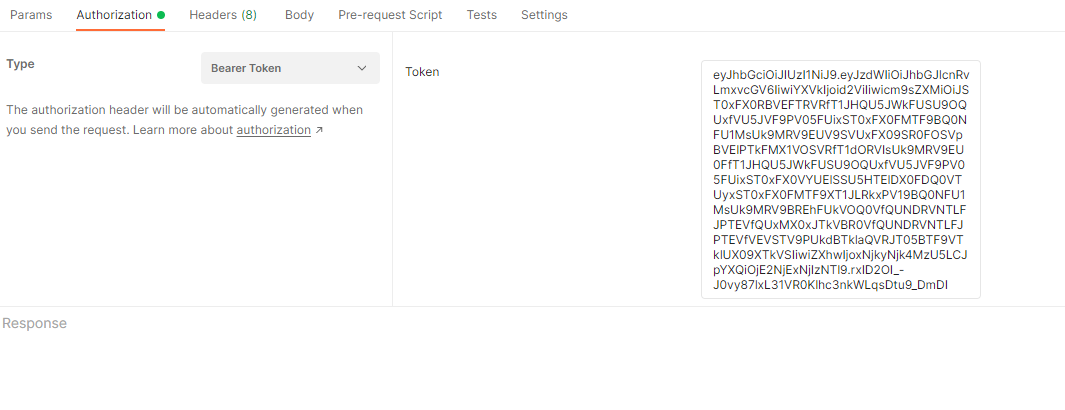
Example from code:
headers.add("Authorization", "Bearer " + token);
API response codes according to license status
|
Code |
Status |
Description |
|
0000 |
VALID |
The license is valid and the user can access Anjana correctly. |
|
99997 |
EXPIRING |
This is a warning state indicating that the license has been invalid for more than 3 and up to 7 days |
|
99998 |
EXPIRED |
The license has been invalid for more than 7 days; the application cannot be accessed |
|
99996 |
TEMPORARY |
Temporary license. The license is valid and the user can access Anjana correctly. |
|
99995 |
READ_ONLY |
License indicating that the application can only be accessed in read-only mode |